
Tiro alla Fune LED con Raspberry Pi Pico (Striscia NeoPixel + 2 Pulsanti + Buzzer)
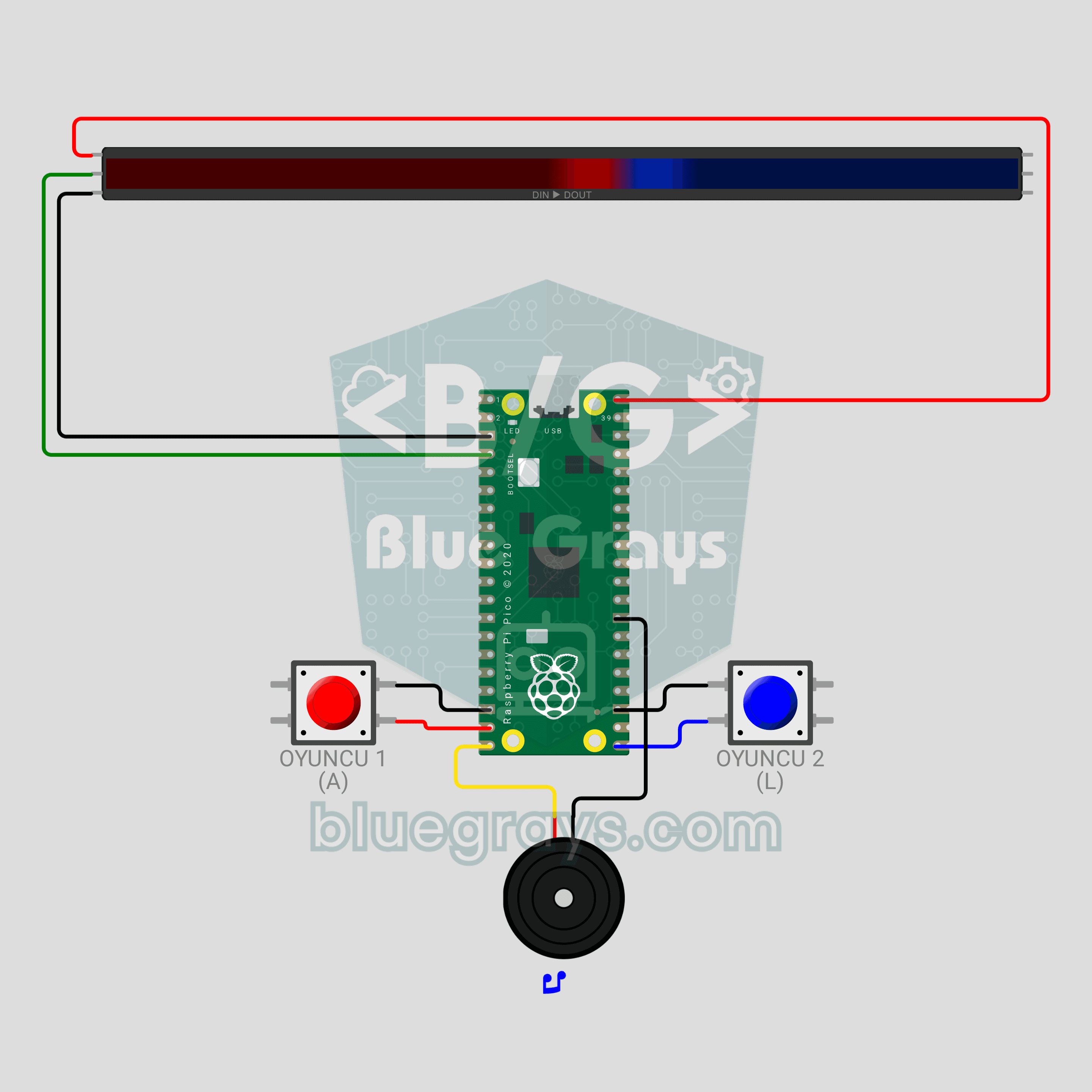
Un duello di pulsanti per due! Il **Raspberry Pi Pico** trasforma una **striscia NeoPixel WS2812B** da 30 LED in una fune: rosso a sinistra, blu a destra. Ogni pressione fa avanzare il tuo colore di un LED; chi colora tutta la striscia vince la manche, chi ne vince 3 vince la partita. Chi preme troppo presto nel conto alla rovescia arretra, il **buzzer passivo** dà a ogni giocatore un clic diverso e il finale è un arcobaleno. `neopixel`, antirimbalzo e suono non bloccante in MicroPython.
Video
Schema circuito
Codice sorgente
1# ─────────────────────────────────────────
2#   BlueGrays · bluegrays.com
3#   Tiro alla Fune LED con Raspberry Pi Pico (Striscia NeoPixel + 2 Pulsanti + Buzzer)
4# ─────────────────────────────────────────
5# Duello a pulsanti per due giocatori. Ogni pressione spinge il tuo colore
6# di un passo lungo la striscia; il primo ad arrivare all'estremità
7# opposta vince il round, il primo a 3 round vince la partita. Premere in
8# anticipo durante il conto alla rovescia ti costa 2 passi.
9#
10# Pin:
11#   GP2  -> DIN della striscia
12#   GP14 -> Pulsante del giocatore 1 (ROSSO), altro piedino a GND
13#   GP16 -> Pulsante del giocatore 2 (BLU), altro piedino a GND
14#   GP15 -> Buzzer (+)
15
16from machine import Pin, PWM
17from neopixel import NeoPixel
18import time
19import math
20
21# ============ IMPOSTAZIONI ============
22NUM_LEDS = 30          # LED sulla striscia
23BRIGHTNESS = 0.6       # ~0.4 A con i colori, va bene per USB
24WIN_ROUNDS = 3         # Round da vincere per aggiudicarsi la partita
25FALSE_START_STEPS = 2  # Penalità per falsa partenza
26SOUND_ON = True        # Effetti sonori
27
28RED = (255, 0, 0)      # Giocatore 1
29BLUE = (0, 60, 255)    # Giocatore 2
30
31# Nodo = numero di LED rossi (il confine tra i colori). Entrambi i giocatori hanno bisogno dello
32# stesso numero di passi.
33START = NUM_LEDS // 2                   # Bordo iniziale
34GOAL = min(START, NUM_LEDS - START)     # Passi necessari per vincere
35
36# ============ HARDWARE ============
37strip = NeoPixel(Pin(2), NUM_LEDS)
38btn1 = Pin(14, Pin.IN, Pin.PULL_UP)   # Giocatore 1
39btn2 = Pin(16, Pin.IN, Pin.PULL_UP)   # Giocatore 2
40buzzer = PWM(Pin(15))
41buzzer.duty_u16(0)
42
43
44# ============ SUONO ============
45class Sound:
46    """
47    TR: Bloklamayan nota calici: oyun ses calarken de butonlari okur
48    EN: Non-blocking note player: the game keeps reading buttons while sound plays
49    """
50
51    def __init__(self, pwm):
52        self.pwm = pwm
53        self.queue = []
54        self.until = 0
55
56    def play(self, notes):
57        # notes = [(frequenza, ms), ...], frequenza 0 = pausa
58        if SOUND_ON:
59            self.queue = list(notes)
60            self.until = 0
61
62    def update(self):
63        now = time.ticks_ms()
64        if self.until and time.ticks_diff(now, self.until) < 0:
65            return
66        if not self.queue:
67            if self.until:
68                self.pwm.duty_u16(0)
69                self.until = 0
70            return
71        freq, ms = self.queue.pop(0)
72        if freq:
73            self.pwm.freq(freq)
74            self.pwm.duty_u16(20000)
75        else:
76            self.pwm.duty_u16(0)
77        self.until = time.ticks_add(now, ms)
78
79
80sound = Sound(buzzer)
81
82
83# ============ PULSANTE ============
84class Button:
85    """
86    TR: 15 ms debounce ile yeni basislari yakalar
87    EN: Catches new presses with a 15 ms debounce
88    """
89
90    def __init__(self, pin):
91        self.pin = pin
92        self.state = 1
93        self.raw = 1
94        self.changed = time.ticks_ms()
95
96    def pressed(self):
97        now = time.ticks_ms()
98        raw = self.pin.value()
99        if raw != self.raw:
100            self.raw = raw
101            self.changed = now
102        if time.ticks_diff(now, self.changed) > 15 and raw != self.state:
103            self.state = raw
104            return raw == 0
105        return False
106
107    def sync(self):
108        # Dimenticare le pressioni vecchie (un pulsante tenuto premuto tra i round non viene
109        # penalizzato)
110        self.state = self.raw = self.pin.value()
111        self.changed = time.ticks_ms()
112
113
114b1 = Button(btn1)
115b2 = Button(btn2)
116
117
118# ============ FUNZIONI DI SUPPORTO PER IL DISEGNO ============
119def dim(color, k=1.0):
120    # Scalare un colore in base alla luminosità globale e a k
121    s = BRIGHTNESS * k
122    return (int(color[0] * s), int(color[1] * s), int(color[2] * s))
123
124
125def fill(color, k=1.0):
126    c = dim(color, k)
127    for i in range(NUM_LEDS):
128        strip[i] = c
129    strip.write()
130
131
132def draw_rope(knot):
133    # `knot` LED sono rossi (a sinistra), il resto blu (a destra); 2 LED per lato del confine
134    # formano il "nodo" luminoso
135    for i in range(NUM_LEDS):
136        if i < knot:
137            k = 1.0 if knot - i <= 2 else 0.45   # I LED vicini al nodo sono più luminosi
138            strip[i] = dim(RED, k)
139        else:
140            k = 1.0 if i - knot < 2 else 0.45
141            strip[i] = dim(BLUE, k)
142    strip.write()
143
144
145def wheel(pos):
146    # Convertire da 0-255 a un colore dell'arcobaleno
147    pos %= 256
148    if pos < 85:
149        return (255 - pos * 3, pos * 3, 0)
150    if pos < 170:
151        pos -= 85
152        return (0, 255 - pos * 3, pos * 3)
153    pos -= 170
154    return (pos * 3, 0, 255 - pos * 3)
155
156
157def wait_ms(ms):
158    # Attendere mantenendo il suono attivo
159    end = time.ticks_add(time.ticks_ms(), ms)
160    while time.ticks_diff(end, time.ticks_ms()) > 0:
161        sound.update()
162        time.sleep_ms(5)
163
164
165# ============ FASI DI GIOCO ============
166def attract():
167    # In attesa: entrambi i colori respirano, qualsiasi pulsante avvia la partita
168    print("Baslamak icin bir butona bas / Press a button to start")
169    b1.sync()
170    b2.sync()
171    t0 = time.ticks_ms()
172    while True:
173        sound.update()
174        t = time.ticks_diff(time.ticks_ms(), t0)
175        k = 0.25 + 0.75 * (math.sin(t / 400) + 1) / 2
176        for i in range(NUM_LEDS):
177            if i < START:
178                strip[i] = dim(RED, k)
179            else:
180                strip[i] = dim(BLUE, 1.25 - k)   # Respira in controfase
181        strip.write()
182        if b1.pressed() or b2.pressed():
183            return
184        time.sleep_ms(15)
185
186
187def countdown():
188    # Conto alla rovescia 3-2-1; le pressioni anticipate vengono penalizzate. Restituisce il nodo di
189    # partenza
190    knot = START
191    b1.sync()
192    b2.sync()
193    colors = [(255, 0, 0), (255, 150, 0), (0, 255, 0)]   # Rosso, giallo, verde
194    for step in range(3):
195        fill(colors[step], 0.6)
196        if step == 2:
197            sound.play([(1200, 200)])   # GO!
198            break
199        sound.play([(600, 150)])
200        end = time.ticks_add(time.ticks_ms(), 800)
201        while time.ticks_diff(end, time.ticks_ms()) > 0:
202            sound.update()
203            if b1.pressed():
204                knot -= FALSE_START_STEPS
205                print("Oyuncu 1 erken basti! / Player 1 false start!")
206                sound.play([(150, 200)])
207            if b2.pressed():
208                knot += FALSE_START_STEPS
209                print("Oyuncu 2 erken basti! / Player 2 false start!")
210                sound.play([(150, 200)])
211            time.sleep_ms(5)
212    # Le penalità non devono spingere il nodo a un'estremità
213    return max(START - GOAL + 2, min(START + GOAL - 2, knot))
214
215
216def play_round(knot):
217    # Duello a pulsanti; restituisce il vincitore (1 o 2) quando il nodo raggiunge un'estremità
218    draw_rope(knot)
219    while True:
220        sound.update()
221        moved = False
222        if b1.pressed():
223            knot += 1
224            sound.play([(440, 25)])
225            moved = True
226        if b2.pressed():
227            knot -= 1
228            sound.play([(660, 25)])
229            moved = True
230        if moved:
231            if knot >= START + GOAL:   # Striscia tutta rossa
232                return 1
233            if knot <= START - GOAL:   # Striscia tutta blu
234                return 2
235            draw_rope(knot)
236        time.sleep_ms(1)
237
238
239def celebrate_round(winner, scores):
240    # Il colore del vincitore lampeggia 3 volte, poi vengono mostrati i puntini del punteggio
241    color = RED if winner == 1 else BLUE
242    print("Turu kazanan / Round winner: Oyuncu / Player", winner, "| Skor / Score:", scores[0], "-", scores[1])
243    sound.play([(523, 120), (659, 120), (784, 120), (1047, 300)])
244    for _ in range(3):
245        fill(color)
246        wait_ms(180)
247        fill((0, 0, 0))
248        wait_ms(120)
249    # Punteggio: puntini rossi da sinistra, puntini blu da destra
250    for i in range(NUM_LEDS):
251        strip[i] = (0, 0, 0)
252    for s in range(scores[0]):
253        strip[s * 2] = dim(RED)
254    for s in range(scores[1]):
255        strip[NUM_LEDS - 1 - s * 2] = dim(BLUE)
256    strip.write()
257    wait_ms(1800)
258
259
260def celebrate_match(winner):
261    # Fine partita: onda arcobaleno e melodia della vittoria
262    print("MACI KAZANAN / MATCH WINNER: Oyuncu / Player", winner)
263    sound.play([(784, 150), (784, 150), (784, 150), (1047, 450), (0, 80), (988, 150), (1047, 500)])
264    t0 = time.ticks_ms()
265    while time.ticks_diff(time.ticks_ms(), t0) < 3500:
266        sound.update()
267        offset = time.ticks_diff(time.ticks_ms(), t0) // 8
268        for i in range(NUM_LEDS):
269            strip[i] = dim(wheel(i * 256 // NUM_LEDS + offset))
270        strip.write()
271        time.sleep_ms(15)
272    fill(RED if winner == 1 else BLUE)
273    wait_ms(1000)
274
275
276# ============ CICLO PRINCIPALE ============
277print("== BlueGrays · bluegrays.com ==")
278print("Pico LED Halat Cekme / LED Tug of War")
279
280scores = [0, 0]
281while True:
282    attract()
283    while max(scores) < WIN_ROUNDS:
284        start_knot = countdown()
285        winner = play_round(start_knot)
286        scores[winner - 1] += 1
287        celebrate_round(winner, scores)
288    celebrate_match(1 if scores[0] > scores[1] else 2)
289    scores = [0, 0]
290
FAQ
La mia striscia non ha 30 LED. Posso usare un'altra lunghezza?▾
Sì. Imposta `NUM_LEDS` all'inizio del codice con il numero di LED della tua striscia; il punto di partenza (`START`) e i passi per vincere (`GOAL`) si calcolano da soli. Con una striscia da 60 LED ogni giocatore deve premere 30 volte, quindi le manche durano di più.
La resistenza da 330 Ω e il condensatore da 470 µF sono indispensabili?▾
In Wokwi non servono, nel circuito reale sono consigliati. Metti una resistenza da 330 Ω in serie tra GP2 e l'ingresso DIN della striscia e un condensatore da 470 µF tra 5V e GND della striscia (gamba lunga al 5V). Proteggono il primo LED ed evitano sfarfallii e colori casuali.
L'USB del Pico basta per alimentare la striscia?▾
Con 30 LED e `BRIGHTNESS = 0.6` la striscia assorbe al massimo circa 0,4 A, che l'USB regge. VBUS dà 5V solo con l'USB collegato. Per una striscia più lunga o più luminosa usa un alimentatore da 5V/2A separato e collega insieme le masse (GND).
Come cambio il numero di manche e la penalità per la falsa partenza?▾
`WIN_ROUNDS` è il numero di manche per vincere la partita (3 di default). `FALSE_START_STEPS` stabilisce di quanti passi arretra chi preme troppo presto (2 di default; con 0 la penalità sparisce). Per giocare senza suono imposta `SOUND_ON = False`.