
What Is a Resistor? Color Codes, Ohm's Law and Using Resistors with Arduino
What is a resistor, what does it do and how do you read the color code? A resistor guide with Ohm's law, series and parallel connections, pull-up/pull-down and voltage divider examples.

A resistor is the most basic electronic component: it opposes the flow of electric current and limits the current in a circuit. Its unit is the ohm, shown with the Ω symbol. You'll find one in almost every circuit: it protects LEDs, makes buttons read reliably and brings sensor signals to the right level.
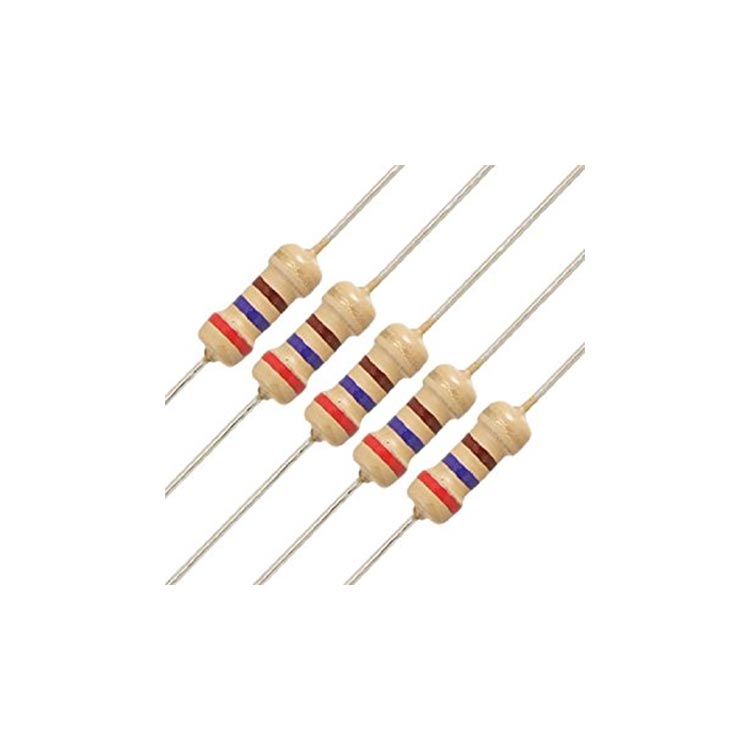
What does a resistor do?
- Current limiting: keeps LEDs and Arduino pins from being damaged by too much current.
- Voltage dividing: two resistors bring a high voltage down to a measurable level.
- Pull-up / pull-down: stops an input from reading random values while the button isn't pressed.
- Sensor circuits: forms a voltage divider with variable resistors such as LDRs and thermistors.
Ohm's law: voltage, current and resistance
Resistor calculations are based on Ohm's law: V = I × R. In other words, voltage (volts) equals current (amps) times resistance (ohms). From this formula, current is I = V / R and resistance is R = V / I. The power dissipated in the resistor is P = V × I.
Example: a 1 kΩ resistor connected to 5 V passes 5 / 1000 = 5 mA and dissipates 25 mW. Instead of doing these calculations by hand, you can use the Ohm's law calculator.
How do you read the resistor color code?
The value of through-hole (THT) resistors is printed as colored bands on the body. On a 4-band resistor, the first two bands give the digits, the third band the multiplier (number of zeros) and the fourth the tolerance. Hold the resistor with the gold or silver band on the right and read from the left.
| Color | Digit | Multiplier | Tolerance |
|---|---|---|---|
| Black | 0 | ×1 | — |
| Brown | 1 | ×10 | ±1% |
| Red | 2 | ×100 | ±2% |
| Orange | 3 | ×1 k | — |
| Yellow | 4 | ×10 k | — |
| Green | 5 | ×100 k | ±0.5% |
| Blue | 6 | ×1 M | ±0.25% |
| Violet | 7 | ×10 M | ±0.1% |
| Gray | 8 | — | ±0.05% |
| White | 9 | — | — |
| Gold | — | ×0.1 | ±5% |
| Silver | — | ×0.01 | ±10% |
Example: Red – Red – Brown – Gold = 2, 2, ×10 → 220 Ω ±5%. Brown – Black – Orange – Gold = 1, 0, ×1000 → 10 kΩ ±5%. To see the result instantly by picking colors or typing a value, try the resistor color code calculator.
Standard resistor values (E12, E24)
Resistors aren't made in every value: the E12 series has 12 values per decade (10, 12, 15, 18, 22, 27, 33, 39, 47, 56, 68, 82) and E24 has 24. If the value you calculated isn't available, pick the next standard value up. To get closer to a target by combining two resistors, use the standard value finder.
Connecting resistors in series and parallel
- Series: resistances add up. 220 Ω + 330 Ω = 550 Ω.
- Parallel: the total is smaller than the smallest resistor: 1/R = 1/R1 + 1/R2. Two equal resistors in parallel halve the value (1 kΩ ∥ 1 kΩ = 500 Ω).
- To solve mixed circuits step by step, the series/parallel resistor calculator also shows the voltage and power of each resistor.
The most common resistors in Arduino projects
| Value | Where it's used |
|---|---|
| 220 Ω – 330 Ω | Limiting LED current |
| 1 kΩ | Transistor base, protecting serial lines |
| 10 kΩ | Button pull-up/pull-down, LDR and NTC voltage dividers |
| 1 kΩ + 2 kΩ | Bringing a 5 V signal down to 3.3 V (ESP32, Pico) |
| 100 kΩ + 10 kΩ | Voltage divider for measuring high voltages |
Pull-up and pull-down resistors
A button only opens and closes the circuit; when it isn't pressed, the input pin floats and reads random HIGH/LOW values. A pull-down resistor (usually 10 kΩ) pulls the pin to GND and a pull-up resistor pulls it to 5 V, giving a stable value. On Arduino, enabling the internal pull-up with pinMode(pin, INPUT_PULLUP) means you don't need an external resistor.
Voltage divider
When two resistors are connected in series and the output is taken from the middle, the input voltage is divided in proportion: Vout = Vin × R2 / (R1 + R2). This is used to bring a high voltage like 12 V down to a level the Arduino can read, or to adapt a 5 V sensor signal to the ESP32's 3.3 V input. The voltage divider calculator works out the values and also suggests ready-made resistor pairs.
Why does a resistor's power rating (watts) matter?
Current through a resistor turns into heat. The most common resistors in projects are rated 1/4 W (0.25 W). If the dissipated power approaches this rating the resistor heats up, and if it exceeds it, the resistor burns. For a safe design, choose a resistor rated for at least twice the power it dissipates.
Frequently asked questions
Does a resistor have a direction?
No, standard resistors have no polarity and can go in either way. When reading the bands, just put the tolerance band on the right.
What does a 10k resistor mean?
10 kΩ, that is, 10,000 ohms. The color code is brown, black, orange plus the tolerance band. On Arduino it's used most for pull-up/pull-down and sensor circuits.
How do I measure a resistor with a multimeter?
Set the multimeter to the ohm (Ω) range, take the resistor out of the circuit and touch the probes to both ends. Measuring it in circuit can give a wrong result because of the other components.
My resistor is getting hot. Is that normal?
Slight warming is normal, but if it's too hot to touch, the resistor's power rating is too low or there's a fault in the circuit. Calculate the power with P = I² × R and use a higher-wattage resistor.
What is a potentiometer?
A potentiometer is an adjustable resistor whose value changes when you turn its knob. On Arduino its middle leg goes to an analog input for things like volume, speed or brightness control.
Projects on this topic
See all projectsMore articles
Learn what a resistor does, how to read its color bands and which resistor goes where in Arduino projects.


