
What Is Arduino? A Complete Beginner's Guide
What is Arduino, what is it used for and how does it work? The parts of the Arduino Uno, what you need for your first project, programming and common mistakes in one guide.
Arduino is an open-source microcontroller board that lets you control electronic circuits with code you write on your computer. Lighting an LED, reading the temperature from a sensor, spinning a motor or switching on a lamp from your phone takes just a few wires and a few lines of code. That's why Arduino has been the first step into electronics for millions of people, from schools to hobbyists and engineers.
What is Arduino used for?
Think of Arduino as a small brain: it takes information from the outside world (buttons, sensors), processes it according to the rules you write and produces an output (LED, motor, display, sound). This loop makes hundreds of projects possible, for example:
- A night light that turns on by itself when it gets dark
- A parking sensor that beeps faster as an object gets closer
- A weather station that shows temperature and humidity on a display
- An RFID door lock that opens with a card
- An automatic watering system that runs when the soil dries out
How does Arduino work?
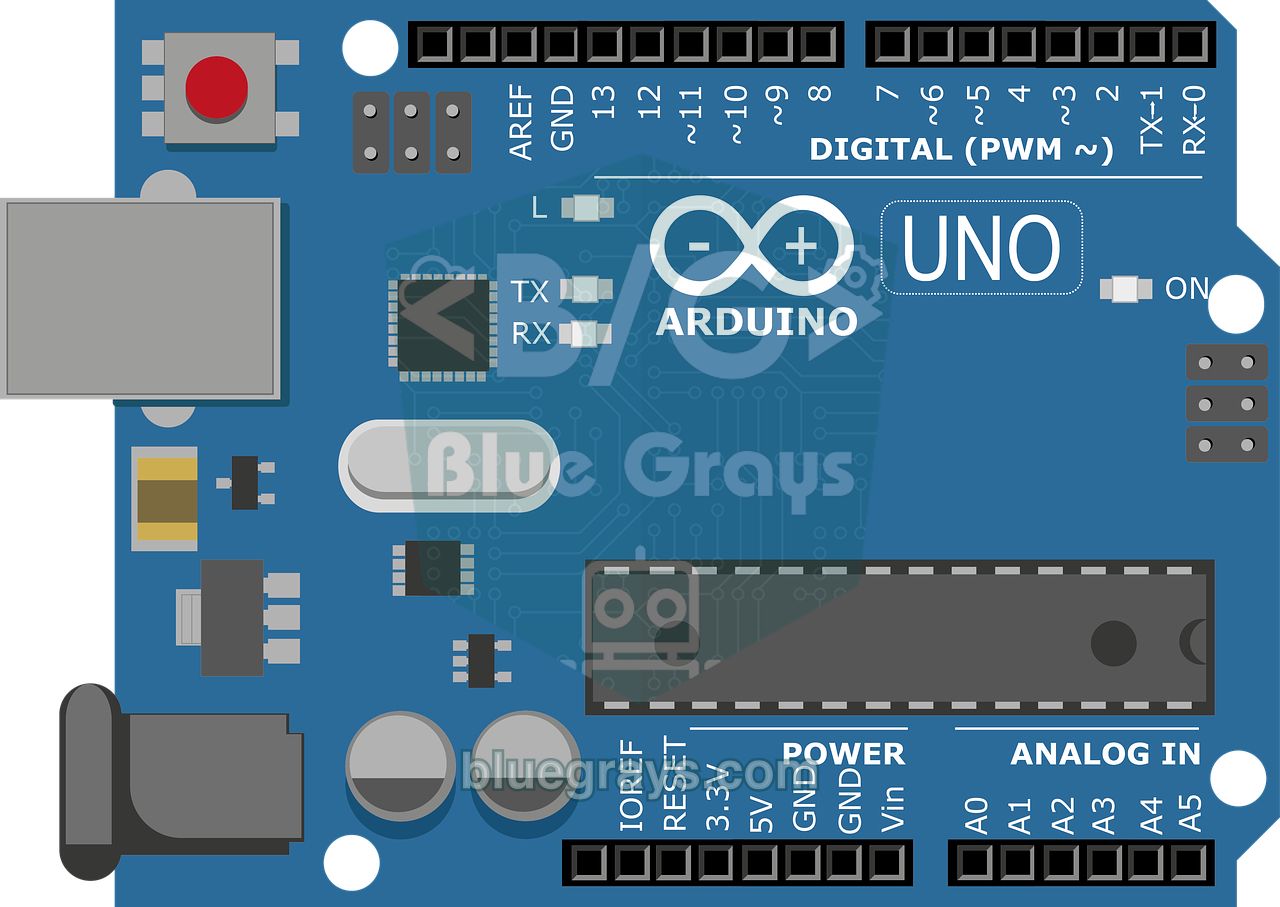
At the heart of the board is a microcontroller. On the Arduino Uno this chip is the ATmega328P: it runs at 16 MHz and has 32 KB of program memory and 2 KB of RAM. The code you write in the Arduino IDE on your computer (called a sketch) is uploaded to this chip over a USB cable. As long as the board has power, it runs the code in an endless loop; it doesn't need to stay connected to the computer.
Every Arduino program has two basic parts:
- setup(): Runs once when the board starts. This is where you decide whether pins are inputs or outputs.
- loop(): Repeats continuously after setup finishes. Reading sensors, making decisions and producing outputs happen here.
void setup() {
  pinMode(13, OUTPUT);     // 13. pini çıkış yap / set pin 13 as output
}

void loop() {
  digitalWrite(13, HIGH);  // LED'i yak / LED on
  delay(1000);             // 1 sn bekle / wait 1 s
  digitalWrite(13, LOW);   // LED'i söndür / LED off
  delay(1000);
}What are the Arduino Uno pins for?
The black sockets along the edges of the board are called pins, and you connect your circuit to them with jumper wires. The main pin groups on the Uno are:
| Pin group | Function | Example use |
|---|---|---|
| D0–D13 (digital) | Read and write HIGH/LOW | LED, button, relay |
| ~3, 5, 6, 9, 10, 11 (PWM) | Produce in-between values with analogWrite | LED brightness, motor speed |
| A0–A5 (analog) | Read 0–5 V as 0–1023 | Potentiometer, LDR, temperature |
| A4 (SDA), A5 (SCL) | I2C communication | I2C LCD, RTC, sensors |
| 5V, 3.3V, GND | Power the circuit | Powering sensors and modules |
To see what every pin does right on the board, use the interactive Arduino, ESP32 and Raspberry Pi pinout tool.
What do you need to get started with Arduino?
You don't need an expensive kit to start. You can build most of your first 10–15 projects with these parts:
- An Arduino Uno (original or compatible clone) and a USB cable
- A breadboard (solderless prototyping board) and male-to-male jumper wires
- LEDs in different colors and 220 Ω, 330 Ω and 10 kΩ resistors
- A few push buttons, a potentiometer and a passive buzzer
- Optional: an LDR, an HC-SR04 distance sensor, a servo motor and a 16x2 LCD
Is the Arduino programming language hard?
Arduino uses a simplified language based on C/C++. Thanks to ready-made functions like digitalWrite, analogRead and delay, you can get a working project with just a few commands. Even if you've never written code, learning by modifying example projects works very well. If you want something closer to Python, the Raspberry Pi Pico with MicroPython is a good alternative.
What's the difference between Arduino, ESP32 and Raspberry Pi?
| Board | Key feature | Best for |
|---|---|---|
| Arduino Uno | 5 V, sturdy, the most resources | Complete beginners |
| ESP32 | Wi-Fi + Bluetooth, fast, cheap | Internet-connected (IoT) projects |
| Raspberry Pi Pico | MicroPython, very cheap | People who want to learn with Python |
| Raspberry Pi 4/5 | A computer running Linux | Cameras, image processing, servers |
If you can't decide which Arduino model to choose, check out our Arduino Uno vs Nano vs Mega comparison.
Common beginner mistakes
- Connecting an LED without a resistor: the LED and the pin can be damaged. Find the right value with the LED resistor calculator.
- Forgetting the GND connection: if the circuit and the board don't share ground, nothing works.
- Reading a button without a pull-up/pull-down resistor: the values jump around randomly; use INPUT_PULLUP.
- Powering motors and relays directly from a pin: pins supply only about 20 mA at most; use a transistor or a driver for high-current loads.
- Not matching the baud rate in the serial monitor with the code: you'll see garbage characters on screen.
How should you choose your first project?
The best way to learn is to get a simple project working and then change it step by step. Start with a single LED, then a traffic light, then button control and sensors. If you don't know which project to start with, the Project Finder in the BlueGrays app picks projects that suit your interests and the board you have.
Frequently asked questions
Do I need to know how to code to use Arduino?
No. You can start by uploading and running ready-made example projects, then learn by trying to understand the code through small changes. The basic commands take only a few days to learn.
Should I buy an original Arduino or a clone?
Clone boards work the same way and are cheaper. Some clones use a different USB chip (CH340), so you may need to install a driver on your computer. Buying an original board supports the Arduino project.
Can I run an Arduino on batteries?
Yes. A 9 V battery or a 7–12 V adapter can go into the board's power jack, and a 5 V power bank into the USB port. For projects that run on batteries for a long time, low-power modes and efficient boards (like ESP32 deep sleep) are preferred.
Are Arduino and Raspberry Pi the same thing?
No. Arduino is a microcontroller that runs a single program; it starts instantly and controls hardware directly. Raspberry Pi is a full computer running Linux. For sensor and motor projects, Arduino is simpler.
My Arduino board doesn't show up on my computer. What should I do?
First make sure your USB cable carries data; some cables are charge-only. On clone boards, install the CH340 driver and select the correct board and port from the Tools menu in the Arduino IDE.
More articles
We explain in plain language what Arduino is, why it's so popular and what you need to build your first project.


