
ESP32 DHT22 Temperature and Humidity (with LCD Display)
This project measures ambient temperature and humidity using a DHT22 sensor and displays the data in real time on a 16x2 I2C LCD. Data is read from the sensor using the one-wire protocol via the Adafruit DHT library. This project serves as the foundation for IoT weather stations, smart home automation, or environmental monitoring systems in greenhouses. Communication with the DHT22 is established via the ESP32's GPIO 4 pin.

Video
Circuit Diagram
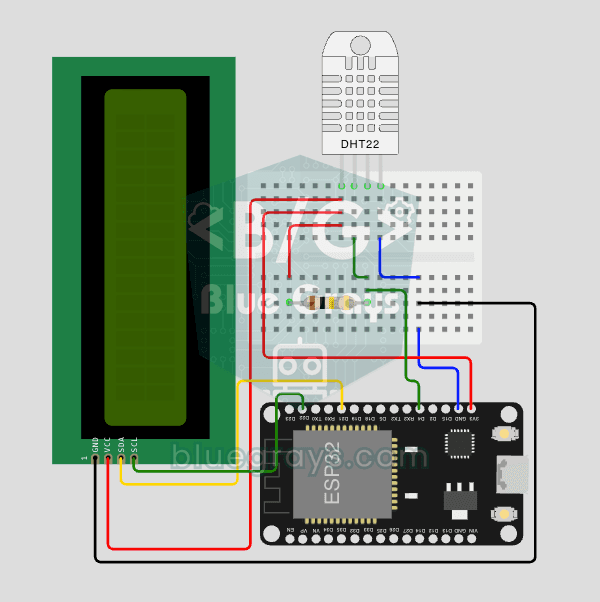
Source Code
1// ─────────────────────────────────────────
2//   BlueGrays · bluegrays.com
3//   ESP32 DHT22 Temperature and Humidity (with LCD Display)
4// ─────────────────────────────────────────
5// Reads temperature and humidity from the DHT22 every 2 s and shows them
6// on a 16x2 I2C LCD. If a reading fails, the screen shows a wiring and
7// pull-up warning.
8//
9// Pins:
10//   GPIO 4  -> DHT22 DATA
11//   10k pull-up between DATA and VCC
12//   GPIO 21 -> LCD SDA, GPIO 22 -> LCD SCL
13//   DHT22 VCC -> 3V3, LCD VCC -> 5V (VIN)
14//   All GNDs common
15
16#include <Wire.h>
17#include <LiquidCrystal_I2C.h>
18#include <DHT.h>
19
20// Pin definitions
21const int DHT_PIN = 4;
22#define DHT_TYPE DHT22
23
24DHT dht(DHT_PIN, DHT_TYPE);
25
26// LCD addr 0x27 or 0x3F
27LiquidCrystal_I2C lcd(0x27, 16, 2);
28
29// DHT22 needs at least 2 s between reads
30const unsigned long READ_INTERVAL = 2000;
31unsigned long lastRead = 0;
32
33void setup() {
34  // DevKit V1 default I2C pins
35  Wire.begin(21, 22);
36  lcd.init();
37  lcd.backlight();
38
39  // Splash screen 3 s
40  lcd.setCursor(3, 0);
41  lcd.print("BlueGrays");
42  lcd.setCursor(3, 1);
43  lcd.print("DHT22 v1.0");
44  delay(3000);
45  lcd.clear();
46
47  dht.begin();
48}
49
50void loop() {
51  // Read every 2 s without delay()
52  if (millis() - lastRead >= READ_INTERVAL) {
53    lastRead = millis();
54
55    float h = dht.readHumidity();
56    float t = dht.readTemperature();
57
58    lcd.clear();
59
60    // NaN = wiring/pullup issue
61    if (isnan(h) || isnan(t)) {
62      lcd.setCursor(0, 0);
63      lcd.print("Sensor okunamadi");
64      lcd.setCursor(0, 1);
65      lcd.print("Kablo+10k pullup");
66    } else {
67      // Temperature
68      lcd.setCursor(0, 0);
69      lcd.print("Sicaklik:");
70      lcd.print(t, 1);
71      lcd.print("C");
72      // Humidity, DHT22 gives decimals
73      lcd.setCursor(0, 1);
74      lcd.print("Nem     :");
75      lcd.print(h, 1);
76      lcd.print("%");
77    }
78  }
79}
80
FAQ
What is the difference between the DHT22 and the DHT11?▾
The DHT22 is more accurate (±0.5 °C, ±2–5% humidity), measures over a wider range (−40 to 80 °C), and offers a resolution of 0.1. The DHT11 is cheaper but is limited to ±2 °C and integer resolution.
Is a 10 kΩ pull-up resistor required?▾
A 10 kΩ pull-up resistor is required for the data line on the bare DHT22 sensor. In 3-pin modules mounted on a board, the resistor is usually already included.
LCD 5 V, ESP32 3.3 V; do they work together?▾
I2C LCD modules produce a clearer image at 5 V. If the pull-up resistors on the SDA/SCL lines of a 5 V-powered module are connected to 5 V, using a level shifter is the safest approach; although many people connect them directly, this pushes the ESP32 to its limits.
Can I send the data over the Internet?▾
Yes, you can use the ESP32's Wi-Fi to send measurements to ThingSpeak, Blynk, or your own server and view the graphs on your phone.