
Juego de la Cuerda LED con Raspberry Pi Pico (Tira NeoPixel + 2 Pulsadores + Zumbador)
¡Un duelo de botones para dos! La **Raspberry Pi Pico** convierte una **tira NeoPixel WS2812B** de 30 LED en una cuerda: rojo a la izquierda, azul a la derecha. Cada pulsación hace avanzar tu color un LED; quien llena la tira con su color gana la ronda, y quien gana 3 rondas, la partida. Pulsar antes de tiempo en la cuenta atrás se castiga, el **zumbador pasivo** da a cada jugador un clic distinto y todo acaba con un arcoíris. `neopixel`, antirrebote y sonido no bloqueante en MicroPython.
Video
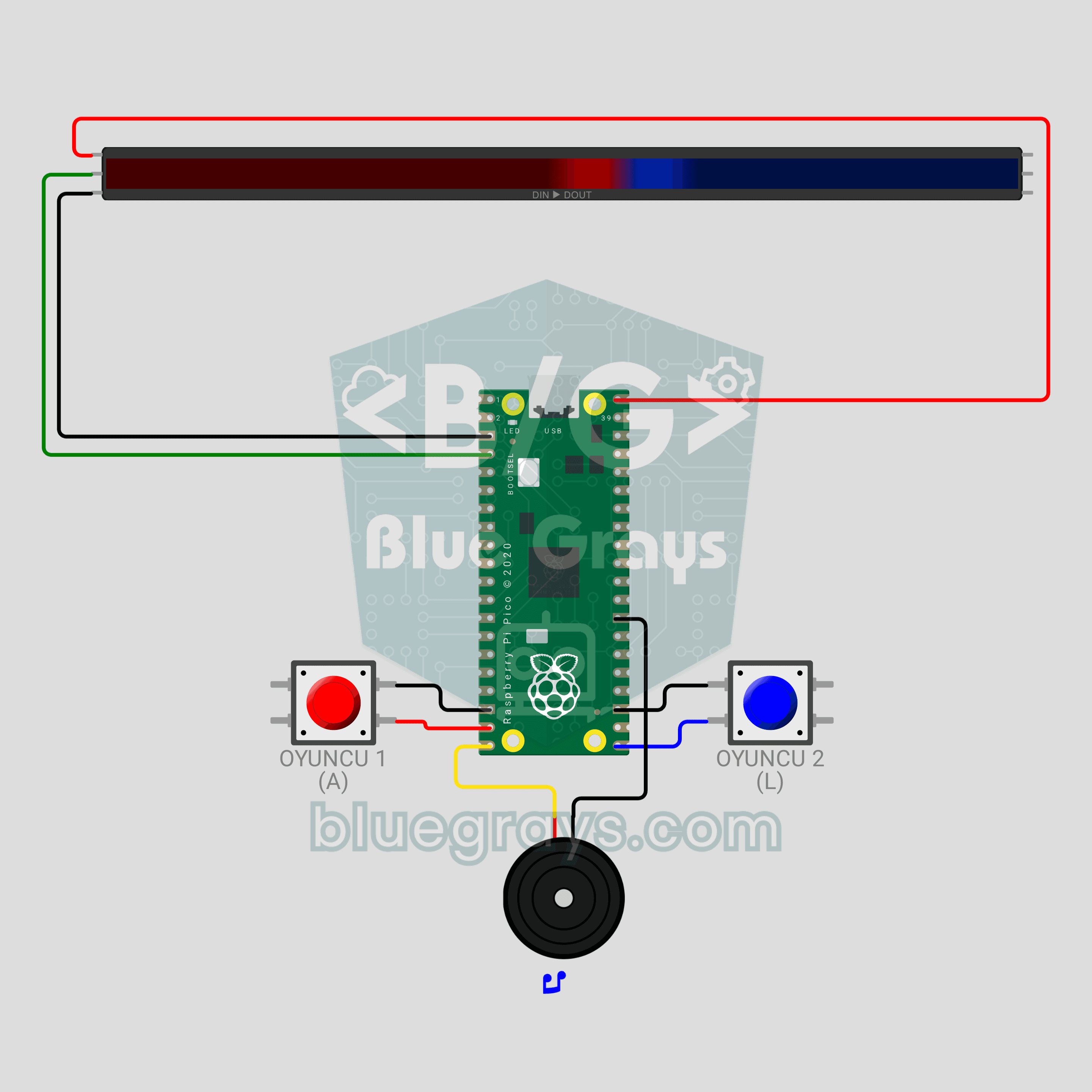
Diagrama del circuito
Código fuente
1# ─────────────────────────────────────────
2#   BlueGrays · bluegrays.com
3#   Juego de la Cuerda LED con Raspberry Pi Pico (Tira NeoPixel + 2 Pulsadores + Zumbador)
4# ─────────────────────────────────────────
5# Duelo de botones para dos jugadores. Cada pulsación empuja tu color un
6# paso a lo largo de la tira; el primero en llegar al extremo opuesto gana
7# la ronda y el primero en ganar 3 rondas gana la partida. Pulsar antes de
8# tiempo durante la cuenta atrás te cuesta 2 pasos.
9#
10# Pines:
11#   GP2  -> DIN de la tira
12#   GP14 -> Botón del jugador 1 (ROJO), otra patilla a GND
13#   GP16 -> Botón del jugador 2 (AZUL), otra patilla a GND
14#   GP15 -> Zumbador (+)
15
16from machine import Pin, PWM
17from neopixel import NeoPixel
18import time
19import math
20
21# ============ AJUSTES ============
22NUM_LEDS = 30          # LED de la tira
23BRIGHTNESS = 0.6       # ~0.4 A con colores, suficiente para USB
24WIN_ROUNDS = 3         # Rondas para ganar la partida
25FALSE_START_STEPS = 2  # Penalización por salida en falso
26SOUND_ON = True        # Efectos de sonido
27
28RED = (255, 0, 0)      # Jugador 1
29BLUE = (0, 60, 255)    # Jugador 2
30
31# Nudo = número de LED rojos (el límite entre colores). Ambos jugadores necesitan el mismo número de
32# pasos.
33START = NUM_LEDS // 2                   # Borde inicial
34GOAL = min(START, NUM_LEDS - START)     # Pasos necesarios para ganar
35
36# ============ HARDWARE ============
37strip = NeoPixel(Pin(2), NUM_LEDS)
38btn1 = Pin(14, Pin.IN, Pin.PULL_UP)   # Jugador 1
39btn2 = Pin(16, Pin.IN, Pin.PULL_UP)   # Jugador 2
40buzzer = PWM(Pin(15))
41buzzer.duty_u16(0)
42
43
44# ============ SONIDO ============
45class Sound:
46    """
47    TR: Bloklamayan nota calici: oyun ses calarken de butonlari okur
48    EN: Non-blocking note player: the game keeps reading buttons while sound plays
49    """
50
51    def __init__(self, pwm):
52        self.pwm = pwm
53        self.queue = []
54        self.until = 0
55
56    def play(self, notes):
57        # notes = [(frecuencia, ms), ...], frecuencia 0 = silencio
58        if SOUND_ON:
59            self.queue = list(notes)
60            self.until = 0
61
62    def update(self):
63        now = time.ticks_ms()
64        if self.until and time.ticks_diff(now, self.until) < 0:
65            return
66        if not self.queue:
67            if self.until:
68                self.pwm.duty_u16(0)
69                self.until = 0
70            return
71        freq, ms = self.queue.pop(0)
72        if freq:
73            self.pwm.freq(freq)
74            self.pwm.duty_u16(20000)
75        else:
76            self.pwm.duty_u16(0)
77        self.until = time.ticks_add(now, ms)
78
79
80sound = Sound(buzzer)
81
82
83# ============ BOTÓN ============
84class Button:
85    """
86    TR: 15 ms debounce ile yeni basislari yakalar
87    EN: Catches new presses with a 15 ms debounce
88    """
89
90    def __init__(self, pin):
91        self.pin = pin
92        self.state = 1
93        self.raw = 1
94        self.changed = time.ticks_ms()
95
96    def pressed(self):
97        now = time.ticks_ms()
98        raw = self.pin.value()
99        if raw != self.raw:
100            self.raw = raw
101            self.changed = now
102        if time.ticks_diff(now, self.changed) > 15 and raw != self.state:
103            self.state = raw
104            return raw == 0
105        return False
106
107    def sync(self):
108        # Olvidar pulsaciones antiguas (un botón mantenido entre rondas no se penaliza)
109        self.state = self.raw = self.pin.value()
110        self.changed = time.ticks_ms()
111
112
113b1 = Button(btn1)
114b2 = Button(btn2)
115
116
117# ============ AYUDANTES DE DIBUJO ============
118def dim(color, k=1.0):
119    # Escalar un color por el brillo global y k
120    s = BRIGHTNESS * k
121    return (int(color[0] * s), int(color[1] * s), int(color[2] * s))
122
123
124def fill(color, k=1.0):
125    c = dim(color, k)
126    for i in range(NUM_LEDS):
127        strip[i] = c
128    strip.write()
129
130
131def draw_rope(knot):
132    # Los LED `knot` son rojos (izquierda), el resto azules (derecha); 2 LED a cada lado del límite
133    # forman el "nudo" brillante
134    for i in range(NUM_LEDS):
135        if i < knot:
136            k = 1.0 if knot - i <= 2 else 0.45   # Los LED cercanos al nudo son más brillantes
137            strip[i] = dim(RED, k)
138        else:
139            k = 1.0 if i - knot < 2 else 0.45
140            strip[i] = dim(BLUE, k)
141    strip.write()
142
143
144def wheel(pos):
145    # Convertir 0-255 a un color del arcoíris
146    pos %= 256
147    if pos < 85:
148        return (255 - pos * 3, pos * 3, 0)
149    if pos < 170:
150        pos -= 85
151        return (0, 255 - pos * 3, pos * 3)
152    pos -= 170
153    return (pos * 3, 0, 255 - pos * 3)
154
155
156def wait_ms(ms):
157    # Esperar mientras el sonido sigue sonando
158    end = time.ticks_add(time.ticks_ms(), ms)
159    while time.ticks_diff(end, time.ticks_ms()) > 0:
160        sound.update()
161        time.sleep_ms(5)
162
163
164# ============ FASES DEL JUEGO ============
165def attract():
166    # Espera: ambos colores respiran, cualquier botón inicia el juego
167    print("Baslamak icin bir butona bas / Press a button to start")
168    b1.sync()
169    b2.sync()
170    t0 = time.ticks_ms()
171    while True:
172        sound.update()
173        t = time.ticks_diff(time.ticks_ms(), t0)
174        k = 0.25 + 0.75 * (math.sin(t / 400) + 1) / 2
175        for i in range(NUM_LEDS):
176            if i < START:
177                strip[i] = dim(RED, k)
178            else:
179                strip[i] = dim(BLUE, 1.25 - k)   # Respira en fase opuesta
180        strip.write()
181        if b1.pressed() or b2.pressed():
182            return
183        time.sleep_ms(15)
184
185
186def countdown():
187    # Cuenta atrás 3-2-1; las pulsaciones anticipadas se penalizan. Devuelve el nudo inicial
188    knot = START
189    b1.sync()
190    b2.sync()
191    colors = [(255, 0, 0), (255, 150, 0), (0, 255, 0)]   # Rojo, amarillo, verde
192    for step in range(3):
193        fill(colors[step], 0.6)
194        if step == 2:
195            sound.play([(1200, 200)])   # GO!
196            break
197        sound.play([(600, 150)])
198        end = time.ticks_add(time.ticks_ms(), 800)
199        while time.ticks_diff(end, time.ticks_ms()) > 0:
200            sound.update()
201            if b1.pressed():
202                knot -= FALSE_START_STEPS
203                print("Oyuncu 1 erken basti! / Player 1 false start!")
204                sound.play([(150, 200)])
205            if b2.pressed():
206                knot += FALSE_START_STEPS
207                print("Oyuncu 2 erken basti! / Player 2 false start!")
208                sound.play([(150, 200)])
209            time.sleep_ms(5)
210    # Las penalizaciones no deben empujar el nudo a un extremo
211    return max(START - GOAL + 2, min(START + GOAL - 2, knot))
212
213
214def play_round(knot):
215    # Duelo de botones; devuelve el ganador (1 o 2) cuando el nudo llega a un extremo
216    draw_rope(knot)
217    while True:
218        sound.update()
219        moved = False
220        if b1.pressed():
221            knot += 1
222            sound.play([(440, 25)])
223            moved = True
224        if b2.pressed():
225            knot -= 1
226            sound.play([(660, 25)])
227            moved = True
228        if moved:
229            if knot >= START + GOAL:   # Tira completamente roja
230                return 1
231            if knot <= START - GOAL:   # Tira completamente azul
232                return 2
233            draw_rope(knot)
234        time.sleep_ms(1)
235
236
237def celebrate_round(winner, scores):
238    # El color ganador destella 3 veces y luego se muestran los puntos de puntuación
239    color = RED if winner == 1 else BLUE
240    print("Turu kazanan / Round winner: Oyuncu / Player", winner, "| Skor / Score:", scores[0], "-", scores[1])
241    sound.play([(523, 120), (659, 120), (784, 120), (1047, 300)])
242    for _ in range(3):
243        fill(color)
244        wait_ms(180)
245        fill((0, 0, 0))
246        wait_ms(120)
247    # Puntuación: puntos rojos desde la izquierda, puntos azules desde la derecha
248    for i in range(NUM_LEDS):
249        strip[i] = (0, 0, 0)
250    for s in range(scores[0]):
251        strip[s * 2] = dim(RED)
252    for s in range(scores[1]):
253        strip[NUM_LEDS - 1 - s * 2] = dim(BLUE)
254    strip.write()
255    wait_ms(1800)
256
257
258def celebrate_match(winner):
259    # Fin de la partida: onda de arcoíris y melodía de victoria
260    print("MACI KAZANAN / MATCH WINNER: Oyuncu / Player", winner)
261    sound.play([(784, 150), (784, 150), (784, 150), (1047, 450), (0, 80), (988, 150), (1047, 500)])
262    t0 = time.ticks_ms()
263    while time.ticks_diff(time.ticks_ms(), t0) < 3500:
264        sound.update()
265        offset = time.ticks_diff(time.ticks_ms(), t0) // 8
266        for i in range(NUM_LEDS):
267            strip[i] = dim(wheel(i * 256 // NUM_LEDS + offset))
268        strip.write()
269        time.sleep_ms(15)
270    fill(RED if winner == 1 else BLUE)
271    wait_ms(1000)
272
273
274# ============ BUCLE PRINCIPAL ============
275print("== BlueGrays · bluegrays.com ==")
276print("Pico LED Halat Cekme / LED Tug of War")
277
278scores = [0, 0]
279while True:
280    attract()
281    while max(scores) < WIN_ROUNDS:
282        start_knot = countdown()
283        winner = play_round(start_knot)
284        scores[winner - 1] += 1
285        celebrate_round(winner, scores)
286    celebrate_match(1 if scores[0] > scores[1] else 2)
287    scores = [0, 0]
288
Preguntas frecuentes
Mi tira no tiene 30 LED. ¿Puedo usar otra longitud?▾
Sí. Cambia `NUM_LEDS` al principio del código por el número de LED de tu tira; el punto de partida (`START`) y los pasos para ganar (`GOAL`) se calculan solos. En una tira de 60 LED cada jugador necesita 30 pulsaciones, así que las rondas duran más.
¿Son imprescindibles la resistencia de 330 Ω y el condensador de 470 µF?▾
En Wokwi no hacen falta, pero en el circuito real se recomiendan. Pon una resistencia de 330 Ω en serie entre GP2 y la entrada DIN de la tira, y un condensador de 470 µF entre 5V y GND de la tira (pata larga a 5V). Protegen el primer LED y evitan parpadeos y colores aleatorios.
¿Basta el USB de la Pico para alimentar la tira?▾
Con 30 LED y `BRIGHTNESS = 0.6` la tira consume como mucho unos 0,4 A, algo que el USB aguanta. VBUS solo da 5V con el USB conectado. Para una tira más larga o más brillo, usa una fuente de 5V/2A aparte y une las masas (GND).
¿Cómo cambio el número de rondas y la penalización por salida en falso?▾
`WIN_ROUNDS` es el número de rondas para ganar la partida (3 por defecto). `FALSE_START_STEPS` indica cuántos pasos retrocede quien pulsa antes de tiempo (2 por defecto; con 0 se quita la penalización). Para jugar sin sonido, pon `SOUND_ON = False`.