
Taśma LED RGB przez Bluetooth na ESP32 (WS2812B)
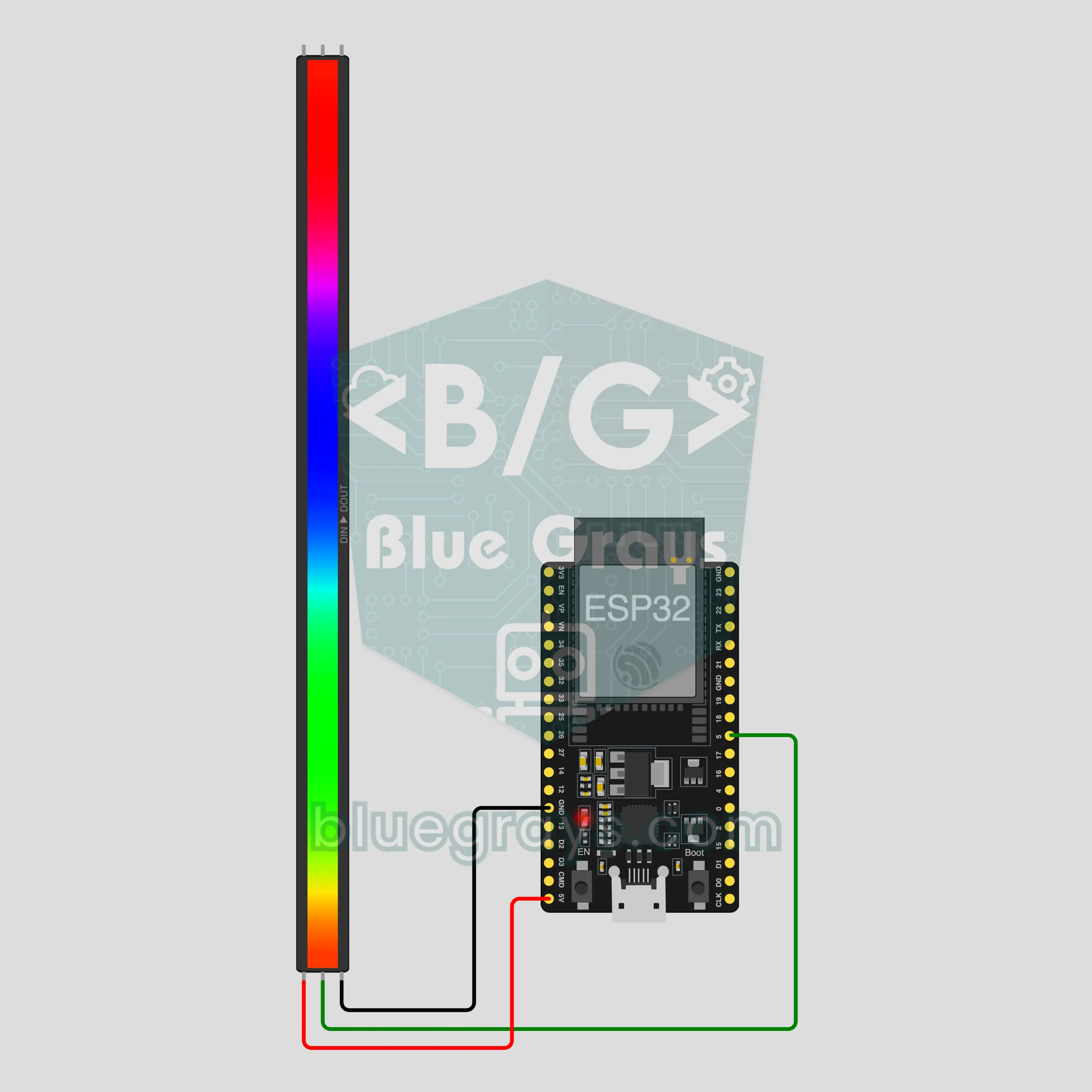
Zmieniaj kolor, jasność i efekt taśmy z telefonu: ESP32 łączy się z telefonem bezpośrednio przez wbudowany Bluetooth, a taśma WS2812B potrzebuje tylko 3 przewodów. Ten projekt to przewodnik krok po kroku po szablonie Bluetooth Taśma LED RGB w aplikacji. Przejdź do Warsztat › Urządzenia › Dodaj urządzenie › Bluetooth, wybierz Taśma LED RGB i wgraj kod przyciskiem Pobierz kod. Przycisk Skonfiguruj jako panel Bluetooth na tej stronie otwiera kreator z tym szablonem.
Film
Schemat układu
Kod źródłowy
1// ┌───────────────────────────┐
2// │ BlueGrays · bluegrays.com │
3// │ Bluetooth · ESP32         │
4// │ BG-Isik                   │
5// └───────────────────────────┘
6// RGB LED strip
7// Arduino IDE board: ESP32 Dev Module
8// the BLE library comes with the ESP32 board package, nothing extra to install
9
10#include <BLEDevice.h>
11#include <BLEServer.h>
12#include <BLE2902.h>
13#include <Adafruit_NeoPixel.h>  // Library Manager: 'Adafruit NeoPixel'
14
15const char BLE_NAME[] = "BG-Isik";  // the board advertises with this name, the app finds it in the list by it
16
17// Pins: change them here if you wired differently
18const int STRIP_PIN = 5;
19const int LED_COUNT = 30;  // number of LEDs on your strip
20
21void btWrite(const char *text);
22void onValue(const char *key, const char *value);
23void sendAll();
24void onLinkLost();
25
26// ── The app sends "key=value" lines; on "?" the board sends all its values ──
27char line[65];
28uint8_t lineLen = 0;
29unsigned long lastRxMs = 0;
30
31bool is(const char *a, const char *b) { return strcmp(a, b) == 0; }
32bool isOn(const char *v) { return v[0] == '1'; }
33
34void sendText(const char *key, const char *value) {
35  char out[72];
36  snprintf(out, sizeof(out), "%s=%s\n", key, value);
37  btWrite(out);
38}
39
40void sendInt(const char *key, long value) {
41  char text[12];
42  snprintf(text, sizeof(text), "%ld", value);
43  sendText(key, text);
44}
45
46void sendFloat(const char *key, float value) {
47  char text[16];
48  dtostrf(value, 1, 1, text);
49  sendText(key, text);
50}
51
52void handleLine(char *text) {
53  char *eq = strchr(text, '=');
54  if (eq == nullptr) {
55    if (text[strlen(text) - 1] == '?') {
56      btWrite("@v=1.0\n");  // the "@v" line tells the app the code version
57      sendAll();
58    }
59    return;
60  }
61  *eq = '\0';
62  onValue(text, eq + 1);
63}
64
65void feed(char c) {
66  lastRxMs = millis();
67  if (c == '\n' || c == '\r') {
68    if (lineLen == 0) return;
69    line[lineLen] = '\0';
70    lineLen = 0;
71    handleLine(line);
72  } else if (lineLen < sizeof(line) - 1) {
73    line[lineLen++] = c;
74  }
75}
76
77// ── Bluetooth (Nordic UART) ──
78#define UART_SERVICE "6E400001-B5A3-F393-E0A9-E50E24DCCA9E"
79#define UART_RX "6E400002-B5A3-F393-E0A9-E50E24DCCA9E"
80#define UART_TX "6E400003-B5A3-F393-E0A9-E50E24DCCA9E"
81
82BLECharacteristic *txChar = nullptr;
83volatile bool linked = false;
84volatile bool linkLost = false;
85// incoming bytes move from the Bluetooth task to loop() through a small ring buffer
86const int RX_SIZE = 256;
87volatile uint8_t rxBuf[RX_SIZE];
88volatile int rxHead = 0, rxTail = 0;
89
90class ServerEvents : public BLEServerCallbacks {
91  void onConnect(BLEServer *server) override { linked = true; }
92  void onDisconnect(BLEServer *server) override { linked = false; linkLost = true; }
93};
94
95class RxEvents : public BLECharacteristicCallbacks {
96  void onWrite(BLECharacteristic *c) override {
97    auto v = c->getValue();
98    for (size_t i = 0; i < v.length(); i++) {
99      int next = (rxHead + 1) % RX_SIZE;
100      if (next == rxTail) break;
101      rxBuf[rxHead] = (uint8_t)v[i];
102      rxHead = next;
103    }
104  }
105};
106
107// lines go out in 20-byte packets (works with every phone)
108void btWrite(const char *text) {
109  if (!linked || txChar == nullptr) return;
110  size_t n = strlen(text);
111  for (size_t i = 0; i < n; i += 20) {
112    size_t len = n - i < 20 ? n - i : 20;
113    txChar->setValue((uint8_t *)text + i, len);
114    txChar->notify();
115    delay(4);
116  }
117}
118
119void btBegin() {
120  BLEDevice::init(BLE_NAME);
121  BLEServer *server = BLEDevice::createServer();
122  server->setCallbacks(new ServerEvents());
123  BLEService *uart = server->createService(UART_SERVICE);
124  txChar = uart->createCharacteristic(UART_TX, BLECharacteristic::PROPERTY_NOTIFY);
125  txChar->addDescriptor(new BLE2902());
126  BLECharacteristic *rx = uart->createCharacteristic(UART_RX, BLECharacteristic::PROPERTY_WRITE | BLECharacteristic::PROPERTY_WRITE_NR);
127  rx->setCallbacks(new RxEvents());
128  uart->start();
129  BLEAdvertisementData adv;
130  adv.setFlags(0x06);
131  adv.setCompleteServices(BLEUUID(UART_SERVICE));
132  BLEAdvertisementData scan;
133  scan.setName(BLE_NAME);
134  BLEAdvertising *advertising = BLEDevice::getAdvertising();
135  advertising->setAdvertisementData(adv);
136  advertising->setScanResponseData(scan);
137  BLEDevice::startAdvertising();
138}
139
140void btPoll() {
141  while (rxTail != rxHead) {
142    char c = (char)rxBuf[rxTail];
143    rxTail = (rxTail + 1) % RX_SIZE;
144    feed(c);
145  }
146  if (linkLost) {
147    linkLost = false;
148    onLinkLost();
149    delay(100);
150    BLEDevice::startAdvertising();
151  }
152}
153
154// ── ESP32 ──
155Adafruit_NeoPixel strip(LED_COUNT, STRIP_PIN, NEO_GRB + NEO_KHZ800);
156bool stripOn = false;
157uint8_t cr = 255, cg = 255, cb = 255;
158int brightness = 70;
159char effect[16] = "sabit";
160uint16_t hue = 0;
161unsigned long lastFrameMs = 0;
162
163uint8_t level() { return map(brightness, 0, 100, 0, 255); }
164
165// gamma correction: colors look on the LEDs like they do on screen
166void fillColor(uint32_t color, uint8_t bright) {
167  strip.setBrightness(bright);
168  strip.fill(strip.gamma32(color));
169  strip.show();
170}
171
172void paint() {
173  if (!stripOn) { strip.clear(); strip.show(); return; }
174  fillColor(strip.Color(cr, cg, cb), level());
175}
176
177void onValue(const char *key, const char *value) {
178  if (is(key, "acik")) {
179    stripOn = isOn(value);
180  } else if (is(key, "renk") && value[0] == '#' && strlen(value) == 7) {
181    long c = strtol(value + 1, nullptr, 16);
182    cr = c >> 16; cg = (c >> 8) & 0xFF; cb = c & 0xFF;
183  } else if (is(key, "parlaklik")) {
184    brightness = constrain(atoi(value), 0, 100);
185  } else if (is(key, "efekt")) {
186    strncpy(effect, value, sizeof(effect) - 1);
187  }
188  paint();
189}
190
191void sendAll() {
192  char hex[8];
193  snprintf(hex, sizeof(hex), "#%02X%02X%02X", cr, cg, cb);
194  sendInt("acik", stripOn);
195  sendText("renk", hex);
196  sendInt("parlaklik", brightness);
197  sendText("efekt", effect);
198}
199
200void onLinkLost() {
201}
202
203void setup() {
204  Serial.begin(115200);
205  strip.begin();
206  paint();
207  btBegin();
208  Serial.print(F("BlueGrays Bluetooth: "));
209  Serial.println(BLE_NAME);
210}
211
212void loop() {
213  btPoll();
214  if (stripOn && !is(effect, "sabit")) {
215    // the effect pauses for a moment while a command arrives (interrupts are off while the strip updates)
216    if (millis() - lastRxMs > 150 && millis() - lastFrameMs >= 30) {
217      lastFrameMs = millis();
218      if (is(effect, "gokkusagi")) {  // a rainbow flows along the strip
219        hue += 512;
220        strip.setBrightness(level());
221        for (int i = 0; i < LED_COUNT; i++) strip.setPixelColor(i, strip.gamma32(strip.ColorHSV(hue + i * 65536L / LED_COUNT)));
222        strip.show();
223      } else if (is(effect, "nefes")) {  // slowly fades out and in
224        float wave = (sin(millis() / 600.0) + 1.0) / 2.0;
225        fillColor(strip.Color(cr, cg, cb), level() * (0.15 + 0.85 * wave));
226      } else if (is(effect, "yanip_sonme")) {  // blinks every half second
227        fillColor(strip.Color(cr, cg, cb), (millis() / 500) % 2 ? level() : 0);
228      } else if (is(effect, "renk_dongusu")) {  // whole strip one color, smooth hue shift
229        hue += 128;
230        fillColor(strip.ColorHSV(hue), level());
231      }
232    }
233  }
234}
235FAQ
Czy działa z iPhonem?
Tak. Projekt korzysta z wbudowanego w ESP32 Bluetooth Low Energy (BLE), który działa i na iPhonie, i na Androidzie. iPhone nie łączy się z klasycznymi modułami Bluetooth, takimi jak HC-05 czy HC-06, dlatego nie ma tu dodatkowego modułu. Nie próbuj parować płytki w ustawieniach Bluetooth telefonu; połączenie nawiązuje tylko aplikacja BlueGrays.
Ile diod LED mogę podłączyć i jakiego zasilania potrzebuję?
Każda dioda LED przy pełnej bieli pobiera do 60 mA, więc 30 diod to około 1,8 A. Port USB komputera tego nie da, więc przy szybkim teście z USB trzymaj jasność w okolicach 20. Na co dzień zasilaj taśmę z osobnego zasilacza 5 V 2 A i połącz jego GND z GND ESP32. Przy dłuższej taśmie zmień LED_COUNT w kodzie i dobierz zasilacz, licząc 60 mA na diodę. Kondensator 1000 µF na wejściu taśmy i rezystor 330 Ω szeregowo na linii danych chronią taśmę.
Dlaczego kolory wyglądają inaczej niż na ekranie?
Jasność diody LED rośnie liniowo z wartością, ale oko nie widzi światła w ten sposób; bez korekcji kolory wyglądają na sprane i bielawe. Dlatego kod koryguje każdy kolor przez gamma32. Ciemne i pastelowe odcienie zbliżają się do ekranu, ale nigdy nie są identyczne. Przy bardzo niskiej jasności kolory się przesuwają, a mieszane odcienie, takie jak żółty i pomarańczowy, bledną; powyżej około 40 różnica maleje.
Co robi taśma po zaniku prądu?
Płytka zawsze startuje z wyłączoną taśmą: kolor wraca do białego, jasność do 70, a efekt do Stały, bo wartości nie są zapisywane na płytce. Gdy aplikacja połączy się ponownie, panel pokazuje bieżące wartości wysłane przez płytkę, więc wystarczy włączyć przełącznik Światło. Jeśli rozłączy się tylko telefon, taśma dalej świeci tak jak wcześniej.