
Tekst na LCD przez Bluetooth na ESP32
Wpisz wiadomość w telefonie, a pojawi się na LCD 16x2 przez Bluetooth, bez internetu i Wi-Fi. Ten projekt to przewodnik krok po kroku po szablonie Bluetooth Tekst na LCD w aplikacji, zbudowany na ESP32 i LCD I2C. Przejdź do Warsztat › Urządzenia › Dodaj urządzenie › Bluetooth, wybierz Tekst na LCD i wgraj kod przyciskiem Pobierz kod. Przycisk Skonfiguruj jako panel Bluetooth na tej stronie też otwiera kreator z tym szablonem.
Film
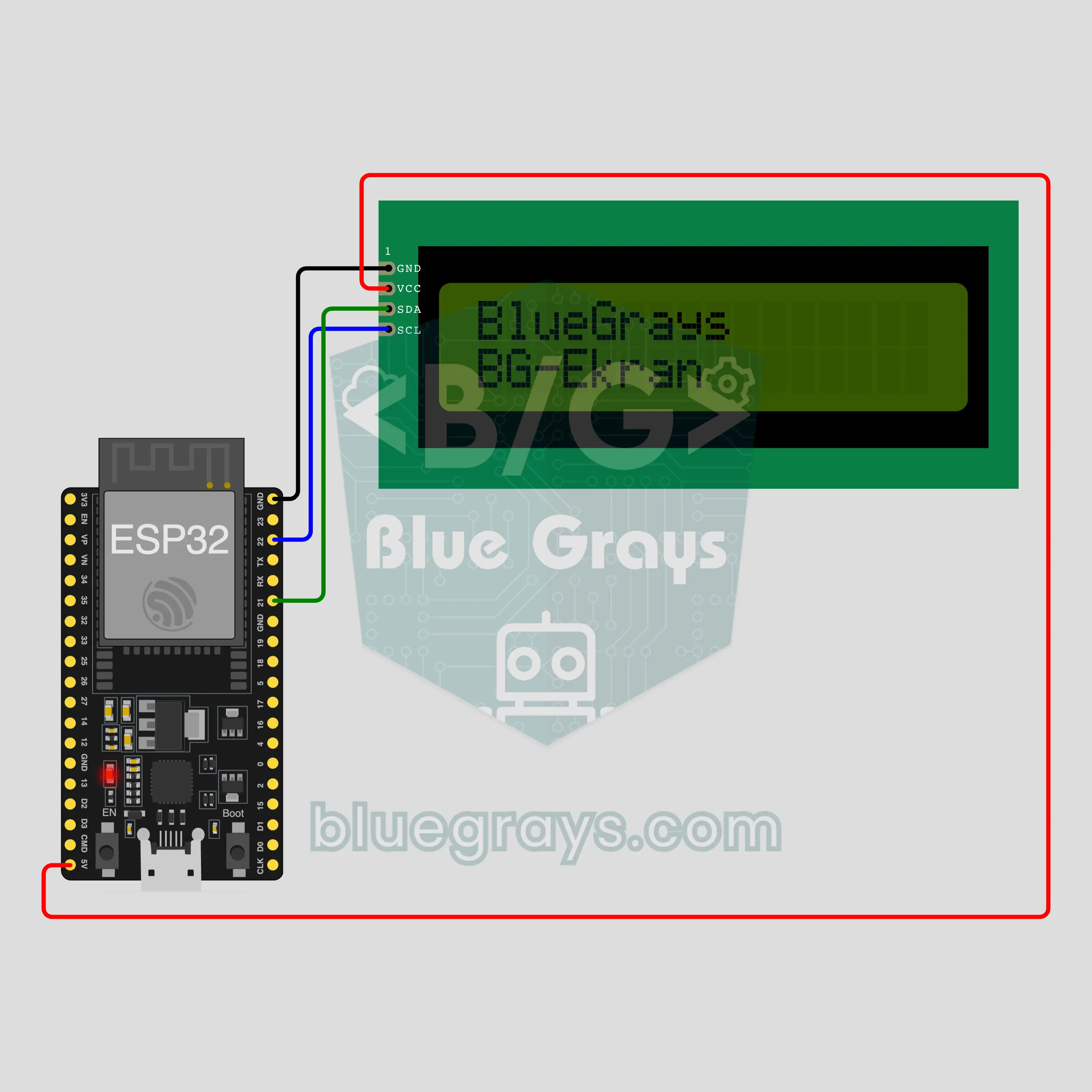
Schemat układu
Kod źródłowy
1// ┌───────────────────────────┐
2// │ BlueGrays · bluegrays.com │
3// │ Bluetooth · ESP32         │
4// │ BG-Ekran                  │
5// └───────────────────────────┘
6// Text on an LCD
7// Arduino IDE board: ESP32 Dev Module
8// the BLE library comes with the ESP32 board package, nothing extra to install
9
10#include <BLEDevice.h>
11#include <BLEServer.h>
12#include <BLE2902.h>
13#include <Wire.h>
14#include <LiquidCrystal_I2C.h>  // Library Manager: 'LiquidCrystal I2C' (Frank de Brabander)
15
16const char BLE_NAME[] = "BG-Ekran";  // the board advertises with this name, the app finds it in the list by it
17
18// Pins: change them here if you wired differently
19const int SDA_PIN = 21, SCL_PIN = 22;
20const int LCD_COLS = 16, LCD_ROWS = 2;  // LCD size: columns × rows
21const uint8_t LCD_ADDRESS = 0x27;  // most I2C LCD backpacks use 0x27; try 0x3F if the screen stays blank
22
23void btWrite(const char *text);
24void onValue(const char *key, const char *value);
25void sendAll();
26void onLinkLost();
27
28// ── The app sends "key=value" lines; on "?" the board sends all its values ──
29char line[65];
30uint8_t lineLen = 0;
31unsigned long lastRxMs = 0;
32
33bool is(const char *a, const char *b) { return strcmp(a, b) == 0; }
34bool isOn(const char *v) { return v[0] == '1'; }
35
36void sendText(const char *key, const char *value) {
37  char out[72];
38  snprintf(out, sizeof(out), "%s=%s\n", key, value);
39  btWrite(out);
40}
41
42void sendInt(const char *key, long value) {
43  char text[12];
44  snprintf(text, sizeof(text), "%ld", value);
45  sendText(key, text);
46}
47
48void sendFloat(const char *key, float value) {
49  char text[16];
50  dtostrf(value, 1, 1, text);
51  sendText(key, text);
52}
53
54void handleLine(char *text) {
55  char *eq = strchr(text, '=');
56  if (eq == nullptr) {
57    if (text[strlen(text) - 1] == '?') {
58      btWrite("@v=1.0\n");  // the "@v" line tells the app the code version
59      sendAll();
60    }
61    return;
62  }
63  *eq = '\0';
64  onValue(text, eq + 1);
65}
66
67void feed(char c) {
68  lastRxMs = millis();
69  if (c == '\n' || c == '\r') {
70    if (lineLen == 0) return;
71    line[lineLen] = '\0';
72    lineLen = 0;
73    handleLine(line);
74  } else if (lineLen < sizeof(line) - 1) {
75    line[lineLen++] = c;
76  }
77}
78
79// ── Bluetooth (Nordic UART) ──
80#define UART_SERVICE "6E400001-B5A3-F393-E0A9-E50E24DCCA9E"
81#define UART_RX "6E400002-B5A3-F393-E0A9-E50E24DCCA9E"
82#define UART_TX "6E400003-B5A3-F393-E0A9-E50E24DCCA9E"
83
84BLECharacteristic *txChar = nullptr;
85volatile bool linked = false;
86volatile bool linkLost = false;
87// incoming bytes move from the Bluetooth task to loop() through a small ring buffer
88const int RX_SIZE = 256;
89volatile uint8_t rxBuf[RX_SIZE];
90volatile int rxHead = 0, rxTail = 0;
91
92class ServerEvents : public BLEServerCallbacks {
93  void onConnect(BLEServer *server) override { linked = true; }
94  void onDisconnect(BLEServer *server) override { linked = false; linkLost = true; }
95};
96
97class RxEvents : public BLECharacteristicCallbacks {
98  void onWrite(BLECharacteristic *c) override {
99    auto v = c->getValue();
100    for (size_t i = 0; i < v.length(); i++) {
101      int next = (rxHead + 1) % RX_SIZE;
102      if (next == rxTail) break;
103      rxBuf[rxHead] = (uint8_t)v[i];
104      rxHead = next;
105    }
106  }
107};
108
109// lines go out in 20-byte packets (works with every phone)
110void btWrite(const char *text) {
111  if (!linked || txChar == nullptr) return;
112  size_t n = strlen(text);
113  for (size_t i = 0; i < n; i += 20) {
114    size_t len = n - i < 20 ? n - i : 20;
115    txChar->setValue((uint8_t *)text + i, len);
116    txChar->notify();
117    delay(4);
118  }
119}
120
121void btBegin() {
122  BLEDevice::init(BLE_NAME);
123  BLEServer *server = BLEDevice::createServer();
124  server->setCallbacks(new ServerEvents());
125  BLEService *uart = server->createService(UART_SERVICE);
126  txChar = uart->createCharacteristic(UART_TX, BLECharacteristic::PROPERTY_NOTIFY);
127  txChar->addDescriptor(new BLE2902());
128  BLECharacteristic *rx = uart->createCharacteristic(UART_RX, BLECharacteristic::PROPERTY_WRITE | BLECharacteristic::PROPERTY_WRITE_NR);
129  rx->setCallbacks(new RxEvents());
130  uart->start();
131  BLEAdvertisementData adv;
132  adv.setFlags(0x06);
133  adv.setCompleteServices(BLEUUID(UART_SERVICE));
134  BLEAdvertisementData scan;
135  scan.setName(BLE_NAME);
136  BLEAdvertising *advertising = BLEDevice::getAdvertising();
137  advertising->setAdvertisementData(adv);
138  advertising->setScanResponseData(scan);
139  BLEDevice::startAdvertising();
140}
141
142void btPoll() {
143  while (rxTail != rxHead) {
144    char c = (char)rxBuf[rxTail];
145    rxTail = (rxTail + 1) % RX_SIZE;
146    feed(c);
147  }
148  if (linkLost) {
149    linkLost = false;
150    onLinkLost();
151    delay(100);
152    BLEDevice::startAdvertising();
153  }
154}
155
156// ── ESP32 ──
157// if you only see boxes, turn the blue trimmer on the back (contrast)
158LiquidCrystal_I2C lcd(LCD_ADDRESS, LCD_COLS, LCD_ROWS);
159char rows[LCD_ROWS][LCD_COLS + 1];
160bool lightOn = true;
161
162// the LCD only knows basic Latin letters: accented ones are simplified (é → e), others become ?
163const char FOLD[] = "AAAAAAACEEEEIIIIDNOOOOOxOUUUUYPsaaaaaaaceeeeiiiidnooooo/ouuuuypyAaAaAaCcCcCcCcDdDdEeEeEeEeEeGgGgGgGgHhHhIiIiIiIiIiJjJjKkkLlLlLlLlLlNnNnNnnNnOoOoOoOoRrRrRrSsSsSsSsTtTtTtUuUuUuUuUuUuWwYyYZzZzZzs";
164
165void toAscii(const char *in, char *out, size_t size) {
166  size_t n = 0;
167  const unsigned char *p = (const unsigned char *)in;
168  while (*p && n + 1 < size) {
169    unsigned char c = *p;
170    if (c < 0x80) { out[n++] = c >= 32 ? c : ' '; p++; continue; }
171    int len = c >= 0xF0 ? 4 : c >= 0xE0 ? 3 : c >= 0xC0 ? 2 : 1;
172    unsigned int code = (len == 2 && p[1]) ? ((c & 0x1F) << 6) | (p[1] & 0x3F) : 0;
173    out[n++] = (code >= 0xC0 && code <= 0x17F) ? FOLD[code - 0xC0] : '?';
174    for (int k = 0; k < len && *p; k++) p++;
175  }
176  out[n] = '\0';
177}
178
179void showRows() {
180  for (int r = 0; r < LCD_ROWS; r++) {
181    lcd.setCursor(0, r);
182    bool ended = false;
183    for (int c = 0; c < LCD_COLS; c++) {
184      if (rows[r][c] == '\0') ended = true;
185      lcd.write(ended ? ' ' : rows[r][c]);
186    }
187  }
188}
189
190// "yazi=" flows the text over the rows, "satir1=" … replaces a single row
191void setText(const char *text) {
192  char flat[LCD_COLS * LCD_ROWS + 1];
193  toAscii(text, flat, sizeof(flat));
194  int len = strlen(flat);
195  for (int r = 0; r < LCD_ROWS; r++) {
196    int start = r * LCD_COLS;
197    int n = len > start ? min(LCD_COLS, len - start) : 0;
198    memcpy(rows[r], flat + start, n);
199    rows[r][n] = '\0';
200  }
201}
202
203void onValue(const char *key, const char *value) {
204  if (is(key, "yazi")) {
205    setText(value);
206    showRows();
207  } else if (strncmp(key, "satir", 5) == 0) {
208    int r = atoi(key + 5) - 1;
209    if (r < 0 || r >= LCD_ROWS) return;
210    toAscii(value, rows[r], LCD_COLS + 1);
211    showRows();
212  } else if (is(key, "isik")) {
213    lightOn = isOn(value);
214    if (lightOn) lcd.backlight(); else lcd.noBacklight();
215  }
216}
217
218void sendAll() {
219  char flat[LCD_COLS * LCD_ROWS + 1];
220  snprintf(flat, sizeof(flat), rows[1][0] ? "%-16s%s" : "%s", rows[0], rows[1]);
221  if (flat[0]) sendText("yazi", flat);
222  sendInt("isik", lightOn);
223}
224
225void onLinkLost() {
226}
227
228void setup() {
229  Serial.begin(115200);
230  Wire.begin(SDA_PIN, SCL_PIN);
231  lcd.init();
232  lcd.backlight();
233  setText("BlueGrays");
234  strncpy(rows[1], BLE_NAME, LCD_COLS);
235  rows[1][LCD_COLS] = '\0';
236  showRows();
237  btBegin();
238  Serial.print(F("BlueGrays Bluetooth: "));
239  Serial.println(BLE_NAME);
240}
241
242void loop() {
243  btPoll();
244}
245FAQ
Czy działa z iPhonem?
Tak. Wbudowany w ESP32 Bluetooth Low Energy (BLE) rozmawia i z iPhonem, i z Androidem. iPhone nie łączy się z klasycznymi modułami Bluetooth, takimi jak HC-05 i HC-06, a ten projekt ich nie potrzebuje. Nie próbuj parować płytki w ustawieniach Bluetooth telefonu; płytki BLE mogą się tam nie pojawiać i to normalne. Połączenie nawiązuje aplikacja BlueGrays.
Czy wyświetli litery z akcentami, takie jak é, ü albo ñ?
Nie jako litery z akcentami. Zanim tekst trafi na wyświetlacz, kod zamienia łacińskie litery z akcentami na zwykłe: é na e, ü na u, ñ na n, ç na c. Wpisz café, a wyświetlacz pokaże cafe, więc tekst zostaje czytelny. Znaki, których nie ma w tablicy zamiany (emoji, cyrylica, znaki japońskie, symbole takie jak ° i €), pojawiają się jako znak zapytania. Podgląd LCD w panelu pokazuje, jak tekst będzie wyglądał, zanim go wyślesz.
Czy mogę użyć LCD 20x4?
Tak. Kreator i ekran kodu mają wybór Typ LCD: 16x2 albo 20x4. Wybierz 20x4, a aplikacja wygeneruje kod dla tego rozmiaru. Połączenia są takie same: cztery przewody na tych samych pinach. Nie zmieniaj ręcznie liczby kolumn i wierszy w kodzie pobranym dla 16x2, bo od rozmiaru zależą też inne części kodu. Właściwa droga to zmiana typu LCD w aplikacji i ponowne pobranie kodu. Ten przewodnik powstał z wyświetlaczem 16x2.
Ile znaków się zmieści i czy długi tekst się przewija?
Wyświetlacz 16x2 mieści 32 znaki: dwa wiersze po 16. Pole tekstowe w panelu nie przyjmie więcej. Pierwsze 16 znaków trafia do górnego wiersza, a reszta do dolnego; kod nie patrzy na słowa, więc słowo może zostać przecięte na końcu wiersza. Tekst się nie przewija, zostaje na miejscu. Żeby zepchnąć słowo do dolnego wiersza, dodaj przed nim spacje; podgląd LCD pokazuje podział, zanim wyślesz. Nowy tekst zastępuje stary.