
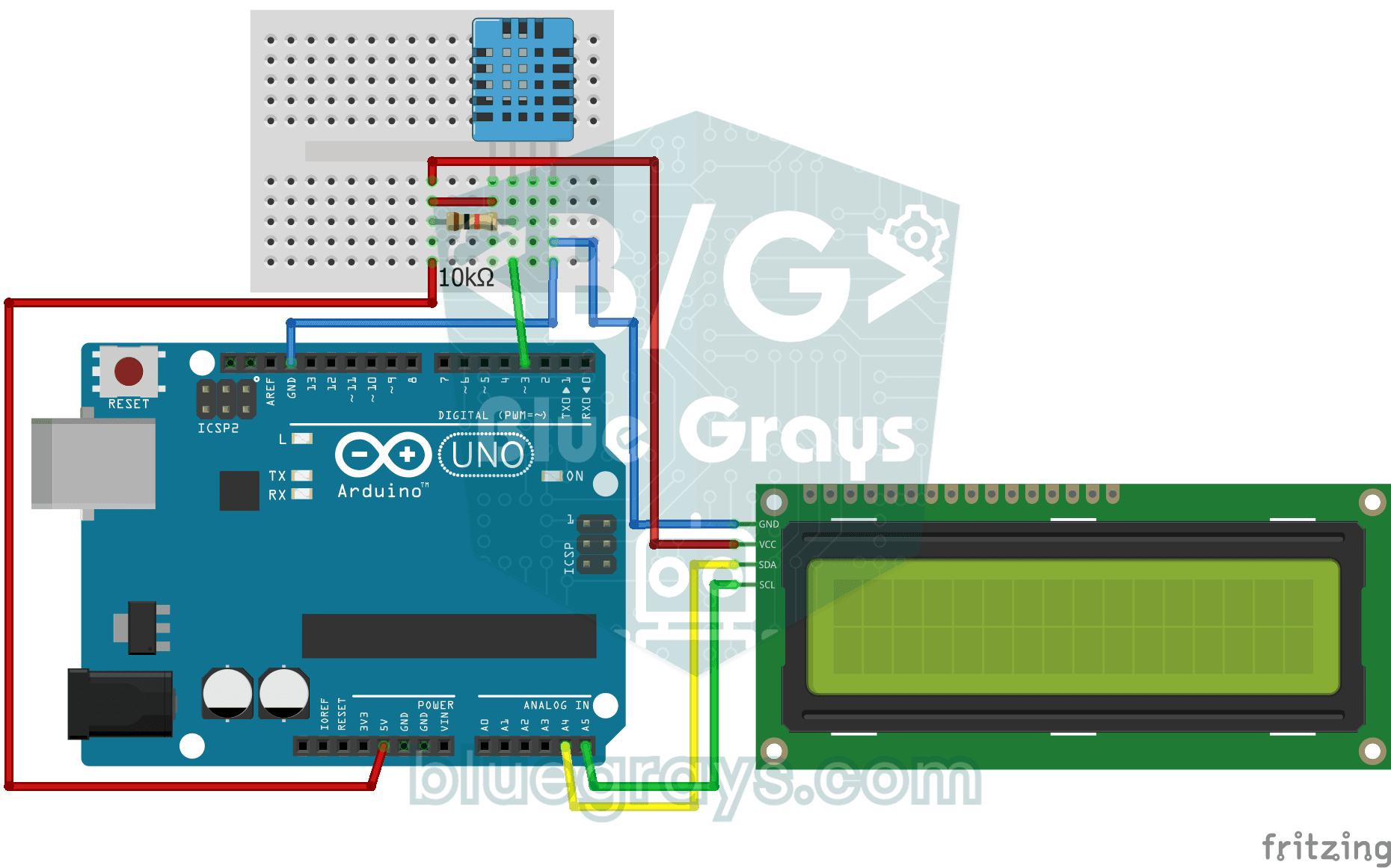
Jak ciepło jest w twoim pokoju i czy powietrze jest wilgotne, czy suche? Czujnik DHT11 mierzy temperaturę i wilgotność, a Arduino wypisuje wartości na dwuwierszowym wyświetlaczu LCD i odświeża je co kilka sekund. Gdy z czujnikiem coś jest nie tak, pojawia się komunikat o błędzie; to pierwszy krok do własnej małej stacji pogodowej.
Film
Schemat układu
Kod źródłowy
C++ (Arduino IDE)
1// ─────────────────────────────────────────
2//   BlueGrays · bluegrays.com
3//   Temperature and Humidity with DHT11
4// ─────────────────────────────────────────
5// The DHT11 sensor measures room temperature and humidity; the I2C LCD
6// shows the temperature on the first line and the humidity on the second.
7// The reading refreshes every 2 s. If a reading fails the screen shows
8// "Sensor Error!".
9//
10// Pins:
11//   D3 -> DHT11 data
12//   (10k resistor between data and 5V, pull-up)
13//   A4 -> LCD SDA
14//   A5 -> LCD SCL
15//   DHT11 and LCD: VCC to 5V, GND to GND
16
17#include <LiquidCrystal_I2C.h>
18#include <Wire.h>
19#include <DHT.h>
20
21#define DHTPIN 3        // DHT11 data pin
22#define DHTTYPE DHT11   // Sensor type in use
23
24LiquidCrystal_I2C lcd(0x27, 16, 2);   // I2C address 0x27, 16x2 LCD
25DHT dht(DHTPIN, DHTTYPE);
26
27void setup() {
28  dht.begin();
29  // Modern libraries prefer init() over begin()
30  lcd.init();
31  lcd.backlight();
32}
33
34void loop() {
35  // Read humidity and temperature (C)
36  float humidity = dht.readHumidity();
37  float temperature = dht.readTemperature();
38
39  // Check if readings failed
40  if (isnan(humidity) || isnan(temperature)) {
41    lcd.setCursor(0, 0);
42    lcd.print("Sensor Error!   ");
43    return;
44  }
45
46  // Line 1: temperature
47  lcd.setCursor(0, 0);
48  lcd.print("Temp: ");
49  lcd.print(temperature);
50  lcd.print((char)223); // Degree symbol (°)
51  lcd.print("C   ");
52
53  // Line 2: humidity
54  lcd.setCursor(0, 1);
55  lcd.print("Humidity: %");
56  lcd.print((int)humidity);   // Print as a whole number (45)
57  lcd.print("   "); // Trailing spaces to clear old data
58
59  delay(2000); // DHT11 is slow, 2 seconds is more stable
60}
61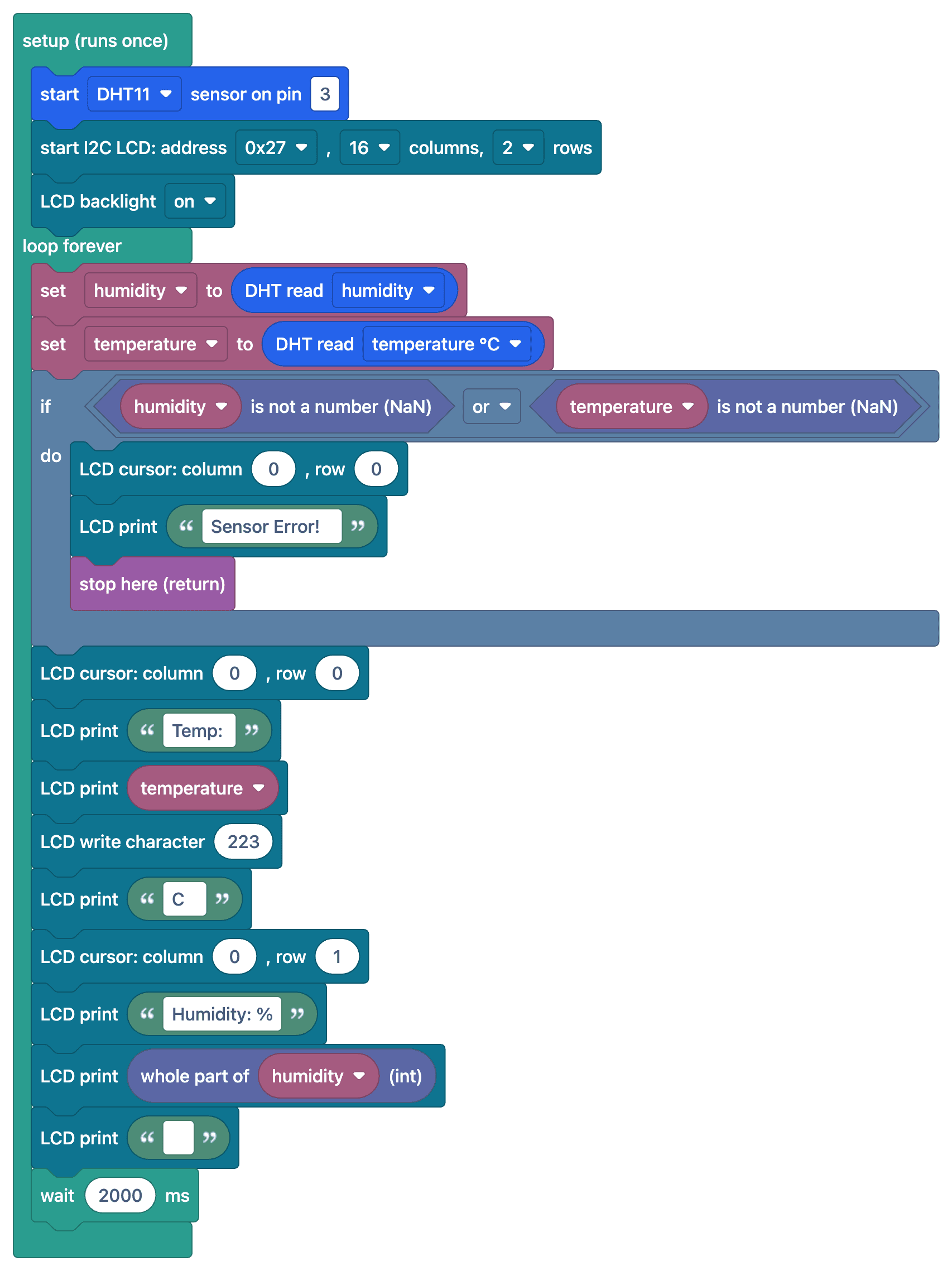
FAQ
Jak dokładne są pomiary DHT11?
DHT11 mierzy temperaturę z dokładnością ±2 °C, a wilgotność z dokładnością ±5% i działa w zakresie 0–50 °C. Do dokładniejszych pomiarów zaleca się DHT22 (±0,5 °C) albo BME280.
Na ekranie widzę „nan” albo komunikat o błędzie. Dlaczego?
Nie udało się odczytać czujnika. Sprawdź rezystor podciągający 10 kΩ na pinie danych i typ czujnika (DHT11) w ustawieniach biblioteki, a między odczytami odczekaj co najmniej 1–2 sekundy.
Dlaczego odczyty odświeżają się powoli?
DHT11 może wykonać najwyżej jeden pomiar na sekundę. Częstsze odczyty dają błędne lub nieaktualne wartości; zaleca się odczekanie 2 sekund między pomiarami.
Czy mogę obliczyć temperaturę odczuwalną?
Tak, funkcja computeHeatIndex() z biblioteki DHT oblicza temperaturę odczuwalną na podstawie temperatury i wilgotności.