
RGB світлодіодна стрічка через Bluetooth на ESP32 (WS2812B)
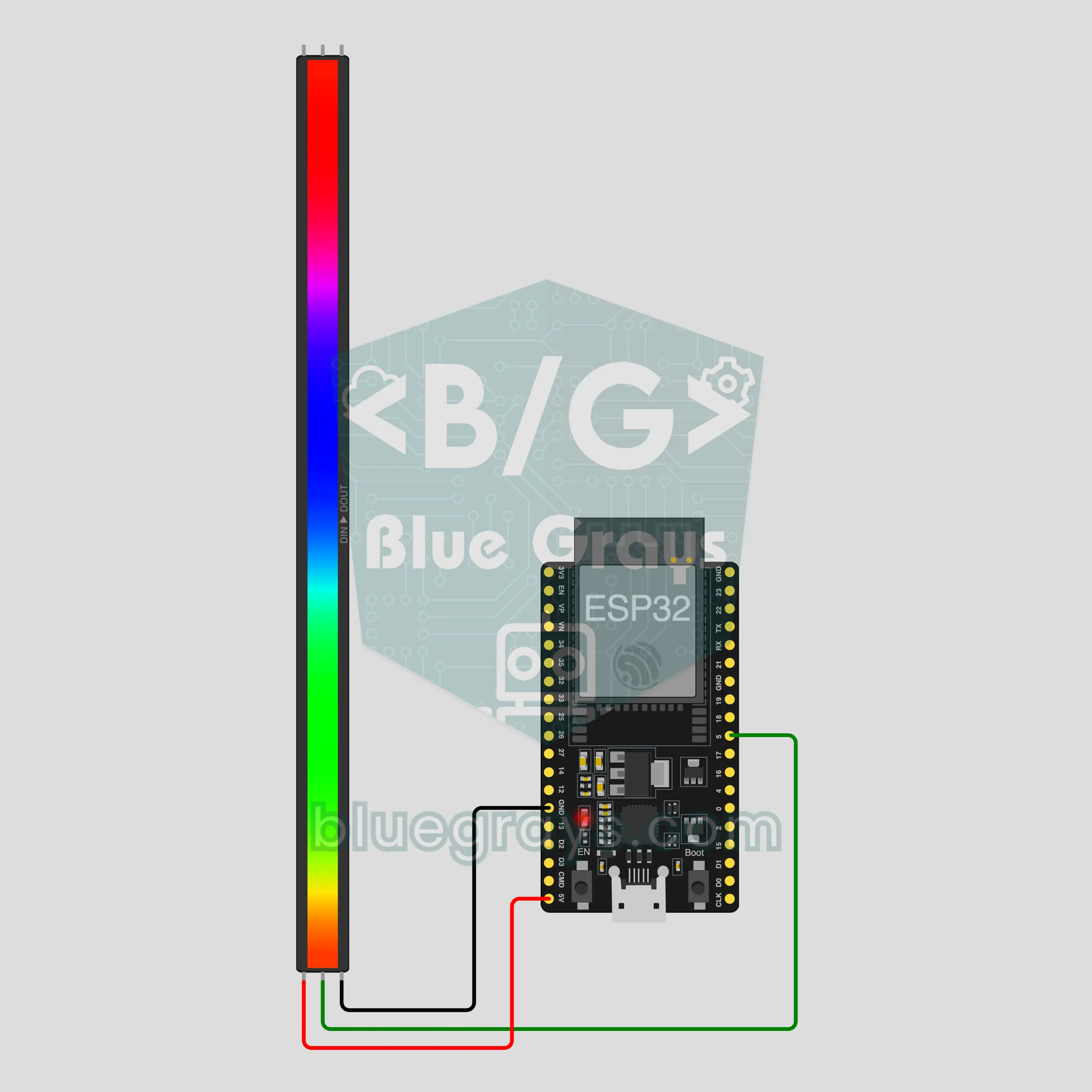
Змінюй колір, яскравість і ефект стрічки з телефона: ESP32 під’єднується прямо до телефона через вбудований Bluetooth, а стрічці WS2812B потрібні лише 3 дроти. Цей проєкт є покроковим посібником до Bluetooth-шаблону RGB світлодіодна стрічка в застосунку. Перейди в Майстерня › Пристрої › Додати пристрій › Bluetooth, вибери «RGB світлодіодна стрічка» й завантаж код через Отримати код. Кнопка Налаштувати як панель Bluetooth на цій сторінці відкриває майстер із цим шаблоном.
Відео
Схема
Вихідний код
1// ┌───────────────────────────┐
2// │ BlueGrays · bluegrays.com │
3// │ Bluetooth · ESP32         │
4// │ BG-Isik                   │
5// └───────────────────────────┘
6// RGB LED strip
7// Arduino IDE board: ESP32 Dev Module
8// the BLE library comes with the ESP32 board package, nothing extra to install
9
10#include <BLEDevice.h>
11#include <BLEServer.h>
12#include <BLE2902.h>
13#include <Adafruit_NeoPixel.h>  // Library Manager: 'Adafruit NeoPixel'
14
15const char BLE_NAME[] = "BG-Isik";  // the board advertises with this name, the app finds it in the list by it
16
17// Pins: change them here if you wired differently
18const int STRIP_PIN = 5;
19const int LED_COUNT = 30;  // number of LEDs on your strip
20
21void btWrite(const char *text);
22void onValue(const char *key, const char *value);
23void sendAll();
24void onLinkLost();
25
26// ── The app sends "key=value" lines; on "?" the board sends all its values ──
27char line[65];
28uint8_t lineLen = 0;
29unsigned long lastRxMs = 0;
30
31bool is(const char *a, const char *b) { return strcmp(a, b) == 0; }
32bool isOn(const char *v) { return v[0] == '1'; }
33
34void sendText(const char *key, const char *value) {
35  char out[72];
36  snprintf(out, sizeof(out), "%s=%s\n", key, value);
37  btWrite(out);
38}
39
40void sendInt(const char *key, long value) {
41  char text[12];
42  snprintf(text, sizeof(text), "%ld", value);
43  sendText(key, text);
44}
45
46void sendFloat(const char *key, float value) {
47  char text[16];
48  dtostrf(value, 1, 1, text);
49  sendText(key, text);
50}
51
52void handleLine(char *text) {
53  char *eq = strchr(text, '=');
54  if (eq == nullptr) {
55    if (text[strlen(text) - 1] == '?') {
56      btWrite("@v=1.0\n");  // the "@v" line tells the app the code version
57      sendAll();
58    }
59    return;
60  }
61  *eq = '\0';
62  onValue(text, eq + 1);
63}
64
65void feed(char c) {
66  lastRxMs = millis();
67  if (c == '\n' || c == '\r') {
68    if (lineLen == 0) return;
69    line[lineLen] = '\0';
70    lineLen = 0;
71    handleLine(line);
72  } else if (lineLen < sizeof(line) - 1) {
73    line[lineLen++] = c;
74  }
75}
76
77// ── Bluetooth (Nordic UART) ──
78#define UART_SERVICE "6E400001-B5A3-F393-E0A9-E50E24DCCA9E"
79#define UART_RX "6E400002-B5A3-F393-E0A9-E50E24DCCA9E"
80#define UART_TX "6E400003-B5A3-F393-E0A9-E50E24DCCA9E"
81
82BLECharacteristic *txChar = nullptr;
83volatile bool linked = false;
84volatile bool linkLost = false;
85// incoming bytes move from the Bluetooth task to loop() through a small ring buffer
86const int RX_SIZE = 256;
87volatile uint8_t rxBuf[RX_SIZE];
88volatile int rxHead = 0, rxTail = 0;
89
90class ServerEvents : public BLEServerCallbacks {
91  void onConnect(BLEServer *server) override { linked = true; }
92  void onDisconnect(BLEServer *server) override { linked = false; linkLost = true; }
93};
94
95class RxEvents : public BLECharacteristicCallbacks {
96  void onWrite(BLECharacteristic *c) override {
97    auto v = c->getValue();
98    for (size_t i = 0; i < v.length(); i++) {
99      int next = (rxHead + 1) % RX_SIZE;
100      if (next == rxTail) break;
101      rxBuf[rxHead] = (uint8_t)v[i];
102      rxHead = next;
103    }
104  }
105};
106
107// lines go out in 20-byte packets (works with every phone)
108void btWrite(const char *text) {
109  if (!linked || txChar == nullptr) return;
110  size_t n = strlen(text);
111  for (size_t i = 0; i < n; i += 20) {
112    size_t len = n - i < 20 ? n - i : 20;
113    txChar->setValue((uint8_t *)text + i, len);
114    txChar->notify();
115    delay(4);
116  }
117}
118
119void btBegin() {
120  BLEDevice::init(BLE_NAME);
121  BLEServer *server = BLEDevice::createServer();
122  server->setCallbacks(new ServerEvents());
123  BLEService *uart = server->createService(UART_SERVICE);
124  txChar = uart->createCharacteristic(UART_TX, BLECharacteristic::PROPERTY_NOTIFY);
125  txChar->addDescriptor(new BLE2902());
126  BLECharacteristic *rx = uart->createCharacteristic(UART_RX, BLECharacteristic::PROPERTY_WRITE | BLECharacteristic::PROPERTY_WRITE_NR);
127  rx->setCallbacks(new RxEvents());
128  uart->start();
129  BLEAdvertisementData adv;
130  adv.setFlags(0x06);
131  adv.setCompleteServices(BLEUUID(UART_SERVICE));
132  BLEAdvertisementData scan;
133  scan.setName(BLE_NAME);
134  BLEAdvertising *advertising = BLEDevice::getAdvertising();
135  advertising->setAdvertisementData(adv);
136  advertising->setScanResponseData(scan);
137  BLEDevice::startAdvertising();
138}
139
140void btPoll() {
141  while (rxTail != rxHead) {
142    char c = (char)rxBuf[rxTail];
143    rxTail = (rxTail + 1) % RX_SIZE;
144    feed(c);
145  }
146  if (linkLost) {
147    linkLost = false;
148    onLinkLost();
149    delay(100);
150    BLEDevice::startAdvertising();
151  }
152}
153
154// ── ESP32 ──
155Adafruit_NeoPixel strip(LED_COUNT, STRIP_PIN, NEO_GRB + NEO_KHZ800);
156bool stripOn = false;
157uint8_t cr = 255, cg = 255, cb = 255;
158int brightness = 70;
159char effect[16] = "sabit";
160uint16_t hue = 0;
161unsigned long lastFrameMs = 0;
162
163uint8_t level() { return map(brightness, 0, 100, 0, 255); }
164
165// gamma correction: colors look on the LEDs like they do on screen
166void fillColor(uint32_t color, uint8_t bright) {
167  strip.setBrightness(bright);
168  strip.fill(strip.gamma32(color));
169  strip.show();
170}
171
172void paint() {
173  if (!stripOn) { strip.clear(); strip.show(); return; }
174  fillColor(strip.Color(cr, cg, cb), level());
175}
176
177void onValue(const char *key, const char *value) {
178  if (is(key, "acik")) {
179    stripOn = isOn(value);
180  } else if (is(key, "renk") && value[0] == '#' && strlen(value) == 7) {
181    long c = strtol(value + 1, nullptr, 16);
182    cr = c >> 16; cg = (c >> 8) & 0xFF; cb = c & 0xFF;
183  } else if (is(key, "parlaklik")) {
184    brightness = constrain(atoi(value), 0, 100);
185  } else if (is(key, "efekt")) {
186    strncpy(effect, value, sizeof(effect) - 1);
187  }
188  paint();
189}
190
191void sendAll() {
192  char hex[8];
193  snprintf(hex, sizeof(hex), "#%02X%02X%02X", cr, cg, cb);
194  sendInt("acik", stripOn);
195  sendText("renk", hex);
196  sendInt("parlaklik", brightness);
197  sendText("efekt", effect);
198}
199
200void onLinkLost() {
201}
202
203void setup() {
204  Serial.begin(115200);
205  strip.begin();
206  paint();
207  btBegin();
208  Serial.print(F("BlueGrays Bluetooth: "));
209  Serial.println(BLE_NAME);
210}
211
212void loop() {
213  btPoll();
214  if (stripOn && !is(effect, "sabit")) {
215    // the effect pauses for a moment while a command arrives (interrupts are off while the strip updates)
216    if (millis() - lastRxMs > 150 && millis() - lastFrameMs >= 30) {
217      lastFrameMs = millis();
218      if (is(effect, "gokkusagi")) {  // a rainbow flows along the strip
219        hue += 512;
220        strip.setBrightness(level());
221        for (int i = 0; i < LED_COUNT; i++) strip.setPixelColor(i, strip.gamma32(strip.ColorHSV(hue + i * 65536L / LED_COUNT)));
222        strip.show();
223      } else if (is(effect, "nefes")) {  // slowly fades out and in
224        float wave = (sin(millis() / 600.0) + 1.0) / 2.0;
225        fillColor(strip.Color(cr, cg, cb), level() * (0.15 + 0.85 * wave));
226      } else if (is(effect, "yanip_sonme")) {  // blinks every half second
227        fillColor(strip.Color(cr, cg, cb), (millis() / 500) % 2 ? level() : 0);
228      } else if (is(effect, "renk_dongusu")) {  // whole strip one color, smooth hue shift
229        hue += 128;
230        fillColor(strip.ColorHSV(hue), level());
231      }
232    }
233  }
234}
235Поширені запитання
Чи працює це з iPhone?
Так. Проєкт використовує вбудований Bluetooth Low Energy (BLE) ESP32, який працює і на iPhone, і на Android. iPhone не може під’єднатися до класичних модулів Bluetooth, як-от HC-05 чи HC-06, тому тут немає додаткового модуля. Не намагайся з’єднати плату в налаштуваннях Bluetooth телефона; з’єднання встановлює лише застосунок BlueGrays.
Скільки світлодіодів можна під’єднати і яке живлення потрібне?
Кожен світлодіод на повному білому споживає до 60 mA, тож 30 світлодіодів дають приблизно 1,8 A. USB-порт комп’ютера стільки не видасть, тому для швидкої перевірки від USB тримай яскравість близько 20. Для щоденного використання живи стрічку від окремого адаптера 5 V 2 A і з’єднай його GND з GND плати ESP32. Для довшої стрічки зміни LED_COUNT у коді й підбери адаптер із розрахунку 60 mA на світлодіод. Конденсатор 1000 µF на вході стрічки й резистор 330 Ω послідовно в лінії даних захищають стрічку.
Чому кольори відрізняються від екранних?
Яскравість світлодіода зростає лінійно зі значенням, але око сприймає світло інакше; без корекції кольори виглядають блідими й білястими. Тому код коригує кожен колір через gamma32. Темні й пастельні відтінки наближаються до екранних, але ніколи не збігаються повністю. На дуже низькій яскравості кольори зміщуються, а змішані відтінки, як-от жовтий і помаранчевий, блякнуть; вище приблизно 40 різниця зменшується.
Що робить стрічка після вимкнення живлення?
Плата завжди стартує з вимкненою стрічкою: колір повертається до білого, яскравість до 70, а ефект до «Статичний», бо значення на платі не зберігаються. Коли застосунок знову під’єднується, панель показує поточні значення, які надсилає плата, тож просто ввімкни перемикач «Світло». Якщо від’єднується лише телефон, стрічка й далі світить як було.