
ESP32 Bluetooth LED und Relais
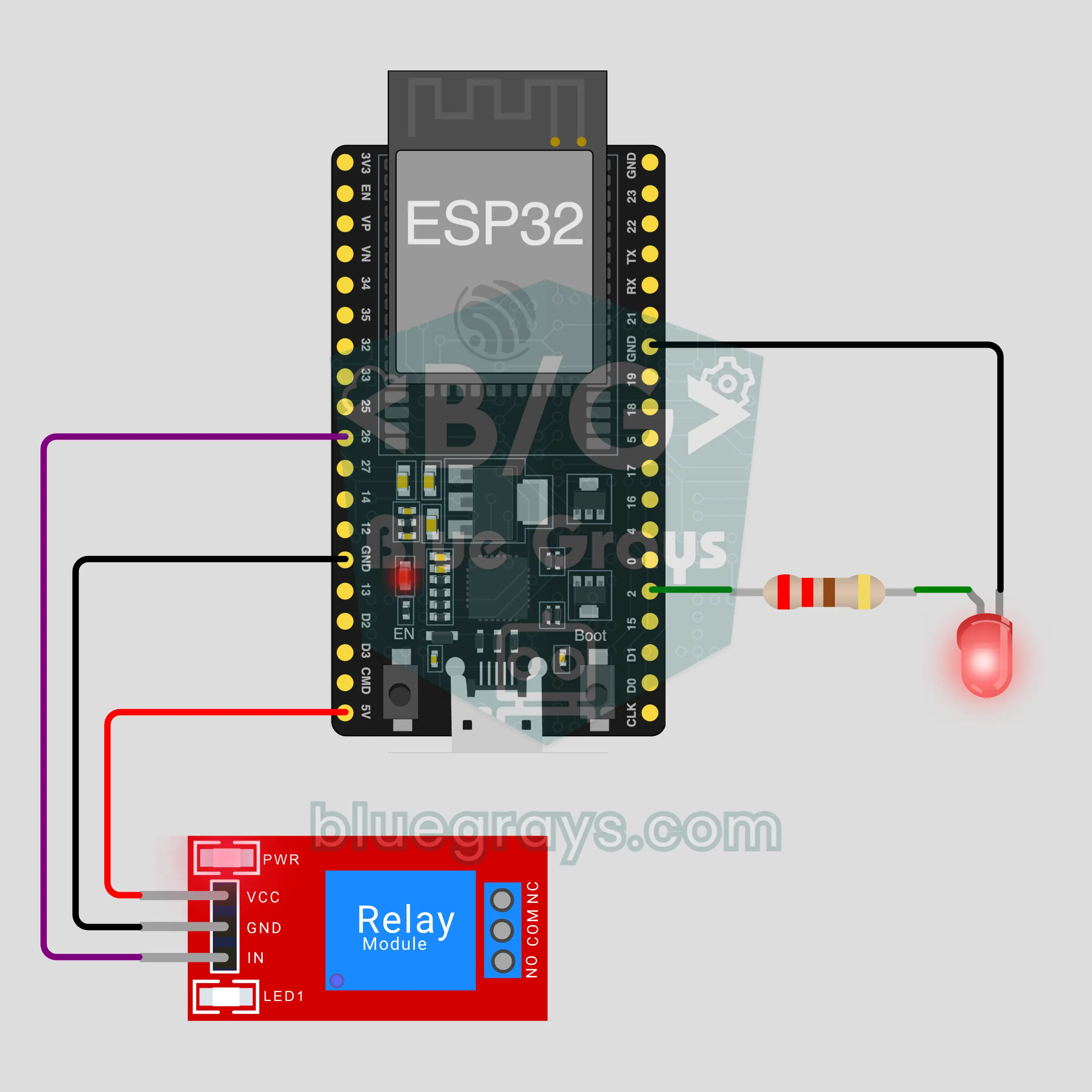
Schalte eine LED und ein Relais per Bluetooth vom Handy aus, ganz ohne Internet oder WLAN. Dieses Projekt ist die Schritt-für-Schritt-Anleitung zur Bluetooth-Vorlage LED und Relais in der App, gebaut mit einem ESP32 und einem 5-V-Relaismodul. Geh zu Werkstatt › Geräte › Gerät hinzufügen › Bluetooth, wähl LED und Relais und lade den Code mit Code holen hoch. Die Taste Als Bluetooth-Panel einrichten auf dieser Seite öffnet den Assistenten mit dieser Vorlage.
Video
Schaltplan
Quellcode
1// ┌───────────────────────────┐
2// │ BlueGrays · bluegrays.com │
3// │ Bluetooth · ESP32         │
4// │ BG-Lamba                  │
5// └───────────────────────────┘
6// LED und Relais
7// Board in der Arduino IDE: ESP32 Dev Module
8// die BLE-Bibliothek kommt mit dem ESP32-Boardpaket, nichts extra zu installieren
9
10#include <BLEDevice.h>
11#include <BLEServer.h>
12#include <BLE2902.h>
13
14const char BLE_NAME[] = "BG-Lamba";  // das Board sendet unter diesem Namen, die App findet es damit in der Liste
15
16// Pins: hier ändern, wenn du anders verkabelt hast
17const int LED_PIN = 2;
18const int RELAY_PIN = 26;
19const bool RELAY_ACTIVE_LOW = true;  // die meisten Relaismodule schalten bei LOW
20
21void btWrite(const char *text);
22void onValue(const char *key, const char *value);
23void sendAll();
24void onLinkLost();
25
26// ── Die App sendet Zeilen im Format "Schlüssel=Wert"; bei "?" schickt das Board alle Werte ──
27char line[65];
28uint8_t lineLen = 0;
29unsigned long lastRxMs = 0;
30
31bool is(const char *a, const char *b) { return strcmp(a, b) == 0; }
32bool isOn(const char *v) { return v[0] == '1'; }
33
34void sendText(const char *key, const char *value) {
35  char out[72];
36  snprintf(out, sizeof(out), "%s=%s\n", key, value);
37  btWrite(out);
38}
39
40void sendInt(const char *key, long value) {
41  char text[12];
42  snprintf(text, sizeof(text), "%ld", value);
43  sendText(key, text);
44}
45
46void sendFloat(const char *key, float value) {
47  char text[16];
48  dtostrf(value, 1, 1, text);
49  sendText(key, text);
50}
51
52void handleLine(char *text) {
53  char *eq = strchr(text, '=');
54  if (eq == nullptr) {
55    if (text[strlen(text) - 1] == '?') {
56      btWrite("@v=1.0\n");  // die Zeile "@v" meldet der App die Codeversion
57      sendAll();
58    }
59    return;
60  }
61  *eq = '\0';
62  onValue(text, eq + 1);
63}
64
65void feed(char c) {
66  lastRxMs = millis();
67  if (c == '\n' || c == '\r') {
68    if (lineLen == 0) return;
69    line[lineLen] = '\0';
70    lineLen = 0;
71    handleLine(line);
72  } else if (lineLen < sizeof(line) - 1) {
73    line[lineLen++] = c;
74  }
75}
76
77// ── Bluetooth (Nordic UART) ──
78#define UART_SERVICE "6E400001-B5A3-F393-E0A9-E50E24DCCA9E"
79#define UART_RX "6E400002-B5A3-F393-E0A9-E50E24DCCA9E"
80#define UART_TX "6E400003-B5A3-F393-E0A9-E50E24DCCA9E"
81
82BLECharacteristic *txChar = nullptr;
83volatile bool linked = false;
84volatile bool linkLost = false;
85// eingehende Bytes gelangen über einen kleinen Ringpuffer vom Bluetooth-Task in loop()
86const int RX_SIZE = 256;
87volatile uint8_t rxBuf[RX_SIZE];
88volatile int rxHead = 0, rxTail = 0;
89
90class ServerEvents : public BLEServerCallbacks {
91  void onConnect(BLEServer *server) override { linked = true; }
92  void onDisconnect(BLEServer *server) override { linked = false; linkLost = true; }
93};
94
95class RxEvents : public BLECharacteristicCallbacks {
96  void onWrite(BLECharacteristic *c) override {
97    auto v = c->getValue();
98    for (size_t i = 0; i < v.length(); i++) {
99      int next = (rxHead + 1) % RX_SIZE;
100      if (next == rxTail) break;
101      rxBuf[rxHead] = (uint8_t)v[i];
102      rxHead = next;
103    }
104  }
105};
106
107// Zeilen gehen in 20-Byte-Paketen raus (klappt mit jedem Handy)
108void btWrite(const char *text) {
109  if (!linked || txChar == nullptr) return;
110  size_t n = strlen(text);
111  for (size_t i = 0; i < n; i += 20) {
112    size_t len = n - i < 20 ? n - i : 20;
113    txChar->setValue((uint8_t *)text + i, len);
114    txChar->notify();
115    delay(4);
116  }
117}
118
119void btBegin() {
120  BLEDevice::init(BLE_NAME);
121  BLEServer *server = BLEDevice::createServer();
122  server->setCallbacks(new ServerEvents());
123  BLEService *uart = server->createService(UART_SERVICE);
124  txChar = uart->createCharacteristic(UART_TX, BLECharacteristic::PROPERTY_NOTIFY);
125  txChar->addDescriptor(new BLE2902());
126  BLECharacteristic *rx = uart->createCharacteristic(UART_RX, BLECharacteristic::PROPERTY_WRITE | BLECharacteristic::PROPERTY_WRITE_NR);
127  rx->setCallbacks(new RxEvents());
128  uart->start();
129  BLEAdvertisementData adv;
130  adv.setFlags(0x06);
131  adv.setCompleteServices(BLEUUID(UART_SERVICE));
132  BLEAdvertisementData scan;
133  scan.setName(BLE_NAME);
134  BLEAdvertising *advertising = BLEDevice::getAdvertising();
135  advertising->setAdvertisementData(adv);
136  advertising->setScanResponseData(scan);
137  BLEDevice::startAdvertising();
138}
139
140void btPoll() {
141  while (rxTail != rxHead) {
142    char c = (char)rxBuf[rxTail];
143    rxTail = (rxTail + 1) % RX_SIZE;
144    feed(c);
145  }
146  if (linkLost) {
147    linkLost = false;
148    onLinkLost();
149    delay(100);
150    BLEDevice::startAdvertising();
151  }
152}
153
154// ── ESP32 ──
155bool ledOn = false, relayOn = false;
156
157void setRelay(bool on) {
158  if (RELAY_ACTIVE_LOW) {
159    if (on) { pinMode(RELAY_PIN, OUTPUT); digitalWrite(RELAY_PIN, LOW); }
160    else { pinMode(RELAY_PIN, INPUT); }  // Aus gibt den Pin frei: 3,3 V HIGH reicht nicht, um ein 5-V-Modul abzuschalten
161  } else {
162    pinMode(RELAY_PIN, OUTPUT); digitalWrite(RELAY_PIN, on ? HIGH : LOW);
163  }
164}
165
166void apply() {
167  digitalWrite(LED_PIN, ledOn ? HIGH : LOW);
168  setRelay(relayOn);
169}
170
171void onValue(const char *key, const char *value) {
172  if (is(key, "led")) ledOn = isOn(value);
173  else if (is(key, "role")) relayOn = isOn(value);
174  apply();
175}
176
177void sendAll() {
178  sendInt("led", ledOn);
179  sendInt("role", relayOn);
180}
181
182void onLinkLost() {
183}
184
185void setup() {
186  Serial.begin(115200);
187  pinMode(LED_PIN, OUTPUT);
188  apply();
189  btBegin();
190  Serial.print(F("BlueGrays Bluetooth: "));
191  Serial.println(BLE_NAME);
192}
193
194void loop() {
195  btPoll();
196}
197FAQ
Klappt das mit dem iPhone?
Ja. Das eingebaute Bluetooth Low Energy (BLE) des ESP32 spricht mit iPhone und Android. Ein iPhone kann sich nicht mit klassischen Bluetooth-Modulen wie HC-05 und HC-06 verbinden, die brauchst du hier aber auch nicht. Versuch nicht, das Board in den Bluetooth-Einstellungen des Handys zu koppeln; BLE-Boards tauchen dort oft gar nicht auf, das ist normal. Die Verbindung stellt die BlueGrays-App her.
Kann ich eine echte Lampe ans Relais hängen?
Das Relaismodul kann Netzspannung schalten, aber 230 V sind lebensgefährlich. In diesem Projekt hängt nichts an den Anschlüssen COM und NO; das Relais zeigt mit seinem Klicken und der Modul-LED, dass es arbeitet. Willst du eine Last testen, fang mit einem Niedervolt-Kreis an, etwa einer Batterie oder einem 12-V-Netzteil. Für Netzspannung hol dir jemanden, der sich auskennt, lass keine blanken Drähte oder Schrauben offen und bleib unter dem Strom, der auf dem Modul steht.
Warum leuchtet die blaue LED auf dem Board mit meiner LED mit?
Auf vielen ESP32-DevKit-Boards hängt die blaue LED auf dem Board ebenfalls an GPIO2. Deine LED sitzt am selben Pin, deshalb blinken beide gemeinsam; das ist kein Fehler. Es hilft sogar: Ist ein Kabel locker, zeigt die blaue LED trotzdem, dass der Befehl angekommen ist. Willst du das nicht, steck deine LED an einen anderen Pin (zum Beispiel GPIO4) und ändere LED_PIN im Code.
Brauche ich Internet oder WLAN, und wie weit reicht es?
Nein. Dein Handy verbindet sich per Bluetooth direkt mit dem Board, ohne Router und ohne Server. In der Wohnung reicht es meist etwa 10 Meter, Wände verkürzen das. Das Board ist immer nur mit einem Handy verbunden; trennt sich dieses, sendet das Board wieder und ein anderes Handy kann sich verbinden. Willst du von unterwegs steuern, nimm ein Projekt mit dem WLAN-IoT-Panel der App.