
What Is a Relay Module? Control Lamps, Sockets and Pumps with Arduino
What is a relay module and how does it work? Arduino wiring, NO, NC and COM terminals, active-LOW relays, JD-VCC and optocouplers, ESP32 and Pico usage, and safety rules for working with mains voltage.
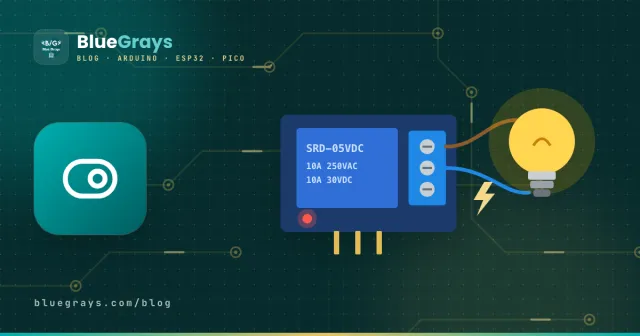
A relay is an electrically operated switch that uses a small electrical signal to turn a much bigger load on and off. An Arduino pin can only supply 5 V and a few tens of milliamps; that's enough for an LED, but not for a lamp, a fan, a water pump or a device running on 230 V mains. A relay module bridges the gap: the Arduino sends a small signal, and the relay closes its internal contacts so the large current flows through the load. It's the core part of smart home, automatic watering and timer projects.
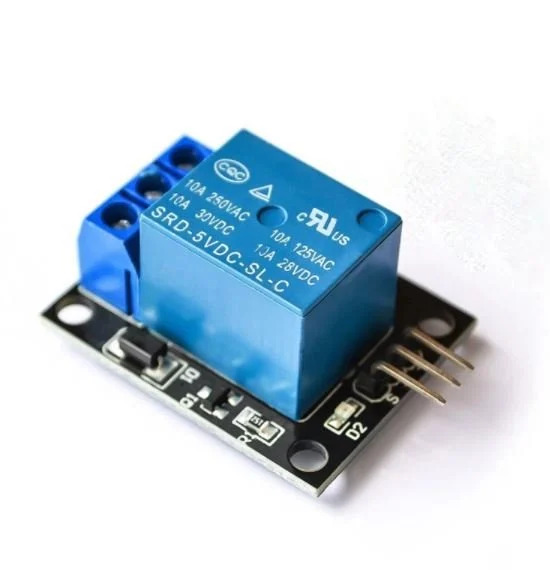
How does a relay work?
Inside a relay there's a coil (an electromagnet), a movable metal arm and a set of contacts. When current flows through the coil, the magnetic field pulls the arm and closes the contacts; the "click" you hear is that movement. When the current stops, a spring pushes the arm back and the contacts open.
The key point is that there's no electrical connection between the coil side (the control circuit) and the contact side (the load circuit). They're linked only magnetically. That keeps your 5 V Arduino circuit isolated from the mains line.
What's on a relay module?
You can't connect a bare relay straight to an Arduino pin: the coil draws more current than the pin can supply, and when it switches off it produces a voltage spike that can destroy the pin. A module board comes with the parts that solve these problems:
- Driver transistor: switches the 70–80 mA the coil needs using the small signal from the pin.
- Flyback diode: absorbs the reverse voltage produced when the coil switches off, protecting the transistor and the Arduino.
- Optocoupler (on some models): passes the control signal across as light, fully separating the Arduino from the relay circuit.
- Status LED: lights up when the relay is on; very handy for checking that your code works.
- Screw terminals: let you connect the load wires securely without soldering.
What do NO, NC and COM mean?
The load side of a relay has three terminals. Which ones you use decides whether your device is on or off when the relay is not energised:
| Terminal | Meaning | When is it connected to COM? |
|---|---|---|
| COM | Common; one of the load wires goes here | Always connected to either NO or NC |
| NO | Normally Open | Only when the relay is energised |
| NC | Normally Closed | When the relay is not energised |
Specifications (common 5 V module)
| Feature | Value |
|---|---|
| Coil voltage | 5 V DC |
| Coil current | About 70–80 mA (per channel) |
| Contact rating | 10 A 250 V AC / 10 A 30 V DC (printed on the relay) |
| Trigger | Active LOW or active HIGH (depends on the module) |
| Control pins | VCC, GND, IN (IN1, IN2... on multi-channel boards) |
| Load terminals | COM, NO, NC |
Connecting a relay module to Arduino
The control side takes three wires: connect the module's VCC to 5V, GND to GND and IN to digital pin 7. On the load side, you cut one of the wires of the device you want to control and connect its two ends to the COM and NO terminals. The relay simply takes the place of an ordinary wall switch.
1const int RELAY_PIN = 7;
2
3void setup() {
4  pinMode(RELAY_PIN, OUTPUT);
5  digitalWrite(RELAY_PIN, HIGH);  // aktif LOW modülde kapalı başla / start OFF on active-LOW modules
6}
7
8void loop() {
9  digitalWrite(RELAY_PIN, LOW);   // röle çeker, cihaz açılır / relay on
10  delay(3000);
11  digitalWrite(RELAY_PIN, HIGH);  // röle bırakır, cihaz kapanır / relay off
12  delay(3000);
13}Controlling a relay with a button: on-off switch
In real projects you usually control the relay with a button, a sensor or a timer. The code below toggles the relay each time you press the button, so you can switch a mains lamp with a tiny push button. For button wiring and bounce, see How to Connect a Push Button to Arduino.
1const int RELAY_PIN = 7;
2const int BUTTON_PIN = 2;      // butonun diğer ucu GND'de / other leg to GND
3
4bool relayOn = false;
5bool lastButton = HIGH;
6
7void setup() {
8  pinMode(RELAY_PIN, OUTPUT);
9  pinMode(BUTTON_PIN, INPUT_PULLUP);
10  digitalWrite(RELAY_PIN, HIGH); // başta kapalı / start OFF (active LOW)
11}
12
13void loop() {
14  bool button = digitalRead(BUTTON_PIN);
15  if (lastButton == HIGH && button == LOW) {   // yeni basış / new press
16    relayOn = !relayOn;
17    digitalWrite(RELAY_PIN, relayOn ? LOW : HIGH);
18    delay(50);                                  // sıçrama önleme / debounce
19  }
20  lastButton = button;
21}
JD-VCC and the optocoupler: full isolation
On optocoupler modules, next to the VCC, GND and IN pins there's a pin called JD-VCC with a jumper. With the jumper fitted, the relay coil is also powered from the Arduino's 5 V. If you remove the jumper and connect a separate 5 V adapter to JD-VCC and its own GND, the coil current comes entirely from that adapter, and the Arduino side only lights the optocoupler's LED. With noisy loads such as motors and pumps, this greatly reduces Arduino freezes and resets.
Relays with the ESP32 and Raspberry Pi Pico
ESP32 and Pico pins output 3.3 V. Most 5 V relay modules will trigger from this signal, but on an active-LOW module a 3.3 V HIGH may not always release the relay fully; if your relay stays on all the time, this is why. The fix is to buy a 3.3 V-trigger module, use an optocoupler board with a JD-VCC split, or add a small NPN transistor. The module itself should still be powered from 5 V. Controlling a relay from a Pico in MicroPython is as simple as this:
1from machine import Pin
2import time
3
4relay = Pin(15, Pin.OUT, value=1)   # GP15, aktif LOW: 1 = kapalı / active LOW: 1 = off
5
6while True:
7    relay.value(0)    # röle çeker / relay on
8    time.sleep(3)
9    relay.value(1)    # röle bırakır / relay off
10    time.sleep(3)
Safety rules for working with mains voltage
- Respect the current rating: never exceed the value printed on the relay (for example 10A 250VAC). With high-power devices such as heaters, air conditioners and kettles, stay well below that limit.
- Switch the live wire: when controlling a lamp or socket, route the live wire through the relay, not the neutral, so no voltage remains on the device when it's off.
- Use proper cable: breadboard jumper wires aren't made for mains; on the load side use insulated cable of a suitable cross-section.
- Insulate the underside of the board: the module's solder side carries mains voltage; don't leave it touching metal surfaces or bare hands.
- Add a fuse: a suitably rated fuse in the load line prevents a fire in case of a short circuit.
Relay, transistor or solid-state relay?
| Feature | Mechanical relay | Transistor / MOSFET | Solid-state relay (SSR) |
|---|---|---|---|
| Switches | AC and DC | DC only | Mostly AC |
| Speed | Slow (milliseconds) | Very fast, can do PWM | Fast |
| Noise | Clicks | Silent | Silent |
| Lifetime | Contacts wear over time | Very long | Very long |
| Best for | Lamps, sockets, pumps | Motor speed, LED strips | AC loads switched often |
In short: if you'll switch a device on and off now and then, a mechanical relay is the cheapest and easiest solution. To adjust a motor's speed or an LED strip's brightness, choose a transistor or MOSFET, and for AC loads switched many times a second, a solid-state relay. To choose a suitable transistor, have a look at the Transistors tool.
Relay project ideas
- Smart watering: run a water pump when the soil moisture sensor says the soil is dry.
- Motion-activated light: turn a lamp on when a PIR sensor detects someone and off again after a while.
- Humidity-controlled fan: start the bathroom extractor when humidity rises; for measuring, see DHT11 Temperature and Humidity Sensor.
- Remote-controlled socket: switch a socket with an IR receiver and a TV remote.
- Timer: turn an aquarium light on and off at the same time every day.
- Phone control: manage a lamp from a web page using the ESP32's Wi-Fi.
Common mistakes and how to fix them
- The relay works backwards: the module is active LOW; swap HIGH and LOW in the code.
- The relay keeps clicking: the power supply may be too weak; use an external 5 V adapter, especially with several relays.
- The Arduino resets when the motor starts: noise and voltage drop; power the coil separately via JD-VCC and add a capacitor across the motor.
- The LED is on but the load doesn't run: the load wires may be on NC, or a terminal screw may be loose.
- The relay never releases with an ESP32: the 3.3 V HIGH can't switch off an active-LOW module; use a 3.3 V-compatible module or a transistor.
- Connecting a bare relay straight to a pin: the coil current and reverse voltage destroy the pin; always use a module, or a transistor plus a diode.
Once you pair a relay with a sensor, you start building automations that are genuinely useful. To see which sensor does what, take a look at the Arduino Sensors Guide; in the BlueGrays app you'll find relay lamp, watering and lighting projects step by step with circuit diagrams.
Frequently asked questions
Why does my relay module keep clicking?
The most common cause is a weak power supply: when the relay pulls in, the voltage drops, the Arduino resets and the relay releases. If you use several relays or power the Arduino from USB, use an external 5 V adapter. Also check that your code doesn't have a loop that keeps switching the relay.
What does an active-LOW relay mean?
It's a relay module that turns on when its IN pin is LOW (0 V) and off when it's HIGH. Most cheap modules work this way. In code you write digitalWrite(pin, LOW) to switch it on and HIGH to switch it off; setting it HIGH first in setup() so it starts off is a good habit.
Can a relay control a DC motor?
For switching the motor on and off, yes, but you can't adjust its speed or easily change its direction. For speed control use a MOSFET or a PWM motor driver, and for direction an H-bridge such as the L298N.
What is the JD-VCC jumper for?
On optocoupler modules it separates the relay coil supply (JD-VCC) from the control supply (VCC). If you remove the jumper and give JD-VCC its own 5 V, the Arduino is fully isolated from the relay circuit and noise from loads such as motors can't reach it.
Should I buy a 5 V or a 12 V relay?
The coil voltage must match the voltage you power the module with. For Arduino projects a 5 V coil module is the most practical, because the Arduino's 5 V or a USB adapter is enough. A 12 V coil relay needs a 12 V supply; it has nothing to do with the voltage on the load side.
How many relays can one Arduino control?
Each relay needs one digital pin, and an Uno has up to 20 usable pins. The real limit is current: each coil draws about 70–80 mA, so for more than 2 relays power the module from an external 5 V adapter rather than the Arduino. For more channels there are 8- and 16-channel modules too.
Projects to build after reading this
See all projects
Lighting 220V Bulb with Push Button
Project that controls a 220V light bulb with a push button using a relay module. Teaches the basics of high voltage switching with relay.

Lighting 220V Bulb with Button (On-Off)
A project that turns a 220V light bulb on and off (toggle) at each button press with a relay module. Teaches permanent switching logic with relay and state variable.

Lighting 220V Bulb with Remote Control
Project that turns 220V light bulb on and off via relay with power and mute buttons of IR remote control. Combines infrared control with high voltage switching.

Smart Irrigation Station
Autonomous plant irrigation system that works 24/7 with two 18650 batteries and LM2596 regulator without tiring Arduino. It automatically manages the water motor by continuously measuring soil moistur

ESP 32 Smart Plant Watering System
In this project, an automatic plant watering system was developed using an ESP32 and a soil moisture sensor. The sensor continuously measures the soil’s moisture level. When the moisture level drops below a specified threshold, the ESP32 activates the relay to turn on the water pump and water the plant. When the soil is sufficiently moist, the pump automatically stops. Thanks to this project, plants can be watered regularly, and water can be conserved. _______________________________ Connections

ESP32 Smart Lighting (PIR + LDR + Relay + OLED)
Turn your hallway, bathroom, or pantry into smart lighting with ESP32! Using a PIR motion sensor, LDR light sensor, and a relay module, we build the classic "light turns on when motion is detected in the dark" scenario — if the environment is already bright, motion does NOT trigger the light, saving energy during the day. The light stays on for 30 seconds; if motion continues, the timer resets and the light stays on longer. The SSD1306 OLED shows large-font status (ON / DAYTIME / WAITING), a cou

Automatic Lighting with the ESP32 PIR Motion Sensor
In this project, we will use the HC-SR501 PIR motion sensor to detect when someone enters the room and automatically turn on the LED. When motion is detected, the LED will stay on for a set period of time, and we will manage the timing using the `millis()` function and a counter, without needing to use `delay()`. This way, we’ll create a motion-sensor-based lighting system that doesn’t tie up the ESP32, allowing it to perform other tasks as well. In real-life applications, it can be used for sta

Doorbell and Light with Motion Sensor
A project that lights the LED and plays the doorbell melody with a buzzer when the PIR sensor detects motion. Combines motion detection with sound and light notification.
More articles
Learn how a relay works, what the NO, NC and COM terminals mean, how to connect the module to Arduino, toggle it with a button and work safely with mains voltage.