
Raspberry Pi Pico Police Strobe Light Effect (Red + Blue, GP11 + GP12)
We simulate a police car's light bar with a Raspberry Pi Pico in its simplest form! 🚨 The red and blue LEDs take turns (flip-flop): while red is on, blue is off, and they swap every 0.3 seconds, forever. The code writes the two steps directly in a single `while True` loop; the speed is set with the `WAIT_MS` constant.
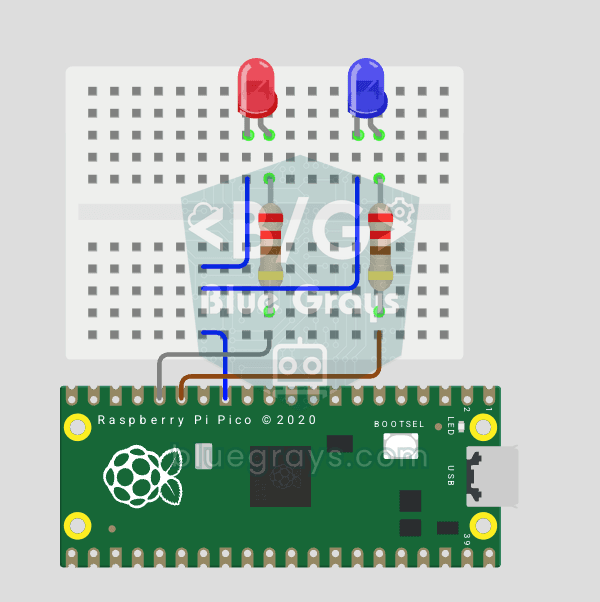
Circuit Diagram
Source Code
1# ─────────────────────────────────────────
2#   BlueGrays · bluegrays.com
3#   Raspberry Pi Pico Police Strobe Light Effect (Red + Blue, GP11 + GP12)
4# ─────────────────────────────────────────
5# Two LEDs alternate (flip-flop): red is on while blue is off, and they
6# swap every 0.3 s. The speed is set with WAIT_MS.
7#
8# Pins:
9#   GP11 -> Red LED (with a 220 ohm resistor)
10#   GP12 -> Blue LED (with a 220 ohm resistor)
11#   LED katotlari -> LED cathodes -> GND
12
13from machine import Pin
14from time import sleep_ms
15
16# ============ PIN / PIN ============
17red_led  = Pin(11, Pin.OUT)      # Red LED
18blue_led = Pin(12, Pin.OUT)      # Blue LED
19
20WAIT_MS = 300      # Switch delay (ms)
21
22print("== BlueGrays · bluegrays.com ==")
23print("Polis Cakar Basit / Simple Police Alternating")
24print("Kirmizi: GP11 | Mavi: GP12")
25
26# ============ MAIN LOOP ============
27while True:
28    # Red on, blue off
29    red_led.value(1)
30    blue_led.value(0)
31    print("[FLIP] KIRMIZI / RED")
32    sleep_ms(WAIT_MS)
33
34    # Blue on, red off
35    red_led.value(0)
36    blue_led.value(1)
37    print("[FLIP] MAVI / BLUE")
38    sleep_ms(WAIT_MS)
39
FAQ
What does WAIT_MS do?▾
It is the wait between the two colors, in milliseconds. The default is 300 ms; 100 ms gives a faster, more hectic light and 600 ms a calmer one. Just change the value and run the code again.
What is the difference between `sleep_ms()` and `sleep()`?▾
sleep() takes the duration in seconds, while sleep_ms() takes an integer number of milliseconds. In this project, sleep_ms(300) expresses the duration clearly; sleep(0.3) requests the same nominal wait.
The blue LED looks dimmer than the red one. Why?▾
The forward voltage of the blue LED (approximately 3 V) is very close to the Pico's 3.3 V output; with the same resistor, less current flows. You can use a smaller resistor, such as 100 Ω, for the blue LED.
Can I create an ambulance or fire truck effect?▾
Yes, you can create the light patterns of different emergency vehicles by changing the number of flashes, the duration, and the colors.