
Raspberry Pi Pico Traffic Light Simulator (3 LEDs Sequential, GP11/GP12/GP13)
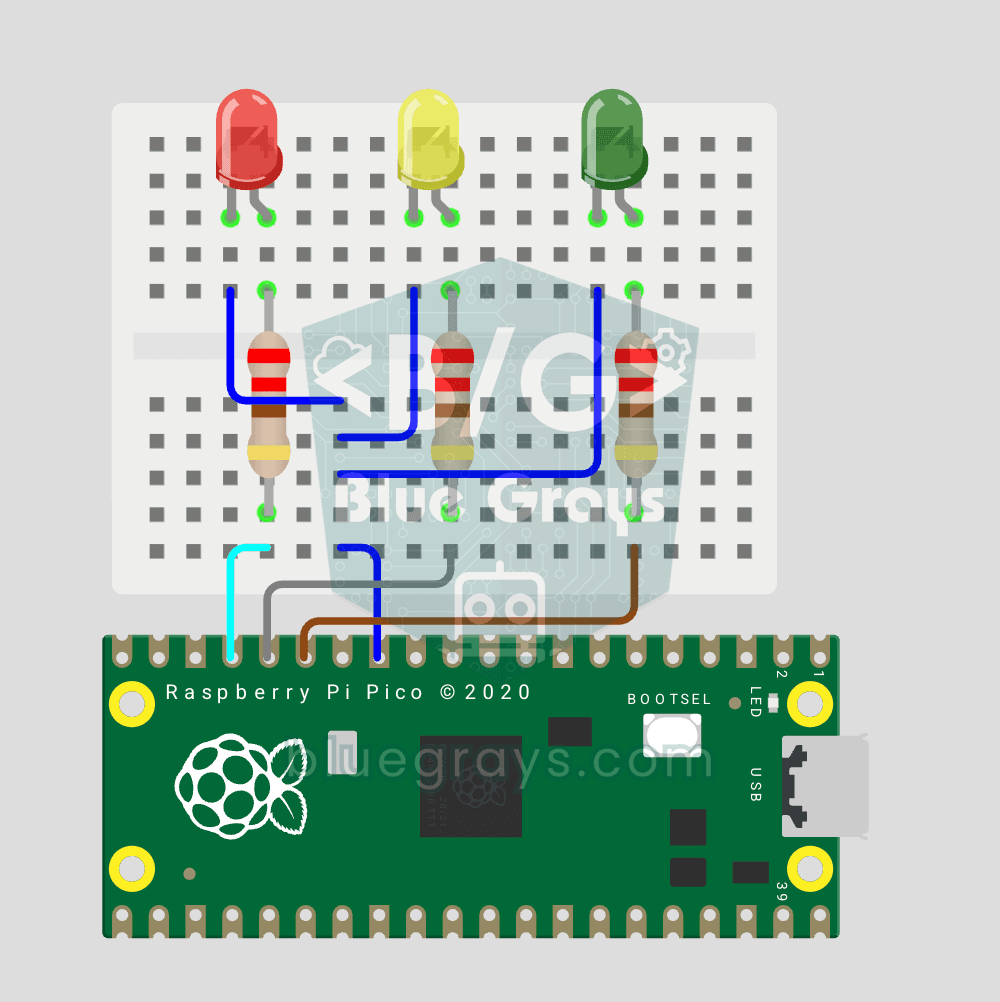
We simulate a real traffic light with red, yellow and green LEDs — the first 3-LED project of the Pico series! Green 4 sec "go", yellow 1.5 sec "ready", red 3 sec "stop" and red+yellow 1 sec "starting" (European traffic light pattern). Learn **function definition** (`def all_off()`), **state machine logic** (sequence) and **multi-GPIO synchronization**. Very simple circuit: 3 LEDs on GP11 (Green), GP12 (Yellow), GP13 (Red), each with a 220Ω current-limiting resistor. GP11-GP12-GP13 are ad
Video
Circuit Diagram
Source Code
1# ─────────────────────────────────────────
2#   BlueGrays · bluegrays.com
3#   Raspberry Pi Pico Traffic Light Simulator (3 LEDs Sequential, GP11/GP12/GP13)
4# ─────────────────────────────────────────
5# A real traffic light cycle with red, yellow and green LEDs: green 4 s,
6# yellow 1.5 s, red 3 s, then red + yellow 1 s (European style start). A
7# helper function that turns all LEDs off avoids repeated code.
8#
9# Pins:
10#   GP11 -> Green LED
11#   GP12 -> Yellow LED
12#   GP13 -> Red LED (each LED with 220 ohm)
13#   LED katotlari -> LED cathodes -> GND
14
15from machine import Pin
16from time import sleep
17
18# ============ PIN / PIN ============
19# Traffic light pins (adjacent GP11-GP12-GP13)
20green_led  = Pin(11, Pin.OUT)      # Green LED: GO
21yellow_led = Pin(12, Pin.OUT)      # Yellow LED: READY
22red_led    = Pin(13, Pin.OUT)      # Red LED: STOP
23
24# ============ HELPER FUNCTION ============
25def all_off():
26    """
27    TR: Tum LED'leri sondur (DRY prensibi: tekrardan kacinmak icin)
28    EN: Turn off all LEDs (DRY principle: avoid repetition)
29    """
30    green_led.value(0)
31    yellow_led.value(0)
32    red_led.value(0)
33
34print("== BlueGrays · bluegrays.com ==")
35print("Trafik Lambasi / Traffic Light")
36print("Yesil: GP11 | Sari: GP12 | Kirmizi: GP13")
37
38# ============ MAIN LOOP ============
39while True:
40    # GREEN: GO (4 s)
41    all_off()
42    green_led.value(1)
43    print("[TRAFIK/TRAFFIC] YESIL / GREEN — GEC / GO")
44    sleep(4)
45
46    # YELLOW: READY (1.5 s)
47    all_off()
48    yellow_led.value(1)
49    print("[TRAFIK/TRAFFIC] SARI / YELLOW — HAZIRLAN / READY")
50    sleep(1.5)
51
52    # RED: STOP (3 s)
53    all_off()
54    red_led.value(1)
55    print("[TRAFIK/TRAFFIC] KIRMIZI / RED — DUR / STOP")
56    sleep(3)
57
58    # RED + YELLOW: STARTING (1 s), European style
59    # Starting phase: the driver puts the car in gear
60    yellow_led.value(1)
61    print("[TRAFIK/TRAFFIC] KIRMIZI+SARI / RED+YELLOW — KALKIS / STARTING")
62    sleep(1)
63
FAQ
What does it mean when the red and yellow lights are on at the same time?▾
At some traffic lights in Europe, the red and yellow lights flash together before the light turns from red to green; this signals to drivers to "get ready." This pattern is also used in Turkey.
What is the benefit of defining a function?▾
A function like `all_off()` lets you call three repetitive lines of code using a single name. The code becomes shorter and more readable, and changes are made in just one place.
How do I change the durations?▾
Change the values in seconds inside `sleep()` for each light. If you define the values as constants at the beginning of the file (e.g., GREEN_TIME = 4) and use them in calls such as `sleep(GREEN_TIME)`, it becomes much easier to configure them.
Can I add a pedestrian button?▾
Yes. You can add a button that, when pressed, changes the loop to red. To ensure the button is detected immediately, you need to use `ticks_ms()` for timing instead of `sleep`; this will be explained in the next mode selector project.