
What Is a Potentiometer? Analog Reading and Control with Arduino
What is a potentiometer, how does it work and how do you connect it to Arduino? Linear vs logarithmic pots, the B10K code, reading with analogRead and an LED brightness example.
A potentiometer is an adjustable resistor whose resistance changes as you turn its shaft. A radio's volume knob, a lamp dimmer and the sticks of a game controller are all potentiometers. In Arduino projects it's the easiest way to get a value from the user: you turn the knob and the Arduino reads a number between 0 and 1023.
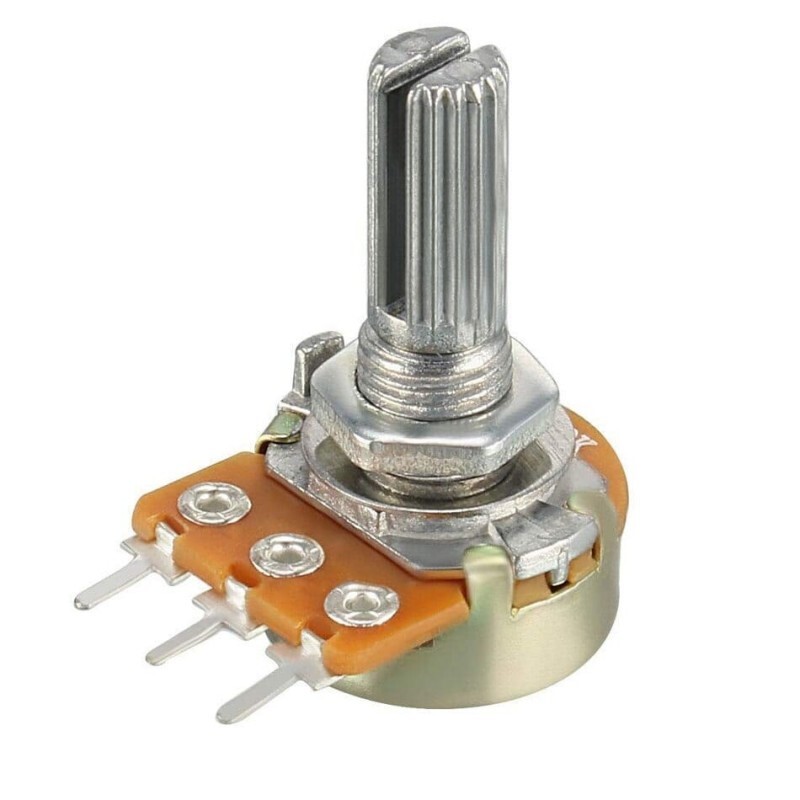
How does a potentiometer work?
Inside there's an arc-shaped resistive track and a wiper that slides along it. The resistance between the two outer legs is fixed (for example 10 kΩ). The middle leg is connected to the wiper; as you turn the shaft, the wiper moves along the track and the resistance to each outer leg changes. Put 5 V and GND on the outer legs and you get a voltage between 0 and 5 V on the middle leg. In other words, a potentiometer is an adjustable voltage divider.
Types of potentiometers
| Type | Looks like | Used for |
|---|---|---|
| Rotary pot | Shaft, 3 legs | Volume, brightness, speed control |
| Trimpot (trimmer) | Small, adjusted with a screwdriver | Values set once and left (like LCD contrast) |
| Slide pot | Slides along a straight track | Mixers and control panels |
| Joystick | Two pots in one | Two-axis control (X and Y) |
Connecting a potentiometer to Arduino
- Connect one outer leg to 5V and the other to GND (swapping them just reverses the direction).
- Connect the middle leg to an analog input, for example A0.
- Connect an LED with a 220 Ω resistor to PWM-capable pin 9.
- Upload the code below and open the serial monitor; turning the knob changes the value and the LED brightness.
const int POT_PIN = A0;   // potansiyometre orta bacak / pot wiper
const int LED_PIN = 9;    // PWM pini / PWM pin

void setup() {
  pinMode(LED_PIN, OUTPUT); // LED çıkış / LED output
  Serial.begin(9600);       // seri monitör / serial monitor
}

void loop() {
  int raw = analogRead(POT_PIN);              // 0–1023 oku / read 0–1023
  int brightness = map(raw, 0, 1023, 0, 255); // PWM'e çevir / scale to PWM
  analogWrite(LED_PIN, brightness);           // parlaklık / brightness
  Serial.println(raw);                        // değeri yaz / print value
  delay(20);
}
The map() function converts a value from one range to another, like turning a 0–1023 reading into a 0–255 PWM value or a 0–180 servo angle. To see the voltage divider idea in numbers, use the voltage divider calculator.
Analog reading range by board
| Board | Resolution | Range | Function |
|---|---|---|---|
| Arduino Uno / Nano | 10 bit | 0–1023 | analogRead() |
| ESP32 | 12 bit | 0–4095 | analogRead() |
| Raspberry Pi Pico | 12 bit (scaled to 16 bit) | 0–65535 | ADC.read_u16() |
Common mistakes
- Connecting the middle leg directly to 5V or GND: at the end of its travel this makes a short circuit and can burn the pot. Power always goes to the outer legs.
- Jittery values: readings can wobble by a few units. Average several readings or ignore small changes.
- Using a logarithmic pot: with an A-type pot the value changes slowly at the start and fast at the end; use a B type for linear control.
- Connecting it to a digital pin: a potentiometer gives an analog value, so it must go to an analog input like A0–A5.
You'll find how to set a servo angle with a potentiometer in What Is a Servo Motor?, and the basics of resistance in What Is a Resistor?.
Frequently asked questions
What value potentiometer should I buy for Arduino?
A 10 kΩ linear (B10K) pot is the most common choice. Values from 1 kΩ to 100 kΩ also work; very low values draw more current and very high ones can read noisily.
How do I tell the legs of a potentiometer apart?
Holding it with the shaft facing you, the middle leg is the wiper. The order of the outer legs only decides which way you turn for the value to rise.
Why doesn't the reading reach exactly 0 or 1023?
Contact resistance at the ends and manufacturing tolerance can shift the extreme values by a few units. Leaving a 5–10 unit margin in your code solves it.
Are a joystick and a potentiometer the same thing?
A joystick contains two potentiometers at right angles and usually a button. Each axis is read on its own analog input.
Projects to build after reading this
See all projects
Servo Motor Operation with Potentiometer
Project that controls the servo motor in real time by converting the potentiometer value to the range 0-180°. teaches map() function and analog-servo integration.

SG90 Servo Angle Control with Pot
Servo Motor (SG90) Control with Potentiometer The main objective of this project is to precisely control the angular position of a servo motor in real time using an analog input unit, the potentiometer. The project is a basic engineering example to grasp the logic of analog-to-digital conversion (ADC) and signal mapping. Operation Logic: Analog Data Reading: When the user turns the potentiometer, the resistance change results in a voltage signal between 0V and 5V on the A0 analog pin of the Ard

ESP32 LED Brightness Control with a Potentiometer (Analog → PWM)
In this project, we control the brightness of an LED analogically using a potentiometer. The ESP32's ADC pin reads the 0-3.3V voltage from the potentiometer, and this value is then converted into a PWM (Pulse Width Modulation) signal and sent to the LED. As a result, as you turn the potentiometer, the LED gradually brightens and dims. With Arduino Core 3.0+, `analogWrite()` can be used directly; on the ESP32-S2/S3, the ADC resolution is fixed at 12-bit.

Speed Adjustable Walking Led
Project that can adjust the LED walking speed in real time with the potentiometer. Teaches to dynamically control the delay time by reading the potentiometer value with analogRead.

Speed Adjustable Led Black Lightning
Project with potentiometer that can adjust the speed of the black lightning LED animation in real time. It combines analog input and bidirectional loop control.

Led Control with Joystick
Control project that lights LEDs in 4 different directions according to the X and Y axis values of the joystick module. Teaches analog joystick reading and direction detection logic.

ESP32 Color Mixer Light (3 Potentiometers + RGB LED + OLED)
A smart color-mixing lamp that lets you mix any color you want by turning three potentiometers with the ESP32! As you turn the red, green, and blue potentiometers, the common-cathode RGB LED changes color in real time. The SSD1306 OLED display shows real-time values for each color in the 0–255 range, visual fill bars, and the HEX web color code (such as #FF8040). A mini professional color studio—teaches RGB color theory, ADC analog reading, brightness control via PWM, and I2C display design all

Digital Voltmeter with LCD Display
Digital voltmeter project that measures voltage in the range of 0-55V with voltage divider circuit and displays the result on I2C LCD screen. Teaches voltage divider formula and analog measurement cal
More articles
Learn how a potentiometer changes its value as you turn it, how to connect it to Arduino and how to use the analog value to control an LED, a servo or volume.