
Tir à la Corde LED avec Raspberry Pi Pico (Ruban NeoPixel + 2 Boutons + Buzzer)
Un duel de boutons à deux ! Le **Raspberry Pi Pico** transforme un **ruban NeoPixel WS2812B** de 30 LED en corde : rouge à gauche, bleu à droite. Chaque appui fait avancer ta couleur d'une LED ; celui qui colore tout le ruban gagne la manche, le premier à 3 manches remporte le match. Un appui trop tôt au compte à rebours fait reculer, le **buzzer passif** donne à chaque joueur son propre clic et le match finit en arc-en-ciel. `neopixel`, anti-rebond et son non bloquant en MicroPython.
Vidéo
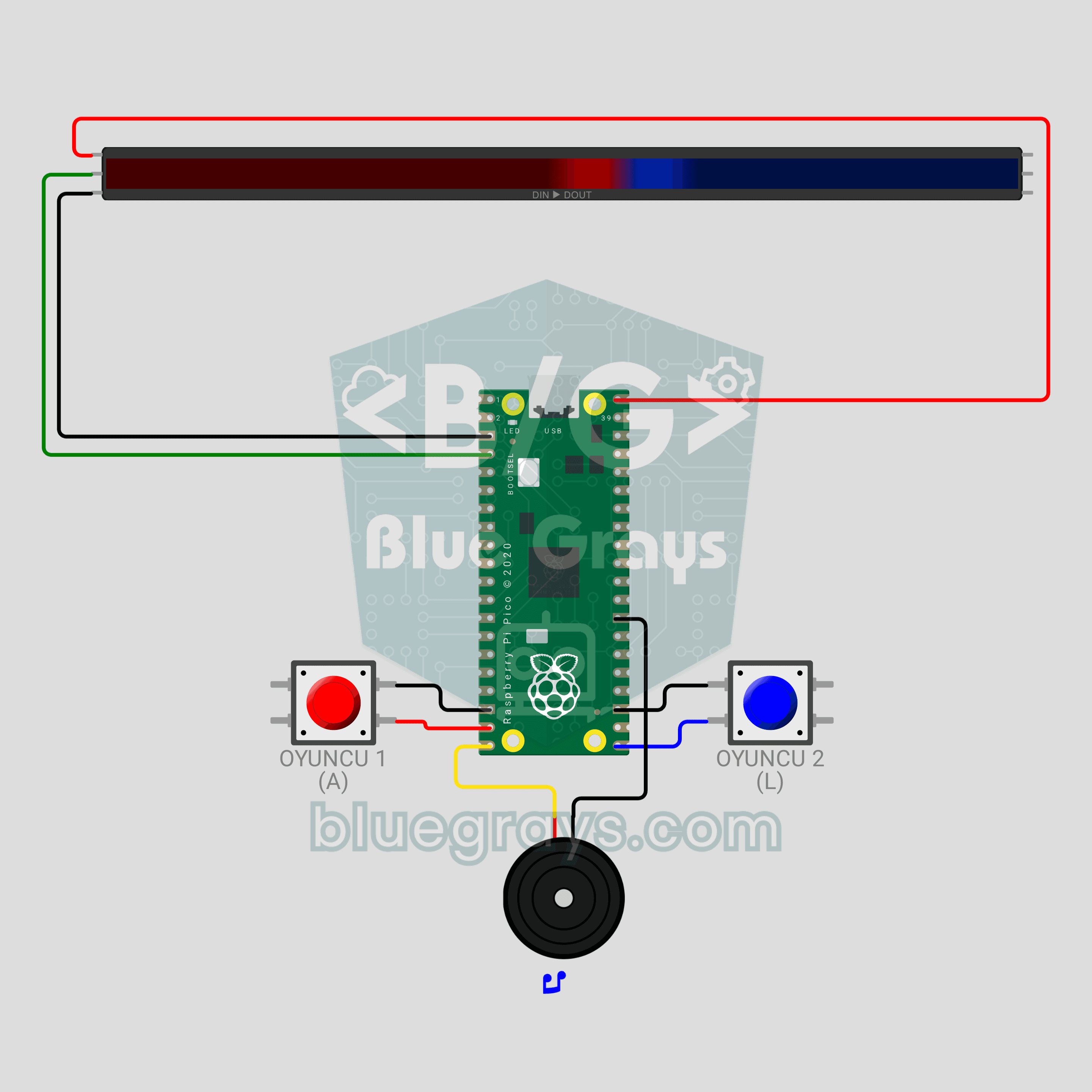
Schéma du circuit
Code source
1# ─────────────────────────────────────────
2#   BlueGrays · bluegrays.com
3#   Tir à la Corde LED avec Raspberry Pi Pico (Ruban NeoPixel + 2 Boutons + Buzzer)
4# ─────────────────────────────────────────
5# Duel de boutons à deux joueurs. Chaque appui pousse ta couleur d'un cran
6# le long du ruban ; le premier à atteindre l'autre bout gagne la manche,
7# le premier à 3 manches gagne le match. Appuyer trop tôt pendant le
8# compte à rebours te coûte 2 pas.
9#
10# Broches :
11#   GP2  -> DIN du ruban
12#   GP14 -> Bouton du joueur 1 (ROUGE), autre patte sur GND
13#   GP16 -> Bouton du joueur 2 (BLEU), autre patte sur GND
14#   GP15 -> Buzzer (+)
15
16from machine import Pin, PWM
17from neopixel import NeoPixel
18import time
19import math
20
21# ============ RÉGLAGES ============
22NUM_LEDS = 30          # LED du ruban
23BRIGHTNESS = 0.6       # ~0.4 A avec les couleurs, sans problème pour l'USB
24WIN_ROUNDS = 3         # Manches à gagner pour remporter le match
25FALSE_START_STEPS = 2  # Pénalité de faux départ
26SOUND_ON = True        # Effets sonores
27
28RED = (255, 0, 0)      # Joueur 1
29BLUE = (0, 60, 255)    # Joueur 2
30
31# Nœud = nombre de LED rouges (la frontière entre les couleurs). Les deux joueurs ont besoin du même
32# nombre de pas.
33START = NUM_LEDS // 2                   # Bordure de départ
34GOAL = min(START, NUM_LEDS - START)     # Pas nécessaires pour gagner
35
36# ============ MATÉRIEL ============
37strip = NeoPixel(Pin(2), NUM_LEDS)
38btn1 = Pin(14, Pin.IN, Pin.PULL_UP)   # Joueur 1
39btn2 = Pin(16, Pin.IN, Pin.PULL_UP)   # Joueur 2
40buzzer = PWM(Pin(15))
41buzzer.duty_u16(0)
42
43
44# ============ SON ============
45class Sound:
46    """
47    TR: Bloklamayan nota calici: oyun ses calarken de butonlari okur
48    EN: Non-blocking note player: the game keeps reading buttons while sound plays
49    """
50
51    def __init__(self, pwm):
52        self.pwm = pwm
53        self.queue = []
54        self.until = 0
55
56    def play(self, notes):
57        # notes = [(fréquence, ms), ...], fréquence 0 = silence
58        if SOUND_ON:
59            self.queue = list(notes)
60            self.until = 0
61
62    def update(self):
63        now = time.ticks_ms()
64        if self.until and time.ticks_diff(now, self.until) < 0:
65            return
66        if not self.queue:
67            if self.until:
68                self.pwm.duty_u16(0)
69                self.until = 0
70            return
71        freq, ms = self.queue.pop(0)
72        if freq:
73            self.pwm.freq(freq)
74            self.pwm.duty_u16(20000)
75        else:
76            self.pwm.duty_u16(0)
77        self.until = time.ticks_add(now, ms)
78
79
80sound = Sound(buzzer)
81
82
83# ============ BOUTON ============
84class Button:
85    """
86    TR: 15 ms debounce ile yeni basislari yakalar
87    EN: Catches new presses with a 15 ms debounce
88    """
89
90    def __init__(self, pin):
91        self.pin = pin
92        self.state = 1
93        self.raw = 1
94        self.changed = time.ticks_ms()
95
96    def pressed(self):
97        now = time.ticks_ms()
98        raw = self.pin.value()
99        if raw != self.raw:
100            self.raw = raw
101            self.changed = now
102        if time.ticks_diff(now, self.changed) > 15 and raw != self.state:
103            self.state = raw
104            return raw == 0
105        return False
106
107    def sync(self):
108        # Oublier les appuis périmés (un bouton maintenu entre deux manches n'est pas pénalisé)
109        self.state = self.raw = self.pin.value()
110        self.changed = time.ticks_ms()
111
112
113b1 = Button(btn1)
114b2 = Button(btn2)
115
116
117# ============ AIDES AU DESSIN ============
118def dim(color, k=1.0):
119    # Mettre une couleur à l'échelle de la luminosité globale et de k
120    s = BRIGHTNESS * k
121    return (int(color[0] * s), int(color[1] * s), int(color[2] * s))
122
123
124def fill(color, k=1.0):
125    c = dim(color, k)
126    for i in range(NUM_LEDS):
127        strip[i] = c
128    strip.write()
129
130
131def draw_rope(knot):
132    # `knot` LED sont rouges (gauche), les autres bleues (droite) ; 2 LED de chaque côté de la
133    # frontière forment le "nœud" lumineux
134    for i in range(NUM_LEDS):
135        if i < knot:
136            k = 1.0 if knot - i <= 2 else 0.45   # Les LED près du nœud sont plus lumineuses
137            strip[i] = dim(RED, k)
138        else:
139            k = 1.0 if i - knot < 2 else 0.45
140            strip[i] = dim(BLUE, k)
141    strip.write()
142
143
144def wheel(pos):
145    # Convertir 0-255 en couleur d'arc-en-ciel
146    pos %= 256
147    if pos < 85:
148        return (255 - pos * 3, pos * 3, 0)
149    if pos < 170:
150        pos -= 85
151        return (0, 255 - pos * 3, pos * 3)
152    pos -= 170
153    return (pos * 3, 0, 255 - pos * 3)
154
155
156def wait_ms(ms):
157    # Attendre tout en gardant le son actif
158    end = time.ticks_add(time.ticks_ms(), ms)
159    while time.ticks_diff(end, time.ticks_ms()) > 0:
160        sound.update()
161        time.sleep_ms(5)
162
163
164# ============ PHASES DU JEU ============
165def attract():
166    # Attente : les deux couleurs respirent, n'importe quel bouton lance la partie
167    print("Baslamak icin bir butona bas / Press a button to start")
168    b1.sync()
169    b2.sync()
170    t0 = time.ticks_ms()
171    while True:
172        sound.update()
173        t = time.ticks_diff(time.ticks_ms(), t0)
174        k = 0.25 + 0.75 * (math.sin(t / 400) + 1) / 2
175        for i in range(NUM_LEDS):
176            if i < START:
177                strip[i] = dim(RED, k)
178            else:
179                strip[i] = dim(BLUE, 1.25 - k)   # Respire en opposition de phase
180        strip.write()
181        if b1.pressed() or b2.pressed():
182            return
183        time.sleep_ms(15)
184
185
186def countdown():
187    # Compte à rebours 3-2-1 ; les appuis anticipés sont pénalisés. Renvoie le nœud de départ
188    knot = START
189    b1.sync()
190    b2.sync()
191    colors = [(255, 0, 0), (255, 150, 0), (0, 255, 0)]   # Rouge, jaune, vert
192    for step in range(3):
193        fill(colors[step], 0.6)
194        if step == 2:
195            sound.play([(1200, 200)])   # GO!
196            break
197        sound.play([(600, 150)])
198        end = time.ticks_add(time.ticks_ms(), 800)
199        while time.ticks_diff(end, time.ticks_ms()) > 0:
200            sound.update()
201            if b1.pressed():
202                knot -= FALSE_START_STEPS
203                print("Oyuncu 1 erken basti! / Player 1 false start!")
204                sound.play([(150, 200)])
205            if b2.pressed():
206                knot += FALSE_START_STEPS
207                print("Oyuncu 2 erken basti! / Player 2 false start!")
208                sound.play([(150, 200)])
209            time.sleep_ms(5)
210    # Les pénalités ne doivent pas pousser le nœud à une extrémité
211    return max(START - GOAL + 2, min(START + GOAL - 2, knot))
212
213
214def play_round(knot):
215    # Duel de boutons ; renvoie le gagnant (1 ou 2) quand le nœud atteint une extrémité
216    draw_rope(knot)
217    while True:
218        sound.update()
219        moved = False
220        if b1.pressed():
221            knot += 1
222            sound.play([(440, 25)])
223            moved = True
224        if b2.pressed():
225            knot -= 1
226            sound.play([(660, 25)])
227            moved = True
228        if moved:
229            if knot >= START + GOAL:   # Ruban entièrement rouge
230                return 1
231            if knot <= START - GOAL:   # Ruban entièrement bleu
232                return 2
233            draw_rope(knot)
234        time.sleep_ms(1)
235
236
237def celebrate_round(winner, scores):
238    # La couleur gagnante clignote 3 fois, puis les points de score sont affichés
239    color = RED if winner == 1 else BLUE
240    print("Turu kazanan / Round winner: Oyuncu / Player", winner, "| Skor / Score:", scores[0], "-", scores[1])
241    sound.play([(523, 120), (659, 120), (784, 120), (1047, 300)])
242    for _ in range(3):
243        fill(color)
244        wait_ms(180)
245        fill((0, 0, 0))
246        wait_ms(120)
247    # Score : points rouges depuis la gauche, points bleus depuis la droite
248    for i in range(NUM_LEDS):
249        strip[i] = (0, 0, 0)
250    for s in range(scores[0]):
251        strip[s * 2] = dim(RED)
252    for s in range(scores[1]):
253        strip[NUM_LEDS - 1 - s * 2] = dim(BLUE)
254    strip.write()
255    wait_ms(1800)
256
257
258def celebrate_match(winner):
259    # Fin de match : vague arc-en-ciel et mélodie de victoire
260    print("MACI KAZANAN / MATCH WINNER: Oyuncu / Player", winner)
261    sound.play([(784, 150), (784, 150), (784, 150), (1047, 450), (0, 80), (988, 150), (1047, 500)])
262    t0 = time.ticks_ms()
263    while time.ticks_diff(time.ticks_ms(), t0) < 3500:
264        sound.update()
265        offset = time.ticks_diff(time.ticks_ms(), t0) // 8
266        for i in range(NUM_LEDS):
267            strip[i] = dim(wheel(i * 256 // NUM_LEDS + offset))
268        strip.write()
269        time.sleep_ms(15)
270    fill(RED if winner == 1 else BLUE)
271    wait_ms(1000)
272
273
274# ============ BOUCLE PRINCIPALE ============
275print("== BlueGrays · bluegrays.com ==")
276print("Pico LED Halat Cekme / LED Tug of War")
277
278scores = [0, 0]
279while True:
280    attract()
281    while max(scores) < WIN_ROUNDS:
282        start_knot = countdown()
283        winner = play_round(start_knot)
284        scores[winner - 1] += 1
285        celebrate_round(winner, scores)
286    celebrate_match(1 if scores[0] > scores[1] else 2)
287    scores = [0, 0]
288
FAQ
Mon ruban n'a pas 30 LED. Puis-je utiliser une autre longueur ?▾
Oui. Mets dans `NUM_LEDS`, en haut du code, le nombre de LED de ton ruban ; le point de départ (`START`) et le nombre de pas pour gagner (`GOAL`) se calculent tout seuls. Sur un ruban de 60 LED, chaque joueur doit appuyer 30 fois, les manches durent donc plus longtemps.
La résistance de 330 Ω et le condensateur de 470 µF sont-ils indispensables ?▾
Pas dans Wokwi, mais ils sont recommandés sur le vrai montage. Place une résistance de 330 Ω en série entre GP2 et l'entrée DIN du ruban, et un condensateur de 470 µF entre le 5V et le GND du ruban (patte longue au 5V). Ils protègent la première LED et évitent scintillement et couleurs aléatoires.
L'USB du Pico suffit-il pour alimenter le ruban ?▾
Avec 30 LED et `BRIGHTNESS = 0.6`, le ruban consomme au plus environ 0,4 A, ce que l'USB supporte. VBUS ne fournit du 5V que lorsque l'USB est branché. Pour un ruban plus long ou plus lumineux, utilise une alimentation 5V/2A séparée et relie les masses (GND).
Comment changer le nombre de manches et la pénalité de faux départ ?▾
`WIN_ROUNDS` est le nombre de manches pour gagner le match (3 par défaut). `FALSE_START_STEPS` fixe de combien de pas recule celui qui appuie trop tôt (2 par défaut ; 0 supprime la pénalité). Pour jouer sans son, mets `SOUND_ON = False`.