
ESP32 Bluetooth LED and Relay
Switch an LED and a relay on and off from your phone over Bluetooth, no internet or Wi-Fi needed. This project is the step-by-step guide to the LED and relay Bluetooth template in the app, built with an ESP32 and a 5 V relay module. Go to Workshop › Devices › Add a device › Bluetooth, pick LED and relay and upload the code with Get the code. The Set up as a Bluetooth panel button on this page opens the wizard with this template too.
Video
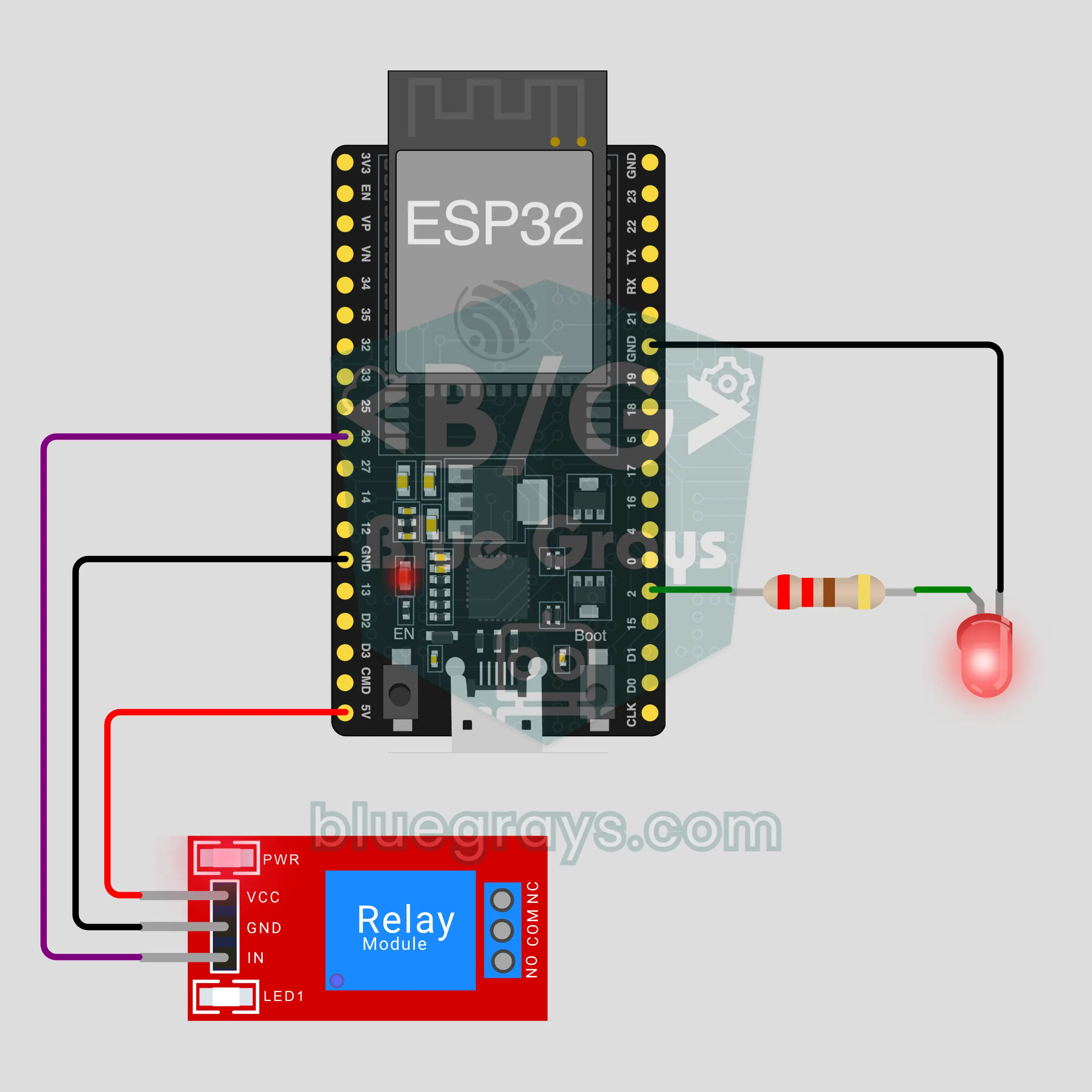
Circuit Diagram
Source Code
1// ┌───────────────────────────┐
2// │ BlueGrays · bluegrays.com │
3// │ Bluetooth · ESP32         │
4// │ BG-Lamba                  │
5// └───────────────────────────┘
6// LED and relay
7// Arduino IDE board: ESP32 Dev Module
8// the BLE library comes with the ESP32 board package, nothing extra to install
9
10#include <BLEDevice.h>
11#include <BLEServer.h>
12#include <BLE2902.h>
13
14const char BLE_NAME[] = "BG-Lamba";  // the board advertises with this name, the app finds it in the list by it
15
16// Pins: change them here if you wired differently
17const int LED_PIN = 2;
18const int RELAY_PIN = 26;
19const bool RELAY_ACTIVE_LOW = true;  // most relay modules switch on LOW
20
21void btWrite(const char *text);
22void onValue(const char *key, const char *value);
23void sendAll();
24void onLinkLost();
25
26// ── The app sends "key=value" lines; on "?" the board sends all its values ──
27char line[65];
28uint8_t lineLen = 0;
29unsigned long lastRxMs = 0;
30
31bool is(const char *a, const char *b) { return strcmp(a, b) == 0; }
32bool isOn(const char *v) { return v[0] == '1'; }
33
34void sendText(const char *key, const char *value) {
35  char out[72];
36  snprintf(out, sizeof(out), "%s=%s\n", key, value);
37  btWrite(out);
38}
39
40void sendInt(const char *key, long value) {
41  char text[12];
42  snprintf(text, sizeof(text), "%ld", value);
43  sendText(key, text);
44}
45
46void sendFloat(const char *key, float value) {
47  char text[16];
48  dtostrf(value, 1, 1, text);
49  sendText(key, text);
50}
51
52void handleLine(char *text) {
53  char *eq = strchr(text, '=');
54  if (eq == nullptr) {
55    if (text[strlen(text) - 1] == '?') {
56      btWrite("@v=1.0\n");  // the "@v" line tells the app the code version
57      sendAll();
58    }
59    return;
60  }
61  *eq = '\0';
62  onValue(text, eq + 1);
63}
64
65void feed(char c) {
66  lastRxMs = millis();
67  if (c == '\n' || c == '\r') {
68    if (lineLen == 0) return;
69    line[lineLen] = '\0';
70    lineLen = 0;
71    handleLine(line);
72  } else if (lineLen < sizeof(line) - 1) {
73    line[lineLen++] = c;
74  }
75}
76
77// ── Bluetooth (Nordic UART) ──
78#define UART_SERVICE "6E400001-B5A3-F393-E0A9-E50E24DCCA9E"
79#define UART_RX "6E400002-B5A3-F393-E0A9-E50E24DCCA9E"
80#define UART_TX "6E400003-B5A3-F393-E0A9-E50E24DCCA9E"
81
82BLECharacteristic *txChar = nullptr;
83volatile bool linked = false;
84volatile bool linkLost = false;
85// incoming bytes move from the Bluetooth task to loop() through a small ring buffer
86const int RX_SIZE = 256;
87volatile uint8_t rxBuf[RX_SIZE];
88volatile int rxHead = 0, rxTail = 0;
89
90class ServerEvents : public BLEServerCallbacks {
91  void onConnect(BLEServer *server) override { linked = true; }
92  void onDisconnect(BLEServer *server) override { linked = false; linkLost = true; }
93};
94
95class RxEvents : public BLECharacteristicCallbacks {
96  void onWrite(BLECharacteristic *c) override {
97    auto v = c->getValue();
98    for (size_t i = 0; i < v.length(); i++) {
99      int next = (rxHead + 1) % RX_SIZE;
100      if (next == rxTail) break;
101      rxBuf[rxHead] = (uint8_t)v[i];
102      rxHead = next;
103    }
104  }
105};
106
107// lines go out in 20-byte packets (works with every phone)
108void btWrite(const char *text) {
109  if (!linked || txChar == nullptr) return;
110  size_t n = strlen(text);
111  for (size_t i = 0; i < n; i += 20) {
112    size_t len = n - i < 20 ? n - i : 20;
113    txChar->setValue((uint8_t *)text + i, len);
114    txChar->notify();
115    delay(4);
116  }
117}
118
119void btBegin() {
120  BLEDevice::init(BLE_NAME);
121  BLEServer *server = BLEDevice::createServer();
122  server->setCallbacks(new ServerEvents());
123  BLEService *uart = server->createService(UART_SERVICE);
124  txChar = uart->createCharacteristic(UART_TX, BLECharacteristic::PROPERTY_NOTIFY);
125  txChar->addDescriptor(new BLE2902());
126  BLECharacteristic *rx = uart->createCharacteristic(UART_RX, BLECharacteristic::PROPERTY_WRITE | BLECharacteristic::PROPERTY_WRITE_NR);
127  rx->setCallbacks(new RxEvents());
128  uart->start();
129  BLEAdvertisementData adv;
130  adv.setFlags(0x06);
131  adv.setCompleteServices(BLEUUID(UART_SERVICE));
132  BLEAdvertisementData scan;
133  scan.setName(BLE_NAME);
134  BLEAdvertising *advertising = BLEDevice::getAdvertising();
135  advertising->setAdvertisementData(adv);
136  advertising->setScanResponseData(scan);
137  BLEDevice::startAdvertising();
138}
139
140void btPoll() {
141  while (rxTail != rxHead) {
142    char c = (char)rxBuf[rxTail];
143    rxTail = (rxTail + 1) % RX_SIZE;
144    feed(c);
145  }
146  if (linkLost) {
147    linkLost = false;
148    onLinkLost();
149    delay(100);
150    BLEDevice::startAdvertising();
151  }
152}
153
154// ── ESP32 ──
155bool ledOn = false, relayOn = false;
156
157void setRelay(bool on) {
158  if (RELAY_ACTIVE_LOW) {
159    if (on) { pinMode(RELAY_PIN, OUTPUT); digitalWrite(RELAY_PIN, LOW); }
160    else { pinMode(RELAY_PIN, INPUT); }  // off releases the pin: a 3.3 V HIGH is not enough to turn a 5 V module off
161  } else {
162    pinMode(RELAY_PIN, OUTPUT); digitalWrite(RELAY_PIN, on ? HIGH : LOW);
163  }
164}
165
166void apply() {
167  digitalWrite(LED_PIN, ledOn ? HIGH : LOW);
168  setRelay(relayOn);
169}
170
171void onValue(const char *key, const char *value) {
172  if (is(key, "led")) ledOn = isOn(value);
173  else if (is(key, "role")) relayOn = isOn(value);
174  apply();
175}
176
177void sendAll() {
178  sendInt("led", ledOn);
179  sendInt("role", relayOn);
180}
181
182void onLinkLost() {
183}
184
185void setup() {
186  Serial.begin(115200);
187  pinMode(LED_PIN, OUTPUT);
188  apply();
189  btBegin();
190  Serial.print(F("BlueGrays Bluetooth: "));
191  Serial.println(BLE_NAME);
192}
193
194void loop() {
195  btPoll();
196}
197FAQ
Does it work with an iPhone?
Yes. The ESP32's built-in Bluetooth Low Energy (BLE) talks to both iPhone and Android. An iPhone cannot connect to classic Bluetooth modules like the HC-05 and HC-06, and this project does not need them. Do not try to pair the board in your phone's Bluetooth settings; BLE boards may not show up there, which is normal. The BlueGrays app makes the connection.
Can I connect a real lamp to the relay?
The relay module can switch mains voltage, but mains power can kill. In this project nothing is connected to the relay's COM and NO terminals; the relay shows it works with its click and the module LED. If you want to try a load, start with a low-voltage circuit such as a battery or a 12 V adapter. If you move to mains, do it with someone experienced, leave no bare wires or screws exposed and stay within the current rating printed on the module.
Why does the blue LED on the board light up together with my LED?
On many ESP32 DevKit boards the blue on-board LED is also wired to GPIO2. Your LED is on the same pin, so both blink together; this is not a fault. It is even handy: if a wire is loose, the blue LED still shows the command reached the board. If you do not want it, move your LED to another pin (for example GPIO4) and change LED_PIN in the code.
Do I need internet or Wi-Fi, and what is the range?
No. Your phone connects straight to the board over Bluetooth, with no router or server. Indoors the range is usually around 10 metres, and walls shorten it. The board connects to one phone at a time; when that phone leaves, the board starts advertising again and another phone can connect. To control it from outside your home, pick a project that uses the Wi-Fi IoT panel in the app.