
ESP32 IoT Lamp Switch (Relay)
Turn your lamp on and off from your phone, wherever you are. This project is the step-by-step guide to the Relay lamp IoT template in the app, built with an ESP32 and a relay module and tried with an LED first. Go to Workshop › Devices › Add a device and pick Relay lamp; Ohmi prepares the code with your own device key. The code on this page is an example: the key and Wi-Fi details are placeholders.
Control this device from the app
Connect your ESP32 or Raspberry Pi Pico W to Wi-Fi, then switch it on and off and watch live readings from your phone. Ohmi prepares the code; you just enter your Wi-Fi details and upload it.
Template in the app: Relay lamp
- Where is it in the app?Add a new device from the Tools tab or Workshop › Devices and pick this template.
- Arduino libraryOpen the Library Manager in the Arduino IDE, search for BlueGraysIoT and install it.
The free plan includes 1 device, 1 chart and 24 hours of history. Premium adds more devices, more charts and longer history.
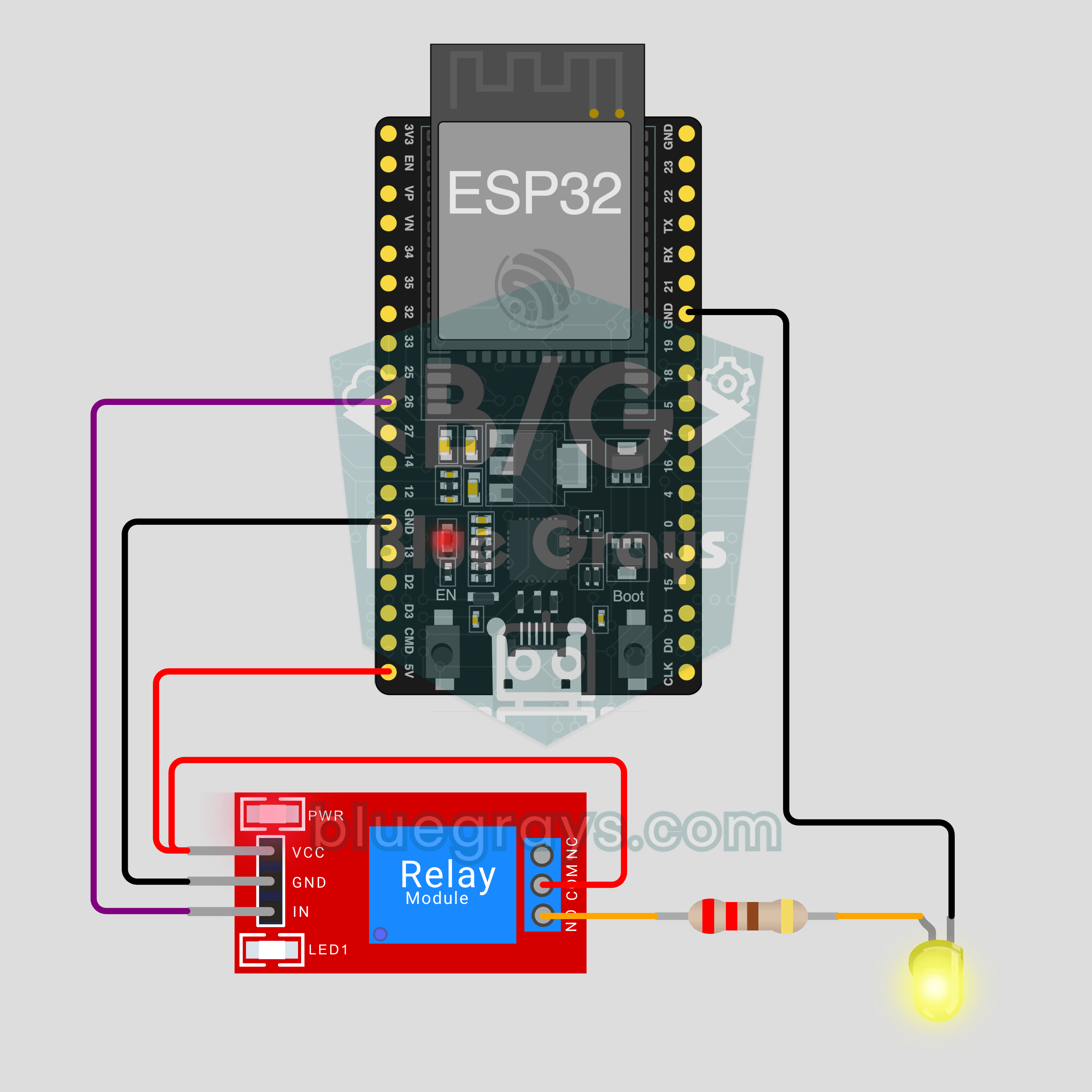
Circuit Diagram
Source Code
1// ─────────────────────────────────────────
2//   BlueGrays · bluegrays.com
3//   ESP32 IoT Lamp Switch (Relay)
4// ─────────────────────────────────────────
5// The "Relay lamp" IoT template from the BlueGrays app: switch a lamp on
6// and off from your phone with a relay. Ohmi prepares the real code in the
7// app with your own device key (Workshop › Devices › Add a device); the
8// code here is an example, the device key and Wi-Fi details are
9// placeholders. Library Manager: BlueGraysIoT (with its dependencies). The
10// board only joins 2.4 GHz Wi-Fi networks. The relay switches on LOW. Only
11// wire a mains lamp with someone experienced; try with an LED first.
12//
13// Pins:
14//   GPIO26 -> Relay module IN
15//   5V, GND -> Relay module VCC, GND
16//   Relay COM -> 5V, NO -> 220 ohm -> LED anode, LED cathode -> GND
17//   Pico W: relay IN GP15
18
19/*
20 * Relay lamp · BlueGrays IoT
21 * BlueGrays · bluegrays.com
22 * Do not share this code: it contains your device key and Wi-Fi password.
23 */
24
25#include <BlueGraysIoT.h>
26
27const char *DEVICE_KEY = "YOUR_DEVICE_KEY";
28const char *WIFI_NAME = "YOUR_WIFI_NAME";
29const char *WIFI_PASSWORD = "YOUR_WIFI_PASSWORD";
30
31BlueGraysIoT bg(DEVICE_KEY);
32
33const int RELAY_PIN = 26;
34const bool RELAY_ACTIVE_LOW = true;  // most relay modules switch on LOW
35void setRelay(bool on) { digitalWrite(RELAY_PIN, (on != RELAY_ACTIVE_LOW) ? HIGH : LOW); }
36
37void setup() {
38  Serial.begin(115200);
39  pinMode(RELAY_PIN, OUTPUT);
40  setRelay(false);
41  bg.onSwitch("lamba", setRelay);
42  bg.setDebug(Serial);
43  bg.setLanguage(BG_LANG_EN);
44  bg.begin(WIFI_NAME, WIFI_PASSWORD);
45}
46
47void loop() {
48  bg.loop();  // avoid long delay() calls here
49}
50FAQ
Can I upload the code on this page straight to my board?
You can, but it will not connect: the device key and Wi-Fi details in it are placeholders. In the app go to Workshop › Devices › Add a device and pick Relay lamp; Ohmi prepares the code with your key, network name and password. Copy that code and upload it. You can see the full code later in Device › Code and key.
Does it work with a Pico W?
Yes. Pick Pico W as the board when you add the device; the code stays the same and only the relay pin changes: the relay's IN goes to GP15 and VCC to VBUS. In Arduino IDE install the "pico" package from Boards Manager. The circuit and photo on this page were made with an ESP32.
Can I connect a real mains lamp?
Mains voltage (230 V or 120 V) can kill and start fires. Try with an LED first, as shown on this page. If you move to a real lamp, do it with someone who knows electrics: the plug is out of the socket, only the live wire goes through the relay's COM and NO terminals, no bare wire is left exposed, the circuit sits in a closed box and the lamp's power stays under the limit printed on the module.
What happens to the lamp after a power cut?
At power-up the relay is set to off first, so the lamp never turns on by itself. As soon as the board is back on Wi-Fi and the server, the library applies the last state from the app: if the lamp was on before the power cut it lights up again, if it was off it stays off. If only the Wi-Fi drops while the board is running, the lamp simply stays as it is.