
AR-170IntermediatePremium
UNO R4 WiFi Web Server: Relay and LED
The UNO R4 WiFi joins your home Wi-Fi and serves its own web page. Two big buttons in your phone's browser switch the relay (a lamp LED) and a second LED on and off; no extra app needed. At start-up the board's IP address scrolls on the LED matrix, then the matrix shows the state with two icons: the lamp on the left, the LED on the right. You learn to build a web server with the R4's own WiFiS3 library.
0.0(0)
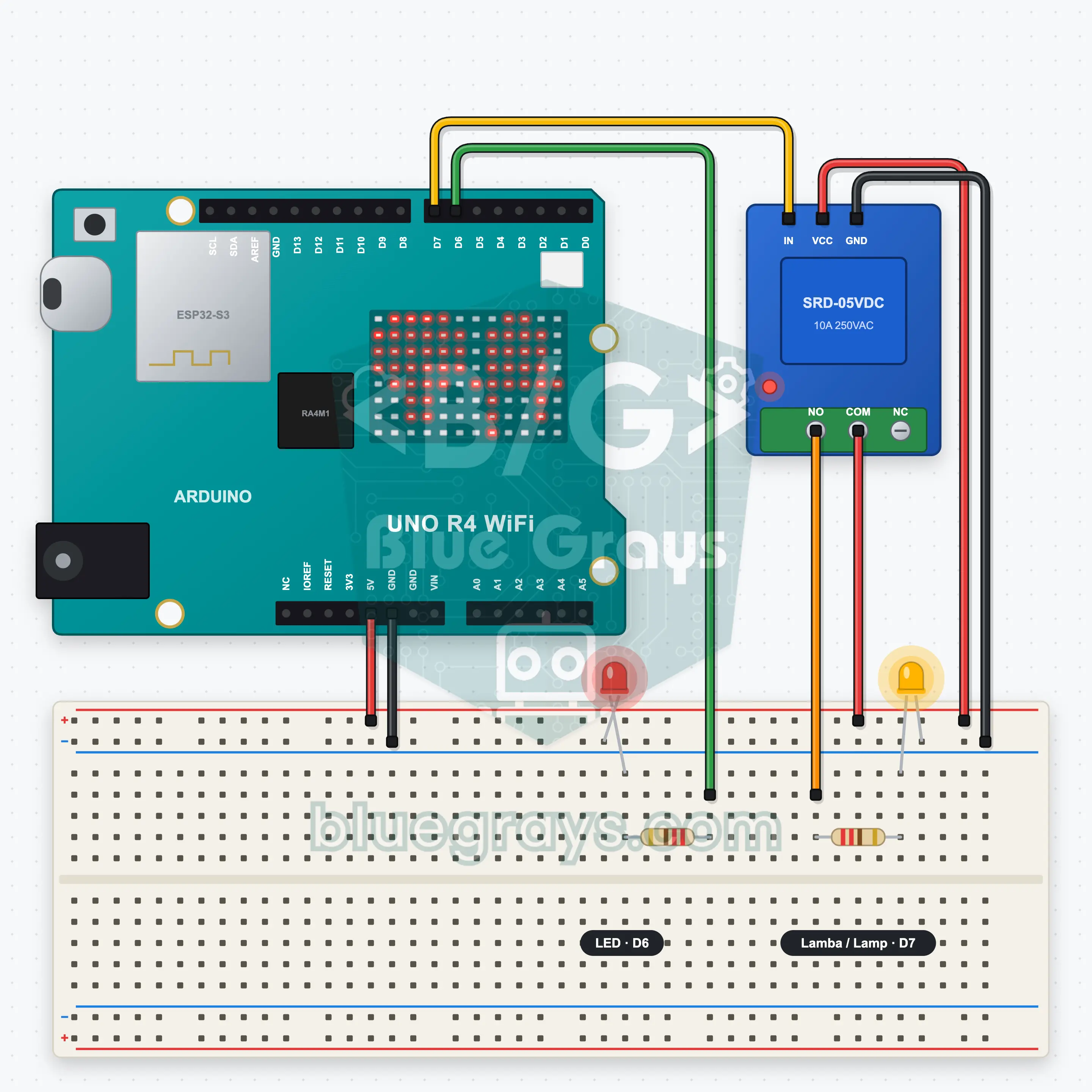
Want to switch the lamp on without leaving the sofa? The UNO R4 WiFi joins your home Wi-Fi and works like a tiny website. Type the board's address into your phone's browser and two buttons appear: one clicks the relay and lights the lamp, the other turns on the LED. The LED matrix on the board shows the address and tells you with icons what is on. Learning: the R4's WiFiS3 library, how a web server reads a request, sending commands through the address, JSON replies and how a relay switches a circuit.
Source Code
Premium Content
The source code, block version and FAQ of this project are open to Premium members.
- All Project Code
- Block version
- Frequently Asked Questions