
WS2812B NeoPixel LED Strip with Arduino: Addressable RGB LED Guide
What is a WS2812B NeoPixel and how do you wire it? Addressable RGB LED strips, rings and matrices, power calculation, Adafruit NeoPixel and FastLED code, rainbow effects, ESP32 and Pico examples.
The WS2812B is an RGB LED with its own driver chip built in. While an ordinary RGB LED needs a separate pin for each colour, with the WS2812B you control hundreds of LEDs over a single data wire and give each one its own colour and brightness. NeoPixel is Adafruit's name for this family of addressable LEDs. Sold as strips, rings, sticks and matrices, they're used in countless projects, from ambient lighting and LED clocks to games and notification lamps.
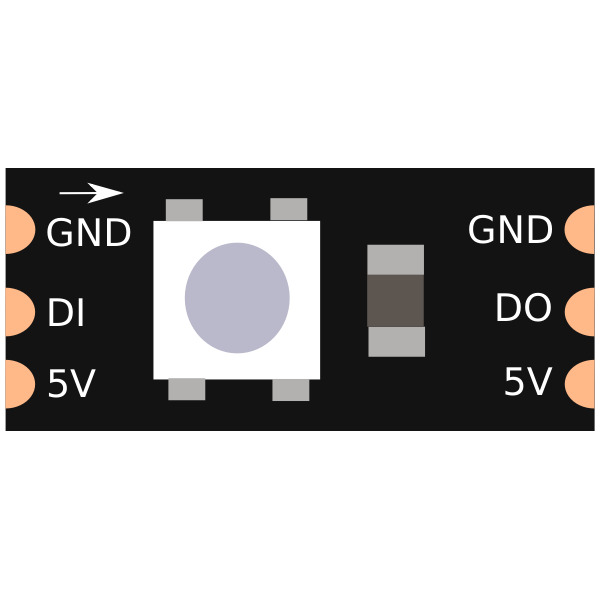
How does the WS2812B work?
Inside each WS2812B's 5x5 mm package are three tiny LEDs, red, green and blue, plus a miniature chip that drives them. The Arduino sends 24-bit colour packets one after another down the data line: 8 bits of green, 8 of red and 8 of blue (GRB order). The first LED keeps the first 24 bits for itself and passes the rest on to the next LED through its DO pin; every LED does the same. When the data line stays LOW for at least 50 microseconds (280 on newer versions), all the LEDs show their colour at the same moment. With 256 levels per colour, a single LED can show 16.7 million different colours.
| Feature | Value |
|---|---|
| Supply voltage | 5 V (3.5–5.3 V) |
| Current per LED | Up to ~60 mA (full white), ~1 mA when off |
| Data rate | 800 kHz, single wire |
| Colour order | GRB (green, red, blue) |
| Colour depth | 24 bit, 16.7 million colours |
| Package | 5050 SMD (5x5 mm) |
Strips, rings and matrices
| Type | Number of LEDs | Typical use |
|---|---|---|
| Strip | 30, 60 or 144 per metre | Ambient lighting, TV backlight, shelf lighting |
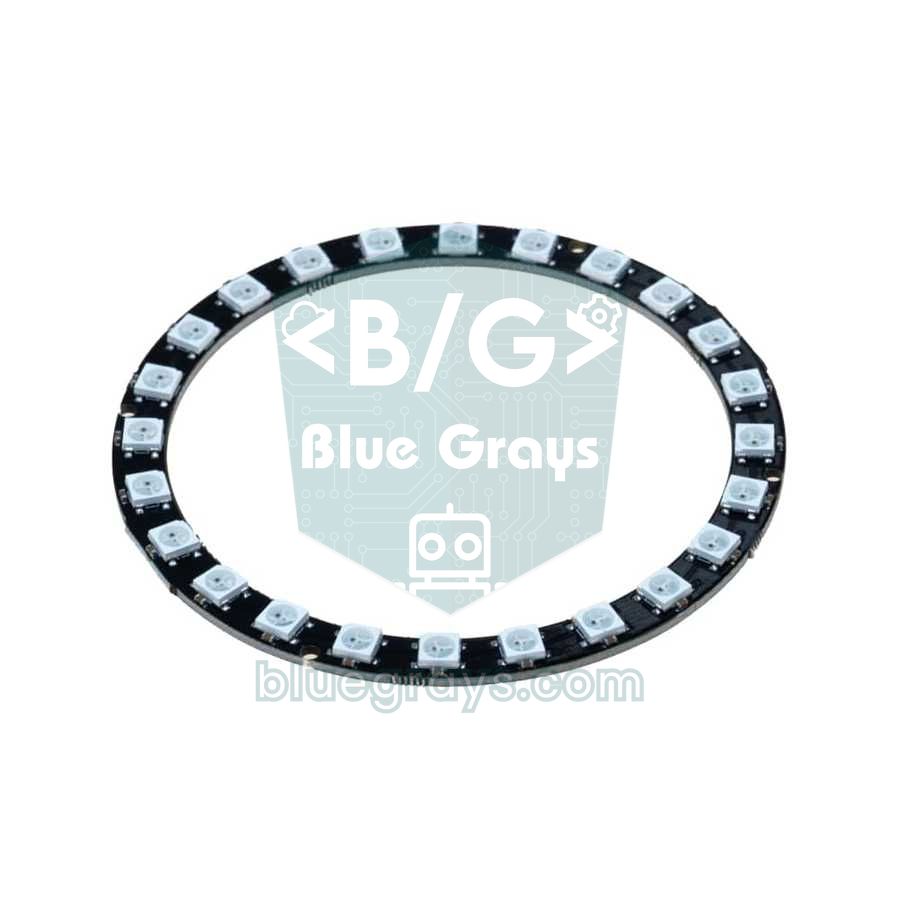
| Ring | 8, 12, 16, 24 | LED clock, gauge, desk lamp |
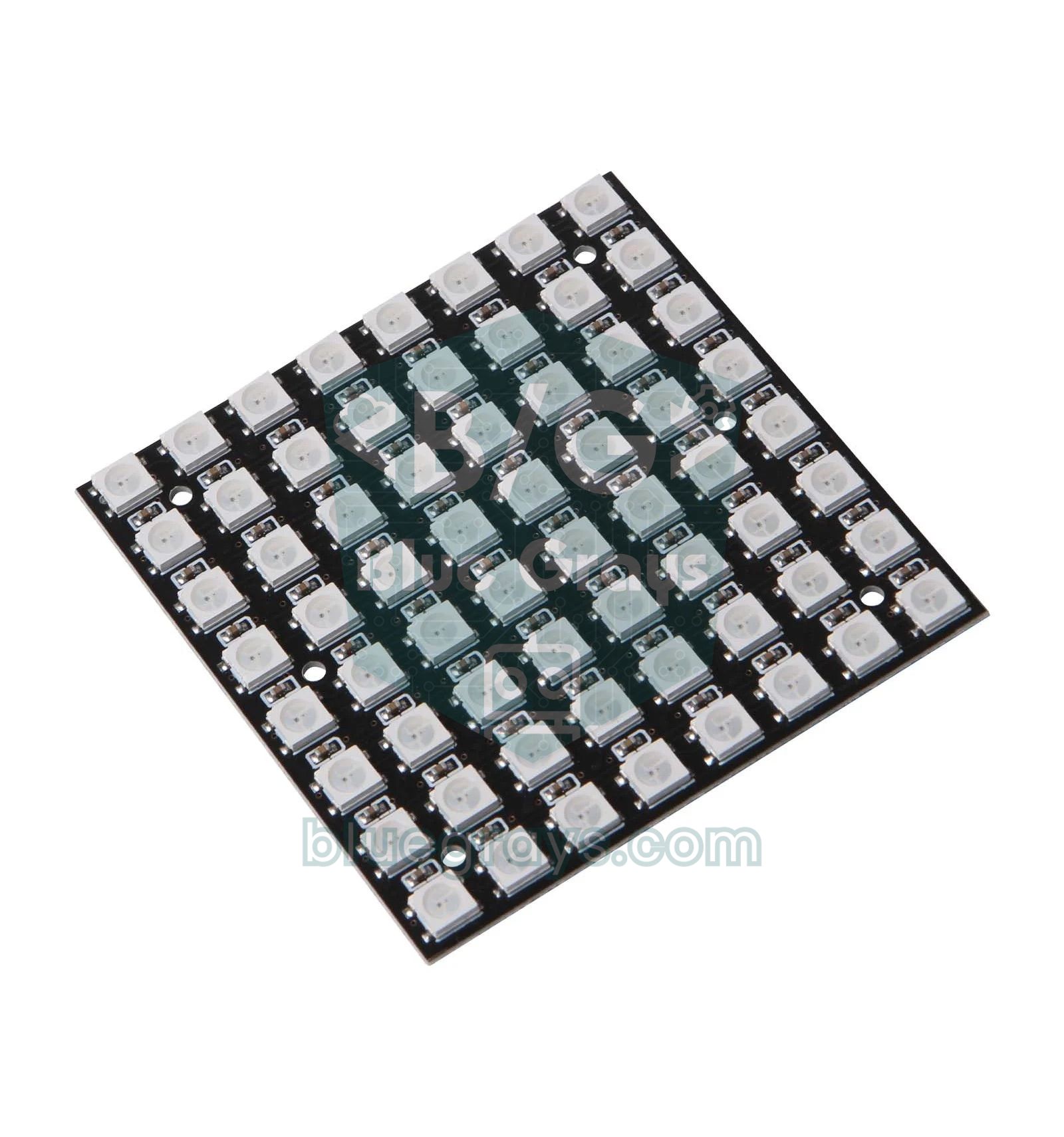
| Matrix | 8x8 = 64, 16x16 = 256 | Scrolling text, animations, pixel games |
| Stick | 8 | Level indicator, status light |
Wiring the WS2812B
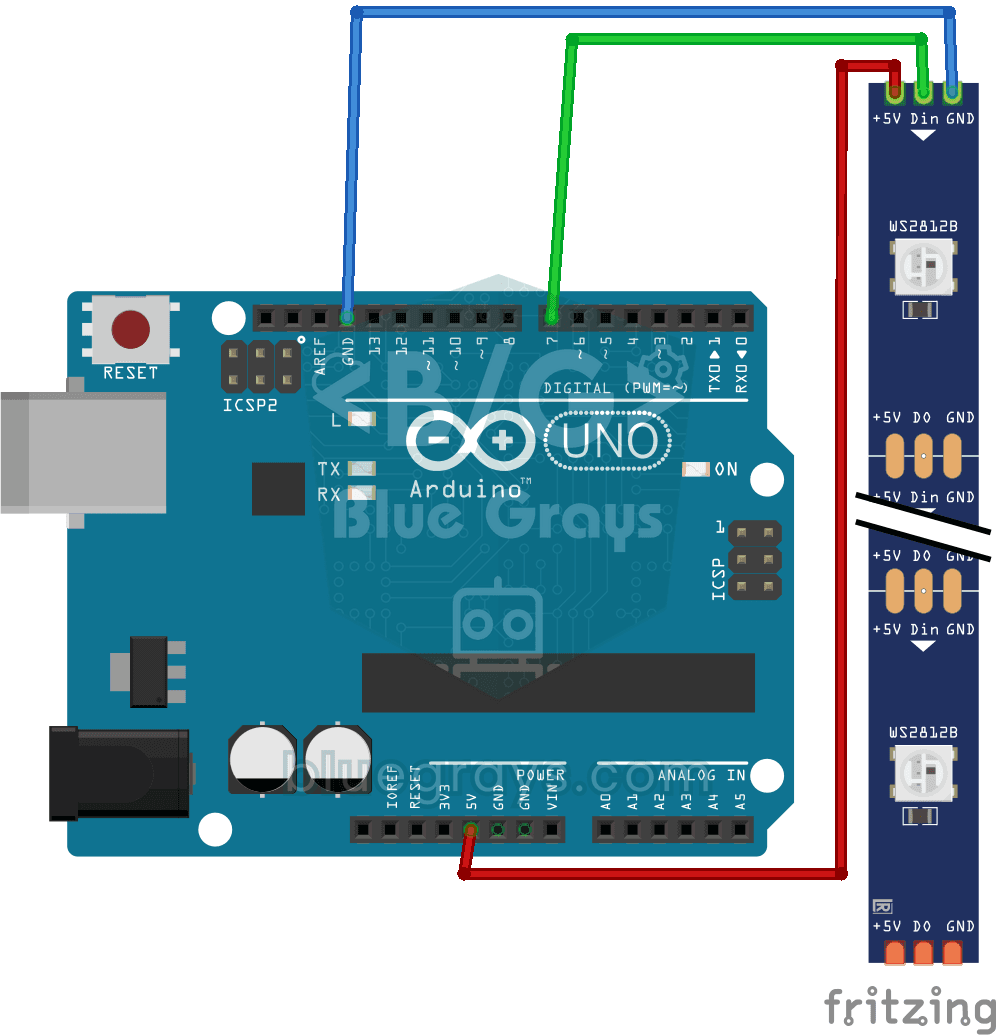
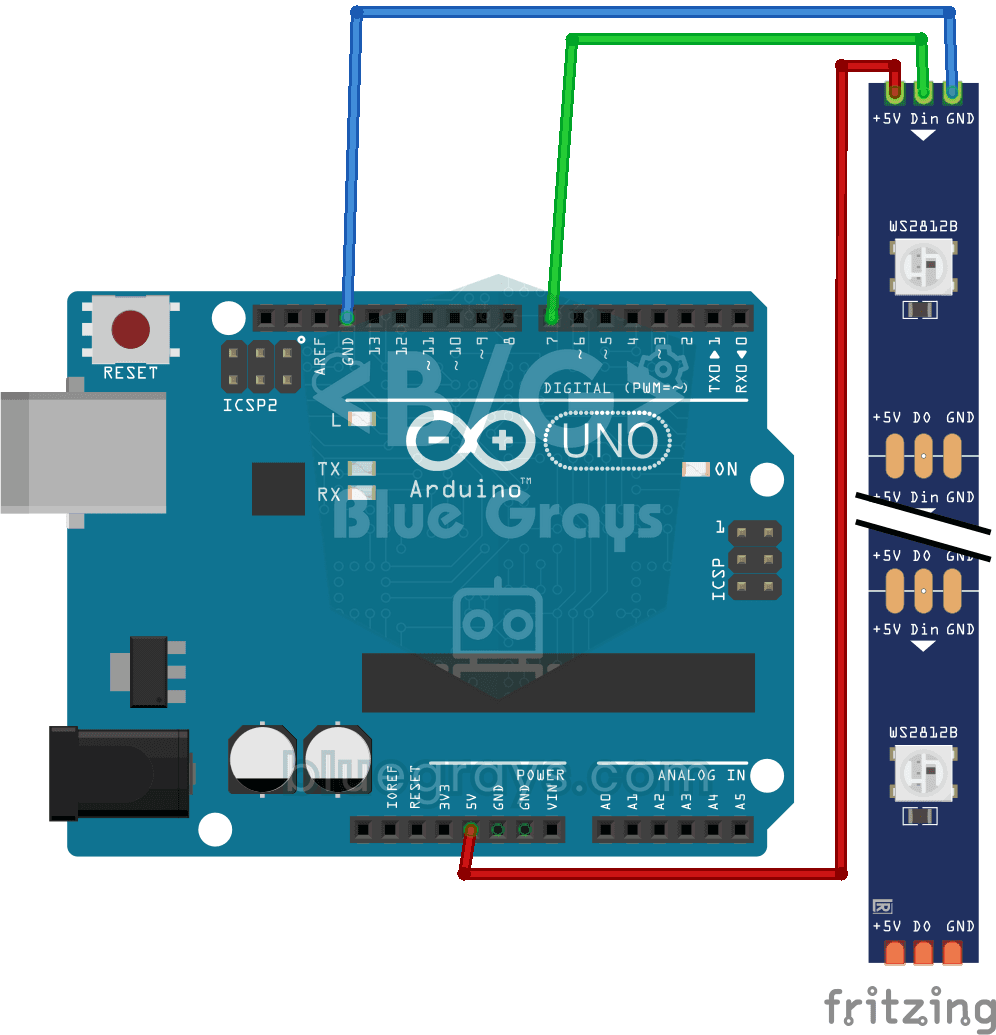
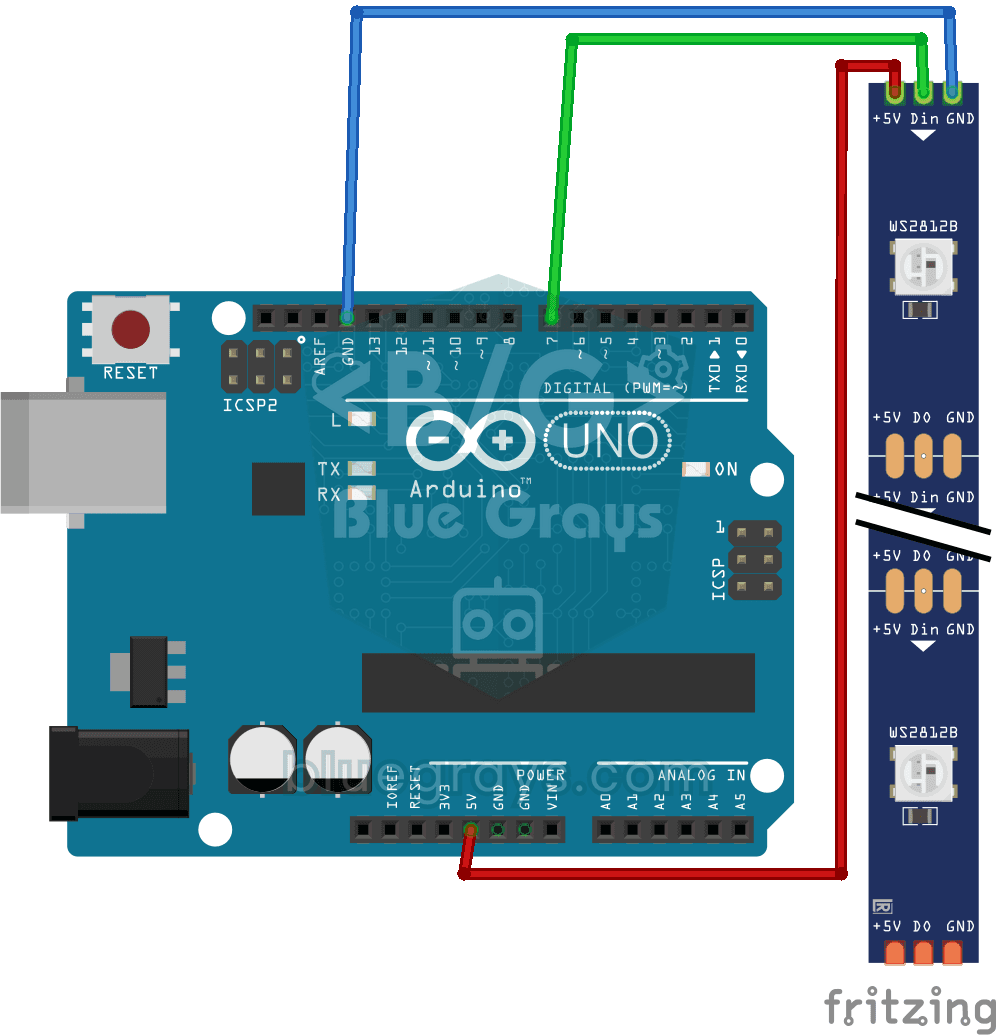
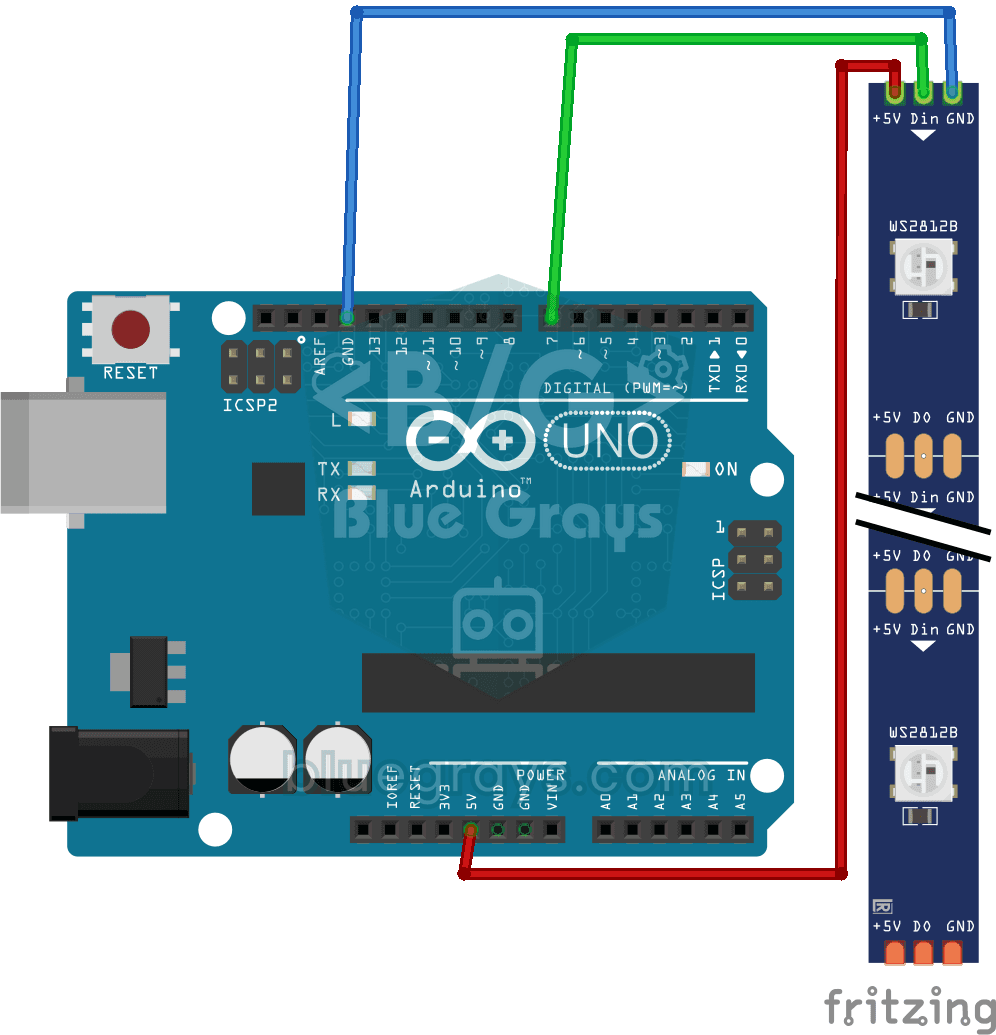
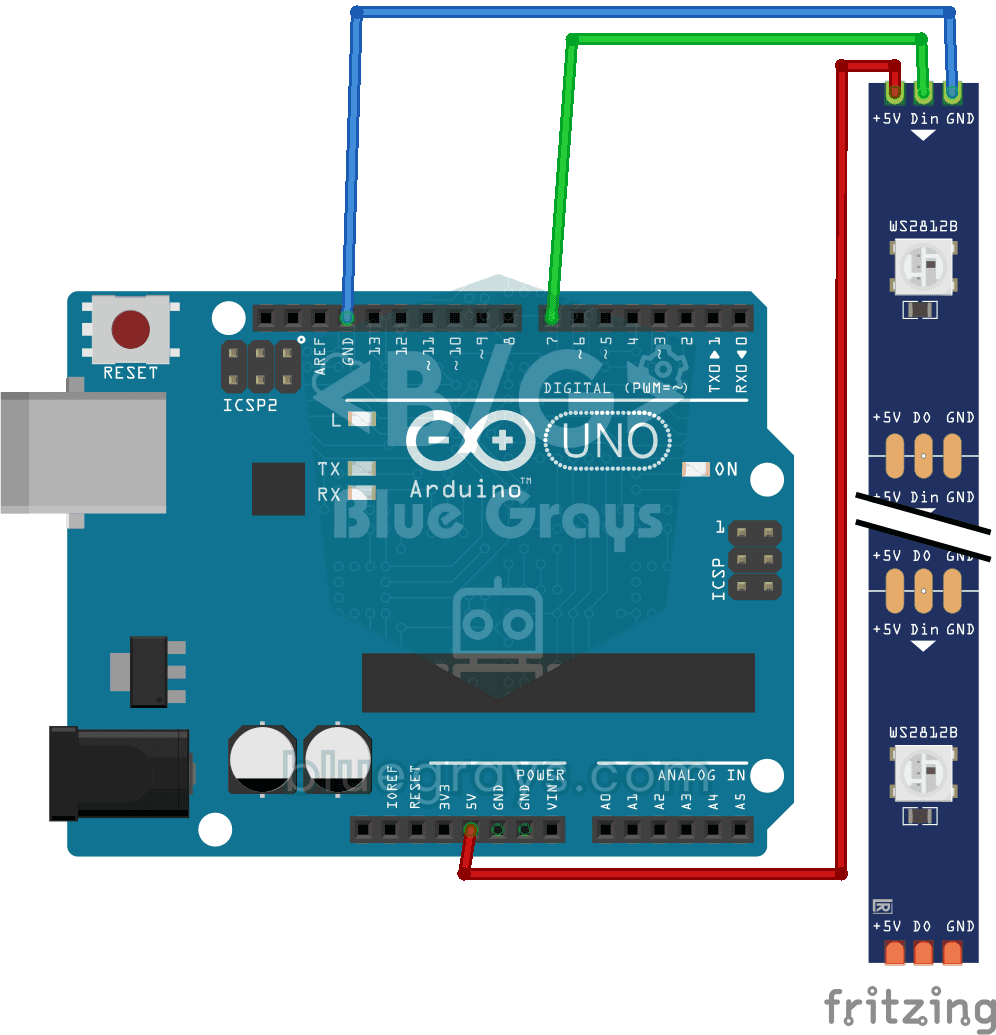
The WS2812B has three connections: 5V, GND and DIN (data in). The arrows on the strip show the direction the data flows; always connect the Arduino to the end where the arrows start, the DIN side. Adding a 330–470 Ω resistor in series with the data line, and a 1000 µF capacitor between 5V and GND at the strip's power input, protects the first LED from sudden voltage spikes.
| WS2812B pin | Connection |
|---|---|
| 5V | Arduino 5V for a few LEDs, an external 5 V adapter for more |
| GND | GND (with an external adapter, it must share ground with the Arduino) |
| DIN | D6 (through a 330 Ω resistor) |
| DOUT | DIN of the next LED or strip |
Power calculation: how many amps do you need?
The worst-case formula is simple: number of LEDs × 60 mA. In animations, all the LEDs are rarely full white at the same time; in practice you'll see an average of around 20 mA per LED. Even so, you should pick the adapter for the worst case or limit the brightness in software. Use the Ohm's law tool to work out the power in watts, and the battery life tool to estimate run time in battery-powered projects.
| Number of LEDs | Worst case (full white) | Recommended supply |
|---|---|---|
| 8 | 0.48 A | USB is enough (limited brightness) |
| 30 | 1.8 A | 5 V 3 A adapter |
| 60 | 3.6 A | 5 V 4 A adapter |
| 144 | 8.6 A | 5 V 10 A adapter |
Your first code with the Adafruit NeoPixel library
In the Library Manager, search for Adafruit NeoPixel and install it. The code below "wipes" the strip with a colour by lighting the LEDs one by one in red, green and blue:
1#include <Adafruit_NeoPixel.h>
2
3#define PIN 6          // DIN pini / data pin
4#define NUM_LEDS 8     // LED sayısı / number of LEDs
5
6Adafruit_NeoPixel strip(NUM_LEDS, PIN, NEO_GRB + NEO_KHZ800);
7
8void setup() {
9  strip.begin();
10  strip.setBrightness(50);   // 0–255, yalnız bir kez / only once
11  strip.show();              // hepsini söndür / all off
12}
13
14void colorWipe(uint32_t color, int wait) {
15  for (int i = 0; i < NUM_LEDS; i++) {
16    strip.setPixelColor(i, color);
17    strip.show();            // değişikliği gönder / send the change
18    delay(wait);
19  }
20}
21
22void loop() {
23  colorWipe(strip.Color(255, 0, 0), 80);   // kırmızı / red
24  colorWipe(strip.Color(0, 255, 0), 80);   // yeşil / green
25  colorWipe(strip.Color(0, 0, 255), 80);   // mavi / blue
26}
setPixelColor() only changes the colour in memory; to actually light the LEDs you need to call show(). That way you can set the colour of every LED and display them all in one go. Because setBrightness() permanently scales the colour data, it's best to call it once in setup() rather than changing it constantly in loop(). Each LED takes 3 bytes of the Arduino's RAM; the Uno's 2 KB fills up quickly with hundreds of LEDs.
Rainbow effect: HSV colours
Using HSV (hue, saturation, value) instead of setting colours with red, green and blue values makes effects much easier: you move around the whole colour wheel just by changing the hue. In the Adafruit library the hue runs from 0 to 65535. gamma32() corrects the colours to match how the eye perceives them, so transitions look more natural:
1#include <Adafruit_NeoPixel.h>
2
3#define PIN 6
4#define NUM_LEDS 24
5
6Adafruit_NeoPixel strip(NUM_LEDS, PIN, NEO_GRB + NEO_KHZ800);
7
8void setup() {
9  strip.begin();
10  strip.setBrightness(40);
11}
12
13void loop() {
14  for (long first = 0; first < 65536; first += 256) {
15    for (int i = 0; i < NUM_LEDS; i++) {
16      uint16_t hue = first + i * 65536L / NUM_LEDS;   // her LED'e farklı ton / a different hue per LED
17      strip.setPixelColor(i, strip.gamma32(strip.ColorHSV(hue)));
18    }
19    strip.show();
20    delay(10);
21  }
22}
The FastLED library
For more advanced effects, the FastLED library is also very popular. It keeps the LEDs in a CRGB array, offers readable commands such as leds[3] = CRGB::Red; and uses a hue range of 0–255. Ready-made functions like fill_rainbow() and fadeToBlackBy() let you write fire, shooting-star or breathing effects in a few lines. One of its handiest features is FastLED.setMaxPowerInVoltsAndMilliamps(5, 2000);: the library automatically lowers the brightness to keep the current under 2 A.
Using an 8x8 NeoPixel matrix
A matrix is really just a long strip: 64 LEDs chained one after another on a single data line. On most matrices the rows run in a zigzag (serpentine): even rows go left to right, odd rows right to left. So to turn an x, y coordinate into an LED number, you use y × 8 + x on even rows and y × 8 + (7 − x) on odd rows. Since 64 LEDs can draw 3.8 A at full white, keeping the brightness low is especially important on matrices.
WS2812B with the ESP32 and Raspberry Pi Pico
The Adafruit NeoPixel and FastLED libraries also work on the ESP32; thanks to Wi-Fi, it's easy to control the LEDs from your phone or build a lamp that changes colour with the weather. The thing to watch is the voltage level: a WS2812B powered from 5 V expects at least 3.5 V on its data input, while the ESP32 and Pico output 3.3 V. Most strips still work, but if the first LED flickers or random colours appear, add a level shifter such as a 74AHCT125 to the data line. On the Raspberry Pi Pico, MicroPython has a built-in neopixel module:
1from machine import Pin
2import neopixel
3import time
4
5NUM = 8
6np = neopixel.NeoPixel(Pin(0), NUM)      # GP0 → DIN
7
8def wheel(pos):                          # 0–255 → renk çemberi / colour wheel
9    if pos < 85:
10        return (255 - pos * 3, pos * 3, 0)
11    if pos < 170:
12        pos -= 85
13        return (0, 255 - pos * 3, pos * 3)
14    pos -= 170
15    return (pos * 3, 0, 255 - pos * 3)
16
17j = 0
18while True:
19    for i in range(NUM):
20        r, g, b = wheel((i * 256 // NUM + j) & 255)
21        np[i] = (r // 5, g // 5, b // 5)  # parlaklığı düşür / dim it
22    np.write()
23    j = (j + 2) & 255
24    time.sleep_ms(20)
WS2812B project ideas
- TV ambient light: stick a strip to the back of your TV to give the room a soft glow.
- NeoPixel clock: show hours, minutes and seconds in different colours on a 60-LED ring.
- Sound level meter: build an LED bar that rises with the music's volume using a microphone module.
- Notification lamp: change colour with the ESP32 based on the weather or new e-mail from the internet.
- Police lights and Knight Rider: write red-blue flashing or back-and-forth scanning light effects.
- Pixel snake game: recreate the classic snake game with an 8x8 matrix and a joystick.
Common mistakes and how to fix them
- No LED lights up: the Arduino is connected to the wrong end of the strip, the DOUT side; check the arrows and use the DIN end.
- Colours are mixed up (green instead of red): the colour order is wrong; use NEO_GRB in the code, though some strips need NEO_RGB.
- The first LED flickers or shows random colours: there's no series resistor, the GND isn't shared, or the 3.3 V data signal isn't enough.
- The end of the strip looks yellowish: there's a voltage drop; feed power to the strip at several points or lower the brightness.
- The Arduino resets when the LEDs turn on: too much current is being drawn from USB; use an external adapter and a 1000 µF capacitor.
- Only the first few LEDs light up: NUM_LEDS in the code is smaller than the real number of LEDs, or there's a broken connection somewhere along the strip.
The WS2812B is a great starting point for understanding how colours mix; you'll find the colour logic in How to Use an RGB LED and brightness control in What Is PWM? In the BlueGrays app you'll find WS2812B basics, police lights, running LEDs, a Knight Rider scanner, animation effects and NeoPixel strip control with the ESP32, with circuit diagrams and code.
Frequently asked questions
What's the difference between the WS2812B and NeoPixel?
NeoPixel is Adafruit's brand name for addressable LEDs such as the WS2812, WS2812B and SK6812. They all use the same data protocol, so they're controlled the same way with the same libraries.
How many WS2812Bs can I connect to one Arduino?
There's no hard limit on the data side, but three things limit you: RAM (3 bytes per LED, so a few hundred LEDs in practice on an Uno), refresh time (30 microseconds per LED; 1000 LEDs take about 30 ms, or ~33 frames per second) and the power supply.
Can I power a WS2812B from the Arduino's 5V pin?
Only a few LEDs at low brightness; for example, an 8-LED stick works over USB at a brightness of around 50. For more LEDs, use an external 5 V adapter and connect the grounds together.
Are the resistor and capacitor really necessary?
They aren't strictly required, but they're strongly recommended. The 330–470 Ω resistor on the data line smooths spikes in the signal and protects the first LED, and the 1000 µF capacitor at the power input absorbs the inrush current at the moment power is applied.
Does the WS2812B work with the ESP32 and 3.3 V boards?
Usually, but it isn't guaranteed: a WS2812B powered from 5 V expects at least 3.5 V on its data input. If you see flickering or wrong colours, raise the data signal to 5 V with a level shifter such as a 74AHCT125.
What are the differences between the WS2812B, WS2811, WS2813 and SK6812?
The WS2811 is a separate driver chip and usually drives three LEDs together on 12 V strips. The WS2813 has a backup data line, so the chain keeps working even if one LED fails. The SK6812 is a compatible alternative that also comes in an RGBW version with a white LED; for that you use NEO_GRBW in the code.
Projects to build after reading this
See all projects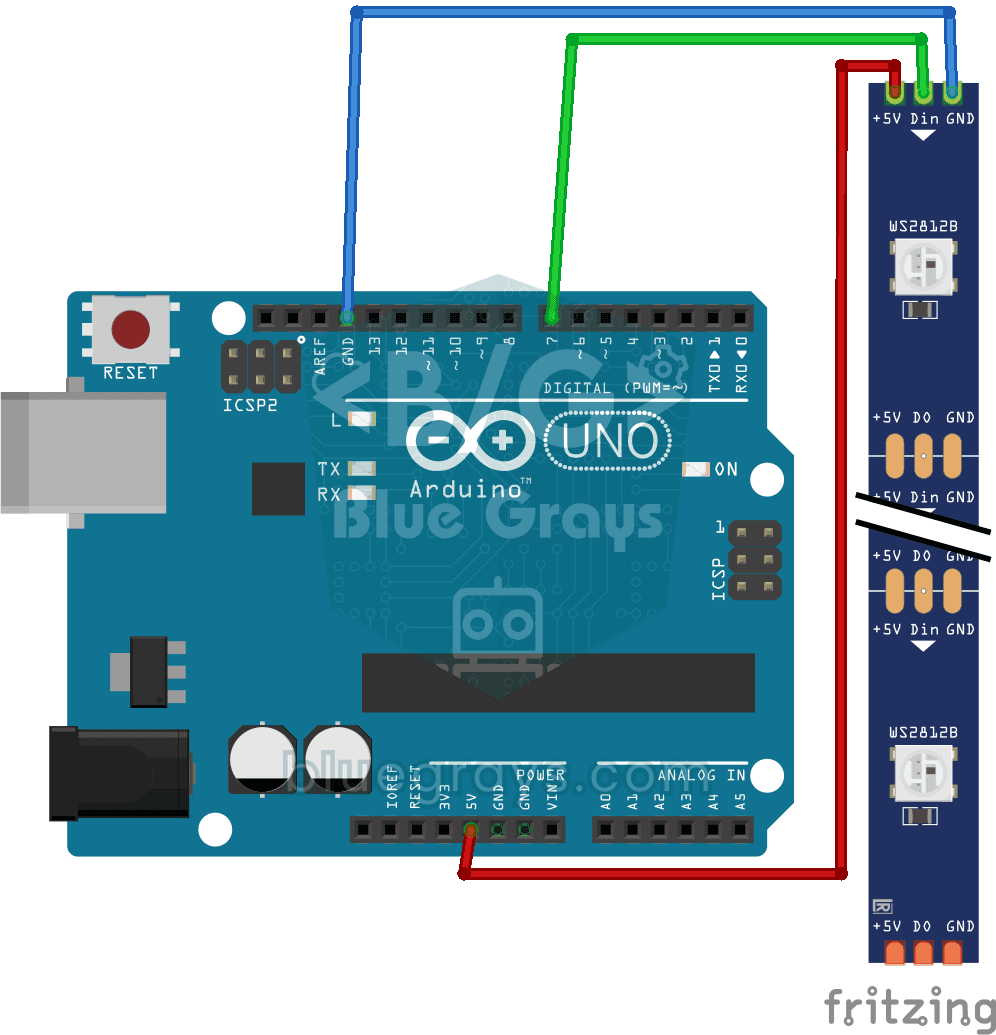
Using a WS2812B LED Strip
Project demonstrating the basic use of the WS2812B addressable LED strip by adjusting the color of each LED independently. Teaches pixel-based color control with the FastLED library.
Police Lights with WS2812B
A project that creates a police strobe effect by rapidly flashing red and blue colors with WS2812B LED strip. Teaches group-based LED control and animation timing logic.
WS2812B LED Chaser
Project to create an LED chaser effect by sequentially moving a single LED forward in a WS2812B LED strip. Teaches pixel-based sequential animation logic.
WS2812B LED Chaser (Fill Effect)
A fill-drain animation project that accumulates LEDs on a WS2812B LED strip by sequentially lighting them, then sequentially extinguishing them. Teaches accumulative LED animation logic.
WS2812B Knight Rider Effect
Project to create a Knight Rider effect by moving a single LED back and forth on the WS2812B LED strip. Teaches bidirectional pixel animation.
WS2812B Black Thunder 3-pack
Project to create a continuously changing rainbow color transition animation on a WS2812B LED strip using HSV color space. Teaches the use of the CHSV color model and the EVERY_N_MILLISECONDS macro.

WS2812B Animation 1
Project that creates a continuous scrolling rainbow animation with HSV color space on WS2812B LED strip. It teaches the logic of smooth color transition by changing the hue value depending on time.

WS2812B Animation 2
Advanced animation project with FastLED palette system on WS2812B LED strip that automatically changes different color palettes such as rainbow, cloud, party, etc. based on time.

ESP32 WS2812B NeoPixel Strip Control
WS2812B (NeoPixel) addressable LEDs are smart RGB LEDs that can be controlled in a daisy-chain configuration via a single data pin. In this project, we will control an 8-LED WS2812B strip using the Adafruit_NeoPixel library to create a smooth rainbow animation. While the ESP32’s 3.3V logic level works seamlessly with most WS2812B components, we’ll demonstrate a solution using a 470Ω series resistor and a 1000µF capacitor in case of instability. The animation is achieved by shifting the hue value
More articles
Learn step by step how to control hundreds of RGB LEDs with a single data wire, wire a WS2812B strip correctly, calculate how much power it needs and write rainbow effects.