
MQ-2 Gas Sensor: Build a Gas and Smoke Alarm with Arduino
How does the MQ-2 gas sensor work? Detecting LPG, methane and smoke, module pins, preheating, analog and digital readings, R0 calibration, the MQ sensor family, and gas alarms with the ESP32 and Pico.
The MQ-2 is a cheap and very common gas sensor that detects combustible gases and smoke in the air. It responds to LPG (bottled gas), propane, butane, methane (natural gas), hydrogen, alcohol vapour and smoke. In Arduino projects it's used to build kitchen gas alarms, smoke detectors and air quality indicators. In this article you'll see step by step what's inside the sensor, how to wire it correctly, why preheating is essential and how to interpret the values you read.
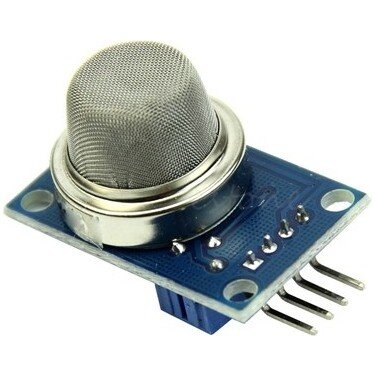
How does the MQ-2 work?
Under the metal mesh there's a small ceramic element coated with tin dioxide (SnO₂) and a heater wire that warms it to a few hundred degrees. In clean air the element's resistance is high. When a combustible gas or smoke reaches it, a chemical reaction on the surface lowers the resistance; the denser the gas, the lower the resistance. The module turns this change in resistance into a voltage with a voltage divider: as gas increases, the voltage on the AO pin rises.
| Feature | Value |
|---|---|
| Supply voltage | 5 V |
| Heater current | ~150 mA (up to 800 mW) |
| Gases detected | LPG, propane, butane, methane, hydrogen, alcohol, smoke |
| Detection range | 300–10,000 ppm |
| Warm-up | A few minutes at each power-on, 24–48 hours on first use |
| Outputs | AO (analog), DO (digital, LM393 comparator) |
Module pins and wiring
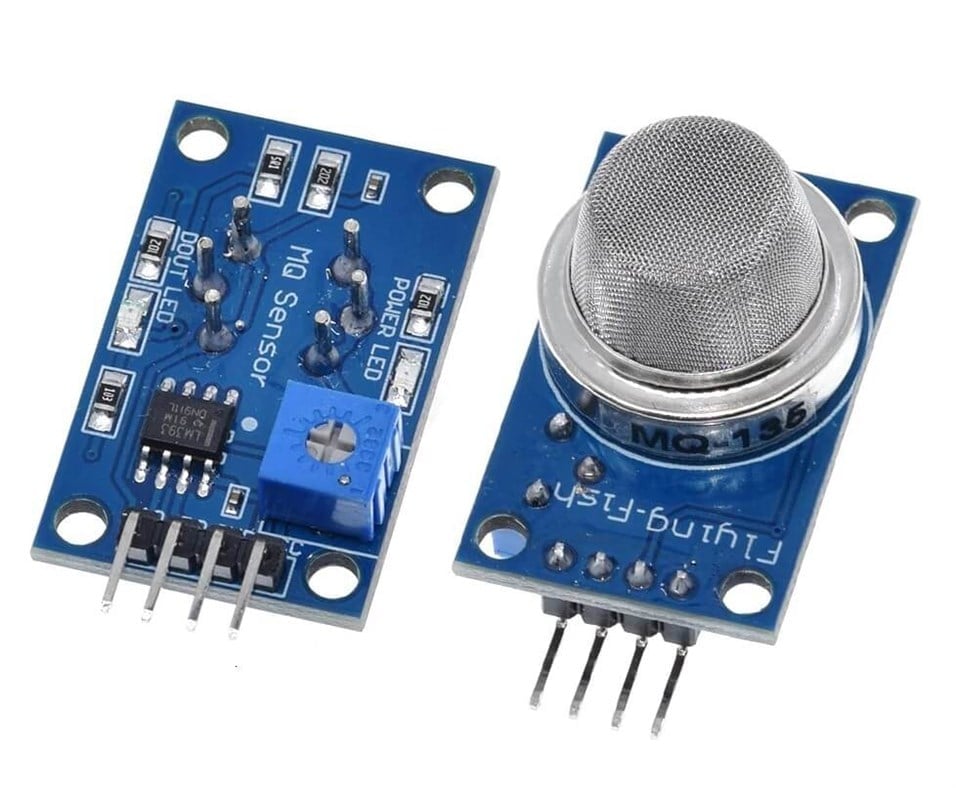
A bare MQ-2 sensor has 6 legs, but projects usually use a ready-made module. The module carries the load resistor, an LM393 comparator chip, a small potentiometer for setting the threshold, a power LED and an alarm LED. The AO pin gives a voltage proportional to the gas concentration, while the DO pin changes state once the gas level passes the threshold you set with the potentiometer.
| Module pin | Function | Arduino Uno |
|---|---|---|
| VCC | Power (including the heater) | 5V |
| GND | Ground | GND |
| AO | Analog output, rises with gas | A0 |
| DO | Digital output, LOW when the threshold is exceeded | D2 |
Why is preheating important?
The sensing element only responds correctly once it reaches its working temperature. In the first minutes after power-on the AO value starts high and then slowly falls and settles; readings taken during this time are misleading. That's why it's good practice to skip the alarm check in your code for the first 1–3 minutes. If you're using a new sensor for the first time, running it continuously for 24–48 hours (burn-in) is recommended for stable values. While the heater is running, the metal mesh gets noticeably warm; that's normal, but don't put flammable materials next to the sensor.
A gas and smoke alarm with Arduino
The code below reads the analog value and prints it to the Serial Monitor, and it also checks the DO pin. If the analog value exceeds the threshold or the DO pin goes LOW, a buzzer sounds:
1const int AO_PIN = A0;
2const int DO_PIN = 2;
3const int BUZZER = 8;
4const int LIMIT = 400;          // analog eşik (0–1023) / analog threshold
5
6void setup() {
7  Serial.begin(9600);
8  pinMode(DO_PIN, INPUT);
9  pinMode(BUZZER, OUTPUT);
10  delay(60000);                 // 1 dk ön ısıtma / 1 min warm-up
11}
12
13void loop() {
14  int value = analogRead(AO_PIN);
15  bool gas = digitalRead(DO_PIN) == LOW;   // çoğu modülde LOW = gaz / LOW = gas on most modules
16
17  Serial.println(value);
18
19  if (value > LIMIT || gas) {
20    tone(BUZZER, 2000, 300);    // alarm sesi / alarm tone
21  }
22  delay(500);
23}
The value 400 here isn't a fixed rule: the clean-air reading can vary between 100 and 300 depending on the sensor, the room temperature and humidity. First run the sensor for a few minutes and check the clean-air value in the Serial Monitor, then set the threshold clearly above it. To test it, just hold a lighter's gas near the sensor for a moment without lighting it; the value rises within seconds.
From analog value to ppm: R0 calibration
On the module, the sensor forms a voltage divider with a load resistor (RL, 1 kΩ on most modules). Using the AO voltage, you can calculate the sensor's resistance (Rs). The datasheet graphs give gas concentration not against Rs directly but against the Rs/R0 ratio; R0 is the sensor's resistance in 1000 ppm of hydrogen, and in clean air Rs/R0 is about 9.8. So you find R0 by measuring the sensor in clean air and dividing by 9.8:
1const float RL = 1.0;           // yük direnci (kΩ) / load resistor (kΩ)
2const float CLEAN_AIR = 9.8;    // temiz havada Rs/R0 / Rs/R0 in clean air
3float R0;
4
5float readRs() {
6  float v = analogRead(A0) * 5.0 / 1023.0;
7  if (v < 0.01) v = 0.01;       // sıfıra bölmeyi önle / avoid dividing by zero
8  return RL * (5.0 - v) / v;    // bölücüden Rs / Rs from the divider
9}
10
11void setup() {
12  Serial.begin(9600);
13  delay(60000);                 // ön ısıtma / warm-up
14  float sum = 0;
15  for (int i = 0; i < 50; i++) {
16    sum += readRs();
17    delay(100);
18  }
19  R0 = (sum / 50) / CLEAN_AIR;  // temiz havada kalibrasyon / clean-air calibration
20}
21
22void loop() {
23  float ratio = readRs() / R0;  // gaz arttıkça küçülür / falls as gas rises
24  Serial.println(ratio);
25  delay(1000);
26}
If the ratio is around 9.8, the air is clean; dropping below 1 means a high gas concentration. To convert this ratio to ppm, the logarithmic curves in the datasheet are used; libraries such as MQUnifiedsensor include these curves ready to use. Still, treat the result as an approximation: temperature, humidity and the sensor's age affect the reading, and since the MQ-2 responds to many gases at once, it can't tell for certain which gas it's measuring. Adding a DHT11 to monitor temperature and humidity is a good idea.
The MQ sensor family: which one to choose?
| Sensor | Most sensitive to | Typical use |
|---|---|---|
| MQ-2 | LPG, propane, methane, hydrogen, smoke | General gas and smoke alarm |
| MQ-3 | Alcohol | Breathalyser |
| MQ-4 | Methane (natural gas) | Natural gas leak alarm |
| MQ-5 | LPG, natural gas | Kitchen gas alarm |
| MQ-7 | Carbon monoxide (CO) | CO monitoring (needs heater cycling) |
| MQ-9 | CO and combustible gases | Around stoves and boilers |
| MQ-135 | Ammonia, benzene, smoke, NOx | Indoor air quality |
The MQ-2 with the ESP32 and Raspberry Pi Pico
The MQ-2's heater needs 5 V, so connect the module's VCC pin to the ESP32's VIN (5V) pin. However, when the module is powered from 5 V, the AO output can go up to 5 V, while the analog inputs of the ESP32 and Pico accept at most 3.3 V. Put a voltage divider made of 10 kΩ and 20 kΩ resistors between AO and the analog pin to bring the signal down to a safe level. With the ESP32 it's easy to send a notification to your phone when gas is detected, or run a ventilation fan through a relay. On the Raspberry Pi Pico, the same alarm looks like this in MicroPython:
1from machine import ADC, Pin
2import time
3
4gas = ADC(26)                  # GP26 (ADC0), AO bölücü üzerinden / AO through a divider
5buzzer = Pin(15, Pin.OUT)
6LIMIT = 30000                  # 0–65535 arası eşik / threshold
7
8time.sleep(60)                 # ön ısıtma / warm-up
9while True:
10    value = gas.read_u16()
11    print(value)
12    buzzer.value(1 if value > LIMIT else 0)
13    time.sleep(0.5)
MQ-2 project ideas
- Kitchen gas alarm: an alarm that sounds a buzzer and lights a red LED when bottled or natural gas leaks.
- Smoke detector: a system that warns you when it detects solder fumes or a burning smell in the workshop.
- Automatic ventilation: a circuit that switches on an extractor fan through a relay when the gas level rises.
- Flame and gas alarm: combine the MQ-2 with a flame sensor to watch for both dangers at once.
- ESP32 detector with notifications: send a Telegram message to your phone when gas is detected.
- Air quality display: show the measured ratio as a graph on an OLED display.
Common mistakes and how to fix them
- It raises the alarm straight after power-on: the sensor hasn't warmed up yet; skip the alarm check for the first 1–3 minutes.
- The value never changes: the DO pin is connected to the analog input instead of AO, or the module isn't getting 5 V.
- The DOUT LED is always on: the potentiometer threshold is set too low; turn it in clean air until the LED goes out.
- The values drift during the day: temperature and humidity are changing; re-set the threshold in clean air from time to time.
- The analog value is always at maximum on the ESP32: the 5 V AO signal is connected directly; use a voltage divider.
- The battery runs down quickly: the heater draws about 150 mA continuously; the MQ-2 isn't suited to running on batteries for long.
Combining the MQ-2 with a buzzer and an LED is the easiest way to go from sensors to a real warning system. In the BlueGrays app you'll find gas sensor basics, a flame and gas sensor alarm and an ESP32 MQ-2 gas and smoke detector alarm, with circuit diagrams and code.
Frequently asked questions
Which gases does the MQ-2 detect?
The MQ-2 is sensitive to LPG, propane, butane, methane (natural gas), hydrogen, alcohol vapour and smoke. It responds only weakly to carbon monoxide. Because it reacts to many gases at once, on its own it can't tell which gas is present.
How long does the MQ-2 need to warm up?
Wait a few minutes (1–3 minutes in practice) at each power-on for the readings to settle. If you're using a new sensor for the first time, running it continuously for 24–48 hours is recommended for the most stable results.
Should I use the MQ-2 or the MQ-4 for natural gas leaks?
The MQ-2 also detects methane, but it responds to many gases. The MQ-4 is more selective for natural gas (methane), so it's a better fit. Either way, don't use a hobby sensor in place of a certified gas detector.
Can I measure carbon monoxide with the MQ-2?
The MQ-2 responds only weakly to carbon monoxide. For CO, the MQ-7 is used, with its heater cycled between a high and a low voltage; but for safety, always use a CO detector that meets the EN 50291 standard.
Is it normal for the sensor to get hot?
Yes. The heater inside keeps the sensing element at a high temperature all the time, so the metal mesh feels noticeably hot to the touch. Keep the sensor away from flammable materials and don't touch it while it's running.
Can I run the MQ-2 on batteries?
You can, but not for long: the heater draws about 150 mA continuously. A 2000 mAh power bank lasts about 13 hours. You can work out the run time for your own project with the battery life tool; where continuous monitoring is needed, use a mains adapter.
Projects to build after reading this
See all projects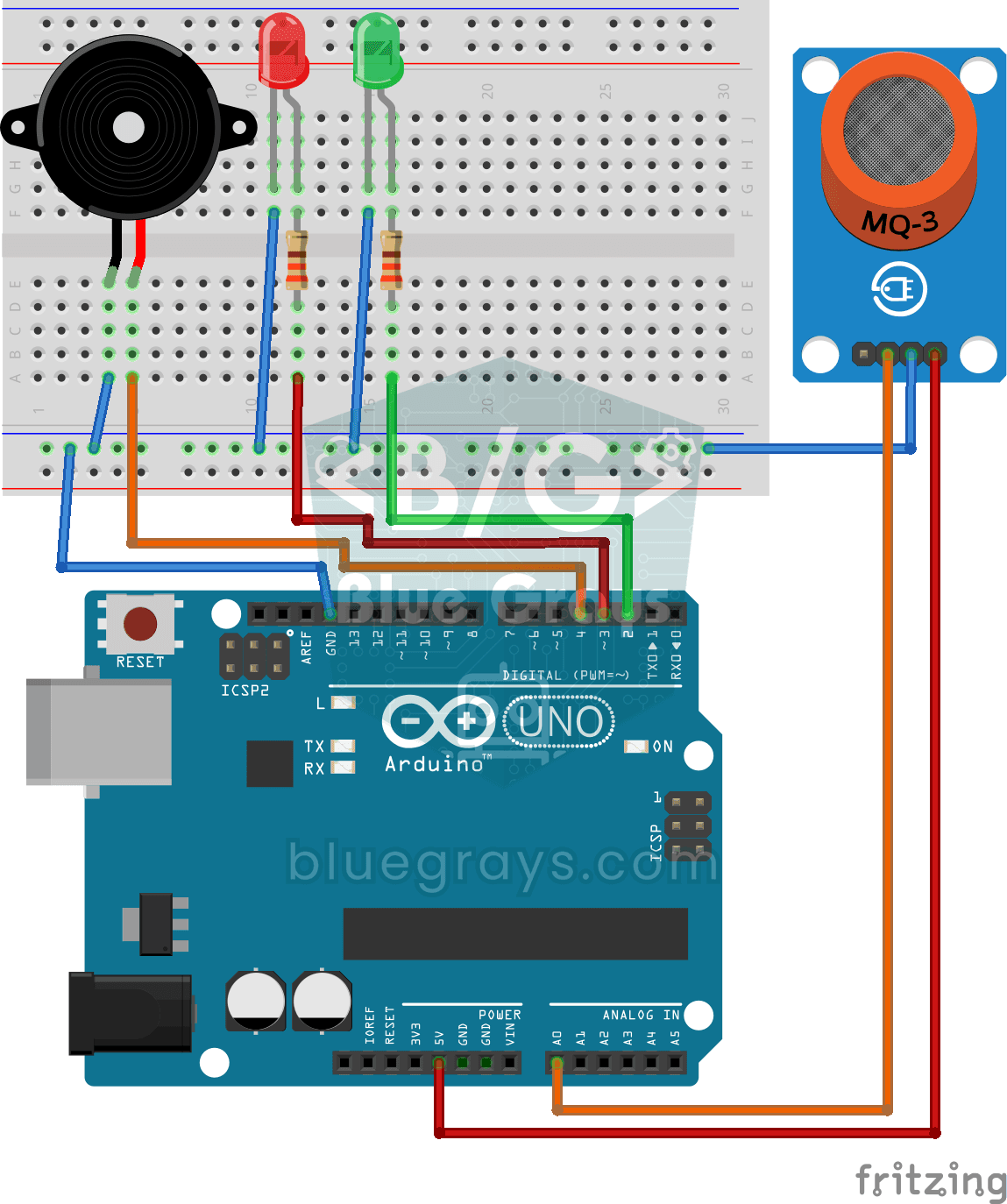
Using a Gas Sensor
Project that measures the gas density in the environment with MQ series gas sensor and alarms with LED and buzzer when it exceeds the threshold value. Teaches analog gas measurement and threshold comp
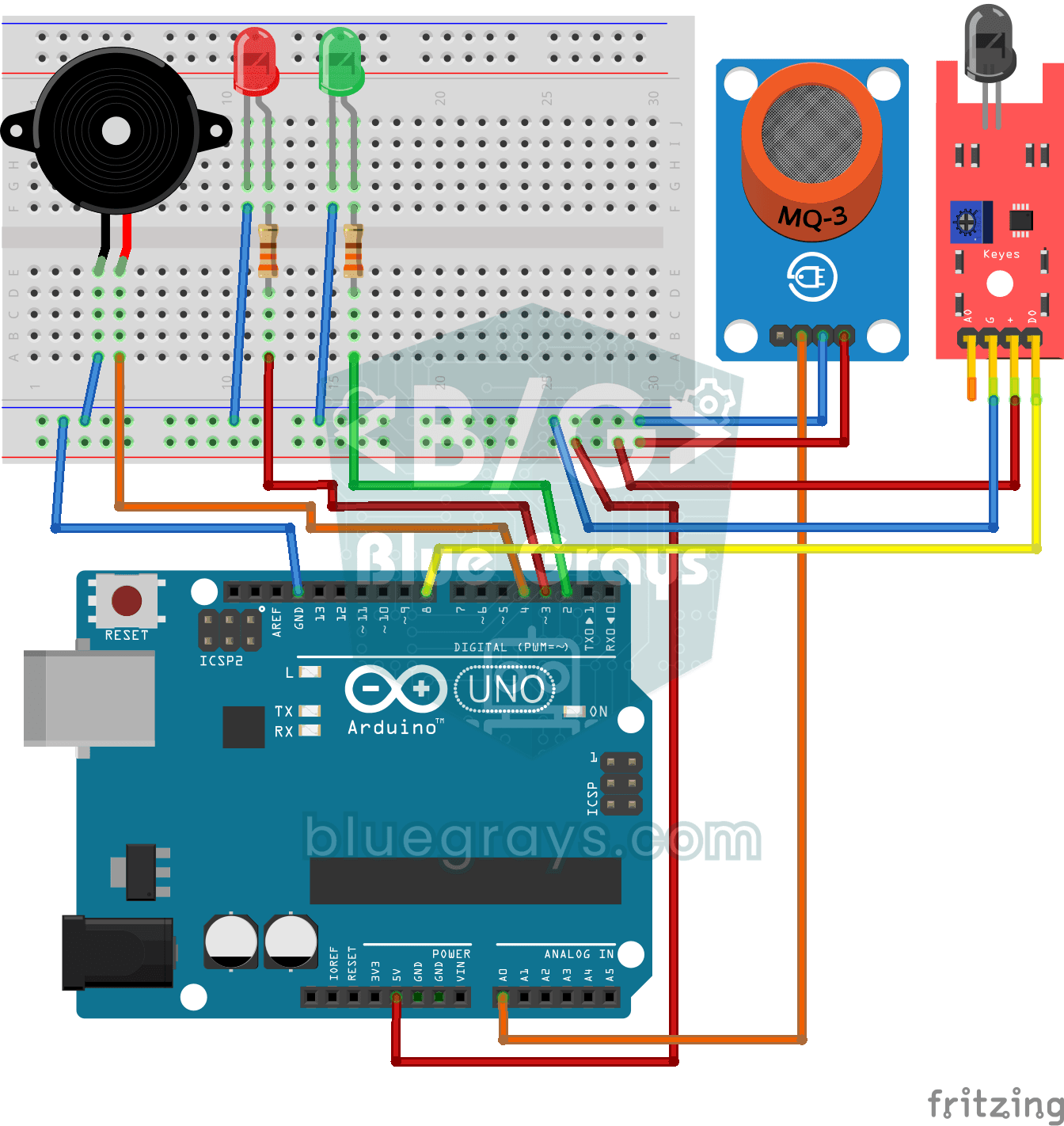
Flame and Gas Sensor Alarm
Advanced security project that uses flame sensor and gas sensor together and alarms with flashing LED and buzzer when fire or gas leakage is detected.

ESP32 MQ-2 Gas/Smoke Detector Alarm
In this project, combustible gas (LPG, methane, propane) and smoke detection is performed using an MQ-2 gas sensor module, and a siren-like alarm is played through a passive buzzer upon detection. The sensor's digital threshold output (DO) is connected to GPIO 4 on the ESP32; when gas or smoke exceeds the threshold, DO goes LOW and the alarm is triggered. Sensitivity is adjusted via the module's potentiometer. The passive buzzer is driven using `tone()` to produce a two-frequency siren effect.
More articles
Learn step by step how the MQ-2 gas sensor works, why it has to warm up, how to connect it to Arduino, set the threshold and build a gas and smoke alarm with a buzzer.