
Ohm's Law Explained: V = I × R, Power and LED Resistor Maths
What is Ohm's law? V = I × R and P = V × I, LED resistor calculation, series and parallel resistors, Arduino pin current limits and multimeter examples.

Ohm's law is the basic rule that describes the relationship between voltage (V), current (I) and resistance (R) in an electrical circuit: V = I × R. In other words, the voltage across a resistor equals the current flowing through it multiplied by its resistance. With this one-line formula you can work out which resistor an LED needs, how much current you can draw from an Arduino pin or what voltage a sensor circuit will produce, all before you burn a single part.
Almost everyone who starts with electronics asks the same first question: “Why do we put a resistor in front of an LED, and why 220 Ω?” In this article we explain Ohm's law from scratch using a water-pipe analogy. Then you'll learn, step by step, how to calculate power (P = V × I) and LED resistors, the current limits of Arduino, ESP32 and Raspberry Pi Pico pins, series and parallel resistors, multimeter measurements and how to build your own ohmmeter with an Arduino. When you don't feel like doing the maths by hand, the Ohm's law calculator and the LED resistor calculator do it in seconds.
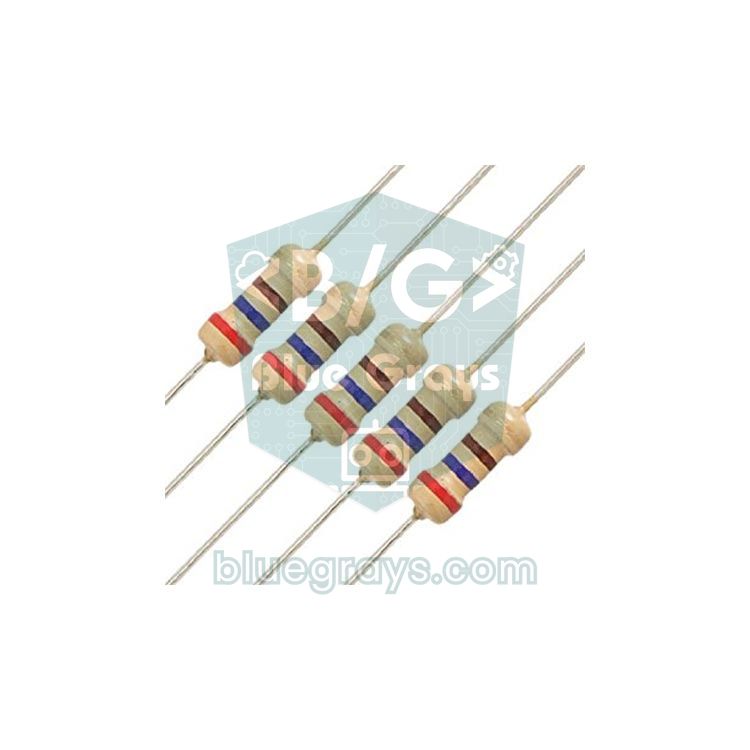
What is Ohm's law? The V = I × R formula
In 1827 the German physicist Georg Simon Ohm showed that the current through a conductor is directly proportional to the voltage applied across it. Double the voltage and the current doubles; double the resistance and the current halves. The easiest way to remember this is the water-pipe analogy: voltage is the water pressure in the tank, current is the amount of water flowing through the pipe each second, and resistance is how narrow the pipe is. More pressure means more flow; a narrower pipe means less flow. In electricity, voltage pushes the electrons, resistance narrows their path, and current is the amount of charge that gets through.
| Quantity | Symbol | Unit | Instrument | Typical Arduino value |
|---|---|---|---|---|
| Voltage | V (U in some books) | volt (V) | Voltmeter | 5 V, 3.3 V |
| Current | I | ampere (A) | Ammeter | 5–20 mA for an LED, 0.5 mA for a pull-up |
| Resistance | R | ohm (Ω) | Ohmmeter | 220 Ω, 330 Ω, 10 kΩ |
| Power | P | watt (W) | Calculated (V × I) | 1/4 W for resistors |
You can use the formula in three ways. To find current, divide voltage by resistance (I = V / R); to find resistance, divide voltage by current (R = V / I); to find voltage, multiply current by resistance (V = I × R). The classic memory aid is the Ohm's law triangle: write V at the top and I and R in the bottom corners. Cover the letter you want with your finger and the two remaining letters show the operation: side by side means multiply, one above the other means divide.
| You want | Formula | Example |
|---|---|---|
| Voltage (V) | V = I × R | 0.02 A × 220 Ω = 4.4 V |
| Current (I) | I = V / R | 5 V / 1000 Ω = 0.005 A = 5 mA |
| Resistance (R) | R = V / I | 3 V / 0.01 A = 300 Ω |
| Power (P) | P = V × I = I² × R = V² / R | 5 V × 0.02 A = 0.1 W |
Units: calculating with milliamps and kilohms
In the Arduino world, currents are usually in milliamps (mA) rather than amps, and resistances are in kilohms (kΩ) rather than ohms. 1 A = 1000 mA, 1 kΩ = 1000 Ω and 1 MΩ = 1,000,000 Ω. The most common calculation mistake is mixing up units: if you plug a 20 mA current into the formula as 20, the result is a thousand times wrong. The right way is to write the current in amps as 0.02, or to do the whole calculation consistently in mA and kΩ.
Electrical power: P = V × I
Ohm's law has an inseparable twin, the power formula: P = V × I. The power a component dissipates is the voltage across it times the current through it, measured in watts (W). Substitute Ohm's law into it and you get two more handy forms: P = I² × R and P = V² / R. The power dissipated in a resistor turns into heat, which is why every resistor has a power rating. The small carbon-film resistors you use on a breadboard are usually rated at 1/4 W (0.25 W).
| Situation | Calculation | Power | What to choose |
|---|---|---|---|
| LED resistor: 3 V across 330 Ω | 3 V × 9.1 mA | 27 mW | 1/4 W is more than enough |
| Pull-up: 5 V across 10 kΩ | 5 V × 0.5 mA | 2.5 mW | 1/4 W is more than enough |
| 100 Ω straight across 5 V | 5 V × 50 mA | 250 mW | Right at the 1/4 W limit; use 1/2 W |
| 22 Ω straight across 5 V | 5 V × 227 mA | 1.14 W | A power resistor of at least 2 W |
For a safe design, pick a resistor rated for at least twice the power it will dissipate. A resistor too hot to touch, a darkened body or a burning smell are signs that the power limit has been exceeded. The same logic applies when choosing batteries and adapters: a project drawing 500 mA at 5 V uses 2.5 W, which is the limit of what a USB 2.0 port can supply.
LED resistor calculation step by step
An LED does not obey Ohm's law directly, because its resistance is not constant. It conducts almost no current until it reaches a certain forward voltage (Vf); once past that threshold, the current rises very quickly. If you connect an LED straight to 5 V or to an Arduino pin, nothing limits the current, and the LED, the pin or both get damaged. That's what the series resistor is for: the LED's forward voltage stays almost constant, the rest of the voltage drops across the resistor, and Ohm's law sets the current. If you're curious about how LEDs work, see What Is an LED?.
- Find the supply voltage (Vs): 5 V on an Arduino Uno and Nano, 3.3 V on an ESP32 and Raspberry Pi Pico.
- Find the LED's forward voltage (Vf): about 2.0 V for red, 3.0–3.2 V for blue and white. For typical values by colour, check the LED voltage table.
- Choose the current you want (I): 20 mA is the upper limit for standard 5 mm LEDs; 5–10 mA is bright enough in most cases and doesn't strain the pin.
- Apply the formula: R = (Vs − Vf) / I.
- Round the result up to the next standard value (E12 series: 100, 120, 150, 180, 220, 270, 330, 390, 470 Ω…). You can find the nearest one with the standard value tool.
- Check the power: P = (Vs − Vf) × I. For a single indicator LED the result is usually below 50 mW, so a 1/4 W resistor is fine.
| LED colour | Vf (approx.) | At 5 V for 10 mA | At 3.3 V for 10 mA |
|---|---|---|---|
| Red | 2.0 V | 300 Ω → 330 Ω | 130 Ω → 150 Ω |
| Yellow | 2.1 V | 290 Ω → 330 Ω | 120 Ω → 120 Ω |
| Green (classic) | 2.2 V | 280 Ω → 330 Ω | 110 Ω → 120 Ω |
| Blue | 3.0 V | 200 Ω → 220 Ω | 30 Ω → 33 Ω (marginal) |
| White | 3.1 V | 190 Ω → 220 Ω | 20 Ω → 22 Ω (marginal) |
Let's work through a concrete example: you're connecting a red LED to a 5 V pin on an Arduino Uno. R = (5 − 2) / 0.01 = 300 Ω, so you pick the standard value 330 Ω. The actual current is I = 3 / 330 ≈ 9.1 mA, and the resistor dissipates 3 V × 9.1 mA ≈ 27 mW. Why is 220 Ω so common in starter kits? Because with a red LED at 5 V it gives about 13.6 mA: bright and safe. Connect the same LED to a 3.3 V ESP32 pin with 330 Ω and the current drops to (3.3 − 2) / 330 ≈ 3.9 mA; the LED lights, but dimmer. On a Raspberry Pi Pico this low current is actually an advantage, because Pico pins have a default drive strength of 4 mA. The LED resistor calculator does all of this on one screen.
Arduino, ESP32 and Pico pin current limits
A microcontroller pin is a small voltage source that can only supply a limited current. When you set it HIGH it outputs 5 V or 3.3 V, but it can only hold that voltage up to a certain current. Ohm's law does the job here as well: if you know the resistance of the load on the pin, you calculate its current with I = V / R and compare the result with the pin's limit.
| Board | Pin voltage | Safe pin current | Highest value | Total limit |
|---|---|---|---|---|
| Arduino Uno / Nano (ATmega328P) | 5 V | 20 mA | 40 mA (absolute maximum) | 200 mA (VCC and GND pins) |
| ESP32 | 3.3 V | About 20 mA (default drive strength) | About 40 mA (at the highest drive setting) | Drive loads through a transistor |
| Raspberry Pi Pico (RP2040) | 3.3 V | 4 mA (default; 2, 4, 8 or 12 mA selectable) | 12 mA | 50 mA for all GPIOs together |
These limits protect the chip itself; running at the absolute maximum for long periods wears it out. The practical rule is simple: drive one or two LEDs from a pin at most and leave the rest to a transistor. For example, the coil of a classic blue 5 V relay has a resistance of about 70 Ω, so I = 5 / 70 ≈ 71 mA. That's almost twice the Uno's 40 mA limit, which is why relays are always driven through a transistor. Ready-made relay modules already carry that transistor and the protection diode on board. The same calculation applies to motors, servos, LED strips and powerful buzzers; you can choose a suitable transistor with the transistor tool.
Series and parallel resistors (in brief)
When you use more than one resistor, you reduce the circuit to a single equivalent resistance and apply Ohm's law again. In a series connection the resistors are joined end to end, the same current flows through all of them, and the total resistance is the sum of the values. In a parallel connection both ends of the resistors are shared, they all have the same voltage across them and the current splits between the branches; the total resistance is always smaller than even the smallest resistor.
| Connection | Total resistance | Current | Voltage | Example |
|---|---|---|---|---|
| Series | R = R1 + R2 + … | The same current flows through all | Shared in proportion to the resistances | 220 Ω + 330 Ω = 550 Ω |
| Parallel | 1/R = 1/R1 + 1/R2 + … | Split between the branches | The same across all | 1 kΩ ∥ 1 kΩ = 500 Ω; 1 kΩ ∥ 2.2 kΩ ≈ 688 Ω |
The most useful application of series resistors is the voltage divider. With two resistors in series, the voltage at the middle point is Vout = Vin × R2 / (R1 + R2). This formula also comes straight from Ohm's law: a current of I = Vin / (R1 + R2) flows through the circuit, and the voltage across R2 is I × R2. For example, to bring a 5 V signal down for a 3.3 V ESP32 input, use R1 = 1 kΩ and R2 = 2 kΩ: you get 5 × 2 / 3 ≈ 3.33 V, and only 5 / 3000 ≈ 1.7 mA flows through the divider. LDR and potentiometer circuits are really voltage dividers too; see the LDR and potentiometer articles for details. The series-parallel and voltage divider tools are ready for the maths.
Pull-up resistors and Ohm's law
The 10 kΩ pull-up resistor you use when connecting a button to an Arduino is also chosen with Ohm's law. While the button is pressed, one end of the resistor is at 5 V and the other at ground, so I = 5 / 10,000 = 0.5 mA flows through it, a negligible loss even in a battery project. Fit 100 Ω instead and every press draws 50 mA while the resistor dissipates 0.25 W: the battery drains and the resistor heats up. A very large value (say 1 MΩ), on the other hand, leaves the pin open to noise. The internal resistor enabled by Arduino's INPUT_PULLUP mode is between 20 and 50 kΩ. The details of button wiring are in How to connect a button to Arduino.
Multimeter measurement examples
- Measuring voltage: Set the multimeter to DC V and touch the probes across both ends of the component, in parallel. The circuit must be running.
- Measuring current: Open the circuit at one point and connect the multimeter in series across the gap, with the red probe in the mA socket. All of the current must flow through the meter.
- Measuring resistance: Switch off the circuit and disconnect at least one leg of the resistor; otherwise parallel paths will change the reading.
- Measuring current indirectly: Measure the voltage across a resistor of known value and calculate I = V / R. It's the safest method, with no wires to unplug.
Let's go through an example: you've built a series circuit running from the 5V pin of a USB-powered Arduino through a 330 Ω resistor and a red LED to GND. With the probes across the resistor you read 2.95 V, and across the LED 1.98 V. You don't need to unplug anything to find the current: I = 2.95 / 330 ≈ 8.9 mA. The two voltages add up to 4.93 V, because USB voltage is never exactly 5.00 V; it usually sits between 4.8 and 5.1 V. The fact that the voltages in a series circuit add up to the supply is Kirchhoff's voltage law, which together with Ohm's law forms the basis of all circuit calculations.
Build your own ohmmeter with Arduino
The best way to make Ohm's law stick is to use it in code. Connect a known 10 kΩ resistor in series with a resistor of unknown value (Rx) and feed the middle point to an analog input: from the voltage it measures, the board first calculates the current (I = V / R) and then the unknown resistance (R = V / I). The wiring is as follows:
| Circuit point | Arduino Uno | ESP32 | Raspberry Pi Pico |
|---|---|---|---|
| Top end of the known resistor (10 kΩ) | 5V | 3V3 | 3V3(OUT), pin 36 |
| Middle point where the two resistors meet | A0 | GPIO 34 | GP26 (ADC0), pin 31 |
| Bottom end of the measured resistor (Rx) | GND | GND | GND, pin 38 |
1// Gerilim bölücü ile ohmmetre / Ohmmeter with a voltage divider
2// 5V -> 10k (bilinen / known) -> A0 -> Rx -> GND
3const float VIN = 5.0;                    // besleme gerilimi / supply voltage
4const float R_KNOWN = 10000.0;            // bilinen direnç (ohm) / known resistor (ohms)
5const int ADC_PIN = A0;
6
7void setup() {
8  Serial.begin(9600);
9}
10
11void loop() {
12  int raw = analogRead(ADC_PIN);          // 0-1023
13  float vout = raw * VIN / 1023.0;        // Rx üzerindeki gerilim / voltage across Rx
14
15  if (raw >= 1020) {
16    Serial.println(F("Direnc yok / No resistor"));
17  } else if (raw <= 3) {
18    Serial.println(F("Kisa devre / Short circuit"));
19  } else {
20    float iMilli = (VIN - vout) / R_KNOWN * 1000.0;  // I = V / R (mA)
21    float rx = vout / iMilli * 1000.0;               // R = V / I (ohm)
22    float pMilli = vout * iMilli;                    // P = V x I (mW)
23    Serial.print(F("Rx = "));
24    Serial.print(rx, 0);
25    Serial.print(F(" ohm   I = "));
26    Serial.print(iMilli, 3);
27    Serial.print(F(" mA   P = "));
28    Serial.print(pMilli, 2);
29    Serial.println(F(" mW"));
30  }
31  delay(1000);
32}
The code first finds the voltage on the analog input. The current through the known resistor is the voltage across it (VIN − vout) divided by 10 kΩ; since the circuit is in series, the same current also flows through Rx. Then Rx = vout / I gives the unknown resistance, and P = V × I gives the power Rx dissipates. Because the Arduino's analog reference is the same 5 V rail, a USB voltage of 4.9 V or 5.1 V barely affects the resistance you get. The measurement is most accurate when Rx is close to the known resistor; with 10 kΩ, roughly 1 kΩ to 100 kΩ measures well.
On an ESP32 you can build the same circuit on GPIO 34; in the code set VIN = 3.3 and ADC_PIN = 34, and because the ESP32's ADC reads 0–4095, replace 1023 with 4095 (and move the "no resistor" threshold to around 4090). This ADC isn't perfectly linear, though, and can't read much above about 3.1 V, so instead of converting the raw value it's more accurate to read the voltage directly in millivolts with analogReadMilliVolts(34). The measurement is then no longer ratiometric, so set VIN to the real voltage you measure on the 3V3 pin with a multimeter. On a Raspberry Pi Pico, the same measurement in MicroPython looks like this:
1from machine import ADC
2import time
3
4VIN = 3.3                                   # Pico ADC referansı / Pico ADC reference
5R_KNOWN = 10000                             # bilinen direnç (ohm) / known resistor (ohms)
6adc = ADC(26)                               # GP26 = ADC0
7
8while True:
9    raw = adc.read_u16()                    # 0-65535
10    vout = raw * VIN / 65535                # Rx üzerindeki gerilim / voltage across Rx
11    if vout > VIN - 0.02:
12        print("Direnc yok / No resistor")
13    elif vout < 0.02:
14        print("Kisa devre / Short circuit")
15    else:
16        i_ma = (VIN - vout) / R_KNOWN * 1000    # I = V / R (mA)
17        rx = vout / i_ma * 1000                 # R = V / I (ohm)
18        print("Rx = {:.0f} ohm  I = {:.3f} mA".format(rx, i_ma))
19    time.sleep(1)
Common calculation mistakes
| Mistake | What happens? | Do this instead |
|---|---|---|
| Writing mA as amps (10 instead of 0.01) | You get 0.3 Ω instead of 300 Ω | Write current in amps or use the V / kΩ = mA shortcut |
| Forgetting the LED forward voltage (R = 5 / 0.01) | You get 500 Ω and the LED is needlessly dim | Use R = (Vs − Vf) / I |
| Reusing a 5 V calculation on a 3.3 V board | The LED stays very dim on an ESP32 or Pico | Redo the calculation with the board's own voltage |
| Not calculating the power | The resistor heats up, darkens and burns | Calculate P = I² × R and allow at least a 2× margin |
| Measuring resistance in a powered circuit | Wrong reading; the multimeter may be damaged | Switch off and lift one leg of the resistor |
| Connecting a relay or motor straight to a pin | The pin is permanently damaged by overcurrent | Use a transistor, MOSFET or relay module |
Projects to try Ohm's law with
- Your first LED circuit: See the brightness difference between 220 Ω and 330 Ω with your own eyes and confirm the current with a multimeter.
- Traffic light: Calculate a separate resistor for the red, yellow and green LEDs based on their forward voltages.
- RGB LED: Find out why each colour channel needs its own resistor in Using an RGB LED.
- Night light: Detect darkness with a voltage divider made of an LDR and a fixed resistor; the code is in the LDR light sensor article.
- Digital voltmeter: Safely measure voltages above 5 V with a voltage divider and show the result on an LCD.
- Pocket ohmmeter: Combine the code above with an I2C LCD display to build a portable resistance meter.
Ohm's law is the basic calculation behind every circuit you'll build, whether it's an LED, a sensor, a motor or a power supply. Once it clicks, you choose resistors by calculation instead of guesswork and never burn a part for nothing. To get to know resistors better, read What Is a Resistor?. In the BlueGrays app you'll find LED, traffic light, button, LDR and digital voltmeter projects for Arduino, ESP32 and Pico, with step-by-step circuit diagrams and code.
Frequently asked questions
What is the formula for Ohm's law?
Ohm's law is written V = I × R: voltage (volts) equals current (amps) times resistance (ohms). The same formula is also used as I = V / R and R = V / I. For example, a 1 kΩ resistor connected to 5 V carries a current of 5 mA.
What resistor do I need for an LED?
The resistor is calculated with R = (supply voltage − LED forward voltage) / current. Typical values for a red LED are 220–330 Ω at the Arduino Uno's 5 V and 100–150 Ω at the ESP32's 3.3 V. Blue and white LEDs have a higher forward voltage, so they need a smaller resistor for the same current.
How much current can an Arduino pin supply?
On the ATmega328P-based Arduino Uno and Nano, the absolute limit is 40 mA per pin, and 20 mA is recommended for continuous use. The total for all pins should not exceed 200 mA. Bigger loads such as relays, motors and LED strips need a transistor, MOSFET or relay module.
What is the power formula and how do you calculate watts?
Power is calculated with P = V × I and measured in watts. Combined with Ohm's law it becomes P = I² × R and P = V² / R. For example, a 100 Ω resistor connected to 5 V carries 50 mA and dissipates 0.25 W, exactly the limit of a 1/4 W resistor.
Does Ohm's law apply to every component?
Ohm's law applies exactly to linear (ohmic) components such as resistors. In semiconductors like LEDs, diodes and transistors, current isn't proportional to voltage, but the current through a resistor in series with them is still calculated with Ohm's law. For an NTC that changes with heat or an LDR that changes with light, the law holds at every moment with the resistance value at that moment.
How do you calculate series and parallel resistors?
Resistors in series add up as R = R1 + R2, and the same current flows through all of them. In parallel you use 1/R = 1/R1 + 1/R2; two equal resistors in parallel halve the total resistance. For example, two 1 kΩ resistors give 2 kΩ in series and 500 Ω in parallel.
Projects to build after reading this
See all projects
Led Lighting
Basic input project that turns a single LED on and off at regular intervals with Arduino. Teaches the use of digitalWrite and delay functions.

Traffic Lamp
Project that simulates a real traffic light with red, yellow and green LEDs. Teaches timing and sequential control logic.

Led Burning with Push Button (Push)
Push control project that turns on the LED when the button is pressed and turns it off when it is released. Teaches button reading and conditional expression usage with digitalRead.

Reading Light Intensity with Ldr
Project that measures ambient light intensity with LDR sensor and displays it on Serial Monitor. Teaches the basics of analog sensor reading and serial communication.

LED Blink with ESP32
Teaches basic GPIO output usage with ESP32. We achieve a blinking effect by turning an LED on and off from a digital pin. ESP32 version of the classic blink project on Arduino UNO; the pin map and syntax remain the same, the only difference is in the pin numbers.
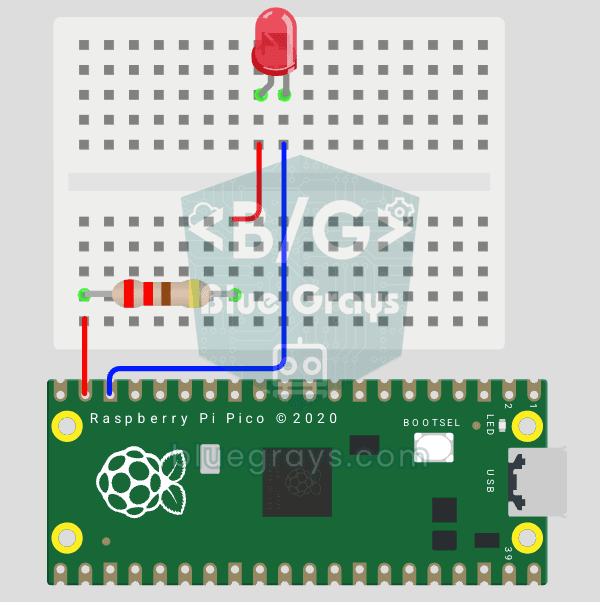
Raspberry Pi Pico: Controlling an External LED (GP14 + Breadboard)
The next step after Pico’s built-in LED: connecting an external LED to the breadboard and controlling it via the GP14 pin. In this project, you’ll learn how to use any of the Pico’s general-purpose GPIO pins as an output, the LED’s polarity (long leg = anode/+, short leg = cathode/–), and why a current-limiting resistor (220Ω) is required. If you don’t include the resistor, excessive current will flow through the LED and it may burn out. The circuit is very simple: Pico GP14 → 220Ω resistor → LE
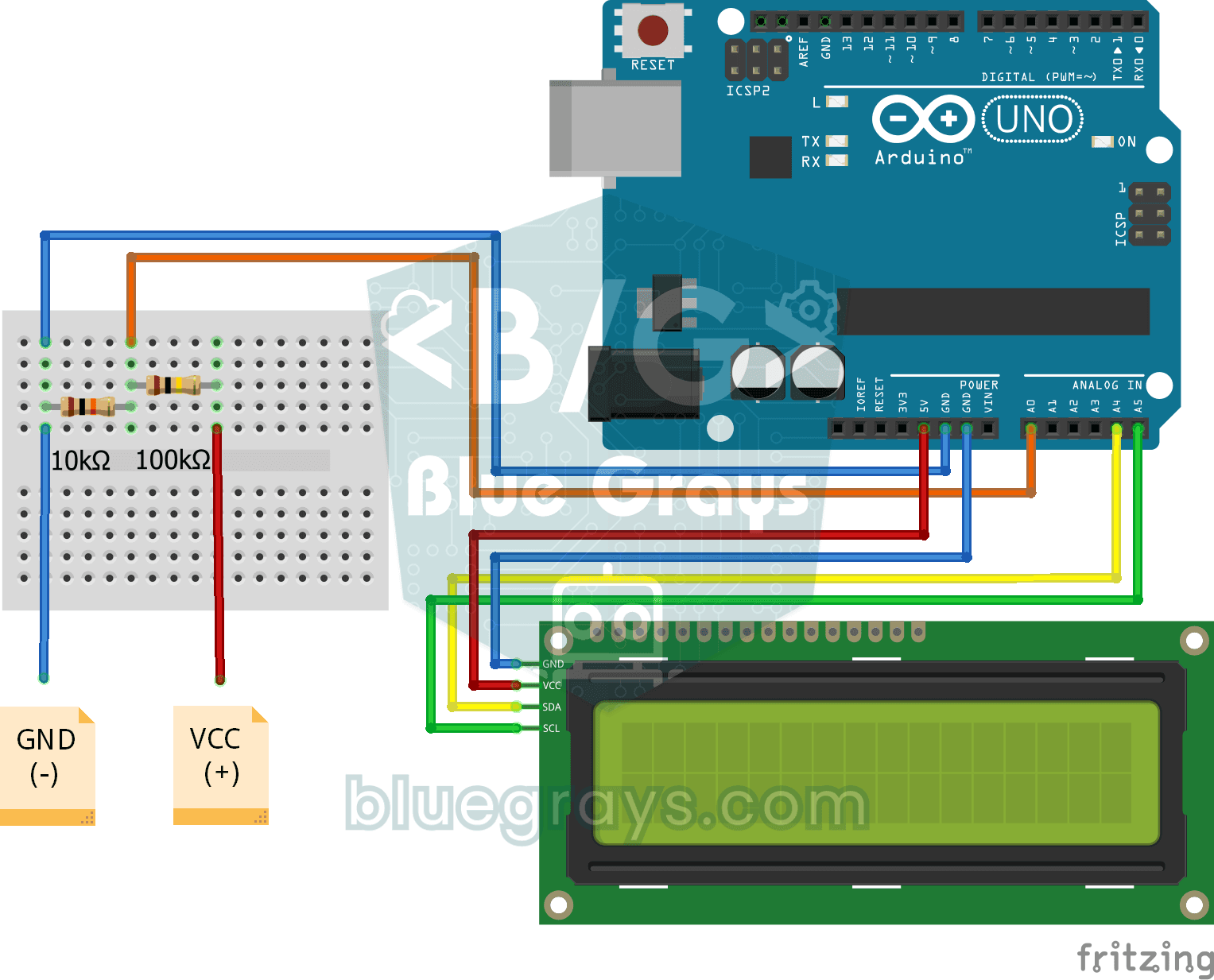
Digital Voltmeter with LCD Display
Digital voltmeter project that measures voltage in the range of 0-55V with voltage divider circuit and displays the result on I2C LCD screen. Teaches voltage divider formula and analog measurement cal
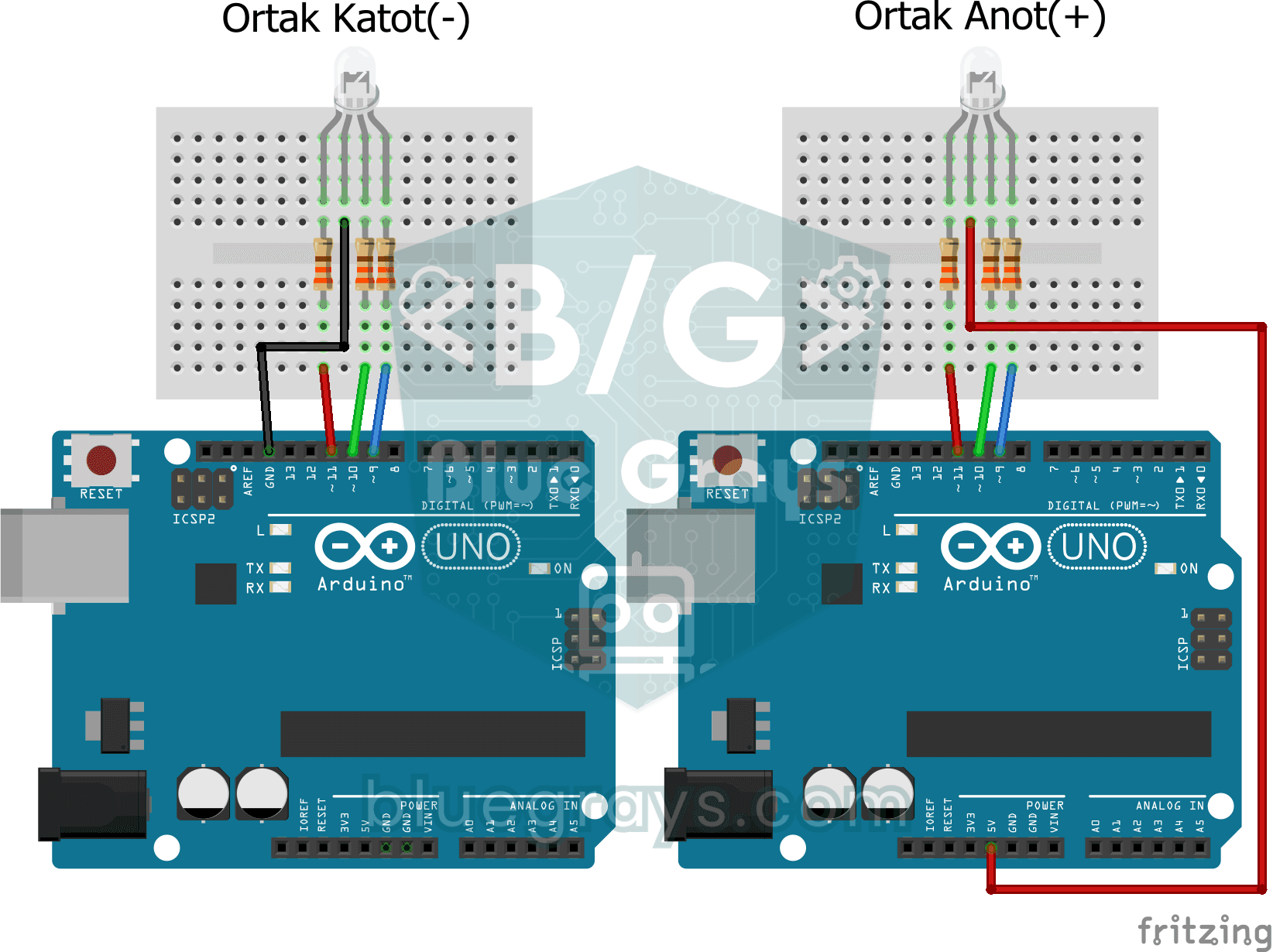
RGB Led Usage
Basic usage project that sequentially turns on and off the red, green and blue colors of the RGB LED. Teaches common cathode RGB LED control.
More articles
Understand Ohm's law with a simple water-pipe analogy, then calculate LED resistors, power, pin current limits and series-parallel resistors step by step with real Arduino, ESP32 and Pico examples.