
Arduino Sound Sensor (KY-038): Clap Switch and Sound Level
How does the KY-038/KY-037 Arduino sound sensor work? Pot setup, peak-to-peak sound level, double-clap lamp, LED bar, ESP32 and Pico code, and the dB truth.
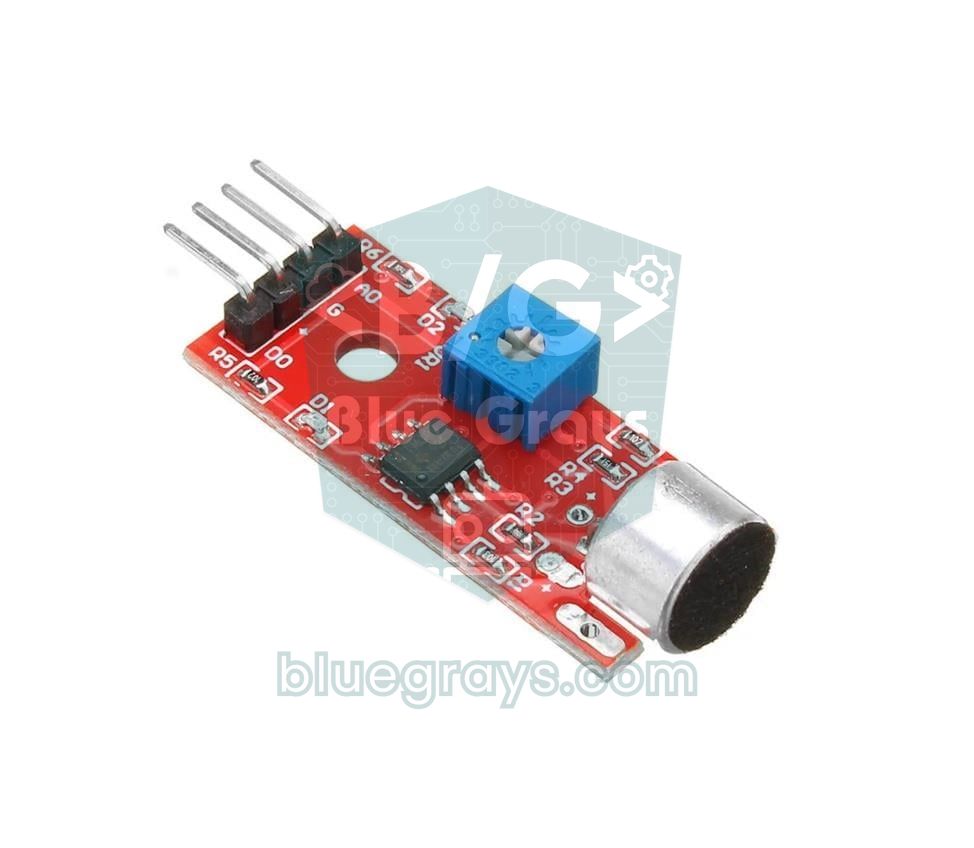
When people talk about an Arduino sound sensor, they usually mean the KY-038: a cheap module that puts a small electret microphone, an LM393 comparator and a blue sensitivity potentiometer on one board. Its big-microphone sibling, the KY-037, works the same way. You don't need a library: the DO pin changes state when the sound passes a threshold and is read with digitalRead(), while the AO pin gives the microphone's raw signal and is read with analogRead(). Clap-activated lamps, noise alarms and sound-reactive lights are all built with this module.
But this sensor has an important limit that many tutorials skip: the KY-038 is a sound / no sound detector. It doesn't record audio, it doesn't recognise speech and it can't measure decibels. In this article you'll learn how the circuit on the module works, how to set the potentiometer properly, why the analog reading often seems not to change at all, and how to measure loudness correctly with the peak-to-peak method. Then you'll build a lamp that switches with a double clap and an 8-LED sound level bar, do the same jobs with an ESP32 and a Raspberry Pi Pico, and see which modules to move to when you need real sound measurement.
What is a sound sensor and how does it work?
The silver cylinder at the end of the board is an electret condenser microphone. Inside, a thin diaphragm faces a plate that carries a permanent electric charge, forming a tiny capacitor. Sound is a pressure wave in the air; as it pushes the diaphragm back and forth, the capacitance changes and a very small voltage change appears. A tiny JFET inside the capsule buffers this signal, which is why an electret microphone is powered through a resistor and has a polarity. The result at the microphone is a sound wave of only a few millivolts riding on a fixed DC voltage.
The 8-pin LM393 chip in the middle of the board contains two comparators, and the module uses one of them. A comparator looks at two voltages: the signal from the microphone and the threshold set by the potentiometer. The moment the signal crosses the threshold, the output changes state, and the DO pin and the second LED on the board respond. Here's a very important detail: a comparator is not an amplifier. It doesn't make the signal bigger; it only answers the question "is it above or below the threshold?". The AO pin carries the microphone's raw, unamplified signal, and that's why the analog reading is so weak.
| Feature | Value |
|---|---|
| Microphone | Electret condenser capsule, omnidirectional |
| Comparator | LM393 (dual comparator, one is used) |
| Supply | 3.3–5 V |
| Current | A few mA (about 5–10 mA including the LEDs) |
| Outputs | AO: raw microphone signal, DO: threshold output |
| Sensitivity adjustment | Blue multi-turn trimmer (usually a 3296 type) |
| LEDs | One for power, one for the DO state |
| Pin order | AO, G, +, DO |
KY-038 vs KY-037
The KY-038 and KY-037 use the same circuit, the same LM393 and the same pin order, so every sketch in this article runs on both without changes. The difference is the microphone capsule: the KY-037 has a larger capsule and is sold as a "high-sensitivity sound sensor", while the KY-038 has a smaller capsule and is the model you'll most often find in sensor kits. In practice both pick up loud sounds nearby well, but neither will hear someone talking on the other side of the room. You'll also find 3-pin LM393 sound modules with only a digital output; on most of them the output goes LOW when there's sound.
| Model | Pins | Microphone | Note |
|---|---|---|---|
| KY-038 | AO, G, +, DO | Small capsule | The most common model in sensor kits |
| KY-037 | AO, G, +, DO | Large capsule | Same circuit and same code; usually a little more sensitive |
| 3-pin LM393 sound module | VCC, GND, OUT | Small capsule | Digital output only; OUT usually goes LOW on sound |
Sound sensor wiring: Arduino Uno, ESP32 and Pico
| Module pin | Arduino Uno | ESP32 | Raspberry Pi Pico |
|---|---|---|---|
| + | 5V | 3V3 | 3V3(OUT), pin 36 |
| G | GND | GND | GND, pin 38 |
| AO | A0 | GPIO 34 (ADC1) | GP26 (ADC0), pin 31 |
| DO | D2 | GPIO 27 | GP15, pin 20 |
Digital output (DO) and potentiometer setup
The DO pin is a yes/no answer. On many KY-038 boards, DO goes HIGH and the second LED lights when the sound passes the threshold; on some clone boards and on 3-pin modules it's the other way round. That's why the sketches keep the level that means "sound" in a constant called SOUND_ACTIVE. The second key point: DO doesn't give one long pulse per clap. Because the sound wave rises above and falls below the threshold hundreds of times a second, the output switches on and off just as fast; a single clap produces a burst of short pulses lasting a few tens of milliseconds. Most boards have no hysteresis on the comparator, so the output also chatters with sounds close to the threshold. So read DO with a fast loop without delay() or with an interrupt, and treat pulses that are close together as a single event.
- Connect the module and place the sensor where it will be used, at a time with normal background noise; always adjust it in the real environment.
- Look at the DO LED on the board. If it stays on in silence, the threshold is too sensitive; turn the potentiometer with a small screwdriver until the LED goes out.
- If the LED never lights, turn the other way to find the point where it starts to light.
- From that point, turn back half a turn to a full turn towards the side where the LED stays off. That way steady noises such as a fridge or a fan won't trigger it.
- Clap from about one metre away: the LED should flash briefly. If it also lights with normal speech, turn it slightly towards less sensitive; if it doesn't light on a clap, turn it slightly towards more sensitive.
1// KY-038 DO testi: sesi algıla ve dahili LED'i yak / KY-038 DO test: detect sound and light the built-in LED
2const int SOUND_DO = 2;               // modülün DO pini / module DO pin
3const int SOUND_ACTIVE = HIGH;        // ses gelince HIGH; kartın tersse LOW / HIGH on sound; LOW if your board is inverted
4const unsigned long HOLD_MS = 200;    // yeni olay için gereken sessizlik / silence needed for a new event
5
6unsigned long lastSound = 0;
7unsigned long events = 0;
8
9void setup() {
10  Serial.begin(9600);
11  pinMode(SOUND_DO, INPUT);
12  pinMode(LED_BUILTIN, OUTPUT);
13}
14
15void loop() {
16  unsigned long now = millis();
17  if (digitalRead(SOUND_DO) == SOUND_ACTIVE) {
18    if (now - lastSound > HOLD_MS) {  // sessizlikten sonra ilk darbe / first pulse after silence
19      events++;
20      Serial.print(F("Ses algilandi / Sound detected #"));
21      Serial.println(events);
22    }
23    lastSound = now;                  // darbe yağmuru süreyi uzatır / the pulse burst extends the time
24  }
25  digitalWrite(LED_BUILTIN, now - lastSound < HOLD_MS ? HIGH : LOW);  // LED en az 200 ms yanar / LED stays on at least 200 ms
26}
The sketch reads the DO pin on every loop without delay(). Every time DO is active, the lastSound time is refreshed; a new event is only counted after 200 ms of silence, so a clap's burst of pulses shows up as a single line in the Serial Monitor. The built-in LED is also kept on for at least 200 ms; otherwise you couldn't see millisecond pulses with your eyes. If the counter keeps rising in silence, either the threshold is too sensitive or your board's DO output is inverted; in the second case, set SOUND_ACTIVE to LOW.
Why is the analog reading (AO) so weak?
Most beginners connect AO to A0, print the analogRead() value and see a number around 500 that barely changes with sound. The sensor isn't broken; the problem is scale. The Arduino Uno's 10-bit ADC divides 0–5 V into 1024 steps, so one step is about 4.9 mV. With normal sounds, the signal the microphone produces is much smaller than that step:
| Sound | Approximate level | Microphone output (peak-to-peak) | ADC steps on the Uno |
|---|---|---|---|
| Whisper | 30 dB SPL | ~0.01 mV | 0 |
| Normal speech (1 m) | 60 dB SPL | ~0.4 mV | 0 (invisible) |
| Loud TV, traffic | 80 dB SPL | ~3.6 mV | 0–1 |
| Very loud sound (1 Pa) | 94 dB SPL | ~18 mV | 3–4 |
| Sharp clap or car horn up close | 110 dB SPL | ~110 mV | ~23 |
The table was calculated with −44 dBV/Pa, the sensitivity of a typical electret capsule, assuming a sine-shaped sound. Depending on the microphone bias resistor on your board, the real values can be a few times larger, but the conclusion stays the same: AO only clearly sees close, loud sounds, while normal speech and whispers fall below the Uno's resolution. You'll find more on how the ADC works in What Is an ADC?.
The second reason is the nature of sound. Sound is a wave that swings up and down around a DC level. A single analogRead() catches a random moment of that wave: it might land on a peak, a trough or right in the middle. So the size of one reading tells you nothing about how loud the sound is. The third reason is speed: the Uno takes about 100 microseconds per analog reading, so it can take at most around 10,000 samples a second. That's enough to track the sound level, but not enough to record audio or analyse frequencies. Finally, noise on the 5 V supply from USB leaks straight into AO. You can solve the first two problems with the right measuring method.
Measuring peak-to-peak amplitude: reading loudness correctly
The right method is to take as many samples as possible over a short time window and find the largest and smallest values. The difference between them is the peak-to-peak amplitude, and it shows how strong the sound is regardless of the DC level. 50 ms is a good window: one period of 20 Hz, the lowest frequency the human ear can hear, is exactly 50 ms, so even the deepest sound fits one full wave into the window. The Uno takes around 450–500 samples in that time.
1// Tepe-tepe genlik ölçümü (Seri Çizici için) / Peak-to-peak amplitude (for the Serial Plotter)
2const int SOUND_AO = A0;                 // modülün AO pini / module AO pin
3const unsigned long WINDOW_MS = 50;      // 50 ms = 20 Hz'in bir periyodu / one period of 20 Hz
4
5void setup() {
6  Serial.begin(115200);
7}
8
9void loop() {
10  int minV = 1023, maxV = 0;
11  long sum = 0;
12  int count = 0;
13  unsigned long start = millis();
14  while (millis() - start < WINDOW_MS) { // yaklaşık 450-500 örnek / about 450-500 samples
15    int v = analogRead(SOUND_AO);
16    if (v < minV) minV = v;
17    if (v > maxV) maxV = v;
18    sum += v;
19    count++;
20  }
21  int p2p = maxV - minV;                 // tepe-tepe genlik / peak-to-peak amplitude
22  float mv = p2p * 5000.0 / 1024.0;      // milivolt karşılığı / in millivolts
23
24  Serial.print(F("p2p:"));
25  Serial.print(p2p);
26  Serial.print(F(" ortalama_avg:"));     // AO'nun DC seviyesi; istemezsen bu iki satırı sil / DC level of AO; delete these two lines if not needed
27  Serial.print(sum / count);
28  Serial.print(F(" mV:"));
29  Serial.println(mv, 1);
30}
After uploading the sketch, open the Serial Plotter from the Tools menu and set the speed to 115200. In a quiet room p2p usually stays between 0 and 3; it rises by a few units when you talk next to the microphone and by tens of units when you clap close by. The ortalama_avg value is AO's DC level, and since it stretches the graph's scale you can delete the two ortalama_avg lines if you want to follow p2p comfortably. On some boards the potentiometer also shifts this DC level; if the average is stuck at 0 or 1023, the signal is clipping, so turn the potentiometer until the value is near the middle. If you're new to the Serial Plotter, take a look at Arduino Serial Monitor.
Step by step: switching a lamp with a double clap
The clap lamp is the best-known sound sensor project, but a circuit that works on a single clap is also triggered by a slammed door, a dropped book or a cough, and the lamp keeps flicking on and off. The fix is to look for a rhythm: the sketch below only reacts to exactly two claps that come 0.12 to 0.7 seconds apart. A single sound, or three or more sounds (music, applause, a barking dog), is ignored.
- Connect the KY-038's + pin to 5V, G to GND and DO to D2.
- Connect the relay module's VCC pin to 5V, GND to GND and IN to D7. You'll find how a relay works and how to wire the load side in What Is a Relay Module?; do your first tests with the relay's own LED instead of a lamp.
- Upload the sketch and open the Serial Monitor at 9600 baud.
- Clap twice from a metre or two away. You should see only one "Alkis / Clap" line per clap; if a single clap is counted more than once, turn the potentiometer slightly towards less sensitive.
- Watch the lamp change state about 0.7 seconds after the second clap.
1// Çift alkışla lamba (röle) / Double-clap lamp (relay)
2const int SOUND_DO = 2;                     // KY-038 DO pini / KY-038 DO pin
3const int RELAY = 7;                        // röle modülü IN / relay module IN
4const int SOUND_ACTIVE = HIGH;              // kartın tersse LOW / LOW if your board is inverted
5const int RELAY_ON = LOW;                   // aktif LOW röle modülü / active-LOW relay module
6const int RELAY_OFF = HIGH;
7const unsigned long QUIET_GAP_MS = 120;     // yeni alkış için gereken sessizlik / silence needed before a new clap
8const unsigned long CLAP_WINDOW_MS = 700;   // dizinin bittiğine karar verme süresi / time to decide the series is over
9const unsigned long LOCKOUT_MS = 1000;      // röle tıkırtısını yok say / ignore the relay click
10
11int clapCount = 0;
12unsigned long lastPulse = 0;                // DO'nun son aktif olduğu an / last time DO was active
13unsigned long lastToggle = 0;               // lambanın son değiştiği an / last time the lamp changed
14bool lampOn = false;
15
16void setup() {
17  Serial.begin(9600);
18  pinMode(SOUND_DO, INPUT);
19  pinMode(RELAY, OUTPUT);
20  digitalWrite(RELAY, RELAY_OFF);           // lamba kapalı başlar / lamp starts off
21}
22
23void loop() {
24  unsigned long now = millis();
25
26  if (digitalRead(SOUND_DO) == SOUND_ACTIVE) {
27    bool locked = now - lastToggle < LOCKOUT_MS;
28    if (!locked && now - lastPulse >= QUIET_GAP_MS) {  // sessizlikten sonra ilk darbe = yeni alkış / first pulse after silence = new clap
29      clapCount++;
30      Serial.print(F("Alkis / Clap: "));
31      Serial.println(clapCount);
32    }
33    lastPulse = now;                        // aynı alkışın darbeleri süreyi uzatır / pulses of the same clap extend the time
34  }
35
36  if (clapCount > 0 && now - lastPulse > CLAP_WINDOW_MS) {  // dizi bitti / the series is over
37    if (clapCount == 2) {                   // yalnız tam iki alkış / exactly two claps only
38      lampOn = !lampOn;
39      digitalWrite(RELAY, lampOn ? RELAY_ON : RELAY_OFF);
40      lastToggle = now;
41      if (lampOn) Serial.println(F("Lamba ACIK / Lamp ON"));
42      else Serial.println(F("Lamba KAPALI / Lamp OFF"));
43    }
44    clapCount = 0;                          // 1, 3 ve fazlası yok sayılır / 1, 3 or more are ignored
45  }
46}| Constant | Value | Purpose |
|---|---|---|
| SOUND_ACTIVE | HIGH | The level DO takes when there's sound; set it to LOW if your board is inverted |
| QUIET_GAP_MS | 120 ms | The silence needed before a new clap is counted; a clap's pulse burst and echo count as one clap |
| CLAP_WINDOW_MS | 700 ms | After this much silence since the last sound, the series is considered over and the claps are evaluated |
| LOCKOUT_MS | 1000 ms | After the lamp changes, sounds are ignored so the relay's click isn't mistaken for a new clap |
| RELAY_ON / RELAY_OFF | LOW / HIGH | For an active-LOW relay module; swap them on an active-HIGH board |
The sketch doesn't use delay(); it measures everything with millis(), so the timing of the claps is never missed. We explain this approach in detail in millis vs delay. The lamp changing 0.7 seconds after the second clap rather than right away is a deliberate choice: the sketch waits to see whether a third clap is coming. If you want a faster response, you can lower CLAP_WINDOW_MS to 400–500 ms, but then you'll need to clap faster. If your room is very echoey and a single clap gets counted twice, raise QUIET_GAP_MS to 150–200 ms.
Sound level bar: an 8-LED VU meter
Feeding the peak-to-peak value straight to the LEDs works, but it doesn't look natural, because our ears perceive sound logarithmically: a sound with twice the amplitude doesn't seem twice as loud. That's why sound is measured in decibels (dB). For amplitude the formula is dB = 20 × log10(p2p / reference); twice the amplitude is +6 dB and ten times is +20 dB. The sketch below measures the room's noise floor for one second at start-up and uses it as the reference; each LED stands for 3 dB above that floor. Connect the LEDs to pins D3–D10, each with a 220 Ω resistor; for LEDs of other colours you can find the right resistor with the LED resistor calculator.
1// 8 LED'li ses seviyesi göstergesi (VU metre) / 8-LED sound level bar (VU meter)
2const int SOUND_AO = A0;                    // modülün AO pini / module AO pin
3const int LED_PINS[8] = {3, 4, 5, 6, 7, 8, 9, 10};  // her LED 220 Ω ile / each LED with 220 Ω
4const float DB_PER_LED = 3.0;               // her LED 3 dB / each LED is 3 dB
5const unsigned long FALL_MS = 80;           // LED'ler bu aralıkla birer birer söner / LEDs drop one by one at this rate
6
7float noiseFloor = 1.0;                     // sessiz ortamın p2p değeri / quiet-room p2p
8int shown = 0;                              // yanan LED sayısı / number of lit LEDs
9unsigned long lastFall = 0;
10
11int readPeakToPeak() {
12  int minV = 1023, maxV = 0;
13  unsigned long start = millis();
14  while (millis() - start < 50) {           // 50 ms pencere / 50 ms window
15    int v = analogRead(SOUND_AO);
16    if (v < minV) minV = v;
17    if (v > maxV) maxV = v;
18  }
19  return maxV - minV;
20}
21
22void setup() {
23  Serial.begin(115200);
24  for (int i = 0; i < 8; i++) pinMode(LED_PINS[i], OUTPUT);
25  long sum = 0;
26  for (int i = 0; i < 20; i++) sum += readPeakToPeak();  // 1 sn sessizlik ölç / measure 1 s of silence
27  noiseFloor = sum / 20.0;
28  if (noiseFloor < 1.0) noiseFloor = 1.0;
29}
30
31void loop() {
32  int p2p = readPeakToPeak();
33  if (p2p < 1) p2p = 1;
34  float db = 20.0 * log10(p2p / noiseFloor);  // tabana göre göreceli dB / relative dB above the floor
35  int level = constrain((int)(db / DB_PER_LED), 0, 8);
36
37  unsigned long now = millis();
38  if (level >= shown) {                     // yükselişte anında / rise instantly
39    shown = level;
40    lastFall = now;
41  } else if (now - lastFall >= FALL_MS) {   // inişte yavaşça / fall slowly
42    shown--;
43    lastFall = now;
44  }
45  for (int i = 0; i < 8; i++) digitalWrite(LED_PINS[i], i < shown ? HIGH : LOW);
46
47  Serial.print(F("dB:"));
48  Serial.println(db, 1);
49}
Stay quiet for a second at start-up; if you talk during that time, the floor is measured too high and the bar reacts less. The bar rises instantly but falls slowly, one LED every 80 ms; that's also why real VU meters look smooth rather than jittery. Because the KY-038's analog signal is weak, 2–3 dB per LED suits it; if you use the same sketch with an amplified microphone such as the MAX4466, you can raise DB_PER_LED to 4–6 dB. For a colourful display you can use a NeoPixel ring instead of LEDs; the details are in WS2812B NeoPixel LED.
Sound sensor with the ESP32: clap detection with an interrupt
The ESP32's ADC is 12-bit and gives values from 0 to 4095; over a 3.3 V range one step is about 0.8 mV, roughly 6 times finer than the Uno. On the other hand the ESP32's ADC is noisier, so the p2p value in a quiet room comes out higher too; the relative dB calculation balances this out on its own. In the sketch below the DO pin is attached to an interrupt: clap pulses aren't missed even while loop() is busy measuring the sound level from AO for 50 ms. The interrupt function is placed in RAM with IRAM_ATTR and kept short, and the variables used by both the interrupt and loop() are declared volatile and protected by a critical section.
1// ESP32: kesmeyle çift alkış + ses seviyesi / ESP32: double clap via interrupt + sound level
2const int SOUND_AO = 34;                    // ADC1 pini, Wi-Fi açıkken de çalışır / ADC1 pin, works with Wi-Fi on
3const int SOUND_DO = 27;                    // modülün DO pini / module DO pin
4const int RELAY = 26;                       // röle modülü IN / relay module IN
5const int SOUND_ACTIVE = HIGH;              // kartın tersse LOW / LOW if your board is inverted
6const int RELAY_ON = LOW;                   // aktif LOW röle / active-LOW relay
7const int RELAY_OFF = HIGH;
8const unsigned long QUIET_GAP_MS = 120;     // yeni alkış için sessizlik / silence before a new clap
9const unsigned long CLAP_WINDOW_MS = 700;   // dizinin bitmesi / end of the series
10const unsigned long LOCKOUT_MS = 1000;      // röle tıkırtısını yok say / ignore the relay click
11
12portMUX_TYPE mux = portMUX_INITIALIZER_UNLOCKED;  // kesme ile loop arasında kilit / lock between ISR and loop
13volatile int clapCount = 0;
14volatile unsigned long lastPulse = 0;
15volatile unsigned long lastToggle = 0;
16bool lampOn = false;
17float noiseFloor = 1.0;
18
19void IRAM_ATTR onSound() {                  // kısa tutulur, RAM'den çalışır / kept short, runs from RAM
20  unsigned long now = millis();
21  portENTER_CRITICAL_ISR(&mux);
22  if (now - lastToggle >= LOCKOUT_MS && now - lastPulse >= QUIET_GAP_MS) clapCount++;
23  lastPulse = now;
24  portEXIT_CRITICAL_ISR(&mux);
25}
26
27int readPeakToPeak() {
28  int minV = 4095, maxV = 0;
29  unsigned long start = millis();
30  while (millis() - start < 50) {           // 50 ms pencere / 50 ms window
31    int v = analogRead(SOUND_AO);           // 0-4095 (12 bit)
32    if (v < minV) minV = v;
33    if (v > maxV) maxV = v;
34  }
35  return maxV - minV;
36}
37
38void setup() {
39  Serial.begin(115200);
40  pinMode(SOUND_DO, INPUT);
41  pinMode(RELAY, OUTPUT);
42  digitalWrite(RELAY, RELAY_OFF);
43  long sum = 0;
44  for (int i = 0; i < 20; i++) sum += readPeakToPeak();  // 1 sn sessiz ortam / 1 s of quiet room
45  noiseFloor = sum / 20.0;
46  if (noiseFloor < 1.0) noiseFloor = 1.0;
47  attachInterrupt(digitalPinToInterrupt(SOUND_DO), onSound, SOUND_ACTIVE == HIGH ? RISING : FALLING);
48}
49
50void loop() {
51  int p2p = readPeakToPeak();               // bu sırada alkışları kesme yakalar / the interrupt catches claps meanwhile
52  float db = 20.0 * log10((p2p < 1 ? 1 : p2p) / noiseFloor);
53  Serial.printf("p2p:%d dB:%.1f\n", p2p, db);
54
55  portENTER_CRITICAL(&mux);
56  unsigned long now = millis();
57  int claps = clapCount;
58  bool finished = claps > 0 && now - lastPulse > CLAP_WINDOW_MS;
59  if (finished) clapCount = 0;              // dizi bitti, sayacı sıfırla / series over, reset the counter
60  portEXIT_CRITICAL(&mux);
61
62  if (finished && claps == 2) {             // yalnız tam iki alkış / exactly two claps only
63    lampOn = !lampOn;
64    digitalWrite(RELAY, lampOn ? RELAY_ON : RELAY_OFF);
65    portENTER_CRITICAL(&mux);
66    lastToggle = millis();
67    portEXIT_CRITICAL(&mux);
68    Serial.println(lampOn ? "Lamba ACIK / Lamp ON" : "Lamba KAPALI / Lamp OFF");
69  }
70}
The sketch runs the same double-clap logic as on the Uno, only inside the interrupt, and prints the sound level in dB roughly every 50 ms. Connect the relay module's IN pin to GPIO 26; some active-LOW relay modules powered from 5 V don't fully release with the ESP32's 3.3 V HIGH level, so in that case choose a module that can be driven at 3.3 V. The ESP32's real strength is Wi-Fi: if the sound level stays above a threshold for a few seconds (say a baby is crying or a dog is barking), you can send a notification to your phone. Use the method in ESP32 Telegram Bot for that, and ESP32 MQTT and Home Assistant to connect it to a home automation system.
Sound sensor with the Raspberry Pi Pico and MicroPython
On the Raspberry Pi Pico, power the module from the 3V3(OUT) pin and connect AO to GP26 and DO to GP15; instead of a lamp, put an LED with a 220 Ω resistor on GP14. The Pico's ADC is 12-bit, but in MicroPython read_u16() scales the value to 0–65535; that's why the p2p numbers look much bigger than on the Uno, while the relative dB calculation stays the same. An interrupt is set up on the DO pin with Pin.irq().
1# Raspberry Pi Pico: çift alkış + ses seviyesi / double clap + sound level
2from machine import Pin, ADC
3import time, math
4
5sound_ao = ADC(26)                  # GP26 = ADC0, modülün AO pini / module AO pin
6sound_do = Pin(15, Pin.IN)          # modülün DO pini / module DO pin
7lamp = Pin(14, Pin.OUT, value=0)    # LED (220 Ω ile) / LED (with 220 Ω)
8
9QUIET_GAP_MS = 120                  # yeni alkış için sessizlik / silence before a new clap
10CLAP_WINDOW_MS = 700                # dizinin bitmesi / end of the series
11LOCKOUT_MS = 1000                   # değişimden sonra sesleri yok say / ignore sounds after a toggle
12
13claps = 0
14last_pulse = time.ticks_ms()
15last_toggle = time.ticks_ms()
16
17def on_sound(pin):                  # kesme fonksiyonu / interrupt handler
18    global claps, last_pulse
19    now = time.ticks_ms()
20    if (time.ticks_diff(now, last_toggle) >= LOCKOUT_MS
21            and time.ticks_diff(now, last_pulse) >= QUIET_GAP_MS):
22        claps += 1
23    last_pulse = now
24
25# DO sesle LOW oluyorsa IRQ_FALLING yaz / use IRQ_FALLING if DO goes LOW on sound
26sound_do.irq(trigger=Pin.IRQ_RISING, handler=on_sound)
27
28def peak_to_peak(window_ms=50):     # 50 ms boyunca en büyük - en küçük / max - min over 50 ms
29    lo, hi = 65535, 0
30    start = time.ticks_ms()
31    while time.ticks_diff(time.ticks_ms(), start) < window_ms:
32        v = sound_ao.read_u16()     # 0-65535
33        if v < lo:
34            lo = v
35        if v > hi:
36            hi = v
37    return hi - lo
38
39noise_floor = max(1, sum(peak_to_peak() for _ in range(20)) / 20)  # 1 sn sessizlik / 1 s of silence
40
41while True:
42    p2p = peak_to_peak()
43    db = 20 * math.log10(max(p2p, 1) / noise_floor)   # göreceli dB / relative dB
44    print("p2p:", p2p, "dB:", round(db, 1))
45
46    now = time.ticks_ms()
47    if claps and time.ticks_diff(now, last_pulse) > CLAP_WINDOW_MS:
48        if claps == 2:              # yalnız tam iki alkış / exactly two claps only
49            lamp.toggle()
50            last_toggle = now
51            print("Lamba / Lamp:", "ON" if lamp.value() else "OFF")
52        claps = 0
When you run the code in Thonny, you'll see the p2p and dB values in the Shell; open the Plotter from the View menu to follow them as a graph. If your board's DO output goes LOW on sound, write IRQ_FALLING instead of IRQ_RISING. To make the program start by itself when the Pico is powered, save the file to the Pico as main.py. If you're new to MicroPython, MicroPython Basics is a good place to start.
Can a sound sensor measure decibels?
Short answer: no. Online you'll find plenty of sketches that use map() to turn the KY-038's peak-to-peak value into a range like 49–90 dB; those are guesses, not measurements. To measure a real sound pressure level (dB SPL) you need a microphone with known sensitivity and a system calibrated with a 94 dB calibrator, linear amplification of the signal, an RMS value calculated over a set time (125 ms on fast, 1 s on slow) and an A-weighting filter that mimics the ear's sensitivity. That's why sound level meters are built to the IEC 61672 standard.
The KY-038 meets none of these conditions: the board's gain is unknown, the sensitivity of microphone capsules varies by a few dB from one to another, the potentiometer and the supply voltage change the signal level, and on the Uno all normal sounds are squeezed into a few ADC steps. The most honest thing you can do is a relative measurement: saying "right now it's 12 dB louder than the quiet room". Even that is more than enough for a noise alarm, a classroom noise traffic light or a VU meter. You can do a rough calibration by comparing with a phone app at one point, but that calibration loses its meaning at other sound levels and on another board.
Alternatives: MAX4466, MAX9814 and INMP441
| Module | Output | Gain | Decibel measurement | Suitable boards |
|---|---|---|---|---|
| KY-038 / KY-037 | AO (raw) + DO (threshold) | None | No | All |
| MAX4466 | Analog, centred at VCC/2 | 25–125×, adjustable | Relative only | All |
| MAX9814 | Analog, centred at 1.25 V, max 2 Vpp | 40 / 50 / 60 dB + automatic gain control (AGC) | No, AGC compresses the level | All |
| INMP441 | Digital I2S, 24-bit | Not needed | Approximate dB SPL | ESP32, Pico (not the Uno) |
| Ready-made sound level module (e.g. DFRobot SEN0232) | Analog, directly in dBA | Factory calibrated | Yes, 30–130 dBA, ±1.5 dB | All |
The MAX4466 combines the same kind of electret microphone with an op-amp of adjustable gain. Its output sits at half the supply voltage in silence and gives a signal of hundreds of millivolts with normal speech nearby; in other words, the KY-038's signal of a few ADC steps becomes tens or even hundreds of steps. The peak-to-peak and VU meter sketches in this article work with the MAX4466 without any changes. If you're curious how the gain is calculated, check the op-amp gain calculator and What Is an Op-Amp?. Powering the module from the Uno's cleaner 3.3V pin reduces noise. The MAX9814, on the other hand, uses automatic gain control to bring even distant speech up to a usable level; it's great for recording and voice detection, but because it pulls quiet and loud environments closer together, it isn't suitable for level measurement.
The INMP441 isn't analog at all but a digital MEMS microphone: it converts sound into 24-bit numbers internally and sends them over an I2S bus, so noise on the wires doesn't get into the measurement. Its main advantage is that the manufacturer specifies its sensitivity with a tight tolerance: a 94 dB SPL sound reads as −26 dBFS. So if you convert the RMS value you measure to dBFS and add 120, you get an approximate dB SPL value. I2S needs an ESP32 or a Pico; the Arduino Uno has no I2S hardware. INMP441 hobby modules are cheap and easy to find, and the ICS-43434 and SPH0645 are similar I2S microphones. If you really need an accurate noise measurement, the easiest route is a ready-made sound level module with an A-weighted, calibrated output; for example, multiplying the DFRobot SEN0232's output voltage by 50 gives you the dBA value directly.
Sound sensor project ideas
- Clap lamp: Add a relay module to the double-clap sketch above to control your desk lamp or an LED strip, and give three claps to a second device.
- Classroom noise traffic light: A noise display that lights green, yellow and red LEDs based on the relative dB value; teachers love it.
- Baby and pet monitor: If the sound stays loud for more than 5 seconds, have the ESP32 send a Telegram message to your phone.
- Sound-reactive lights: A NeoPixel ring or strip that pulses to the beat of the music.
- Door knock detector: A setup that tells you with a buzzer or LED when someone knocks; to catch the knock as vibration instead of sound, the SW-420 vibration sensor is also a good option.
- Smart home scenarios: Combine sound with motion and light sensors to switch off the lights when nobody is in the room; for ideas, see Arduino Smart Home Project.
Common mistakes and how to fix them
| Symptom | Likely cause | Fix |
|---|---|---|
| The DO LED stays on all the time | The threshold is too sensitive or there's constant noise (a fan, a fridge) | Turn the potentiometer in silence until the LED goes out, and move the sensor away from the noise source |
| Nothing happens when you clap | The threshold is too high or DO is on the wrong pin | First check that the LED on the board flashes on a clap, then check the wire and the pin number in the code |
| The counter rises in silence and stops with sound | The board's DO output is active-LOW | Set SOUND_ACTIVE to LOW; on the Pico use IRQ_FALLING |
| analogRead stays around 500 and changes by 1–2 with sound | AO is unamplified and only single readings are taken | Use the peak-to-peak method, bring the sound closer or switch to a MAX4466 |
| AO is always 0 or 1023 | AO and DO are mixed up, or the DC level has drifted to the edge | Check the wiring and use the potentiometer to bring the average to the middle |
| A single clap is counted twice | The room is echoey or QUIET_GAP_MS is too short | Set QUIET_GAP_MS to 150–200 ms and make the threshold slightly less sensitive |
| The lamp switches on and off by itself | Relay click, slammed doors or music | Increase LOCKOUT_MS, move the sensor away from the relay and keep the double-clap rule |
| On the ESP32, AO stops reading when Wi-Fi is on | AO is on an ADC2 pin | Move AO to an ADC1 pin between GPIO 32 and 39 |
With a few wires and well-written code, the KY-038 teaches many basics of electronics at once: comparators, analog-to-digital conversion, interrupts, timing and decibel maths. Start by detecting claps with DO, measure the sound level with the peak-to-peak method, and move to a MAX4466 or INMP441 when you need real sound measurement. In the BlueGrays app you'll find relay lamp, running LED, ESP32 smart lighting and NeoPixel strip projects with circuit diagrams and step-by-step code; adding a sound sensor to them is the easiest way to turn them into systems that respond to claps or sound.
Frequently asked questions
How does an Arduino sound sensor work?
The sound sensor uses an LM393 comparator to compare the small voltage from its electret microphone with a threshold set by the potentiometer. When the sound passes the threshold, the DO pin changes state and the LED on the board lights. The AO pin gives the microphone's raw, unamplified signal, which you read with analogRead().
What is the difference between the KY-038 and KY-037?
Both use the same LM393 circuit and the same AO, G, +, DO pin order, and the code is identical. The KY-037 has a larger microphone capsule and is usually a little more sensitive; the KY-038 is smaller and more common in sensor kits.
How do you adjust the sensitivity of a sound sensor?
In silence, turn the blue potentiometer to the point where the DO LED flickers, then turn it back half a turn to a full turn towards the side where the LED stays off. Because it's a multi-turn potentiometer, you may need several turns before you see any change. Always adjust it where the sensor will be used.
Can a sound sensor measure decibels?
The KY-038 and KY-037 can't measure real decibels (dB SPL): the board's gain and the microphone's sensitivity are unknown, and there's no calibration or A-weighting. You can only calculate relative dB compared with a quiet room. For real measurements, use an I2S microphone with known sensitivity such as the INMP441, or a calibrated sound level module.
Why doesn't my sound sensor's analog value change?
The AO output is the unamplified microphone signal, and with normal sounds it's smaller than one 4.9 mV ADC step on the Uno. Also, a single analogRead() reads a random moment of the sound wave. Sample for 50 ms and calculate the difference between the largest and smallest values (peak-to-peak), and you'll see the change clearly.
Does the sound sensor work with the ESP32 and Raspberry Pi Pico?
Yes, the module also works at 3.3 V; on the ESP32 and Pico, power it from the 3V3 pin so the DO output never goes above 3.3 V. On the ESP32 connect AO to an ADC1 pin (GPIO 32–39), which doesn't clash with Wi-Fi, and on the Pico to GP26, GP27 or GP28.
Projects to build after reading this
See all projects
Toggle an LED with a Button (On/Off)
Press the button once and the light comes on, press it again and it goes off, just like the light switch in your room. The Arduino notices every press and flips the LED to the opposite state, waiting

ESP32 LED Control with Pushbutton (Toggle)
Each time the button is pressed the state of the LED changes: if it is on it turns off, if it is off it turns on. Classic toggle pattern. With debounce we clean up the mechanical noise of the pushbutton to ensure a single toggle with a single press.

LED Chaser
Lights that switch on one after another, as if they were running. The Arduino lights six LEDs one at a time; each glows for a brief moment and goes out, so the light walks from start to end and then s
Lighting 220V Bulb with Button (On-Off)
Want to switch a real household bulb on and off with a tiny button? Each time you press the button, the Arduino flips a relay and the bulb lights up; press again and it goes off. The relay is a go-bet
Raspberry Pi Pico Button Toggle LED (GP14 + GP2)
Button + LED — next level! 🔁 Unlike #155, no need to hold the button. Press and release → LED on. Press and release again → LED off (toggle). Same circuit as #155 (LED GP14, Button GP2), but big code difference. Learn **edge detection** (capturing the 1→0 falling moment), **state tracking**, **debounce** (mechanical bounce filter). MicroPython's `led.toggle()` swaps state in one line. Foundation of all interactive button projects (mode switcher, IRQ, double-click).

ESP32 Smart Lighting (PIR + LDR + Relay + OLED)
Turn your hallway, bathroom, or pantry into smart lighting with ESP32! Using a PIR motion sensor, LDR light sensor, and a relay module, we build the classic "light turns on when motion is detected in the dark" scenario — if the environment is already bright, motion does NOT trigger the light, saving energy during the day. The light stays on for 30 seconds; if motion continues, the timer resets and the light stays on longer. The SSD1306 OLED shows large-font status (ON / DAYTIME / WAITING), a cou

ESP32 Parking Sensor (HC-SR04 + 5-LED Bar + Buzzer + OLED)
The ESP32 version of the car parking sensor! We use the HC-SR04 ultrasonic sensor to measure the distance to the object in front of it. As the distance decreases, the 5-LED bar fills up (green → yellow → red) and the buzzer beep interval shortens. When the object gets very close (under 10 cm), a continuous alarm sounds and all LEDs light up. The SSD1306 OLED display shows the current distance in cm in large font, a status message (STOP / CAUTION / CLOSE / STOP! / DANGER), and a simulation of the

ESP32 WS2812B NeoPixel Strip Control
WS2812B (NeoPixel) addressable LEDs are smart RGB LEDs that can be controlled in a daisy-chain configuration via a single data pin. In this project, we will control an 8-LED WS2812B strip using the Adafruit_NeoPixel library to create a smooth rainbow animation. While the ESP32’s 3.3V logic level works seamlessly with most WS2812B components, we’ll demonstrate a solution using a 470Ω series resistor and a 1000µF capacitor in case of instability. The animation is achieved by shifting the hue value