
Raspberry Pi Pico Binary Clock (6 LEDs + Button)
This clock has no digits! We are building a clock with a Raspberry Pi Pico that shows the time in binary. The 6 LEDs are the 32-16-8-4-2-1 places; add up the lit ones and you read the seconds, minutes or hours. A single button switches fields and sets the time, and a light sweep runs across the LEDs every full hour.
Video
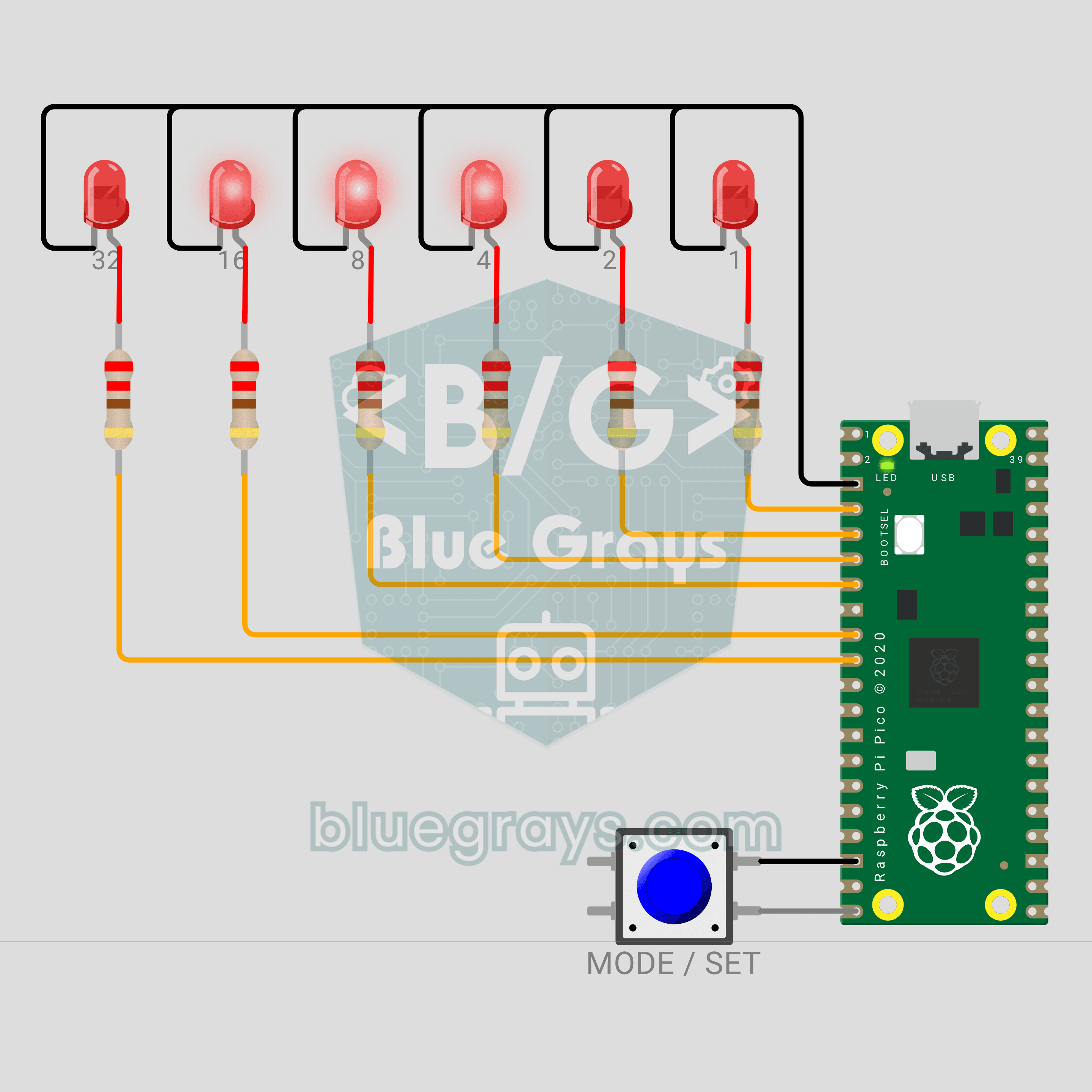
Circuit Diagram
Source Code
1# ─────────────────────────────────────────
2#   BlueGrays · bluegrays.com
3#   Raspberry Pi Pico Binary Clock (6 LEDs + Button)
4# ─────────────────────────────────────────
5# A clock that shows the time as binary numbers. The 6 LEDs are the
6# 32-16-8-4-2-1 places; the lit LEDs add up to the value. A short press
7# switches between seconds, minutes and hours; a long press sets the
8# field. Every full hour a light sweep runs, and the onboard LED ticks the
9# seconds.
10#
11# Pins:
12#   GP2  -> LED 1 (bit 0), through 220 ohm
13#   GP3  -> LED 2 (bit 1), through 220 ohm
14#   GP4  -> LED 4 (bit 2), through 220 ohm
15#   GP5  -> LED 8 (bit 3), through 220 ohm
16#   GP6  -> LED 16 (bit 4), through 220 ohm
17#   GP7  -> LED 32 (bit 5), through 220 ohm
18#   GP15 -> Button (other leg to GND)
19#   LED  -> Onboard LED (seconds tick)
20#   GND  -> LED cathodes, button
21
22from machine import Pin
23import time
24
25# ============ SETTINGS ============
26START_TIME = (12, 59, 50)  # Start time (h, m, s)
27SEC, MIN, HOUR = range(3)
28START_MODE = SEC       # Field shown at start
29LONG_MS = 800          # Long press time
30DEBOUNCE_MS = 20       # Button debounce time
31MODE_MS = 500          # How long the mode marker shows
32BLINK_MS = 300         # Blink period in set mode
33SET_TIMEOUT_MS = 10000 # Set mode saves after this idle time
34SWEEP_STEP_MS = 60     # Step of the full hour sweep
35SWEEP_ROUNDS = 2       # Number of sweeps
36TICK_MS = 100          # Onboard LED flash length
37LOOP_MS = 5            # Loop step
38
39# In order bit 0 (1) ... bit 5 (32)
40LED_PINS = (2, 3, 4, 5, 6, 7)
41MODE_NAMES = ("SANIYE / SECONDS", "DAKIKA / MINUTES", "SAAT / HOURS")
42# Mode marker: 1, 2 or 3 LEDs from the left (seconds, minutes, hours)
43MODE_MARKS = (0b100000, 0b110000, 0b111000)
44
45
46# ============ HARDWARE ============
47leds = [Pin(gp, Pin.OUT, value=0) for gp in LED_PINS]
48# The name "LED" finds the onboard LED on both the Pico and the Pico W (not a GP pin on the W)
49tick_led = Pin("LED", Pin.OUT, value=0)   # The Pico's onboard LED
50
51
52class Button:
53    # Pull-up button: reads 0 when pressed. update() 1 = pressed, -1 = released
54    def __init__(self, gp):
55        self.pin = Pin(gp, Pin.IN, Pin.PULL_UP)
56        self.down = False
57        self.changed_at = time.ticks_ms()
58
59    def update(self, now):
60        pressed = self.pin.value() == 0
61        if pressed != self.down and time.ticks_diff(now, self.changed_at) >= DEBOUNCE_MS:
62            self.down = pressed
63            self.changed_at = now
64            return 1 if pressed else -1
65        return 0
66
67    def held_ms(self, now):
68        return time.ticks_diff(now, self.changed_at)
69
70
71button = Button(15)
72shown = -1                 # Last pattern on the LEDs
73
74
75def show_bits(pattern):
76    # If the pattern changed, write the 6 LEDs: bit i -> LED i
77    global shown
78    if pattern == shown:
79        return
80    shown = pattern
81    for i, led in enumerate(leds):
82        led.value((pattern >> i) & 1)
83
84
85def binary(v):
86    # 6 digit binary text, e.g. 13 -> 001101
87    return "".join("1" if v >> i & 1 else "0" for i in range(5, -1, -1))
88
89
90# ============ CLOCK ============
91clock_s = (START_TIME[0] * 3600 + START_TIME[1] * 60 + START_TIME[2]) % 86400
92start = time.ticks_ms()
93next_second = time.ticks_add(start, 1000)
94tick_off_at = start
95
96
97def hms():
98    return clock_s // 3600, clock_s // 60 % 60, clock_s % 60
99
100
101def field_value(m):
102    h, mi, s = hms()
103    return (s, mi, h)[m]
104
105
106def time_text():
107    return "%02d:%02d:%02d" % hms()
108
109
110# ============ STATE ============
111mode = START_MODE
112setting = False            # Set mode
113long_done = False          # Long press handled for this press
114marker_until = start       # When the mode marker ends
115sweep_at = None            # Start of the light sweep
116blink_ref = start          # Start of the blink cycle
117last_press = start         # Last press in set mode
118
119
120def report(prefix):
121    v = field_value(mode)
122    print("%s %s: %d = %s  (%s)" % (prefix, MODE_NAMES[mode], v, binary(v), time_text()))
123
124
125def save_setting(now):
126    global setting
127    setting = False
128    print("Saat ayarlandi / Time set: %s" % time_text())
129
130
131def on_short(now):
132    global mode, marker_until, clock_s, blink_ref, last_press
133    if setting:
134        # In set mode every short press adds 1 to the selected field
135        h, mi, s = hms()
136        if mode == HOUR:
137            h = (h + 1) % 24
138        else:
139            mi = (mi + 1) % 60
140        clock_s = h * 3600 + mi * 60 + s
141        blink_ref = now
142        last_press = now
143        report("+1")
144    else:
145        mode = (mode + 1) % 3
146        marker_until = time.ticks_add(now, MODE_MS)
147        report("Mod / Mode")
148
149
150def on_long(now):
151    global setting, clock_s, next_second, blink_ref, last_press
152    if setting:
153        if mode == MIN:
154            # After setting the minutes, the seconds restart from zero
155            clock_s -= clock_s % 60
156            next_second = time.ticks_add(now, 1000)
157        save_setting(now)
158    elif mode == SEC:
159        # In seconds mode a long press zeroes the seconds (sync to a time signal)
160        clock_s -= clock_s % 60
161        next_second = time.ticks_add(now, 1000)
162        print("Saniye sifirlandi / Seconds zeroed: %s" % time_text())
163    else:
164        setting = True
165        blink_ref = now
166        last_press = now
167        report("Ayar / Set")
168
169
170def frame(now):
171    # The LED pattern right now: sweep > mode marker > set (blinking) > value
172    if sweep_at is not None:
173        step = time.ticks_diff(now, sweep_at) // SWEEP_STEP_MS
174        pos = step % 10
175        return 1 << (pos if pos < 6 else 10 - pos)     # back and forth
176    if time.ticks_diff(marker_until, now) > 0:
177        return MODE_MARKS[mode]
178    if setting and time.ticks_diff(now, blink_ref) // BLINK_MS % 2:
179        return 0
180    return field_value(mode)
181
182
183# ============ MAIN LOOP ============
184print("== BlueGrays · bluegrays.com ==")
185print("Pico Ikili Saat / Binary Clock")
186print("Kisa basis: alan degistir, uzun basis: ayarla / Short press: next field, long: set")
187print("LED'ler / LEDs: 32 16 8 4 2 1")
188report("Mod / Mode")
189
190next_loop = time.ticks_ms()
191while True:
192    now = time.ticks_ms()
193
194    # Second counter: each next second is added to the last one, so it never drifts
195    if time.ticks_diff(now, next_second) >= 0:
196        next_second = time.ticks_add(next_second, 1000)
197        clock_s = (clock_s + 1) % 86400
198        tick_led.value(1)
199        tick_off_at = time.ticks_add(now, TICK_MS)
200        if clock_s % 60 == 0:
201            print("Saat / Time %s" % time_text()[:5])
202        if clock_s % 3600 == 0 and not setting:
203            sweep_at = now                 # Full hour: light sweep
204    if not setting and time.ticks_diff(now, tick_off_at) >= 0:
205        tick_led.value(0)
206    if sweep_at is not None and time.ticks_diff(now, sweep_at) >= SWEEP_STEP_MS * 10 * SWEEP_ROUNDS:
207        sweep_at = None
208
209    # Button: a short press acts on release, a long press as soon as LONG_MS passes
210    b = button.update(now)
211    if b == 1:
212        long_done = False
213        sweep_at = None                    # A press stops the sweep
214    elif button.down and not long_done and button.held_ms(now) >= LONG_MS:
215        long_done = True
216        on_long(now)
217    elif b == -1 and not long_done:
218        on_short(now)
219
220    if setting:
221        tick_led.value(1)          # Onboard LED on while setting
222        if time.ticks_diff(now, last_press) >= SET_TIMEOUT_MS:
223            save_setting(now)
224
225    show_bits(frame(now))
226
227    # Fixed step: wait until the next 5 ms
228    next_loop = time.ticks_add(next_loop, LOOP_MS)
229    wait = time.ticks_diff(next_loop, time.ticks_ms())
230    if wait > 0:
231        time.sleep_ms(wait)
232    else:
233        next_loop = time.ticks_ms()
234FAQ
How do I read a binary clock?
From left to right the LEDs are worth 32, 16, 8, 4, 2 and 1. Add the values of the lit LEDs: in the pattern 001101, 8, 4 and 1 are on, so the value is 13. Hours never go above 23, so the leftmost LED stays dark in the hours field. The serial monitor prints every value with its binary form.
Why are 6 LEDs enough?
6 bits count from 0 to 63 (2 to the power of 6 = 64 values). Seconds and minutes go up to 59 and hours up to 23, so they all fit in 6 bits. To see hours, minutes and seconds at the same time you would need a separate row of LEDs for each field (17 LEDs in total).
Does the clock reset after a power cut?
Yes. The Pico has no battery-backed clock, so the code starts from `START_TIME` on every boot. A battery-backed RTC module such as the DS1307 would keep the time. In this project you can set the hours and minutes with the button in a few seconds after power-up.
Can I use different LED colours?
Yes. Red, green, yellow and orange LEDs light up nicely at 3.3 V with 220 Ω. Blue and white LEDs need about 3 V and may look dim at 3.3 V; drop their resistor to 100 Ω. Giving the high places a different colour makes the clock easier to read.