
Raspberry Pi Pico Traffic Light with 4-Mode Button Selector (State Machine, GP11-13 + GP4)
4 different traffic light modes with just 1 button! The mode changes with each press of the button: **Normal cycle** (red → yellow → green in sequence), **Red Only** (stop signal), **Yellow Flash** (caution/night mode), **Off** (maintenance). Concepts: **state machine** (the `mode` variable determines which behavior runs), **modulo mode cycling** (`(mode + 1) % 4` → 0→1→2→3→0 infinite loop), **non-blocking timing** (LED phases are timed with `time.ticks_ms()` + `time.ticks_diff()`; however, the
Video
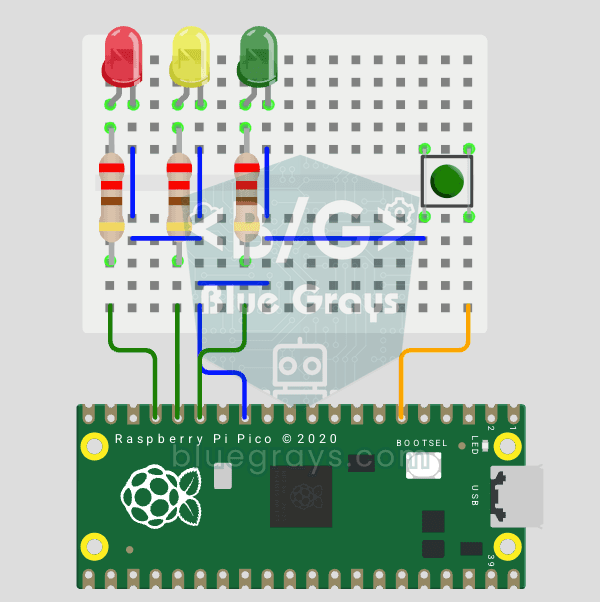
Circuit Diagram
Source Code
1# ─────────────────────────────────────────
2#   BlueGrays · bluegrays.com
3#   Raspberry Pi Pico Traffic Light with 4-Mode Button Selector (State Machine, GP11-13 + GP4)
4# ─────────────────────────────────────────
5# One button cycles 4 modes: normal cycle (red -> yellow -> green), red
6# only, yellow flash and off. Uses a state machine and non-blocking timing
7# with time.ticks_ms(), so the button is always responsive.
8#
9# Pins:
10#   GP11 -> Green LED
11#   GP12 -> Yellow LED
12#   GP13 -> Red LED (each LED with 220 ohm)
13#   GP4  -> Button (other leg to GND)
14
15from machine import Pin
16import time
17
18# ============ LEDS ============
19green  = Pin(11, Pin.OUT)   # Green
20yellow = Pin(12, Pin.OUT)   # Yellow
21red    = Pin(13, Pin.OUT)   # Red
22
23# ============ BUTTON ============
24button = Pin(4, Pin.IN, Pin.PULL_UP)   # Reads 0 when pressed
25
26# ============ STATE ============
27# Mode: 0 normal cycle, 1 red only, 2 yellow flash, 3 off
28mode = 0
29last_btn = 1                 # Previous button value
30blink_state = False          # Yellow flash state
31last_tick = time.ticks_ms()  # Last flash toggle
32
33# ============ NORMAL CYCLE ============
34normal_step = 0                     # 0: red, 1: yellow, 2: green
35normal_last = time.ticks_ms()       # Step start time
36NORMAL_TIMES = [3000, 1000, 3000]   # Red, Yellow, Green (ms)
37LEDS = [red, yellow, green]
38
39def all_off():
40    # Turn all LEDs off
41    red.off(); yellow.off(); green.off()
42
43# ============ MAIN LOOP ============
44while True:
45    btn = button.value()
46
47    # ---- Button pressed (1 -> 0): mode change ----
48    if last_btn == 1 and btn == 0:
49        mode = (mode + 1) % 4
50        all_off()
51        normal_step = 0
52        normal_last = time.ticks_ms()
53        time.sleep_ms(200)   # Debounce
54    last_btn = btn
55
56    now = time.ticks_ms()
57
58    # ---- Normal traffic light cycle ----
59    if mode == 0:
60        if time.ticks_diff(now, normal_last) > NORMAL_TIMES[normal_step]:
61            normal_step = (normal_step + 1) % 3
62            normal_last = now
63        all_off()
64        LEDS[normal_step].on()
65
66    # ---- Red only (stop) ----
67    elif mode == 1:
68        all_off(); red.on()
69
70    # ---- Yellow flash, 0.4 s (caution/night) ----
71    elif mode == 2:
72        if time.ticks_diff(now, last_tick) > 400:
73            blink_state = not blink_state
74            yellow.value(blink_state)
75            last_tick = now
76            red.off(); green.off()
77
78    # ---- Off ----
79    else:
80        all_off()
81
82    time.sleep_ms(10)
83
FAQ
What is a state machine?▾
A single variable (mode) decides what the program is doing right now. Each button press changes the mode, and the loop only runs the code for the current mode. It's the standard way to keep complex behavior organized.
What does (mode + 1) % 4 do?▾
It increases the mode by one and wraps back to 0 when it reaches 4, so the mode cycles 0, 1, 2, 3, 0, 1... forever.
Why use ticks_ms() instead of time.sleep()?▾
During sleep() the Pico can't read the button, so mode changes lag. ticks_ms() and ticks_diff() avoid long waits throughout LED phases. However, this version waits 200 ms for debounce on mode changes and 10 ms at the end of each loop; the button is not read again during these intervals.
Can I add a new mode?▾
Yes, raise the number of modes to 5 and write a separate behavior block for the new one, such as a green flash or lighting all the lights in sequence.