
Arduino Game Projects: Games with Displays and Buttons
The most fun way to learn electronics is to build your own game. In these projects you'll combine buttons, a joystick, displays and a buzzer to create interactive games and animations. Game projects are especially great for learning timing with millis() and state machine logic.

Dice Project
No more lost dice during board games: every time you press the button, a random number from 1 to 6 appears on the 7-segment display. Each press gives exactly one result, and the result is also written

Paddle Ball Game - SSD1306
A ball, two paddles and you: you play table tennis, one of the very first video games, on a small OLED screen. Two buttons move your paddle on the right up and down, while the computer controls the le

OLED T-Rex Run: Arduino Dinosaur Game
The dinosaur game that pops up when your internet goes down, now on your desk: the dinosaur runs across the small OLED screen, cacti come at you, and you jump with a single button. Your score climbs l

Pixel Snake 8x8 Matrix
Build the classic snake game with your own hands and play it. On a colorful 8x8 light matrix, you steer a green snake with a joystick and eat red apples; with every apple the snake grows, speeds up a

Matrix Snake 16x16
The classic snake game, this time on a huge LED display made of 256 lights. You steer the green snake with a joystick and collect red apples; with every apple the snake grows, your score goes up on a

Arduino Memory Game (4 LEDs + 4 Buttons + Buzzer)
Do you trust your memory? Four colored LEDs light up in a sequence, each playing its own note, and you repeat the same order by pressing the buttons. Every correct round adds a new color to the sequen
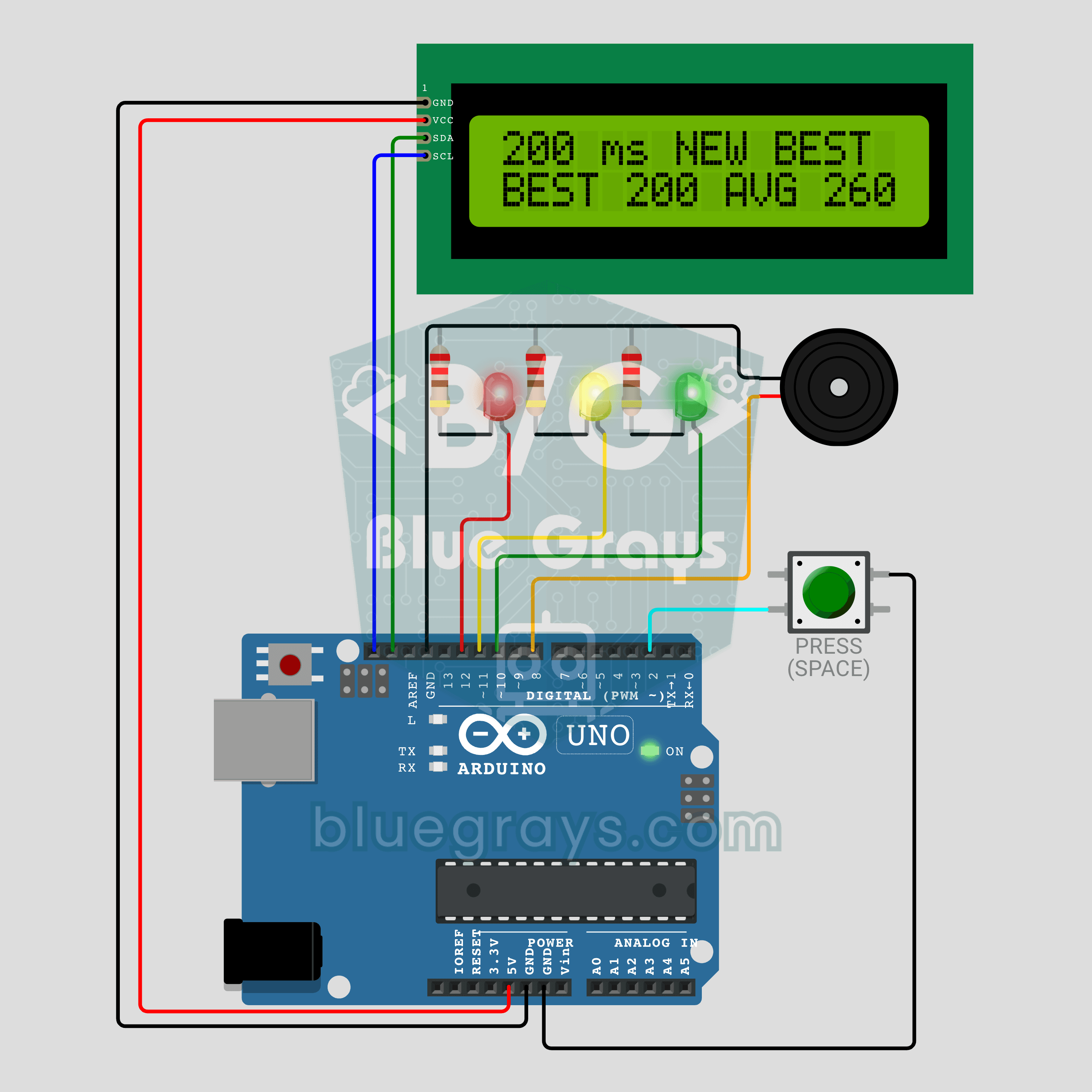
Arduino Reaction Time Test with Sound Cue: Measure Your Reflexes in Milliseconds (LCD + Buzzer + 3 LEDs)
How fast are your reflexes? Press the button: the red LED says get ready, the yellow LED says steady and a random wait of 1.5 to 3.5 seconds begins. The moment the green LED lights up and the buzzer beeps, press again; your reaction time appears on the I2C LCD in milliseconds, with your session best and average below it. Press before green and the screen shows TOO EARLY! with a losing sound. Hold the button for a new player, so everyone races the same wait order.

Arduino LCD Runner Game
Side scrolling endless runner game running on 16x2 character LCD screen. Hero runs automatically, player jumps over obstacles by pressing the button. Random obstacles appear on the top and bottom row. Passive buzzer plays opening melody, jumping sound, 50 point celebration sound and end of game melody. "BlueGrays - Arduino Projects" splash screen is shown on startup. The score is updated instantly in the upper right corner of the screen.
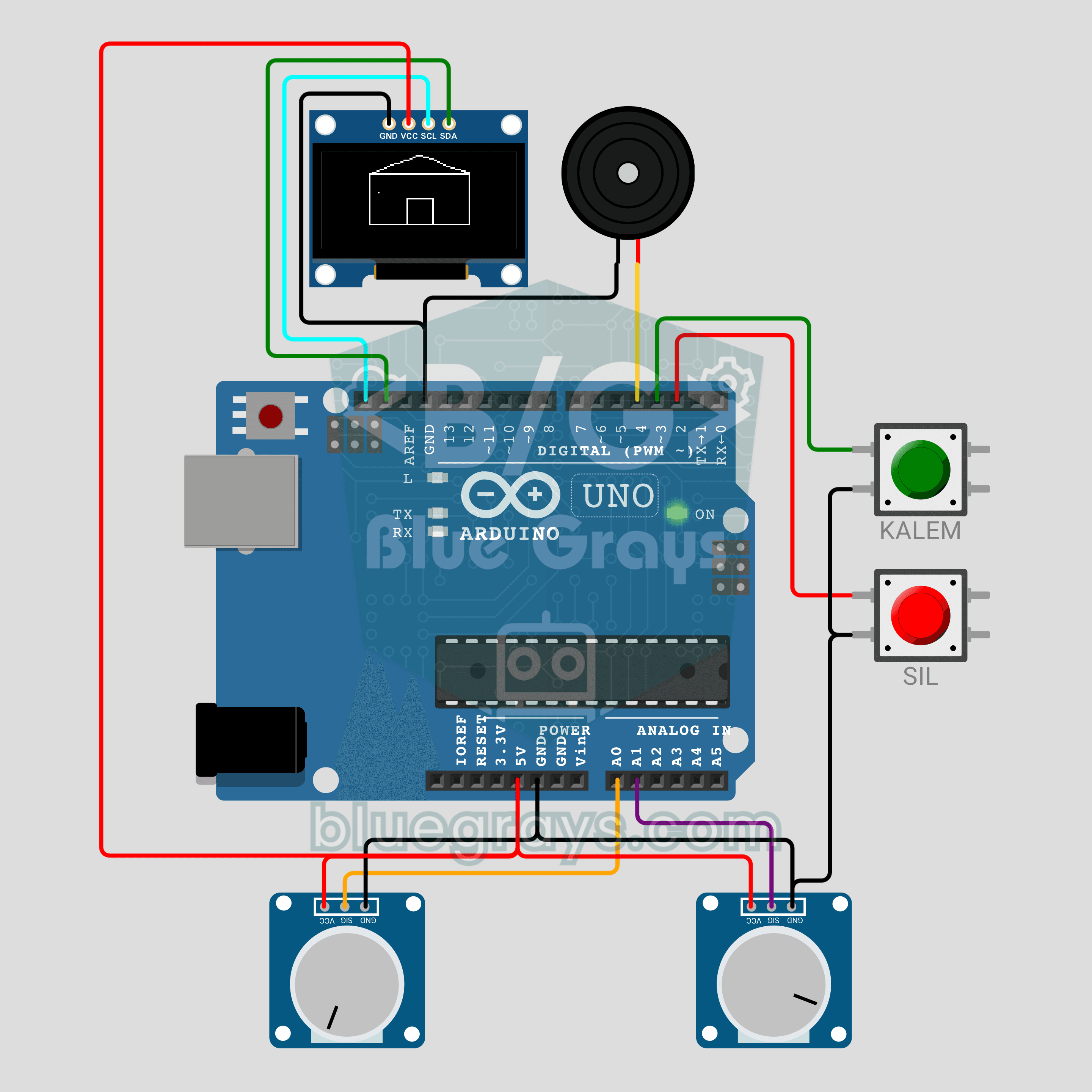
Arduino Magic Drawing Tablet (2 Potentiometers + OLED Display)
We are rebuilding the classic magic drawing tablet with an Arduino! The left potentiometer moves the pen horizontally, the right one vertically, and the 0.96 inch OLED keeps a continuous line. The PEN button lifts and lowers the pen, while the CLEAR button wipes the screen with an eraser animation and a buzzer sound. A fun beginner project about analog input, jitter filtering and drawing on a display.
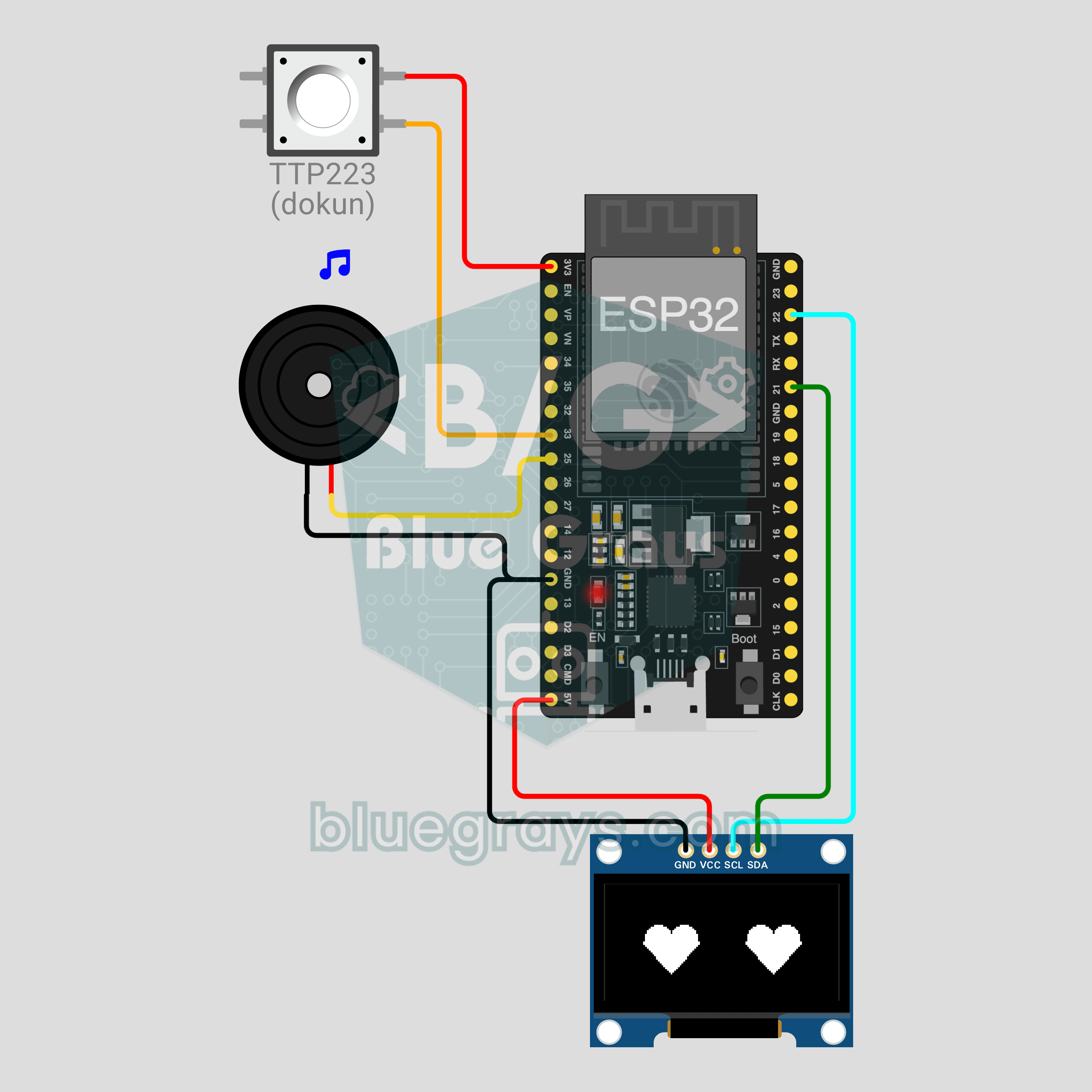
ESP32 Robot Eyes (OLED Display + TTP223 Touch Sensor)
A desk robot with feelings! The ESP32 draws two eyes on a 0.96 inch OLED that look around and blink on their own. Tap the TTP223 touch sensor and the robot gets happy, hold it and the eyes turn into hearts, poke it too often and it gets angry, ignore it for 20 seconds and it falls asleep. A passive buzzer gives every mood its own sound: a state machine, shape-based animation and non-blocking audio in one project.
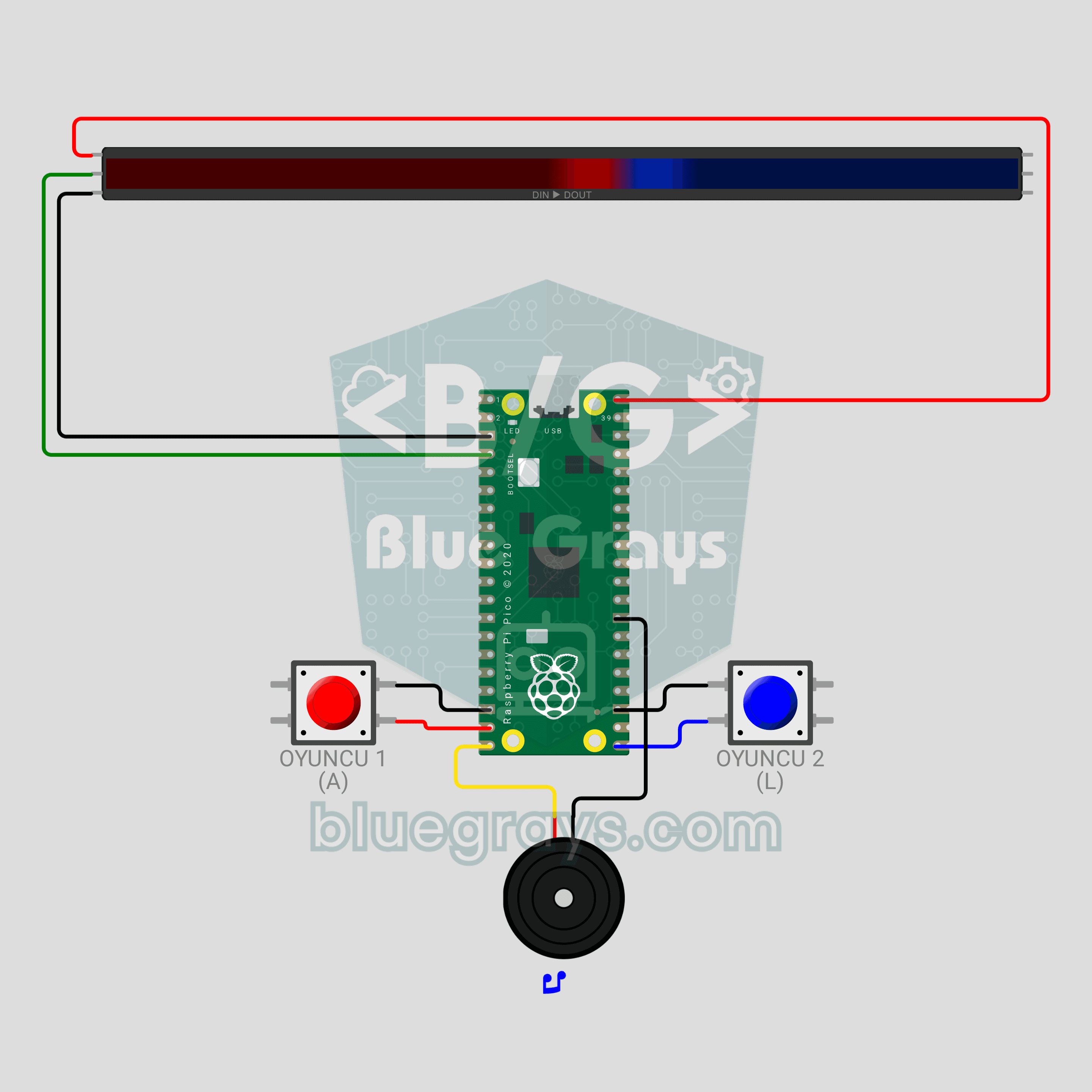
Raspberry Pi Pico LED Tug of War Game (NeoPixel Strip + 2 Buttons + Buzzer)
A two-player button duel! The Raspberry Pi Pico turns a 30-LED WS2812B NeoPixel strip into a rope: red player on the left, blue player on the right. Every press pushes your color one LED forward; fill the whole strip to win the round, and take 3 rounds to win the match. Press too early in the countdown and you lose ground, the passive buzzer gives each player a different click, and the match ends in a rainbow. neopixel, debouncing and non-blocking sound in MicroPython.
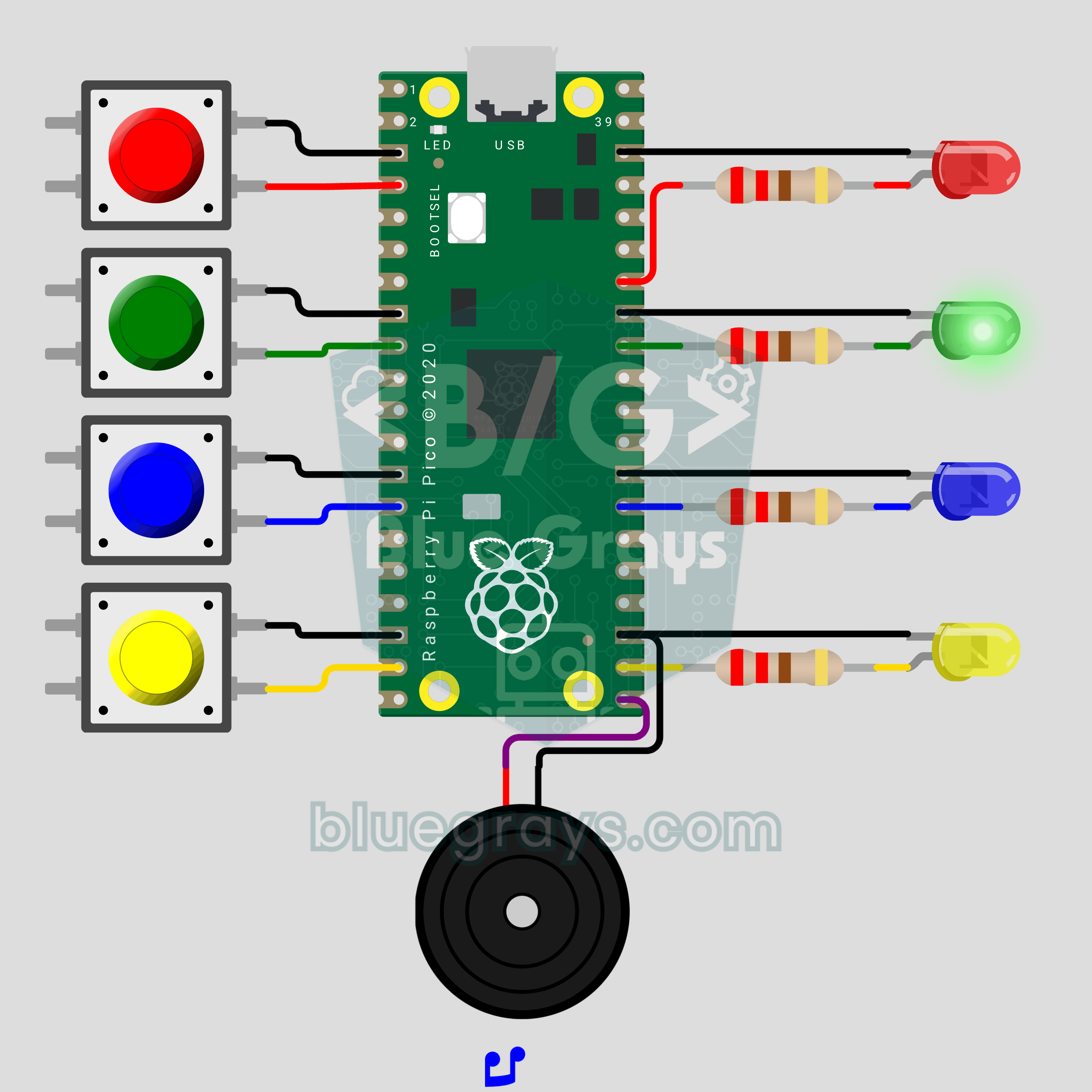
Raspberry Pi Pico Memory Game (4 LEDs + 4 Buttons + Buzzer)
How many rounds can you last? The classic color and sound memory game comes to your desk with a Raspberry Pi Pico. The Pico plays a random color sequence, each color with its own LED and its own note. Repeat it in the same order on 4 buttons and one more color joins every round. Press a wrong one and the buzzer plays a game over tune while the right color blinks. Lists, random numbers and button reading in one game.
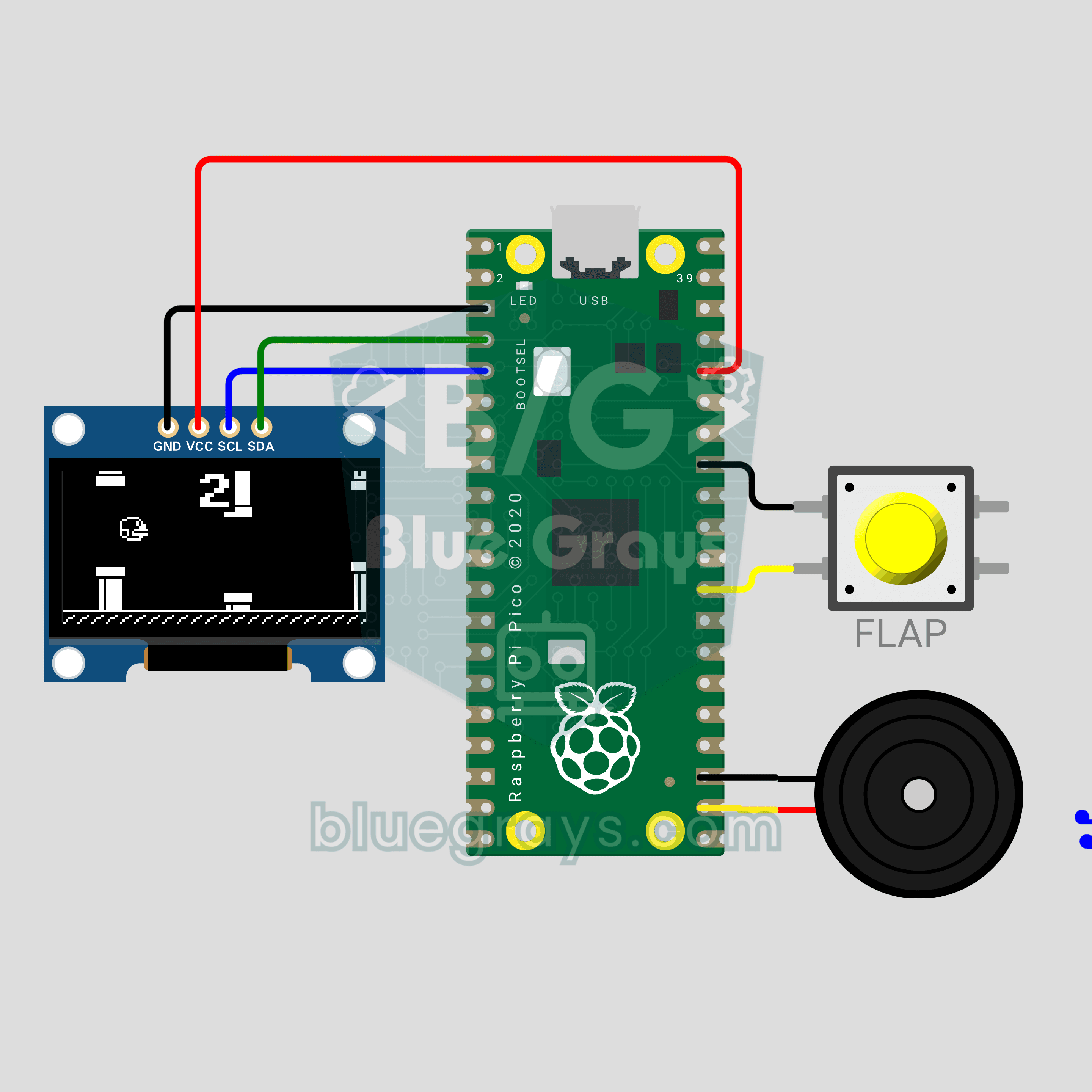
Raspberry Pi Pico Flappy Bird (OLED Display + Button + Buzzer)
That infuriating bird from your phone, now on a 0.96 inch OLED with a single button! A Flappy Bird style game on the Raspberry Pi Pico: every button press makes the bird flap, each pair of pipes you pass scores a point and the gaps get tighter. A buzzer plays the flap, point and record sounds. The high score lives in flappy_best.txt, so it survives a power cut. Physics, collisions and a 30 FPS game loop in one file.
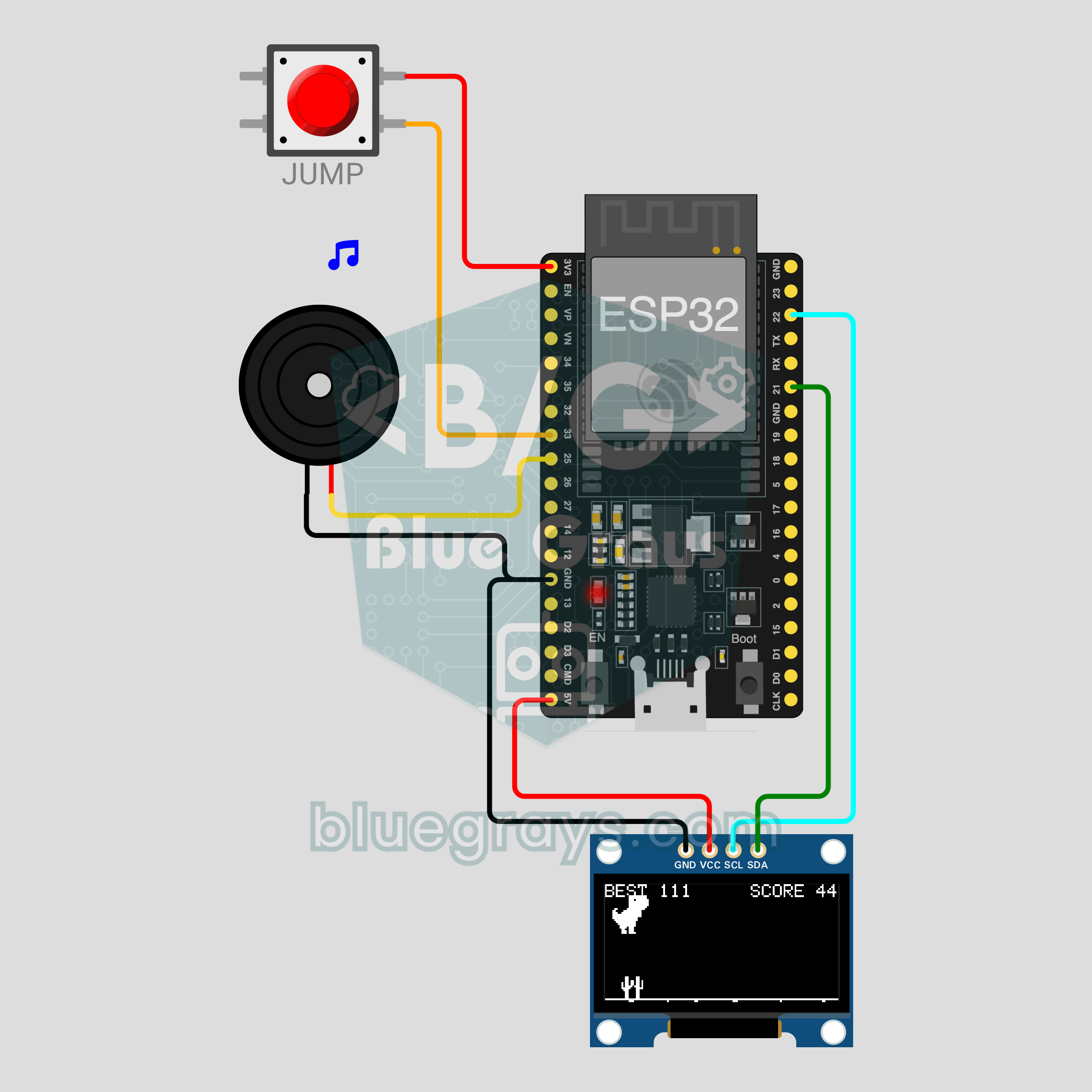
ESP32 T-Rex Run Dino Game (OLED Display + Button + Buzzer)
Chrome's "no internet" dinosaur game, now on your desk! The ESP32 draws a running dino on a 0.96 inch OLED; press the button to jump while the cacti keep speeding up. Score and best score sit on the top line, and the best score is saved to ESP32 flash with Preferences, so it survives a power cut. It is the ESP32 version of the Arduino OLED T-Rex Run project, with a passive buzzer for jump, 100-point and crash sounds.
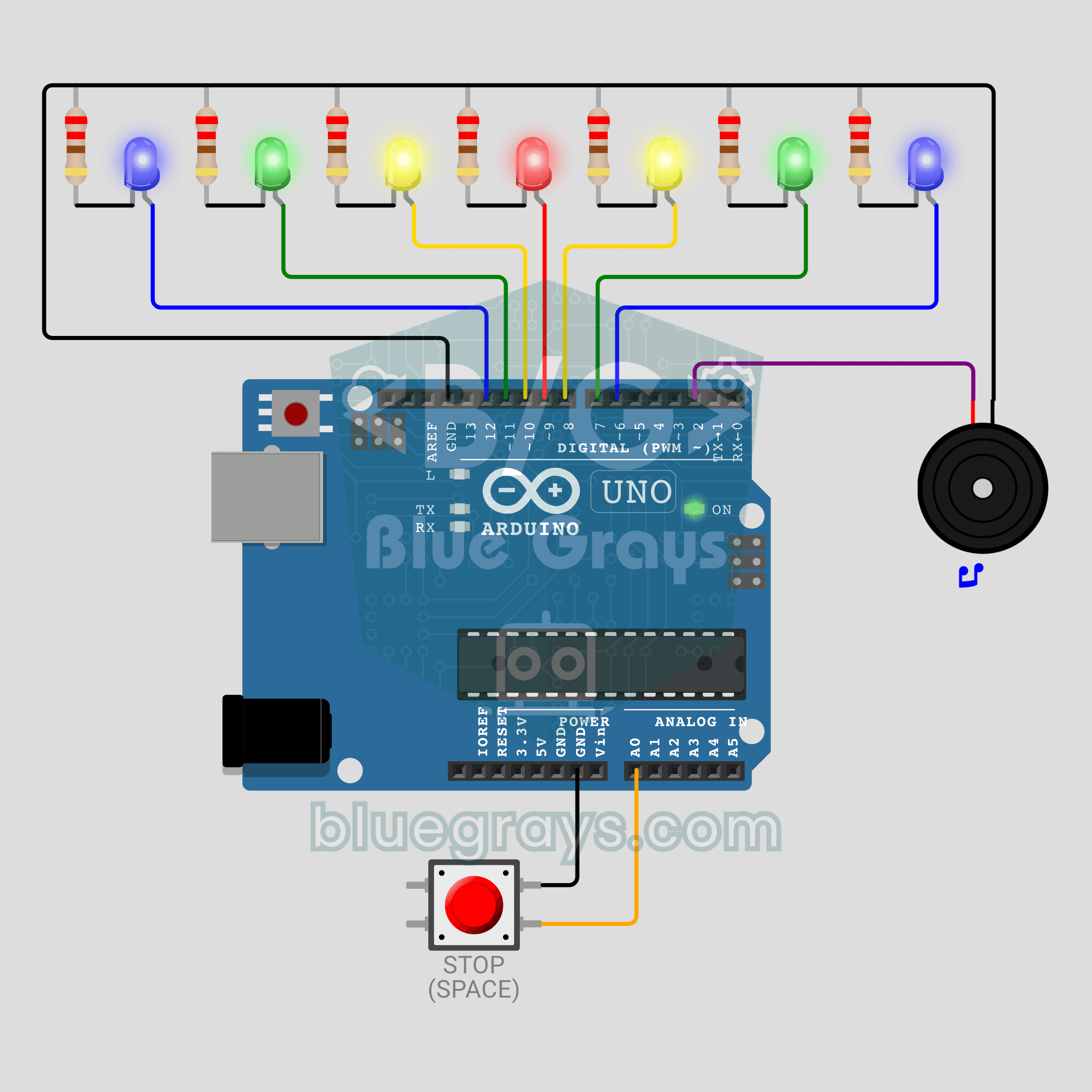
Arduino Cyclone Game: Stop the Light in the Middle (7 LEDs + Button + Buzzer)
Can you stop it on the red LED? A desktop version of the arcade Cyclone game: a light bounces across 7 LEDs and you score by pressing the button while the red centre LED is lit. Every hit reduces the time per LED by about 15%, down to a minimum of 45 ms, and the buzzer plays a tune. A wrong press costs a life, and the game ends after 3. The best score is kept in EEPROM, so it survives a power cut.
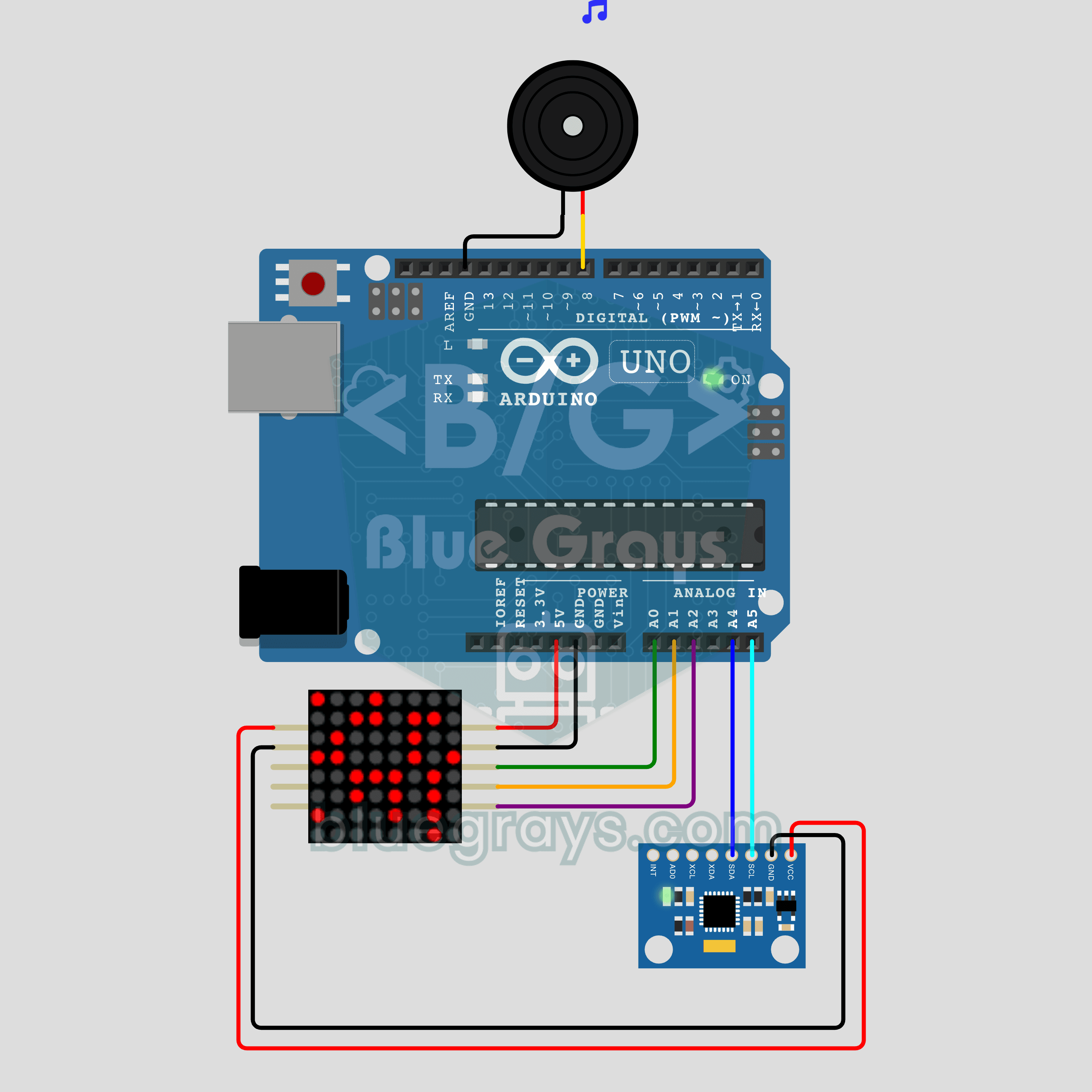
Arduino Tilt Marble Maze (MPU-6050 + MAX7219 8x8 LED Matrix)
No screen, no joystick: tilt the circuit and an LED marble rolls through a maze! The MPU-6050 accelerometer measures the tilt, and the marble on the MAX7219 8x8 LED matrix rolls that way without passing through walls. Reach the goal and a passive buzzer plays a tune as the next maze opens; finish all 3 for a smiley. Library-free sensor reading, tilt-to-speed control and mazes written as text in one project.
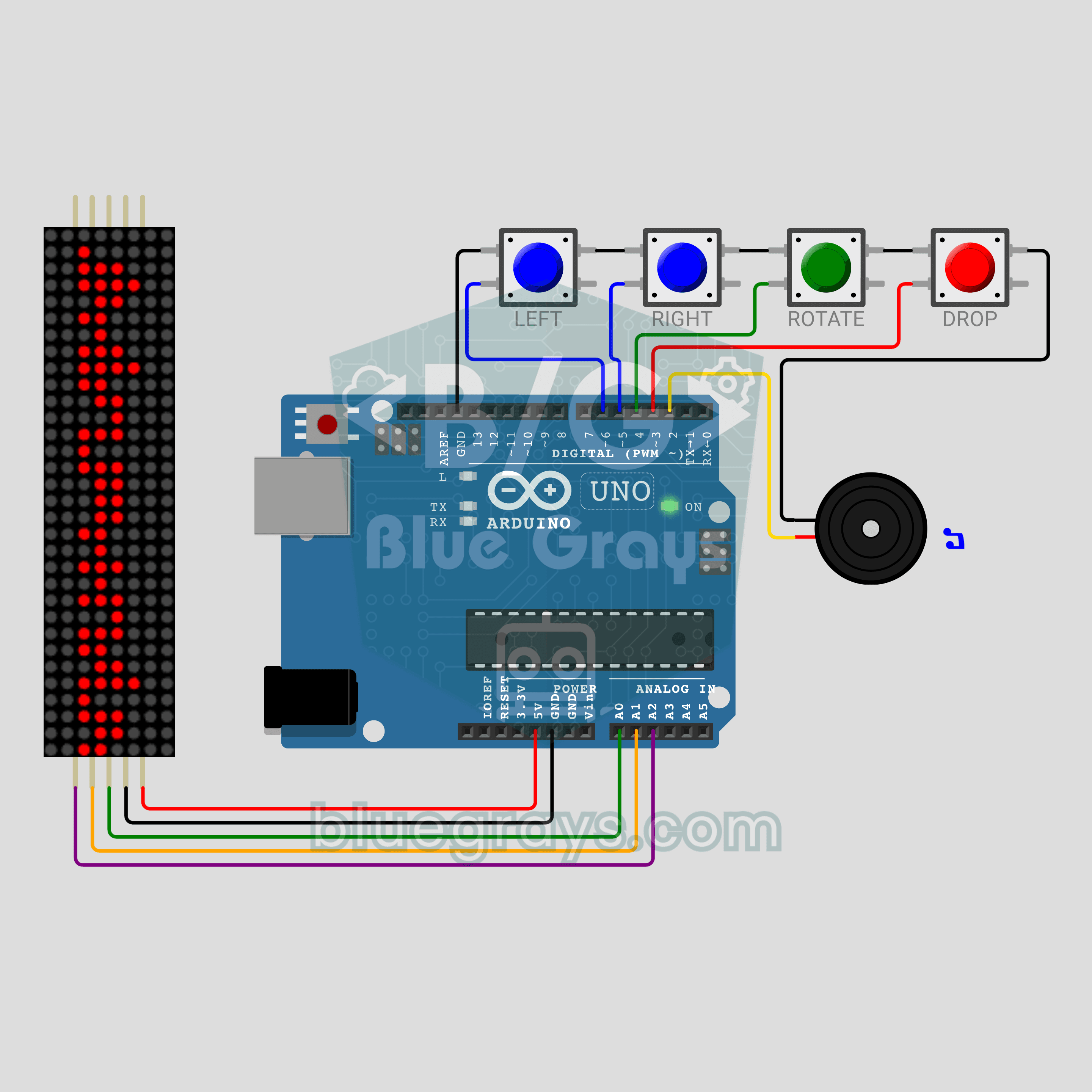
Arduino Tetris (MAX7219 8x32 LED Matrix + 4 Buttons + Buzzer)
No screen, just 256 LEDs: Tetris with music on an Arduino! A MAX7219 8x32 LED matrix standing upright becomes an 8 wide, 32 tall playfield, and 4 buttons move, rotate and drop the pieces. A passive buzzer plays the Tetris theme, full rows flash away and the game speeds up every 2 rows. The matrix is driven without a library, and the best score is kept in EEPROM.
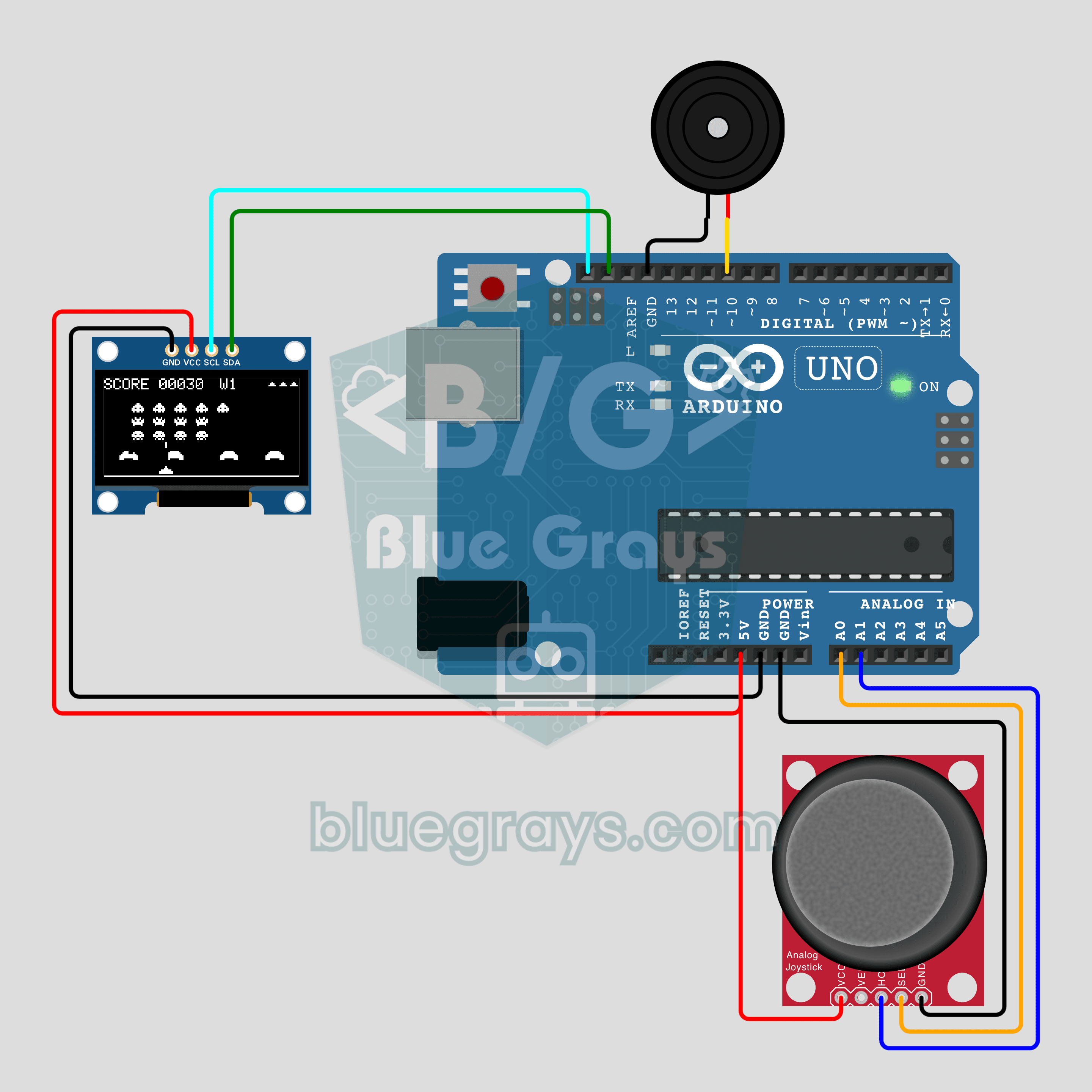
Arduino Alien Attack (0.96 inch OLED + Joystick + Buzzer)
The 1978 legend on a 0.96 inch screen! On a 128x64 OLED, an army of 15 aliens marches, steps down at every edge and speeds up as it thins out. The joystick steers the ship like a wheel and its button fires; there are 4 shields, a bonus UFO and waves that keep getting harder. A passive buzzer plays the classic march and the effects, and the best score is kept in EEPROM.
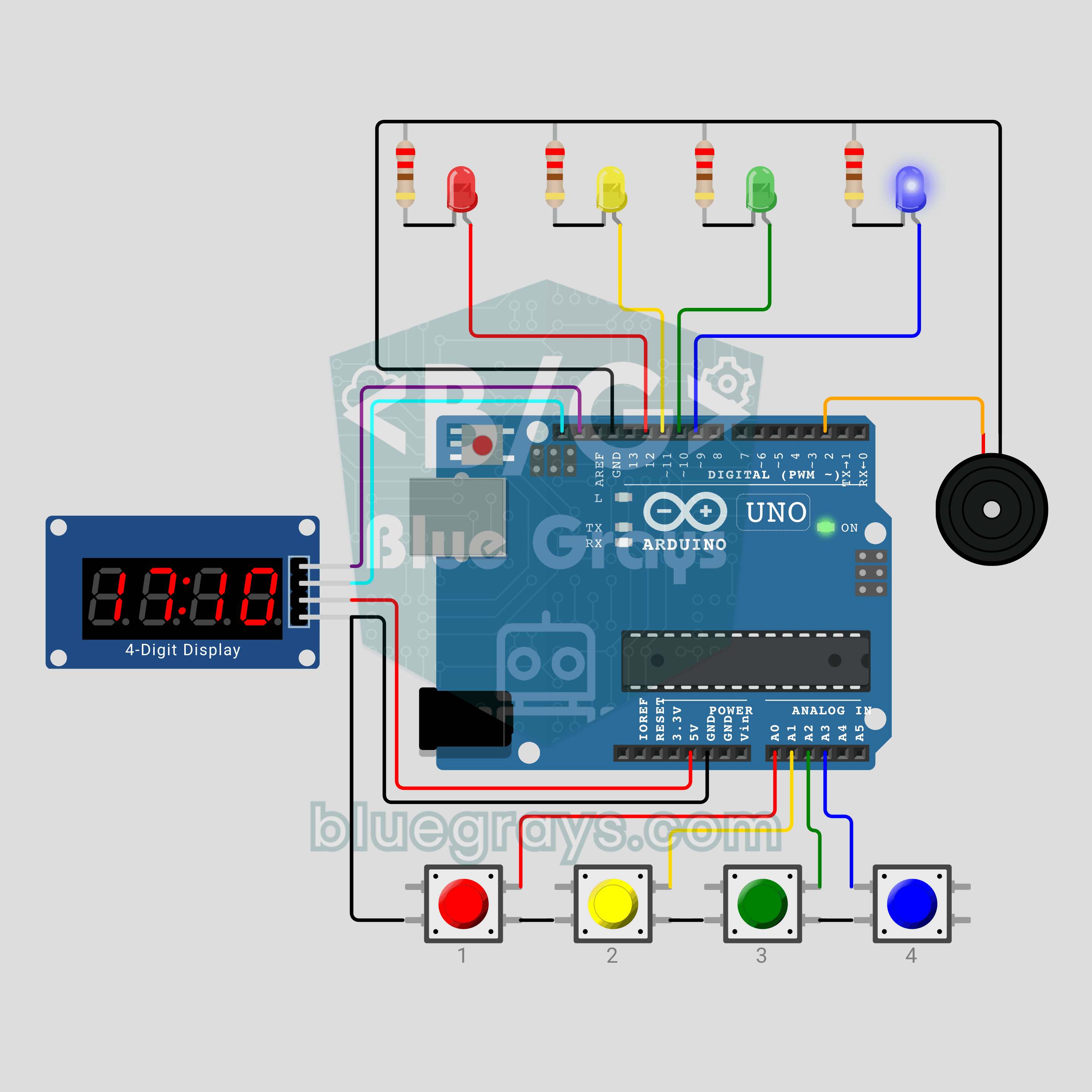
Arduino Whack-a-Mole Game (4 LEDs + 4 Buttons + TM1637 Display)
Hit it the moment it lights up! The arcade classic whack-a-mole on your desk: one of 4 LEDs lights up at random, and if you press the button of the same colour before it goes out, you score. Every 5 hits is a new level and the moles stay up for less time. A wrong button costs 1 point and 3 seconds. Time and score show on the TM1637, the record lives in EEPROM, and a passive buzzer gives each hole its own sound.
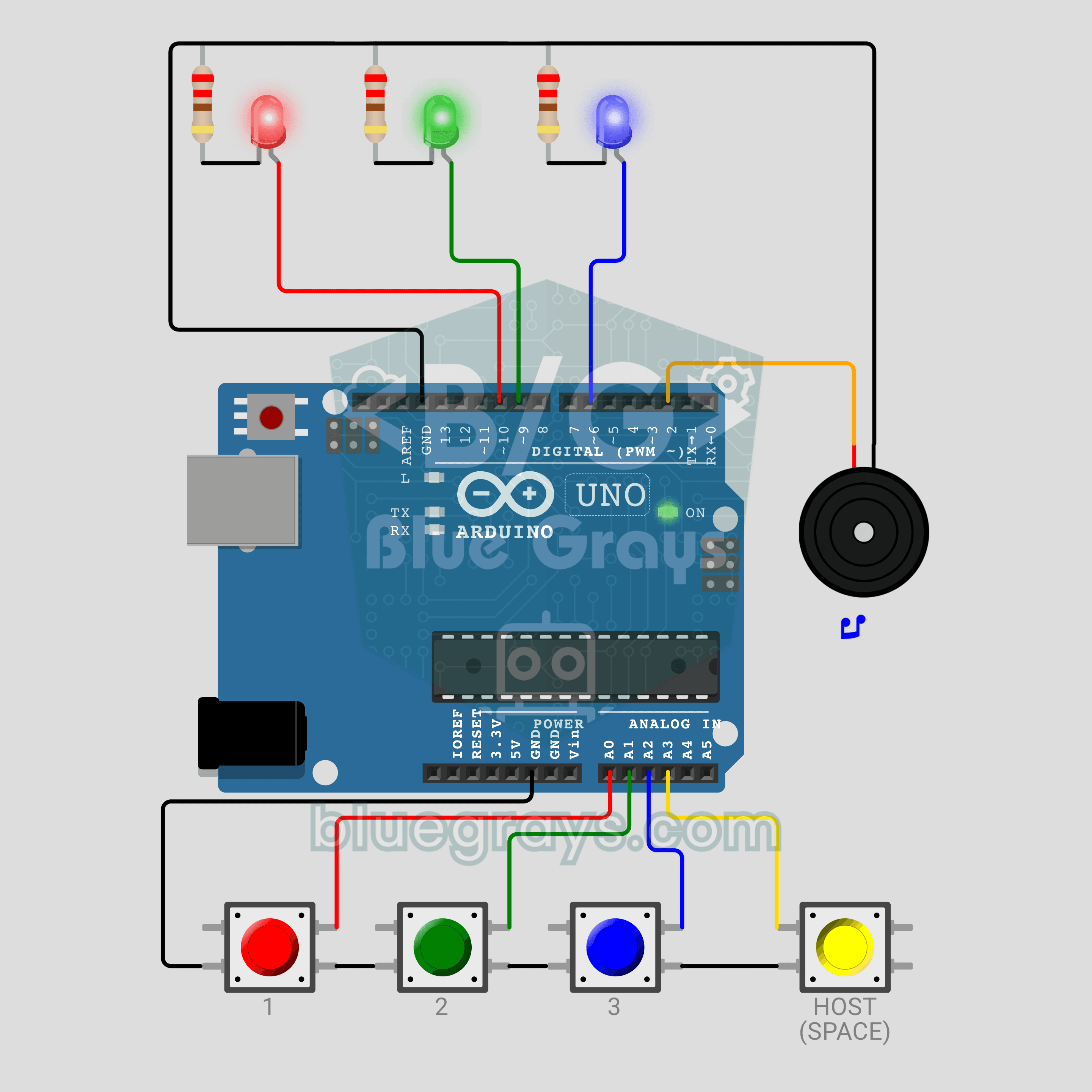
Arduino Quiz Buzzer for 3 Players (4 Buttons + 3 LEDs + Buzzer)
Who buzzed first? The Arduino decides down to the millisecond! The first to buzz answers system from TV quiz shows, for 3 players and a host button. The fastest player's LED lights up bright with its own sound, and the other buttons lock. Buzzing before the host says ready is a foul. Hold the host button for 1 s and the scoreboard plays on the LEDs. Ready for real use in class or at home.
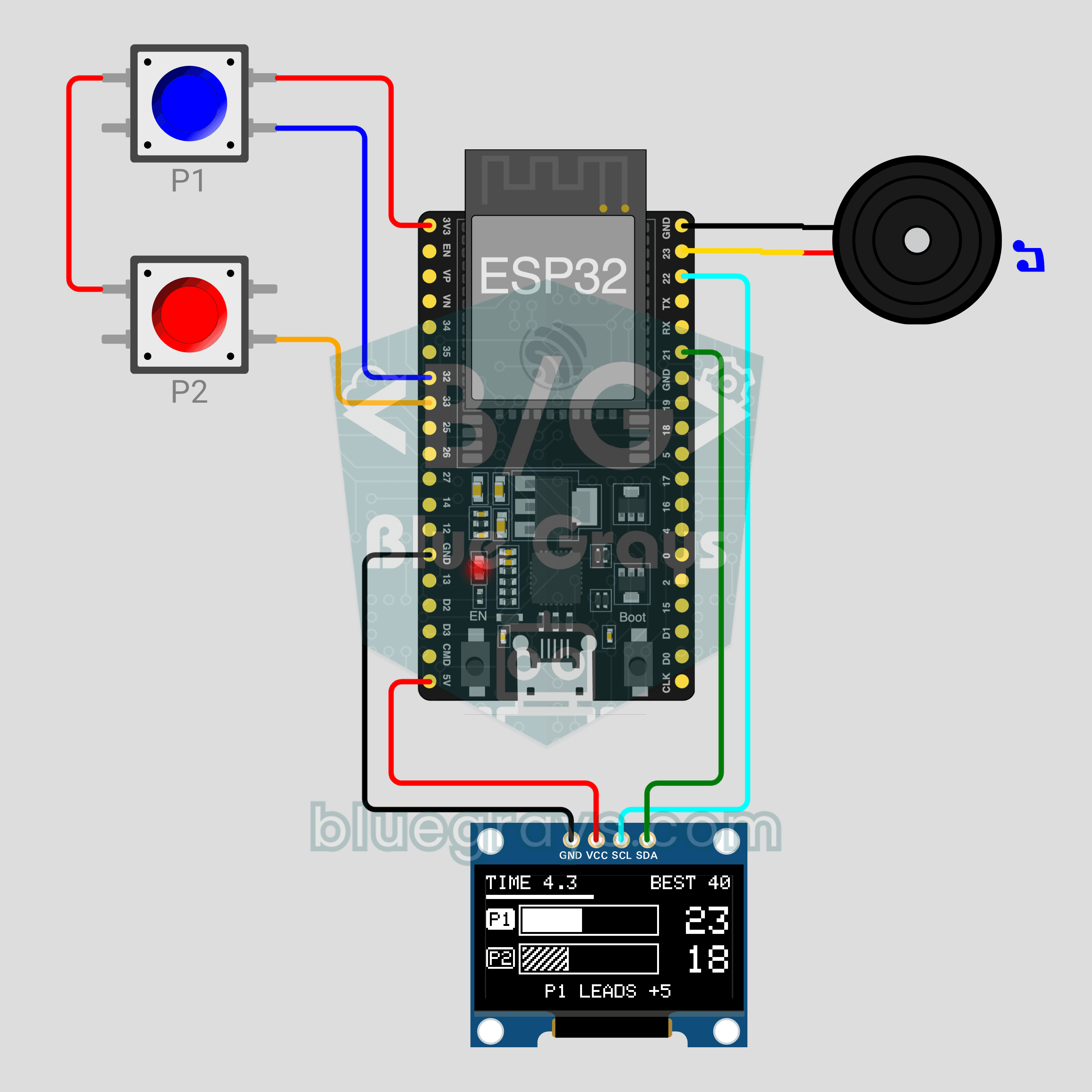
ESP32 Two-Player Click Race (OLED Display + 2 Buttons + Buzzer)
Challenge a friend to a 10-second click race! Both players press their button to get ready, then after a 3-2-1 countdown everyone mashes as fast as they can. The ESP32 races two bars side by side on a 0.96 inch OLED, with the time left, both scores and the leader shown live. When time is up you see the winner and clicks per second, and the best score is saved with Preferences. A passive buzzer plays a click tone for each player, a whistle and a fanfare.
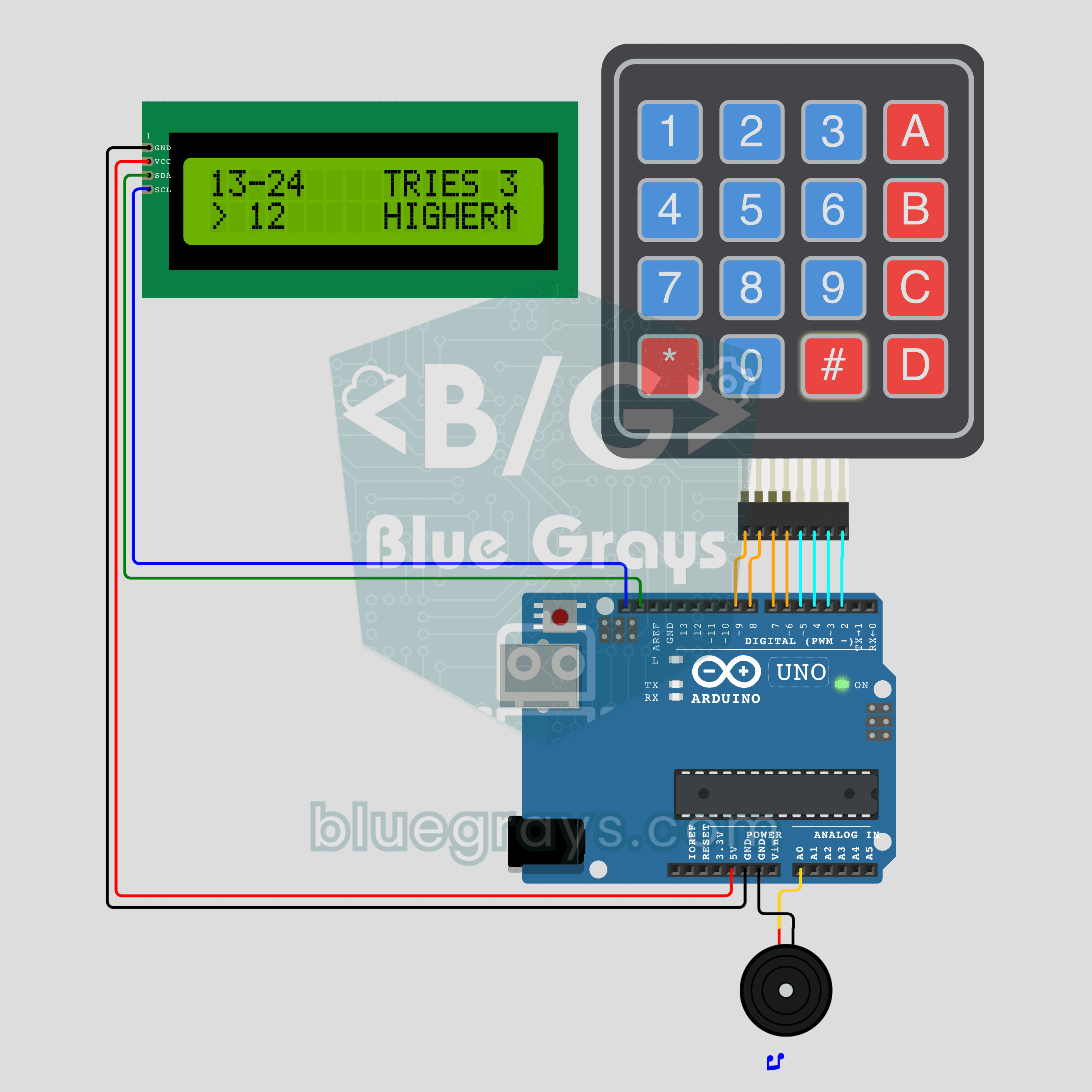
Arduino Number Guessing Game (4x4 Keypad + I2C LCD + Buzzer)
I'm thinking of a number from 1 to 100. Can you find it in 7 guesses or fewer? The Arduino picks a secret number, you type your guess on a 4x4 keypad and send it with #. The I2C LCD says HIGHER or LOWER and shows the range left and your tries, while a passive buzzer gives each hint its own sound. The fewest-tries record is kept in EEPROM. A fun first game that uses a keypad and an LCD together.
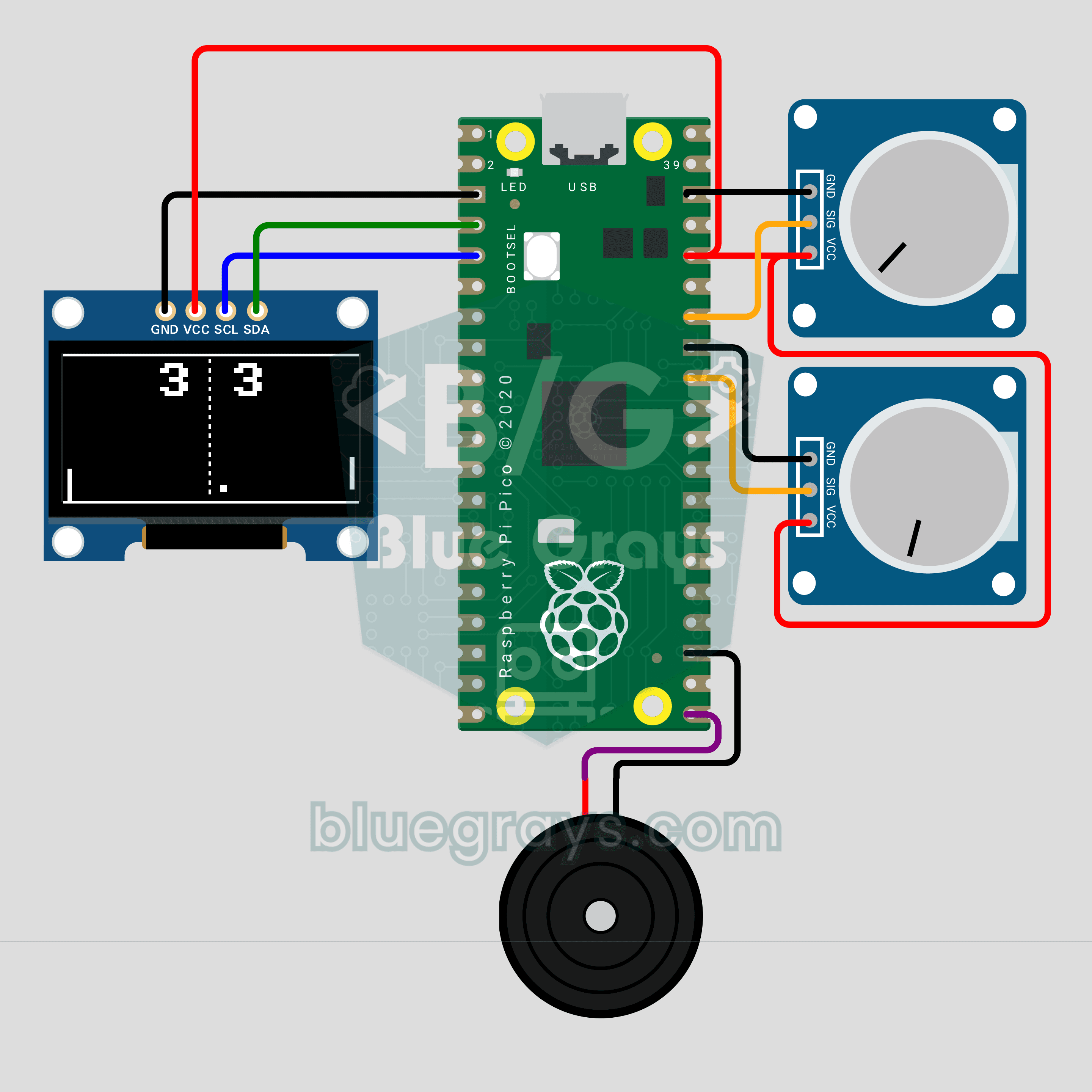
Raspberry Pi Pico Paddle Ball Game (OLED Display + 2 Potentiometers + Buzzer)
The classic paddle ball game, now on a 0.96 inch OLED for two players! Each player turns their own potentiometer to move a paddle. The ball speeds up on every hit and bounces off at an angle set by where it lands on the paddle; first to 5 points wins. A buzzer plays the wall, paddle and point sounds. Analog input, integer physics and partial screen updates in one game on the Raspberry Pi Pico.
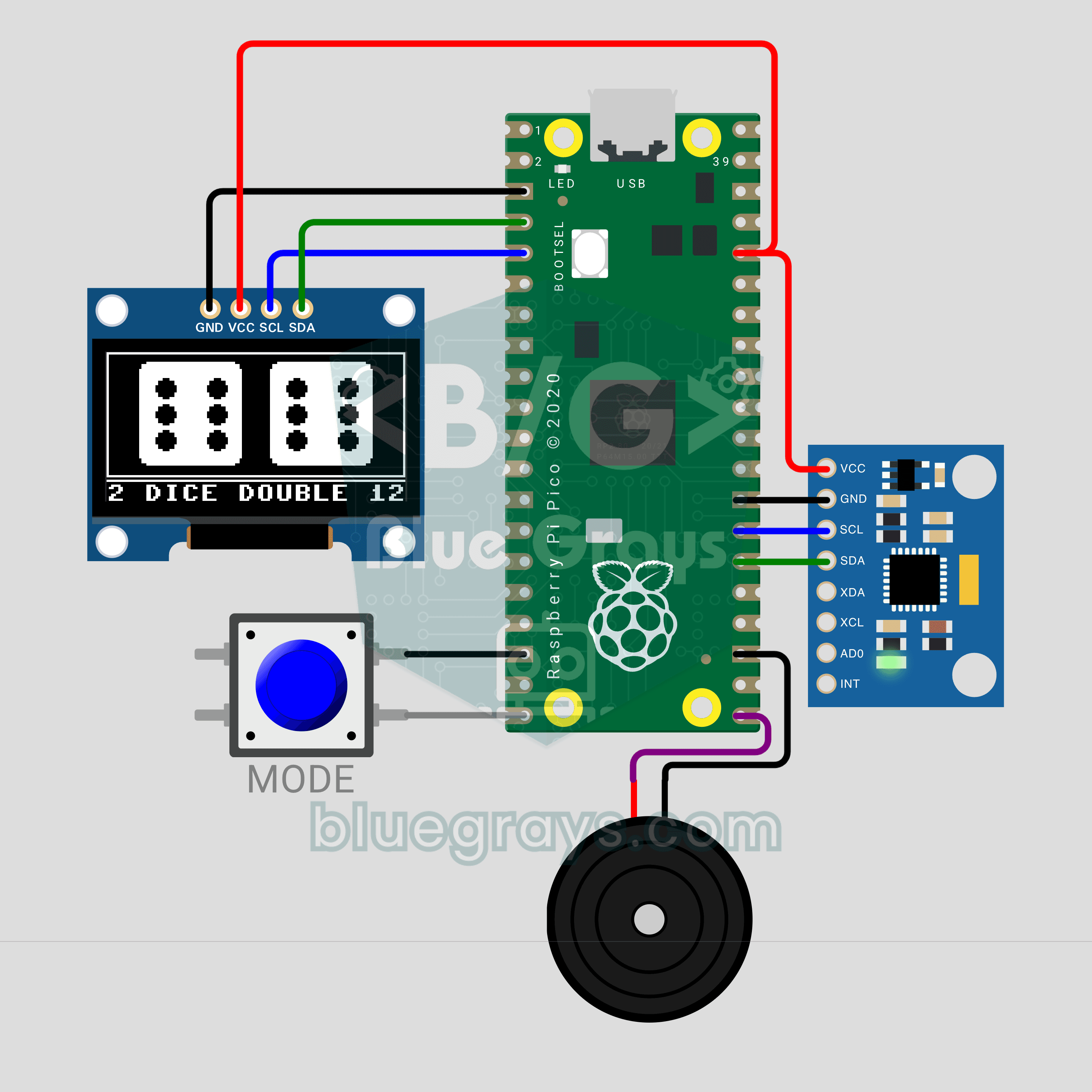
Raspberry Pi Pico Shake Dice (MPU-6050 + OLED Display + Buzzer)
Lost your dice? No problem: shake the circuit and the die rolls on a 0.96 inch OLED! An MPU-6050 accelerometer senses the shake, the die wobbles and spins, and once you stop it slows down and lands on a face. The MODE button switches between one die and two; roll a double and the screen flashes while the buzzer plays a celebration tune. The Raspberry Pi Pico reads the sensor straight over I2C, no library needed.
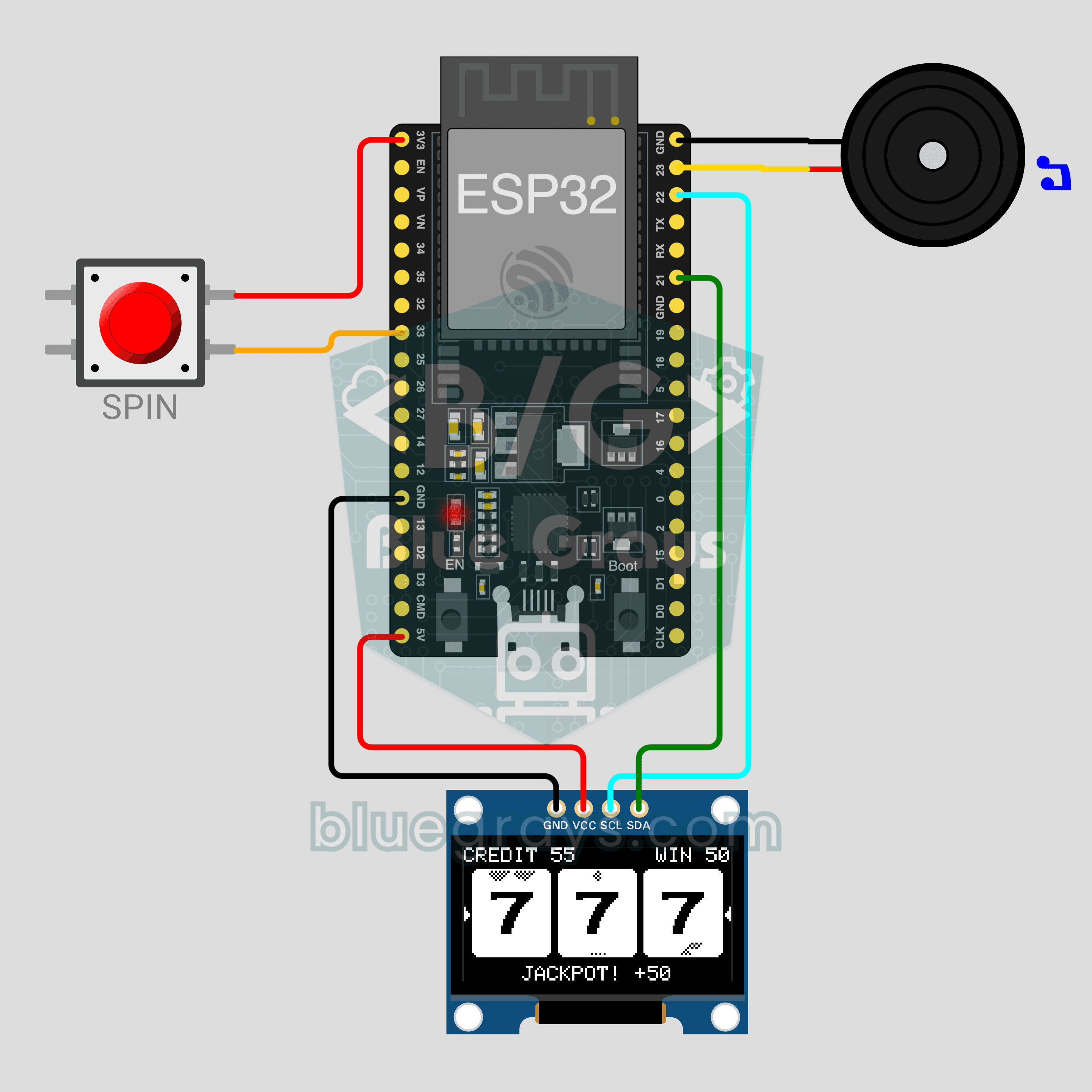
ESP32 Slot Machine Game (OLED Display + Button + Buzzer)
Pull the lever and watch the reels spin! This ESP32 project spins three reels of cherry, bell, BAR and 7 icons on a 0.96 inch OLED with a realistic slow-down, all from one button. The credits are purely virtual, with no real money involved: the goal is to learn the probability and random numbers behind games of chance. If the first two reels match, the third spins longer for suspense, 7-7-7 plays a JACKPOT tune, and Preferences keeps the credits.
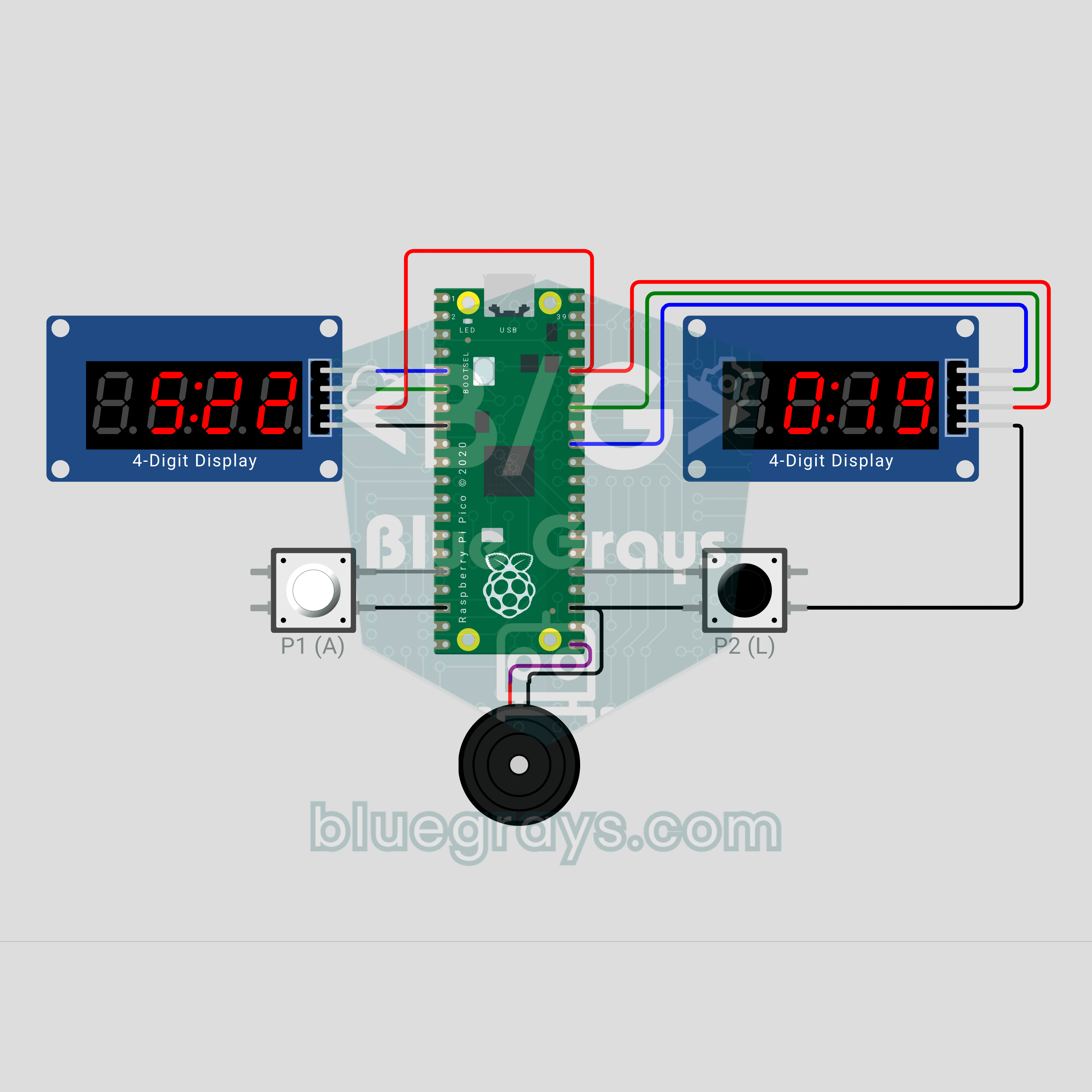
Raspberry Pi Pico Chess Clock (2 TM1637 Displays + 2 Buttons + Buzzer)
Make your move, hit the button, and the clock switches sides! A two-player chess clock with a Raspberry Pi Pico: each player's time runs down on their own TM1637 display and the mover gets an increment. The last 10 seconds show hundredths, a flagged side blinks FLAG and the buzzer sounds an alarm. Press both buttons together to pause. The TM1637 driver lives in the code, no library needed.
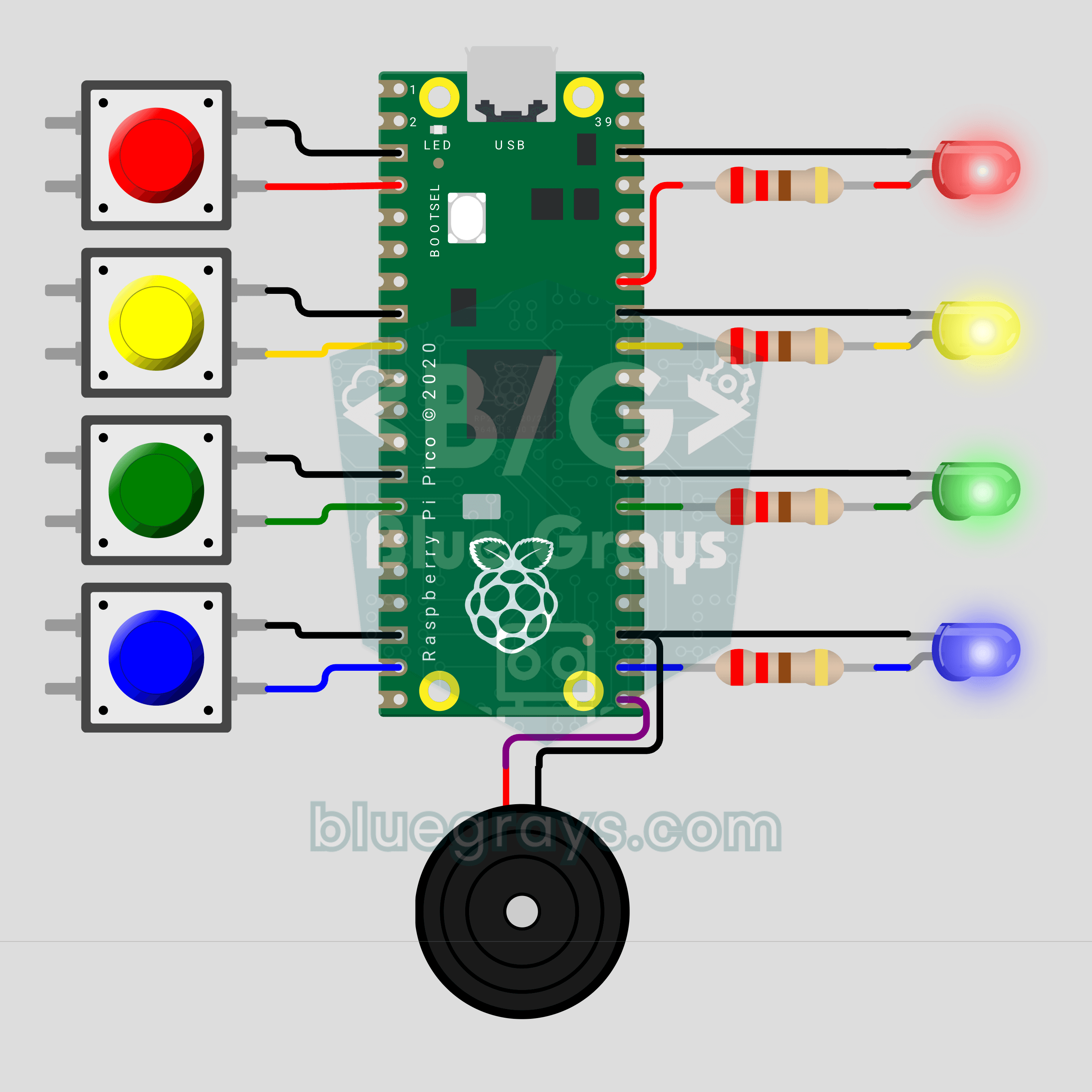
Raspberry Pi Pico Whack-a-Mole (4 LEDs + 4 Buttons + Buzzer)
Hit it when it lights up! The arcade classic Whack-a-Mole on your desk with a Raspberry Pi Pico. Four LEDs are four holes; a lit LED is a mole popping up, so press the button on the same row before the light goes out. Every 5 hits you level up and the moles stay up for less time. You get 3 misses, and a buzzer announces every hit, miss and new record.
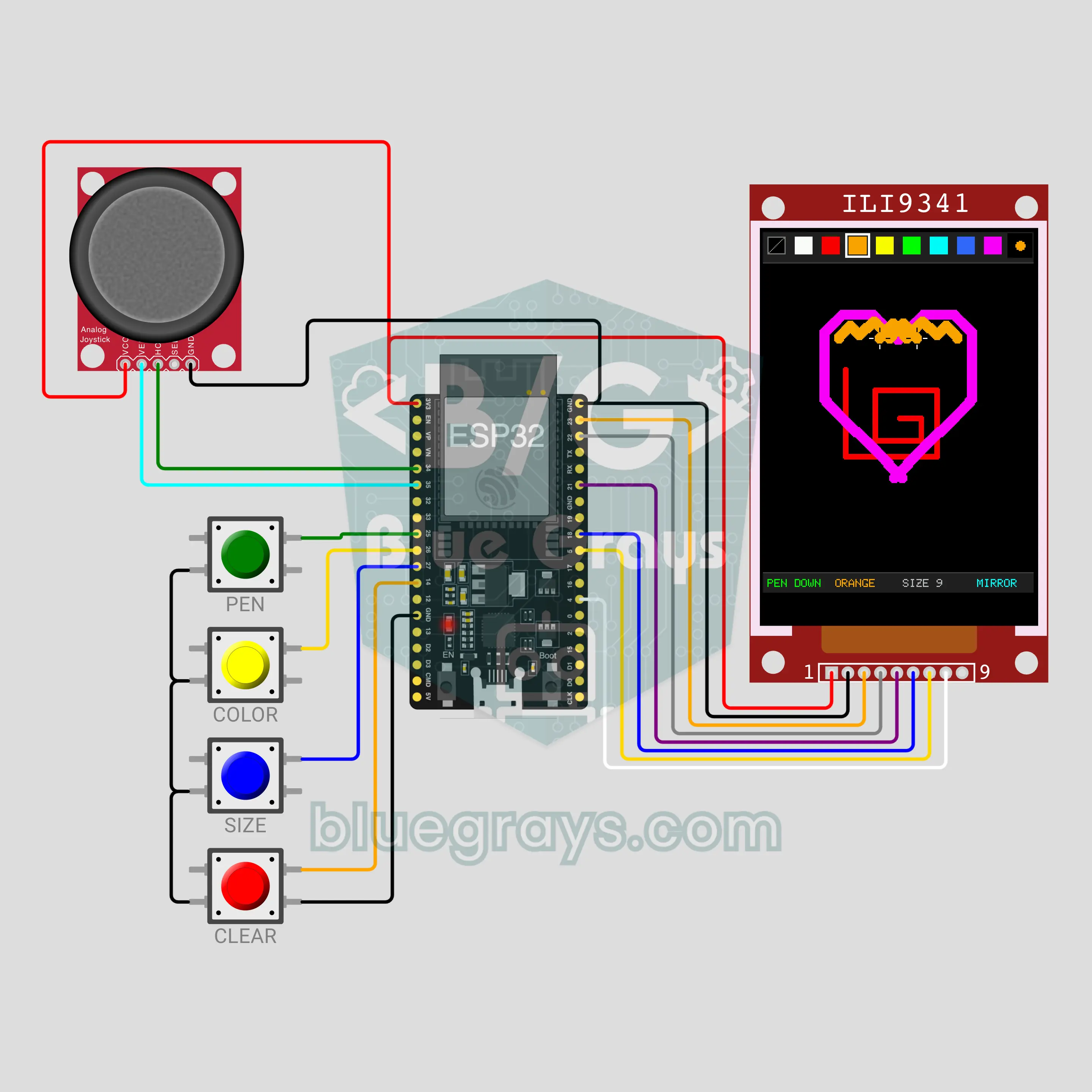
ESP32 Color Drawing Tablet (ILI9341 + Joystick + Buttons)
Push the joystick and draw! We are building a small drawing tablet with an ESP32 and a 2.8 inch ILI9341 color display. The joystick moves the cursor faster the further you push it, and four buttons lift the pen, change the color (8 colors + eraser) and brush size, and clear the canvas. In mirror mode every stroke is copied to the other side, so hearts and butterflies draw themselves.
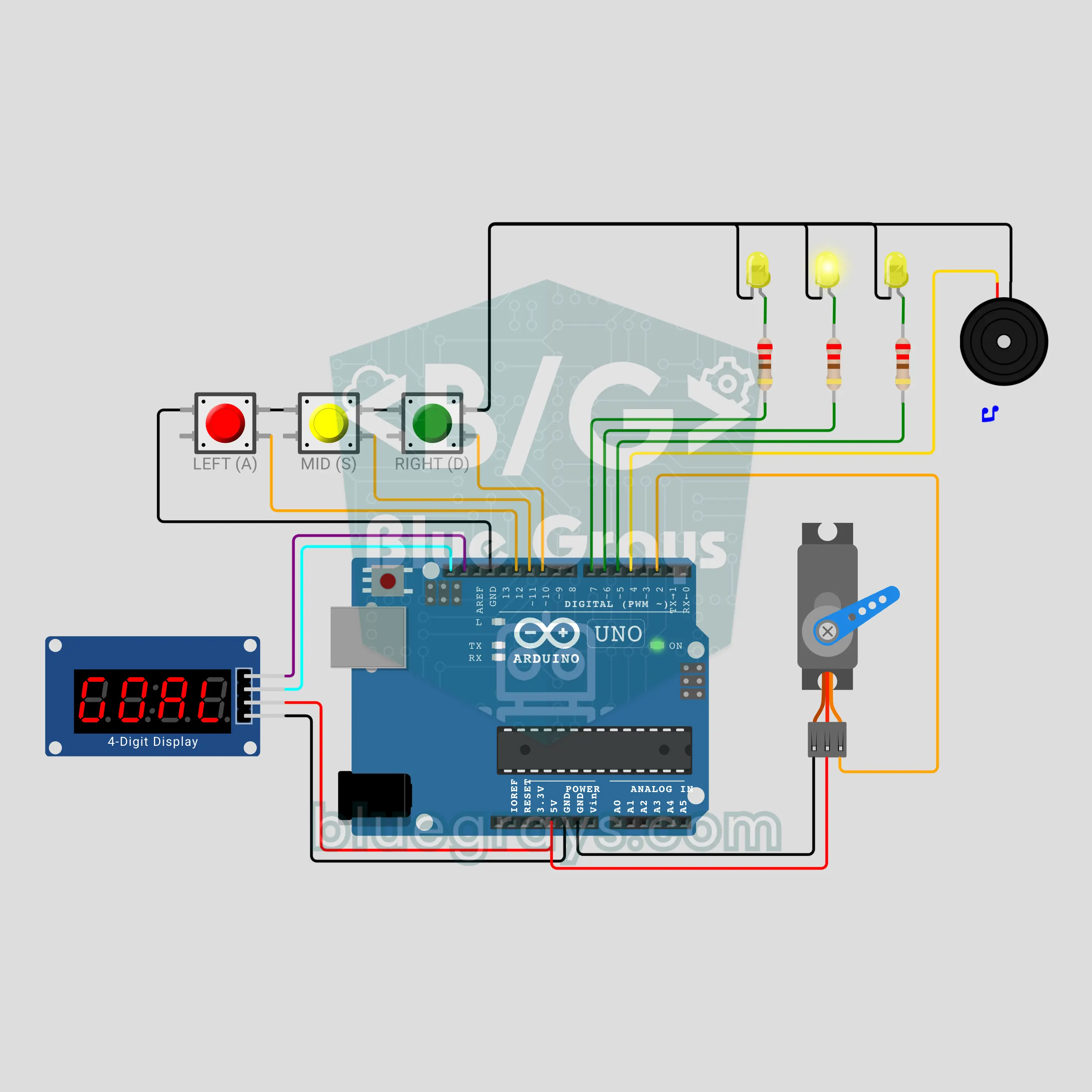
Arduino Penalty Shootout Game (Servo Goalkeeper + TM1637 Display)
A 5-shot penalty shootout on your desk! After a 3-2-1 beep and a whistle you shoot with the left, middle or right button, and the SG90 servo keeper dives to a corner at the same moment. The keeper learns: keep shooting at the same corner and it starts diving there more often. The score is on the TM1637 display, the ball's corner on the LEDs, and the goal tune comes from a passive buzzer. Randomness, weighted odds and servo control in one game.
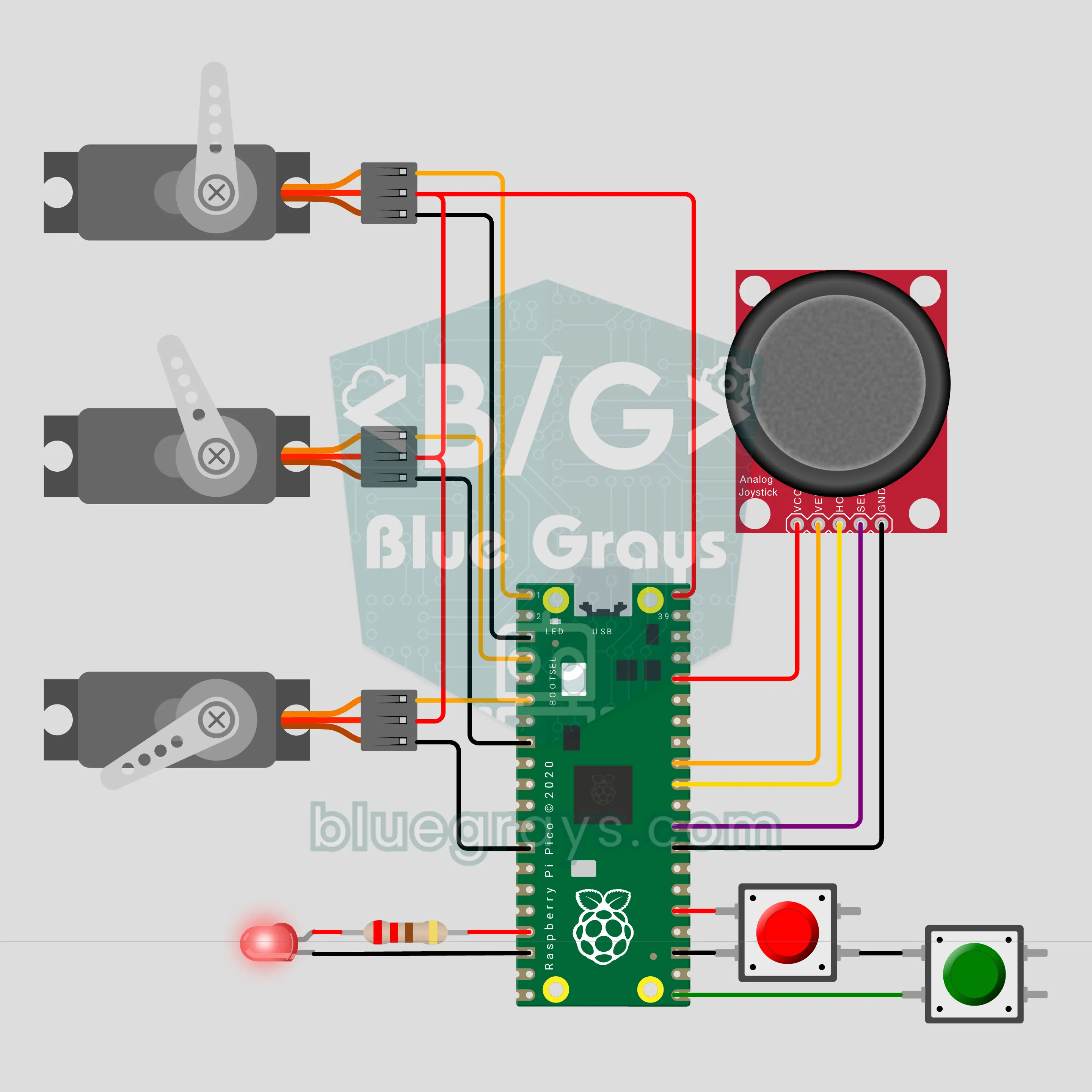
Raspberry Pi Pico Record-and-Replay Robot Arm (3 Servos + Joystick)
Show it a move once and the robot arm repeats it on its own! The Raspberry Pi Pico drives the base, shoulder and gripper with three SG90 servos; a joystick steers the arm and a click opens or closes the gripper. Press RECORD and the motion is saved every 100 ms; press PLAY and the arm follows the same path once or on a loop, at x1, x2 or x0.5 speed. The "teach and repeat" method of factory robots, right on your desk.
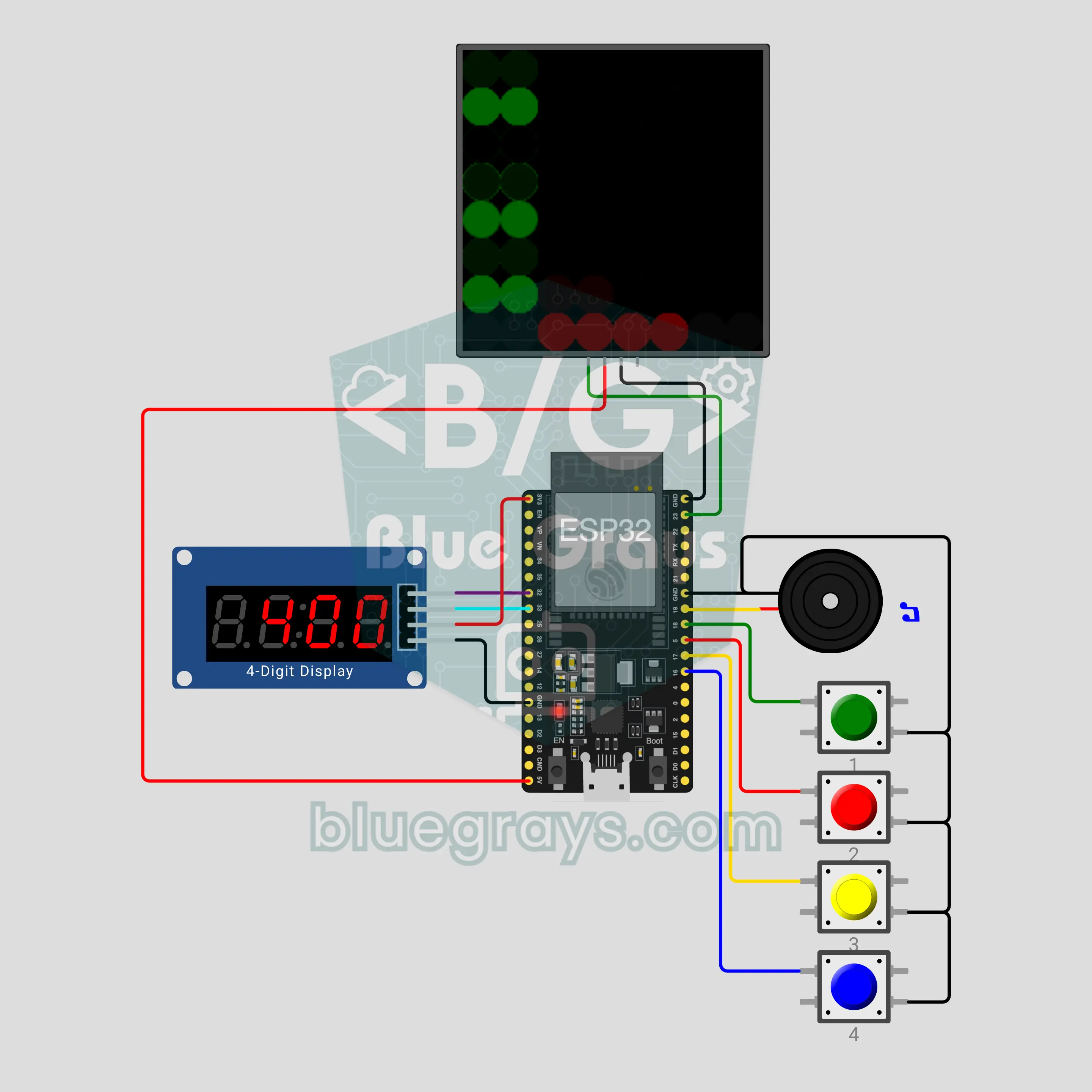
ESP32 Rhythm Game (8x8 NeoPixel Matrix + 4 Buttons + TM1637)
Notes rain down, and if you hit them on time you're the one playing the song! Colored notes fall down 4 lanes of an 8x8 NeoPixel matrix; press the right button the moment one reaches the bottom row and the buzzer plays that note of the melody. The score is on a TM1637 display and combos multiply your points. Üsküdar'a Gider İken, Ode to Joy and Jingle Bells are built in, with an S/A/B/C grade at the end and fireworks for a new record.
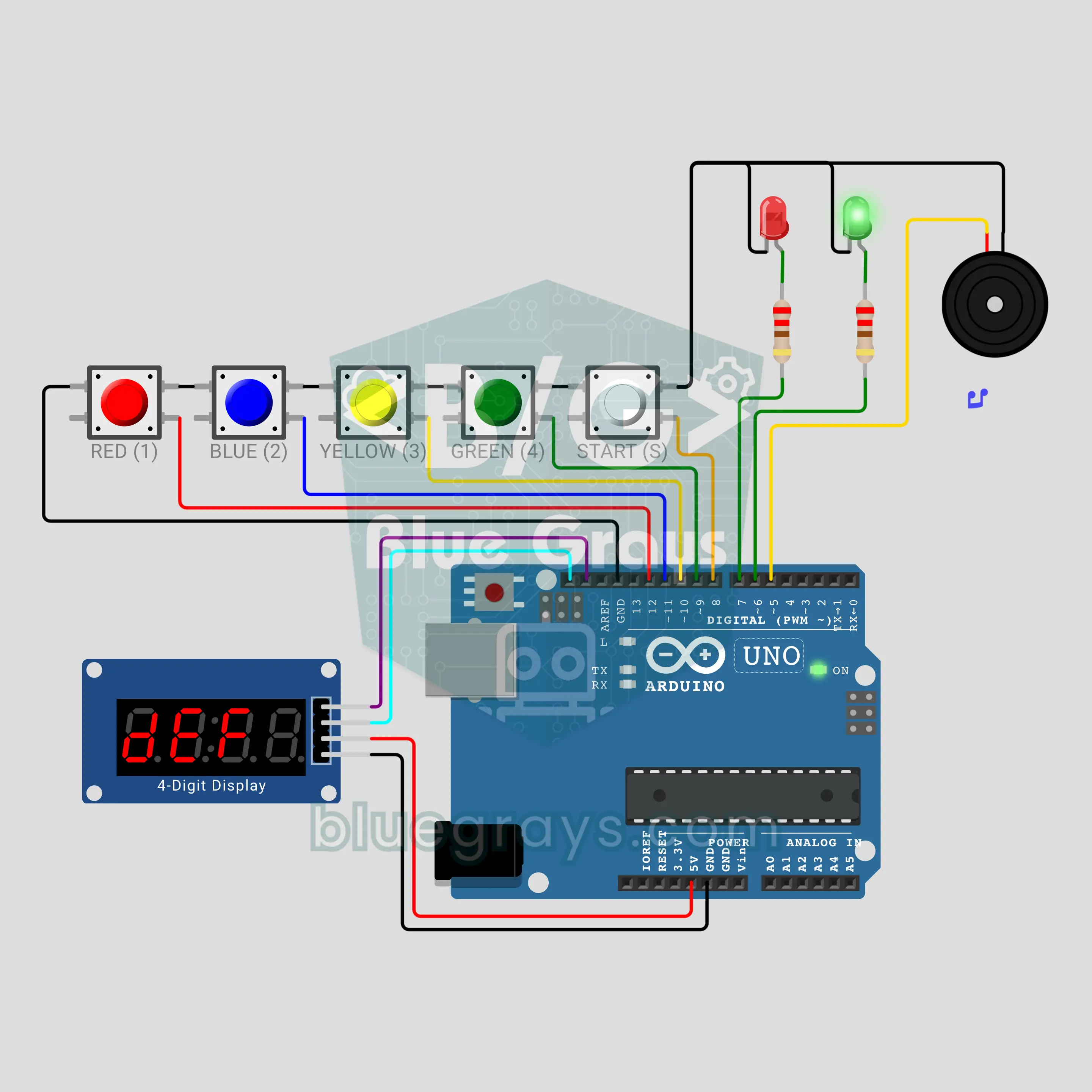
Arduino Bomb Defusal Game: Cut the Right Wire (TM1637 + 4 Wires + Buzzer)
The "red or blue?" movie scene on your desk! Press START and seconds and hundredths race across the TM1637, while the passive buzzer beeps a little faster and higher each time. One of four wires defuses the bomb, one sets it off, one halves the time left and one does nothing, and the roles are shuffled every round. Randomness, non-blocking timing with millis() and an EEPROM defuse counter in one game.
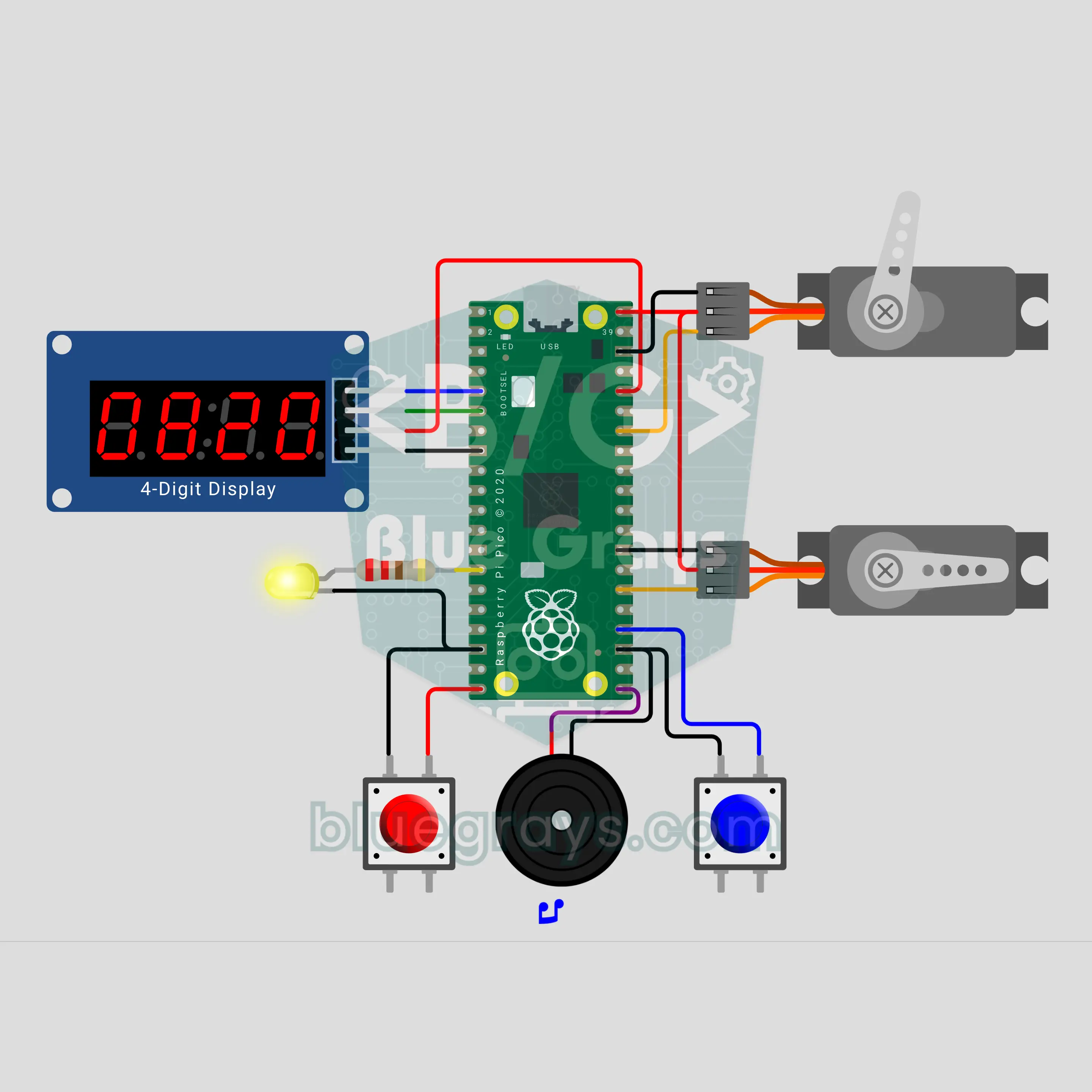
Raspberry Pi Pico Cowboy Duel (2 SG90 Servos + TM1637 + Buzzer)
A two-player reflex duel: a western whistle plays, the yellow LED lights up at a random moment and the first to press wins! The Raspberry Pi Pico knocks the loser's cardboard cowboy down with an SG90 servo and makes the winner's wave; a TM1637 display shows the reaction time in milliseconds. Press before the LED and you shoot your own cowboy. First to 3 points is champion, and the fastest reaction is saved as the record.
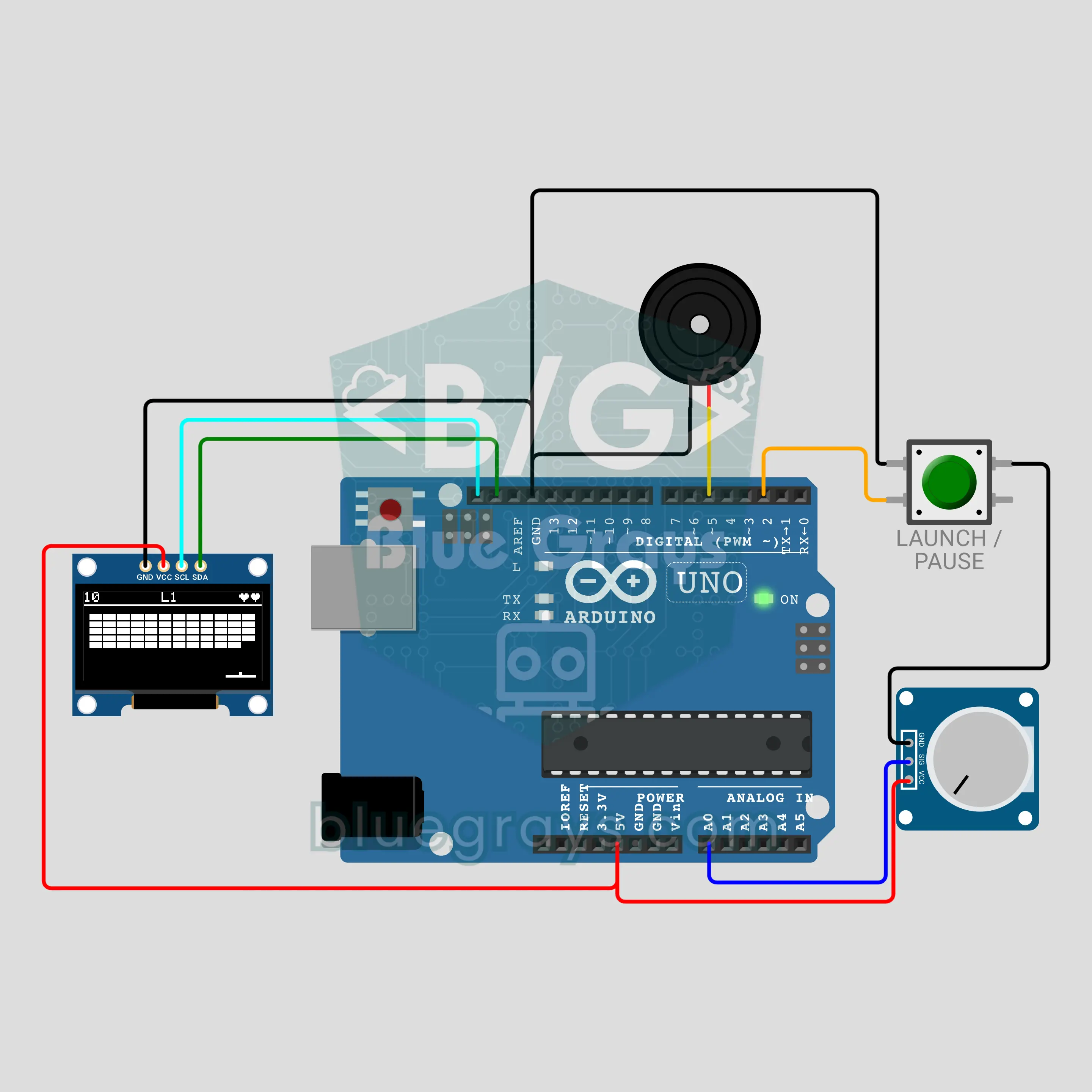
Arduino Brick Breaker Game (OLED Display + Potentiometer + Buzzer)
The 80s arcade classic in your hands! Bounce the ball and smash 5 rows of bricks on a 0.96 inch OLED, sliding the paddle by turning a potentiometer. Five levels bring five different patterns, top row bricks take two hits and some bricks drop a box that widens your paddle. Every brick broken before the ball touches the paddle again raises the passive buzzer's note one step. If nobody plays, the game plays itself.
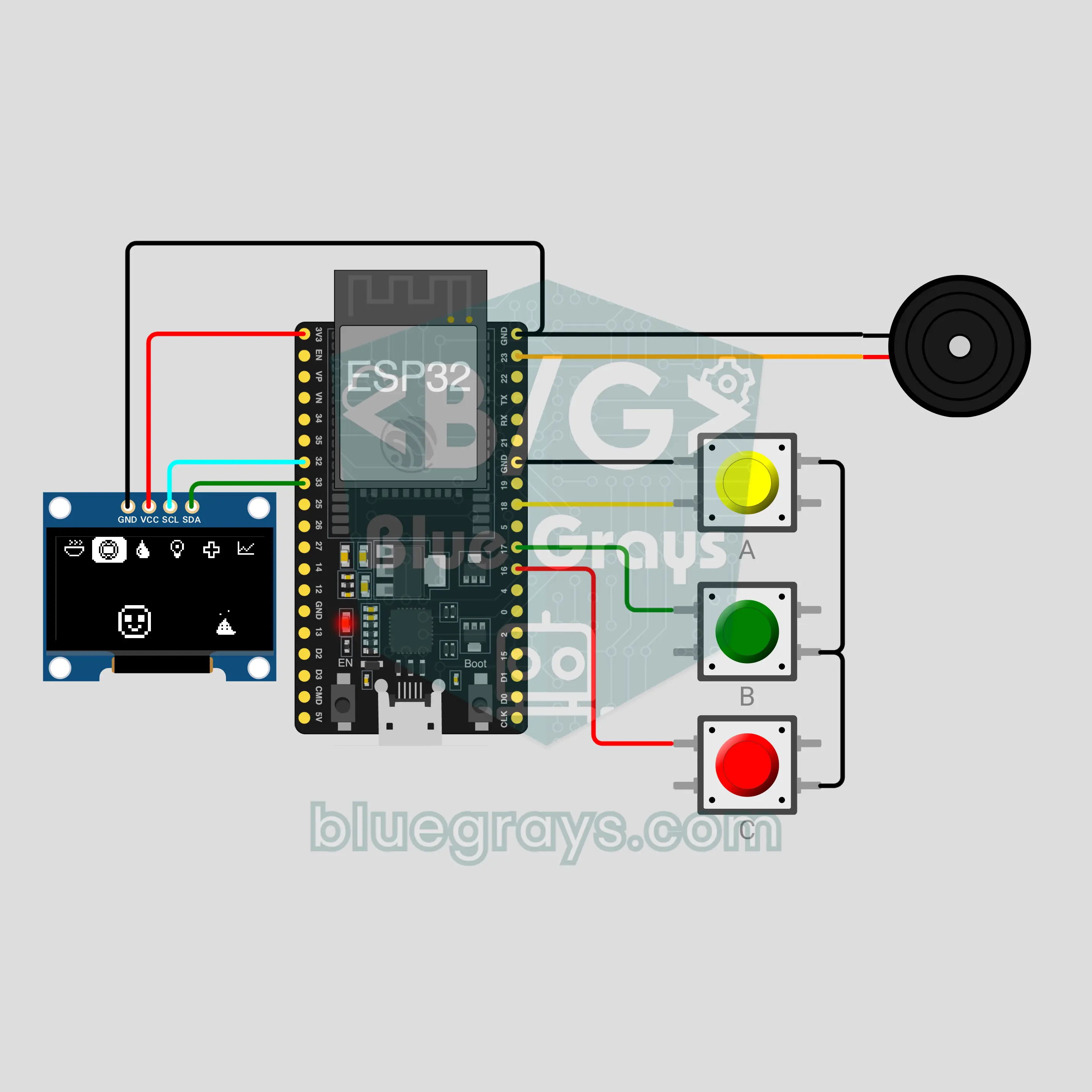
ESP32 Virtual Pet (OLED + 3 Buttons + Buzzer)
The pocket toy of the 90s is back on an ESP32! A pixel baby hatches from an egg on the 0.96 inch OLED; with 3 buttons you feed it, play a mini game, clean up after it and switch off the light so it can sleep. Hunger, happiness, energy and cleanliness drop over time, and the passive buzzer beeps when it needs you. It grows into a different adult depending on your care, and since its state lives in NVS, it waits for you even after you unplug it.
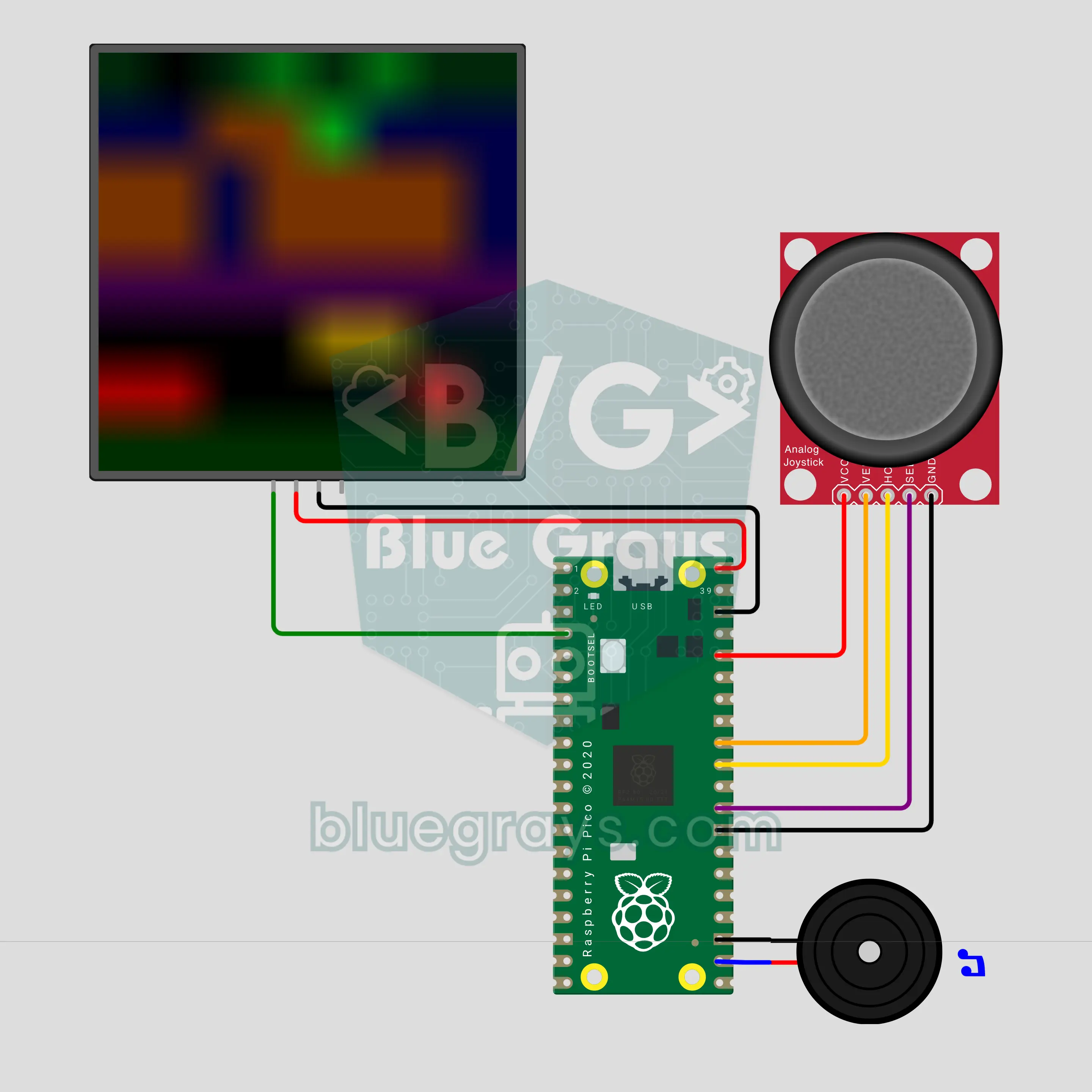
Raspberry Pi Pico Cross the Road: Frog Game (8x8 NeoPixel Matrix + Joystick + Buzzer)
The classic arcade frog game on 64 color LEDs! The Raspberry Pi Pico draws a road of red and yellow cars and a river of drifting logs on an 8x8 NeoPixel matrix; you move the frog one square at a time with a joystick and fill three homes. The traffic speeds up every level, and the buzzer plays hop, crash and home sounds. 3 lives, a score and a best score kept in flash; leave it alone and the game plays itself.
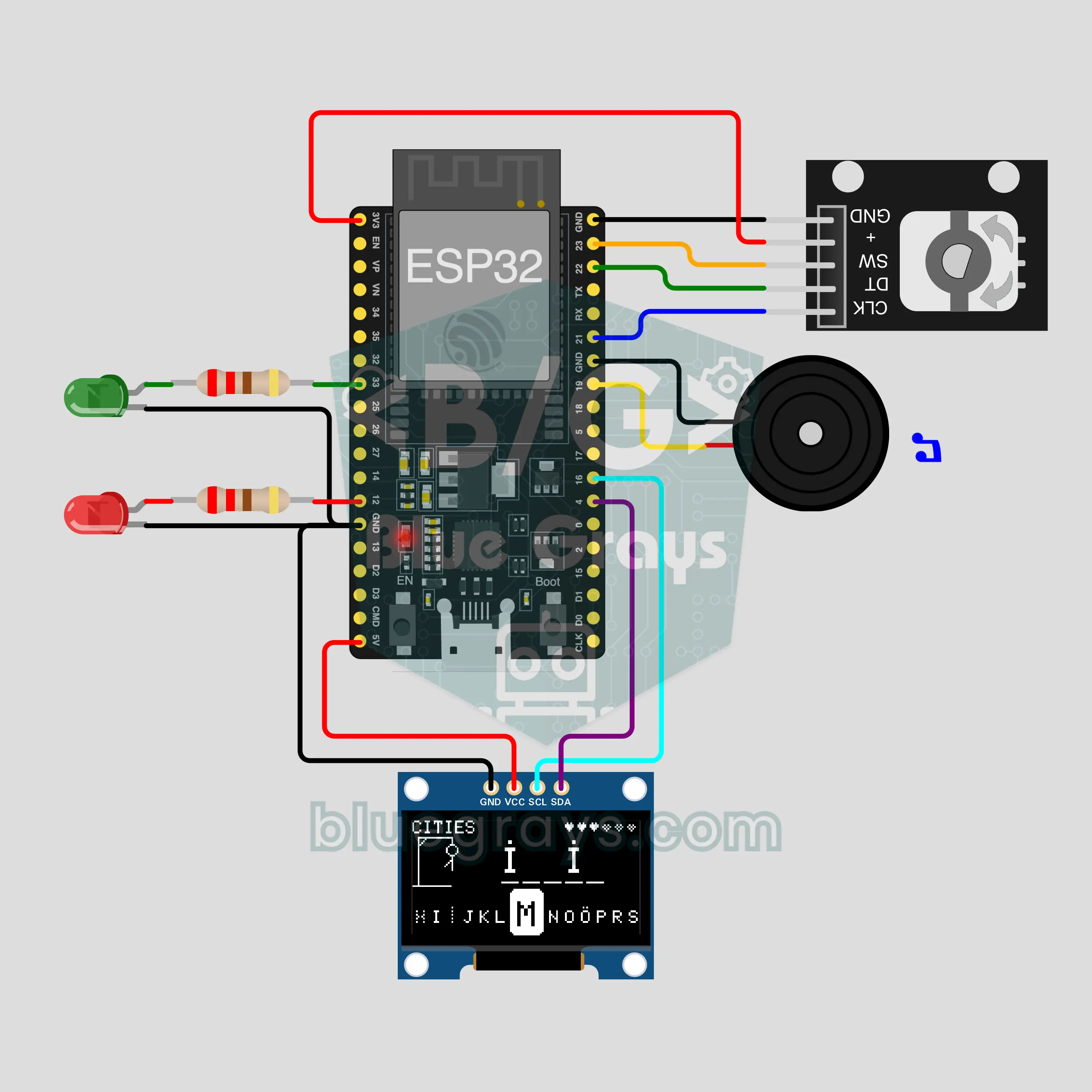
ESP32 Hangman Game (OLED + KY-040 Rotary Encoder + Buzzer)
The classic notebook game hangman on an ESP32 and a 0.96 inch OLED! Turning the KY-040 rotary encoder slides the alphabet strip, pressing it guesses the selected letter. A correct letter flies into place and the green LED lights up; a wrong one adds a piece to the gallows while the red LED and the buzzer complain. Turkish and English words, three categories, a best streak and a two-player mode.
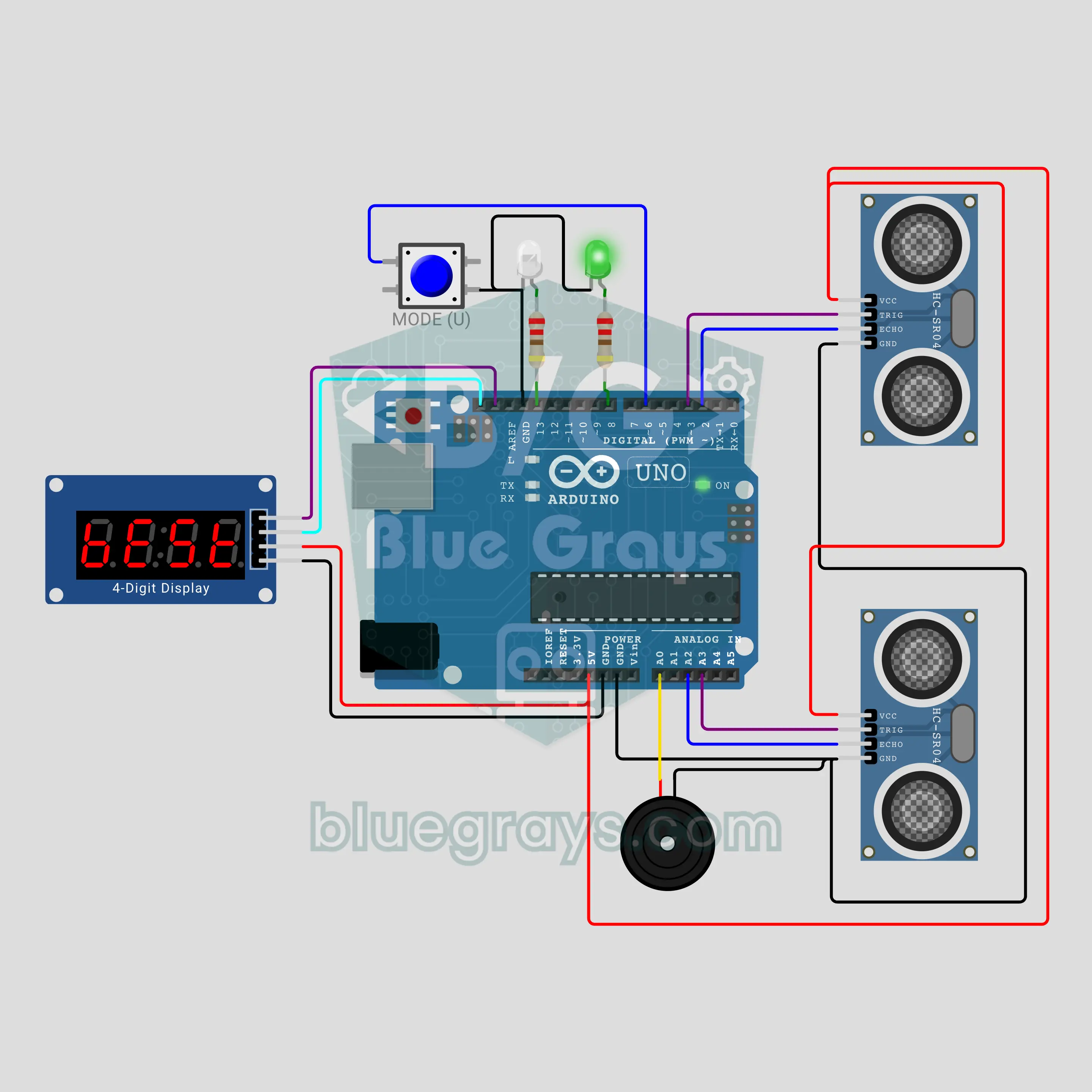
Arduino Toy Car Speed Radar (2 HC-SR04 + TM1637 Display)
A speed radar for toy cars! Two HC-SR04 sensors sit 20 cm apart beside the track and time the car as it passes them with micros(): speed = distance / time. The TM1637 shows the result in cm/s, km/h or as the 1:64 scale real-life speed. Over the limit, a white LED fires like a speed camera flash and a siren sounds; the reverse direction shows a minus sign and the record stays in EEPROM.
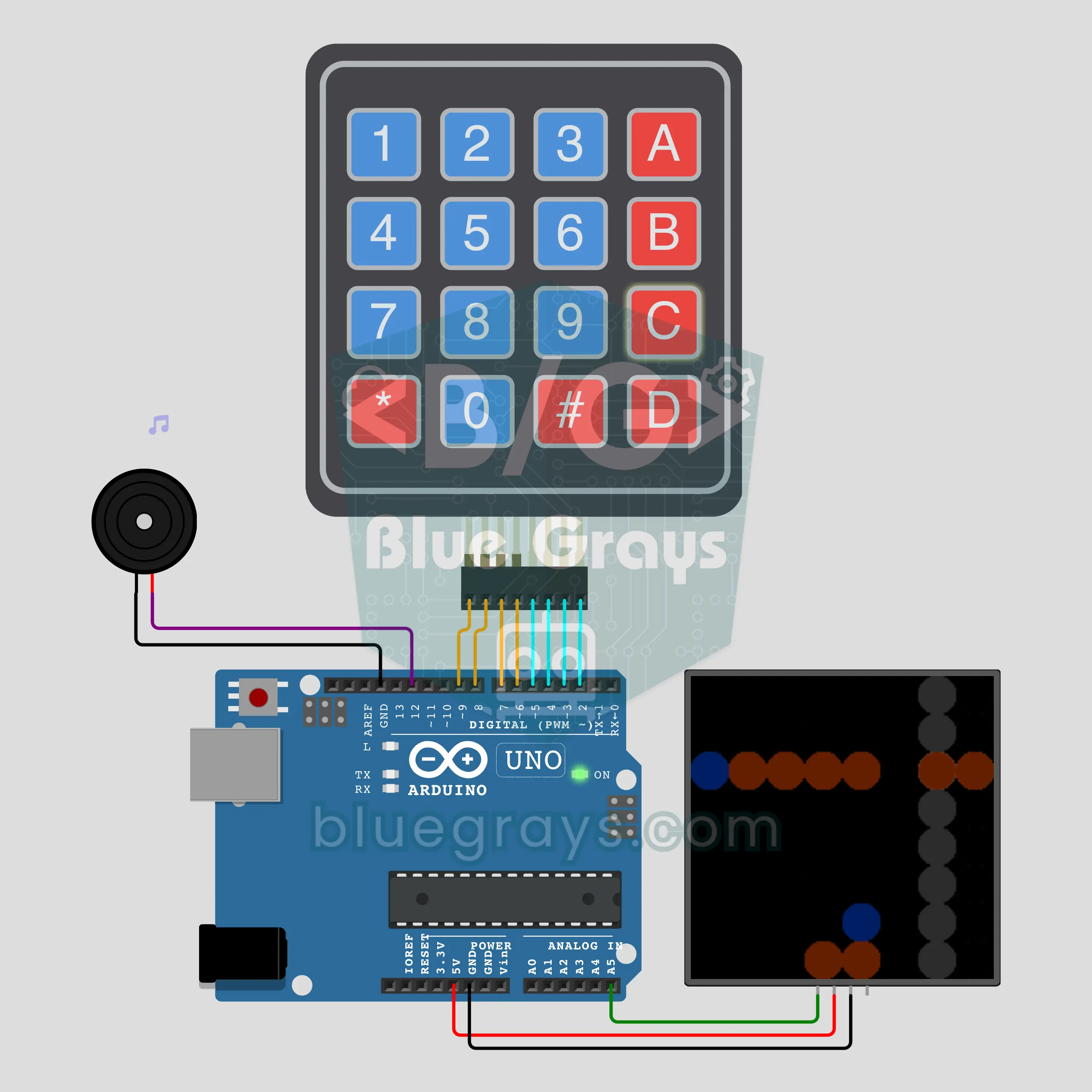
Naval Battle Against the Arduino (4x4 Keypad + 8x8 NeoPixel + Buzzer)
The classic pen-and-paper naval battle game, now with the Arduino as your opponent. It secretly places both fleets on an 8x8 sea, and you type coordinates from A1 to H8 on a 4x4 keypad to fire. On the 8x8 NeoPixel matrix a hit glows red, a miss blue and a sunk ship orange, while a buzzer plays whistles, splashes and explosions. Miss, and the Arduino fires back at your fleet in hunt and target mode.
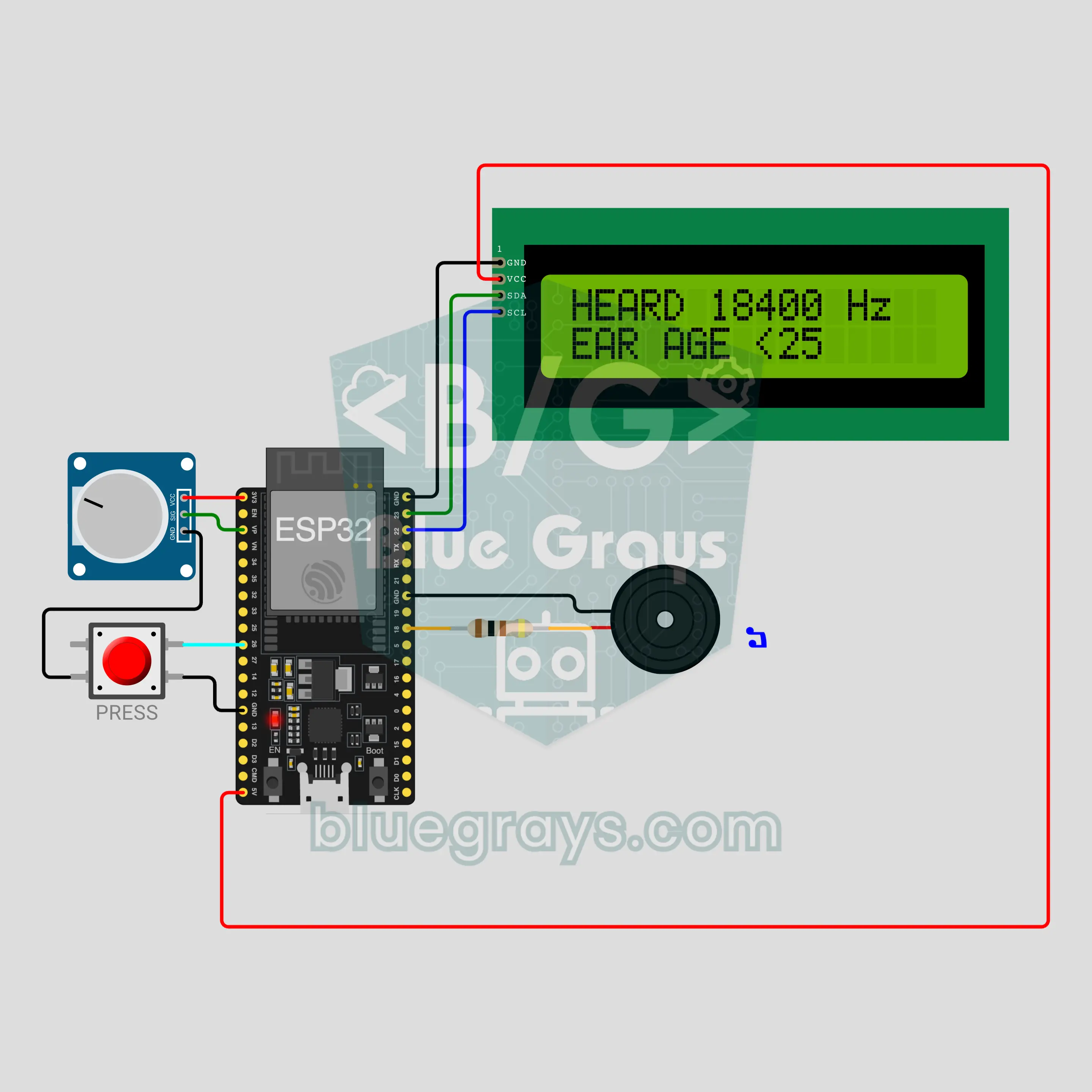
ESP32 Ear Age Test: Can You Hear This Sound? (Speaker + Pot + I2C LCD + Button)
A desk version of the social media "can you hear this sound?" test: a speaker plays beeps that climb step by step from 8 kHz to 20 kHz, and you press the button the moment you stop hearing them. The I2C LCD shows the last frequency you heard and a rough ear age, and a pot sets the volume. It is for fun, not a medical hearing test; start with the volume low.
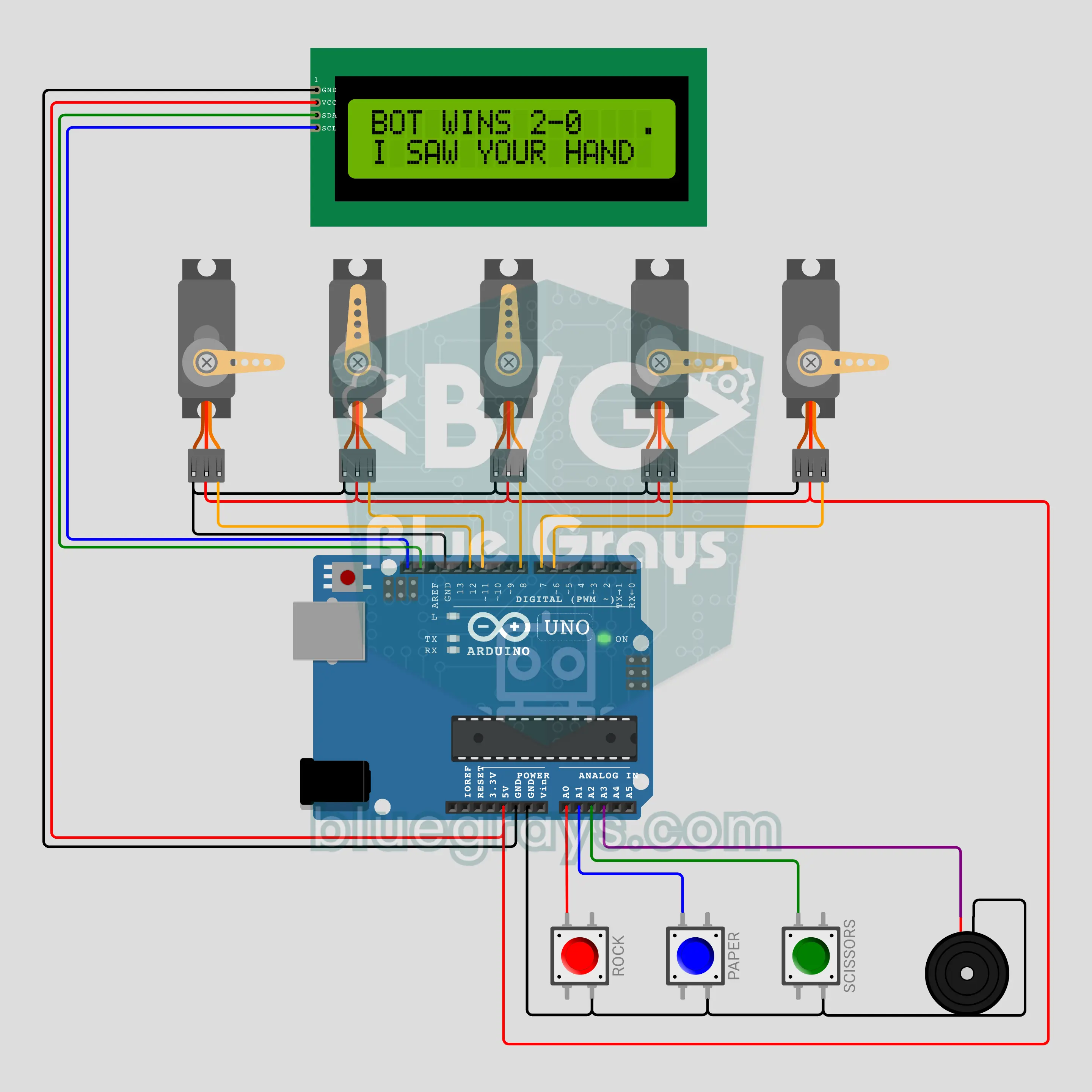
Arduino Cheating Robot Hand: Rock Paper Scissors (5 Servos + 3 Buttons + LCD)
Five servos bend five fingers, so the robot hand makes rock, paper or scissors while you play with three buttons. An I2C LCD counts "3, 2, 1, SHOOT!", shows both picks and the score, and a buzzer beeps on every beat. In normal mode the hand picks at random and plays fair. Hold two buttons together and a secret cheat mode turns on: the hand sees your press and makes the winning shape at the same moment. At the end of the match it even confesses.
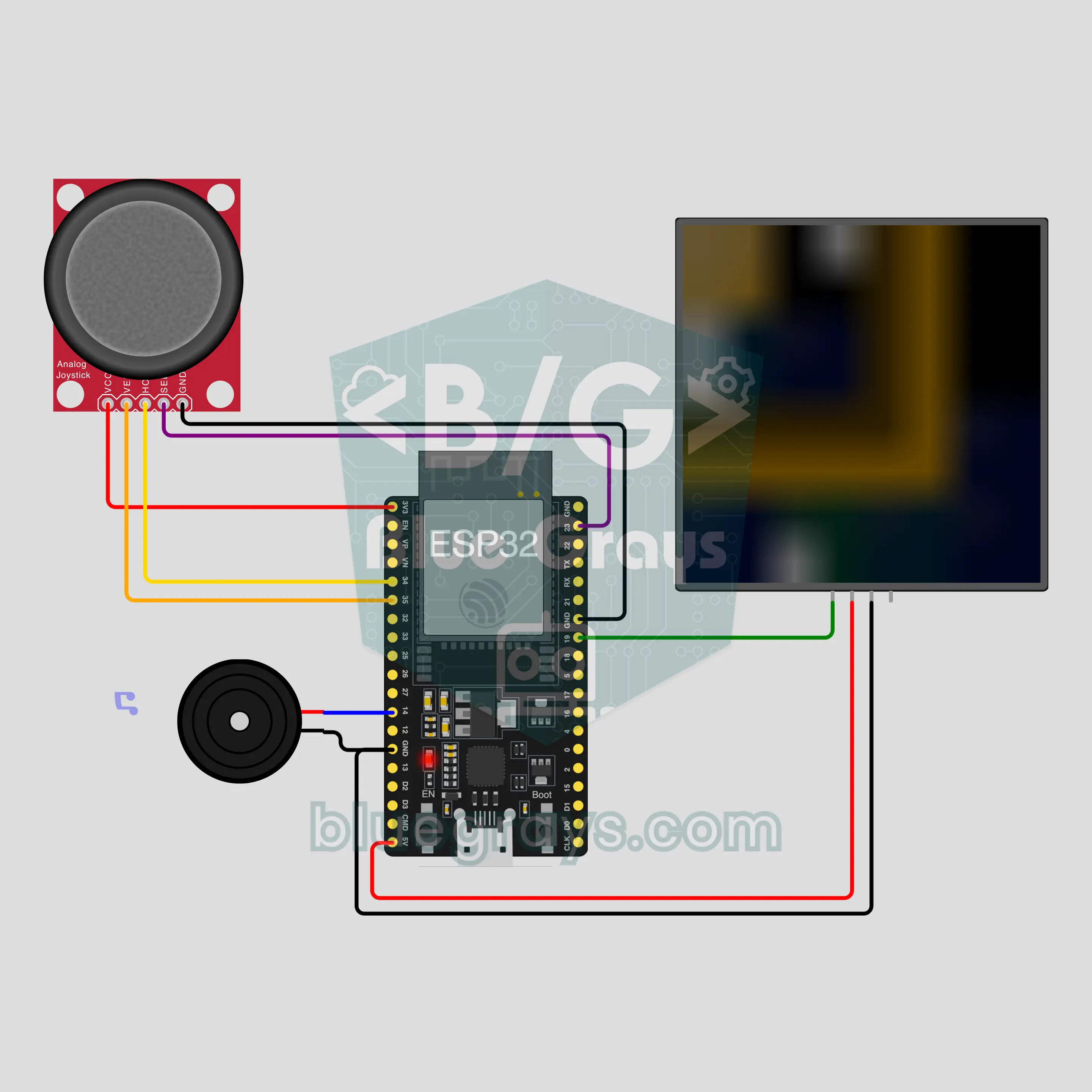
ESP32 2048 on a Matrix: Slide and Merge (8x8 NeoPixel + Joystick + Buzzer)
The addictive 2048-style sliding puzzle from phones, now on an 8x8 NeoPixel matrix. The board is 4x4 tiles with no digits: every number has its own color, 2 is blue, 2048 is gold. Slide with the joystick; when equal numbers merge, the buzzer plays a note that rises with the number. Reaching 2048 starts a golden ring celebration, and when no moves are left the score scrolls across the matrix and your best is kept.
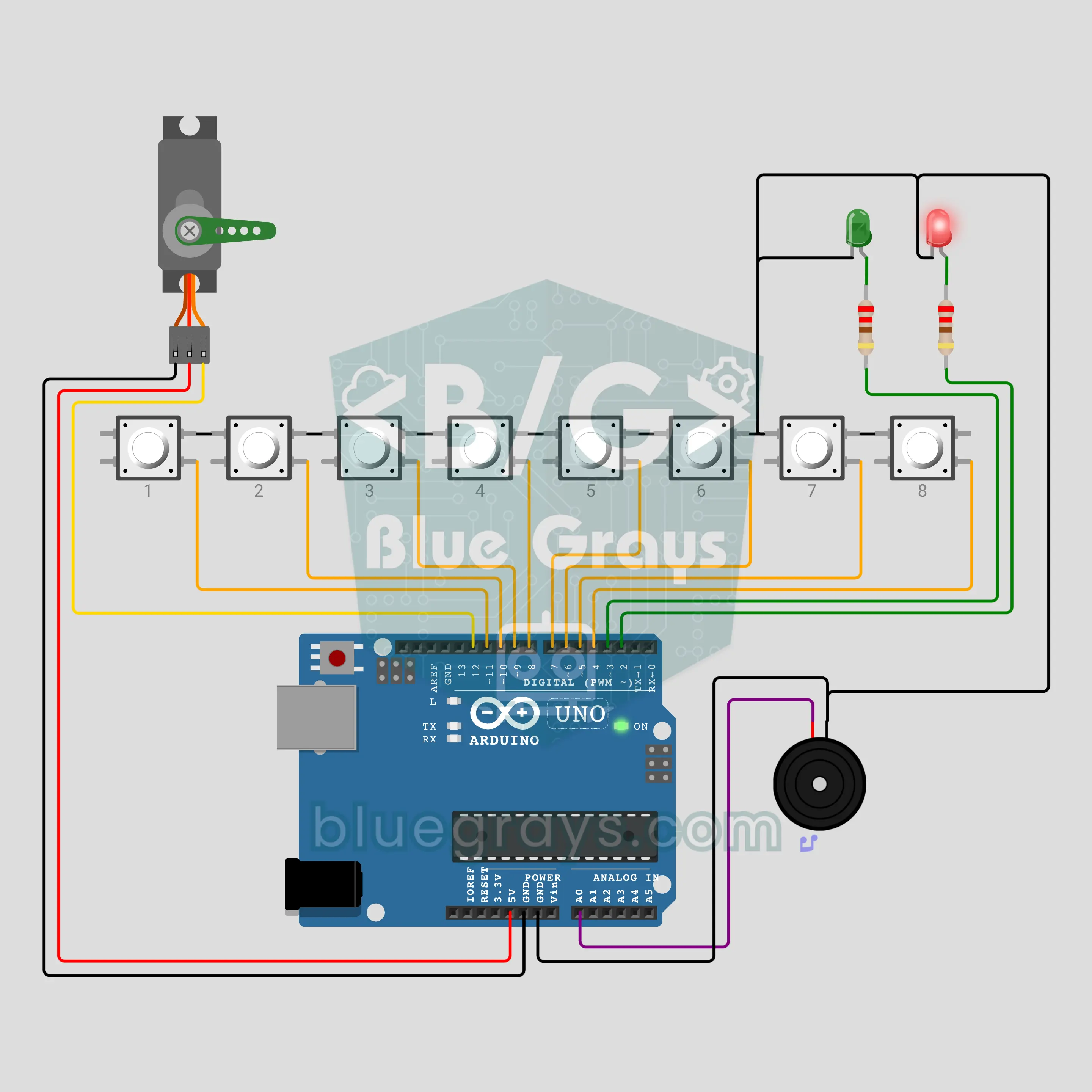
Arduino Biting Crocodile: Which Tooth? (8 Buttons + Servo Jaw + Buzzer)
A party game in the style of the classic biting-crocodile toy: eight buttons are the crocodile's teeth and an SG90 servo is its upper jaw. Each round one tooth is secretly cursed. You take turns pressing teeth; a safe tooth clicks and the jaw twitches a little. Whoever presses the cursed tooth gets bitten: the jaw snaps shut, the red eye lights up and the buzzer growls. As fewer teeth are left, the green eye blinks faster and faster.
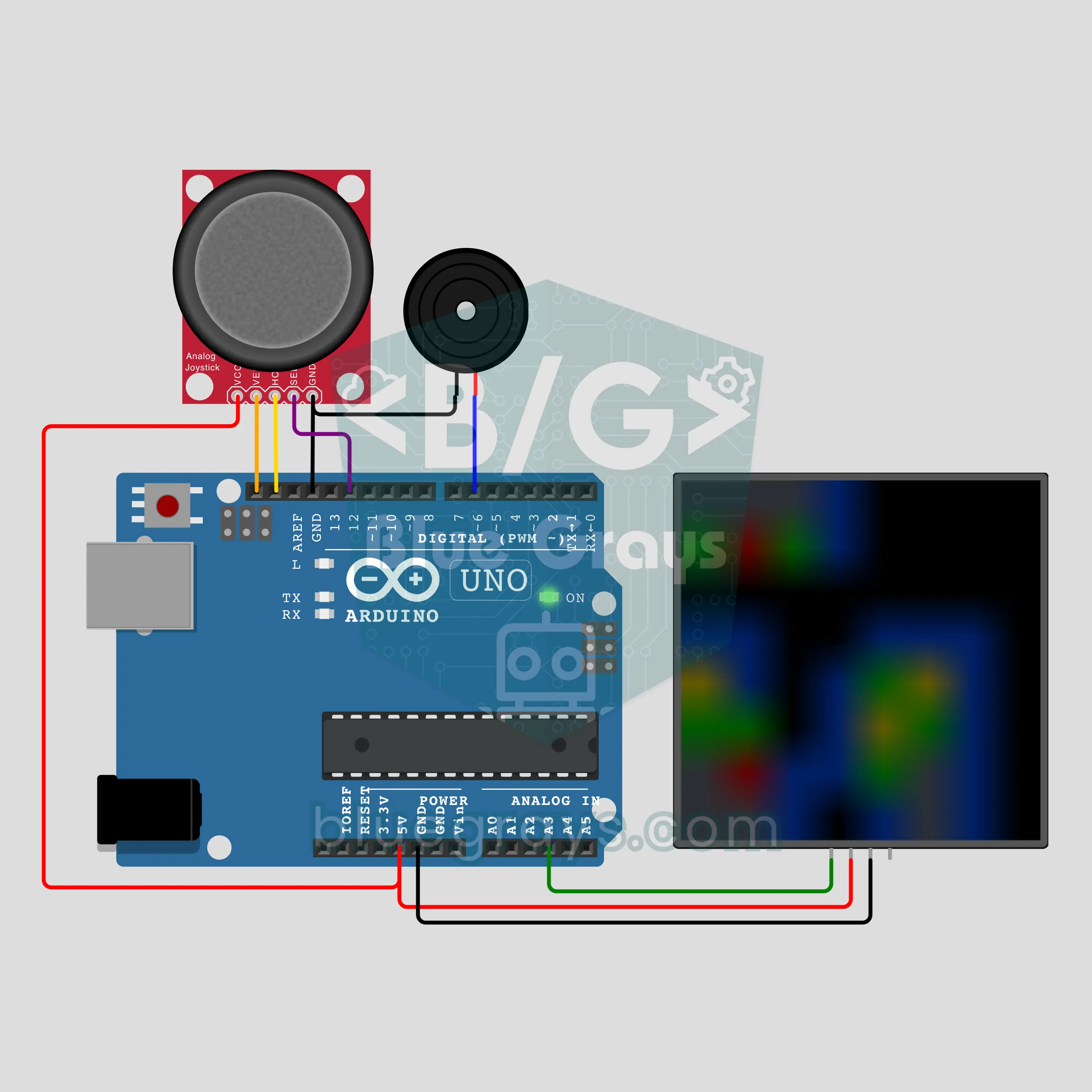
Arduino Minesweeper (8x8 NeoPixel + Joystick + Buzzer)
The legendary minesweeper-style game of old computers, now on an 8x8 NeoPixel matrix. 10 of the 64 cells hide a mine; there are no digits, every number has its own color: 1 blue, 2 green, 3 red. Move the cursor with the joystick, short press to open, long press to plant a flag. An empty cell opens its area wave by wave with a queue; hit a mine and the mines blow up ring by ring, find them all for a rainbow and a buzzer fanfare.
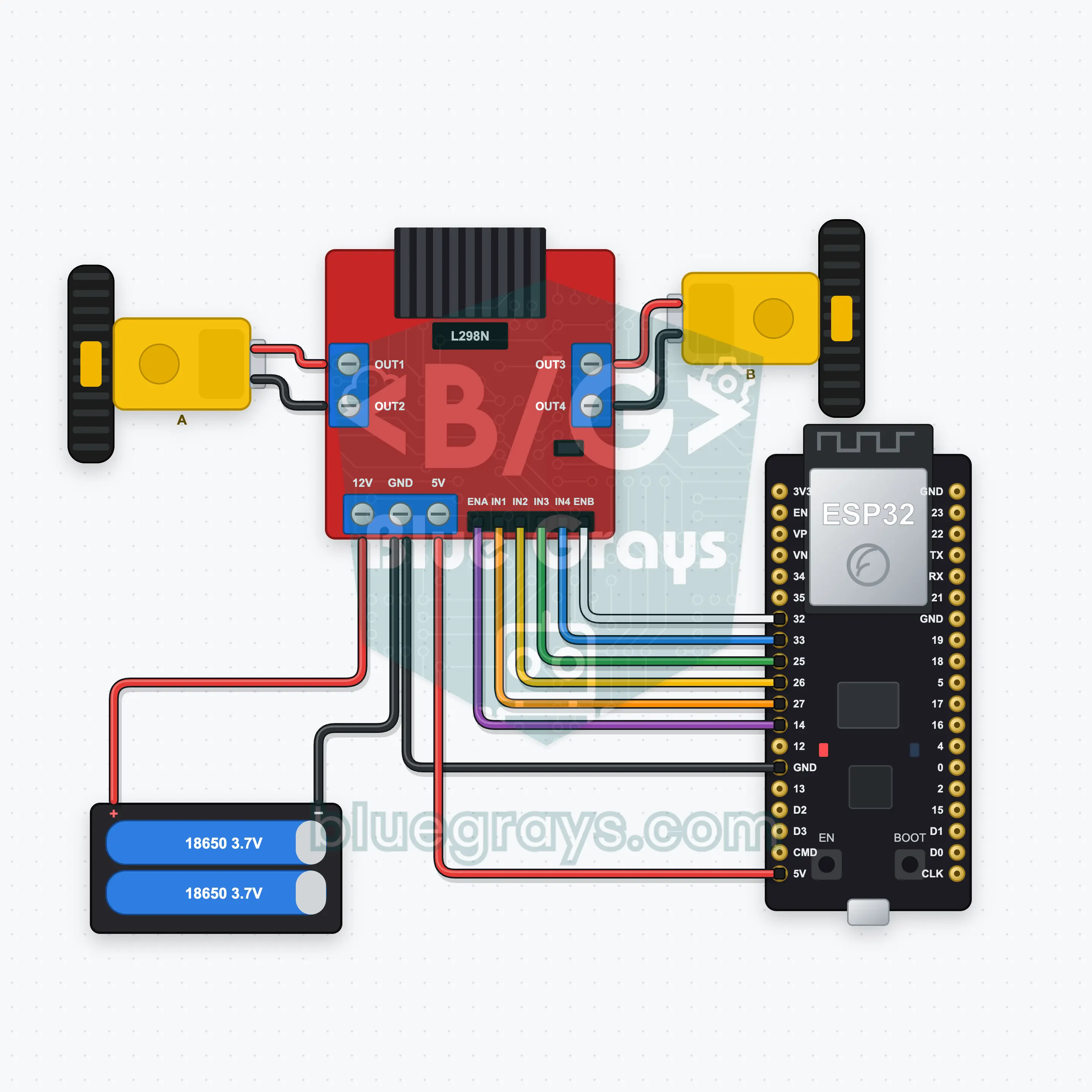
ESP32 Bluetooth Car (L298N)
Drive a two-wheel car over Bluetooth with the joystick on your phone; no internet needed, works on iPhone and Android. This project is the step-by-step guide to the Car remote Bluetooth template in the app, built with an ESP32, an L298N and two motors. Go to Workshop › Devices › Add a device › Bluetooth, pick Car remote and upload the code from Get the code. The Set up as a Bluetooth panel button on this page opens the wizard with this template.
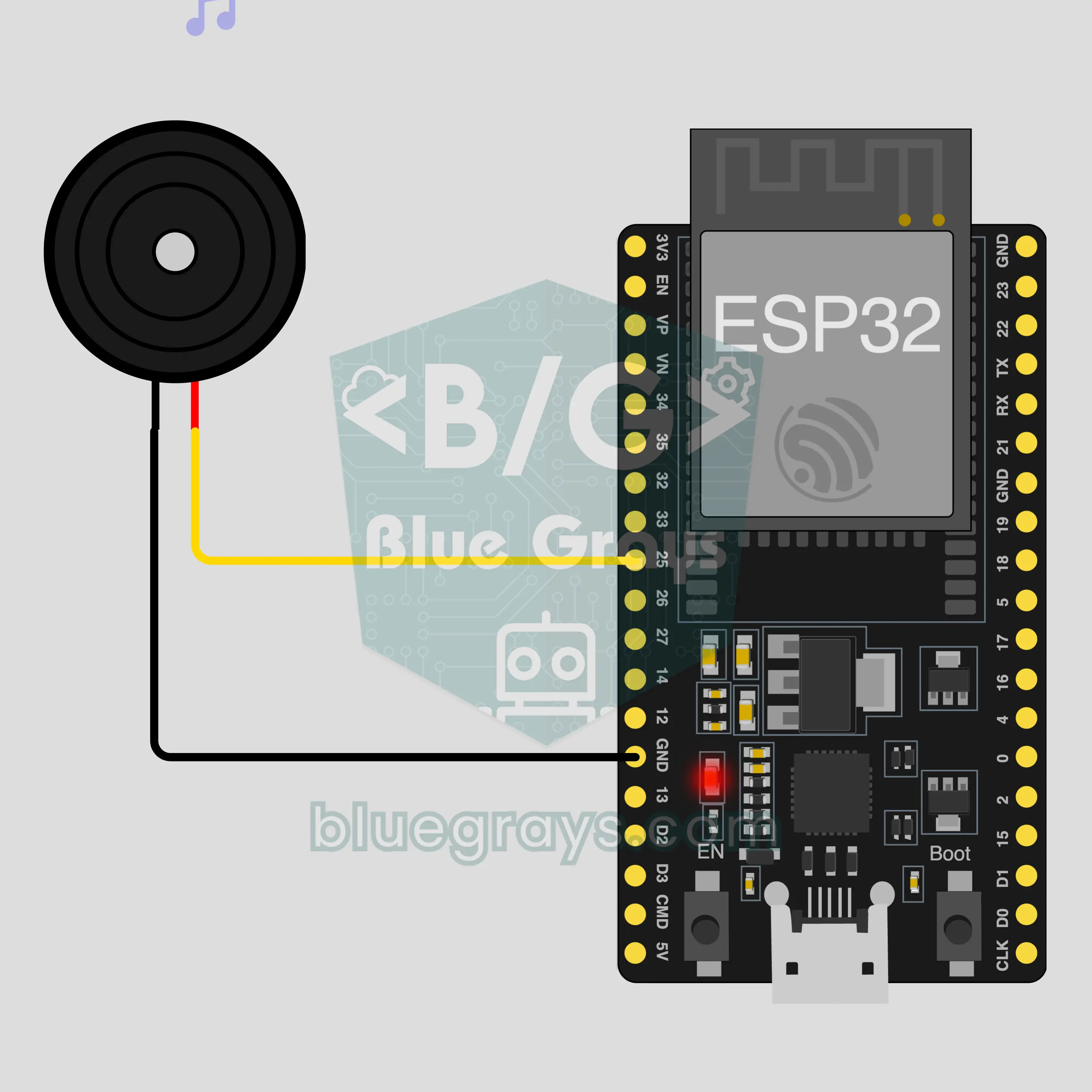
ESP32 Bluetooth Phone Piano
Turn your phone into an 8-key piano: press a key and a passive buzzer on the ESP32 plays that note, no internet or Wi-Fi needed. This is the step-by-step guide to the Phone piano Bluetooth template in the app, built with a buzzer and two jumper wires. Go to Workshop › Devices › Add a device › Bluetooth, pick Phone piano and upload the code with Get the code. The Set up as a Bluetooth panel button on this page opens the wizard with this template too.