
Phone and Internet Control Projects: Wi-Fi, Bluetooth, IR
Controlling a device remotely is the foundation of smart systems. In these projects you'll learn to send commands from your phone over Bluetooth, control things from a browser with an ESP32 web server, send notifications to Telegram and reuse old TV remotes with your own devices.
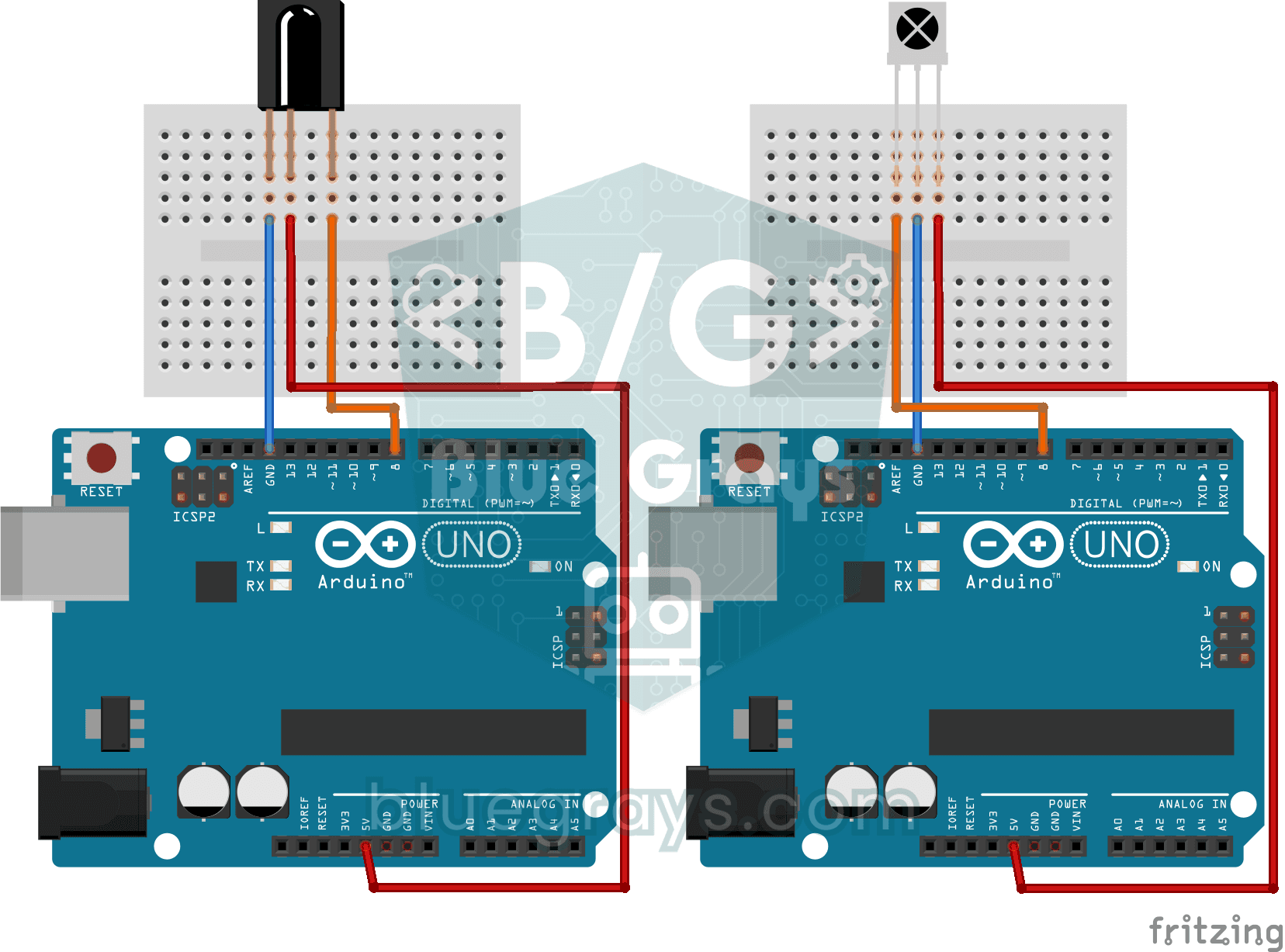
Reading IR Remote Control Codes
Every button on your TV remote sends a secret code using light you cannot see. The infrared receiver catches that light, and the Arduino writes the code of every button you press on your computer scre
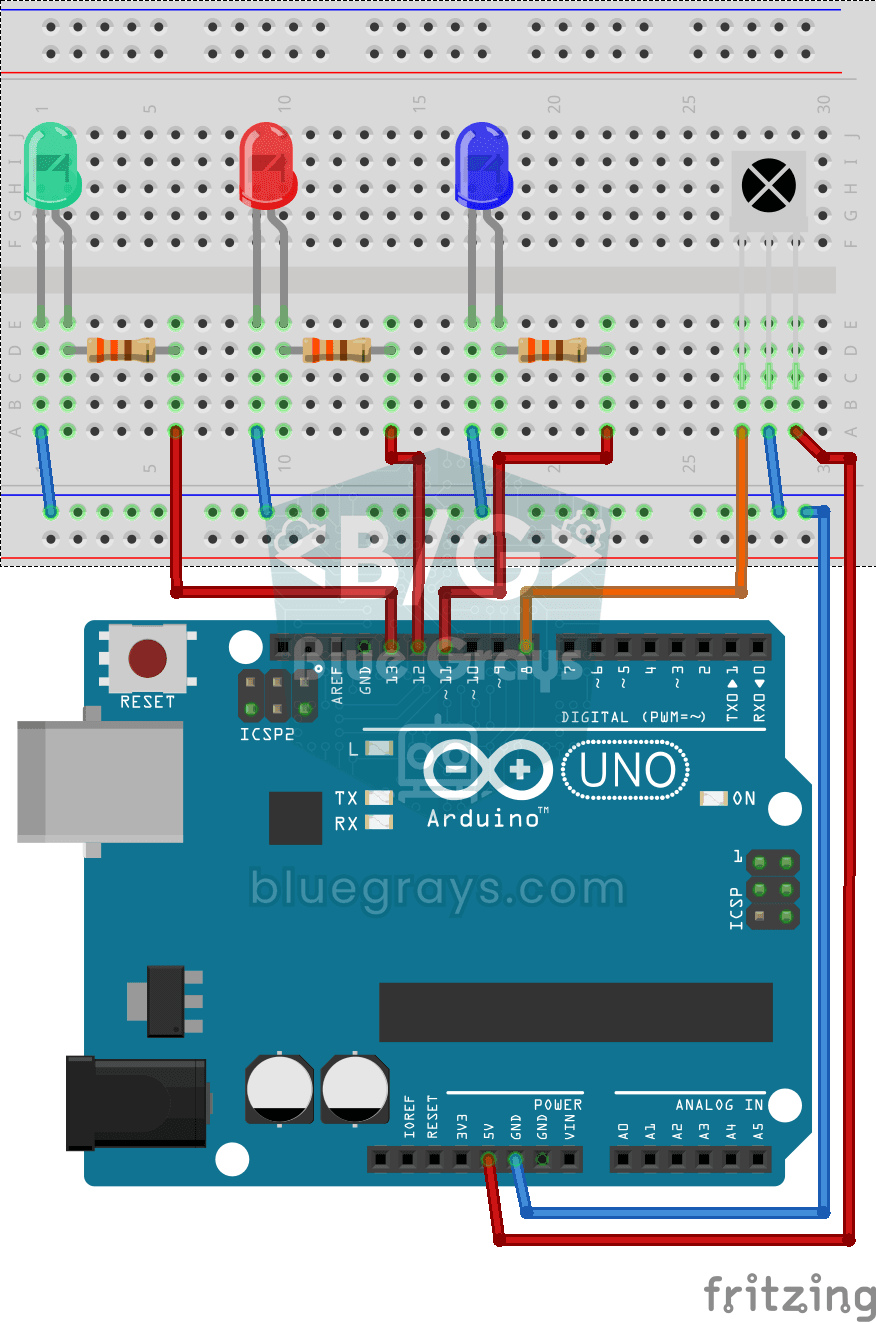
Led On/Off with IR Receiver and Remote Control
Like controlling three separate lamps without leaving your armchair: keys 1, 2 and 3 on the remote turn on the blue, red and green LEDs, and keys 4, 5 and 6 turn them off in the same order. The power
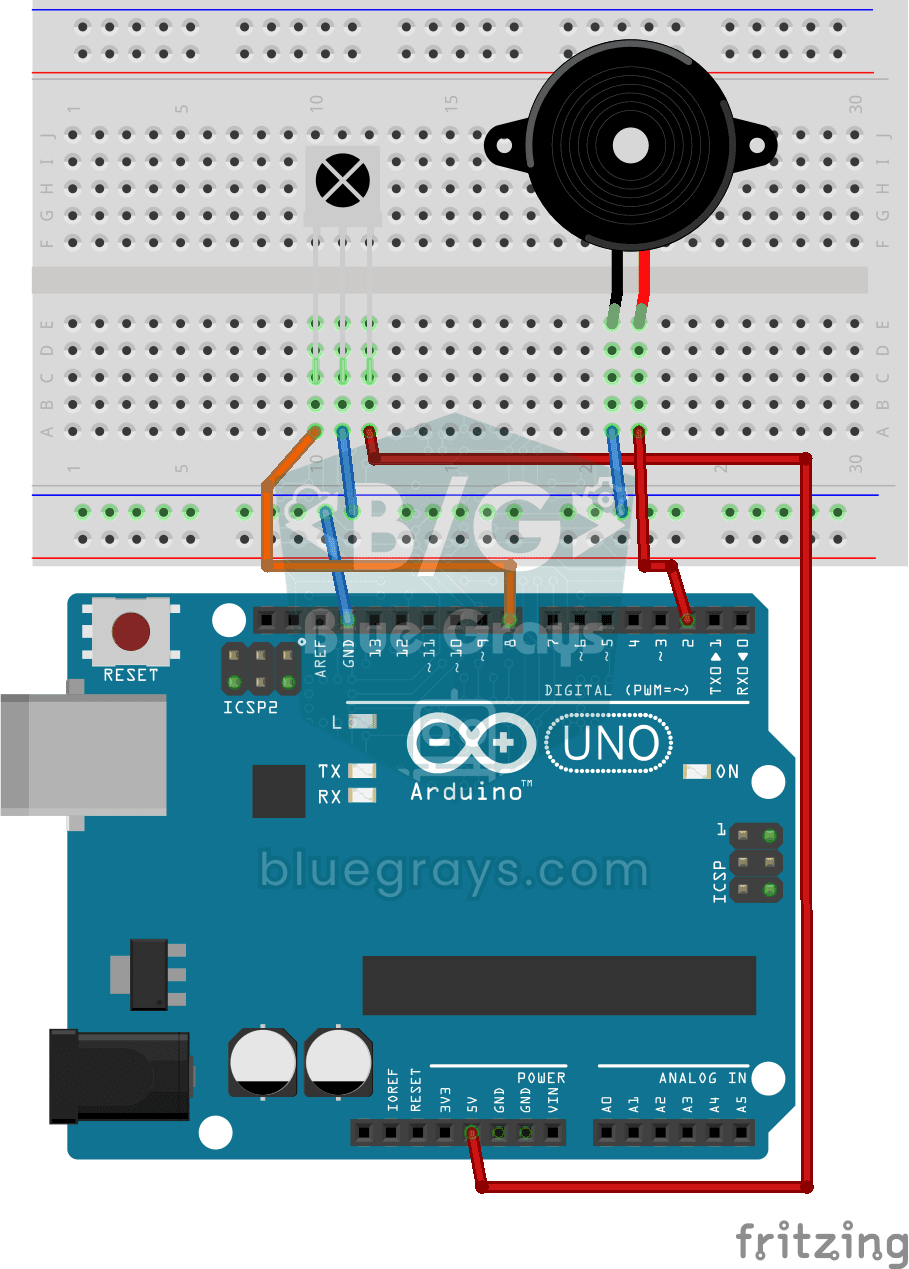
Playing Melodies with an IR Remote and Buzzer
Build a music box that plays tunes with the buttons of a TV remote. An infrared receiver catches the remote's signal; one button plays a lively video game tune through the buzzer, another a familiar c
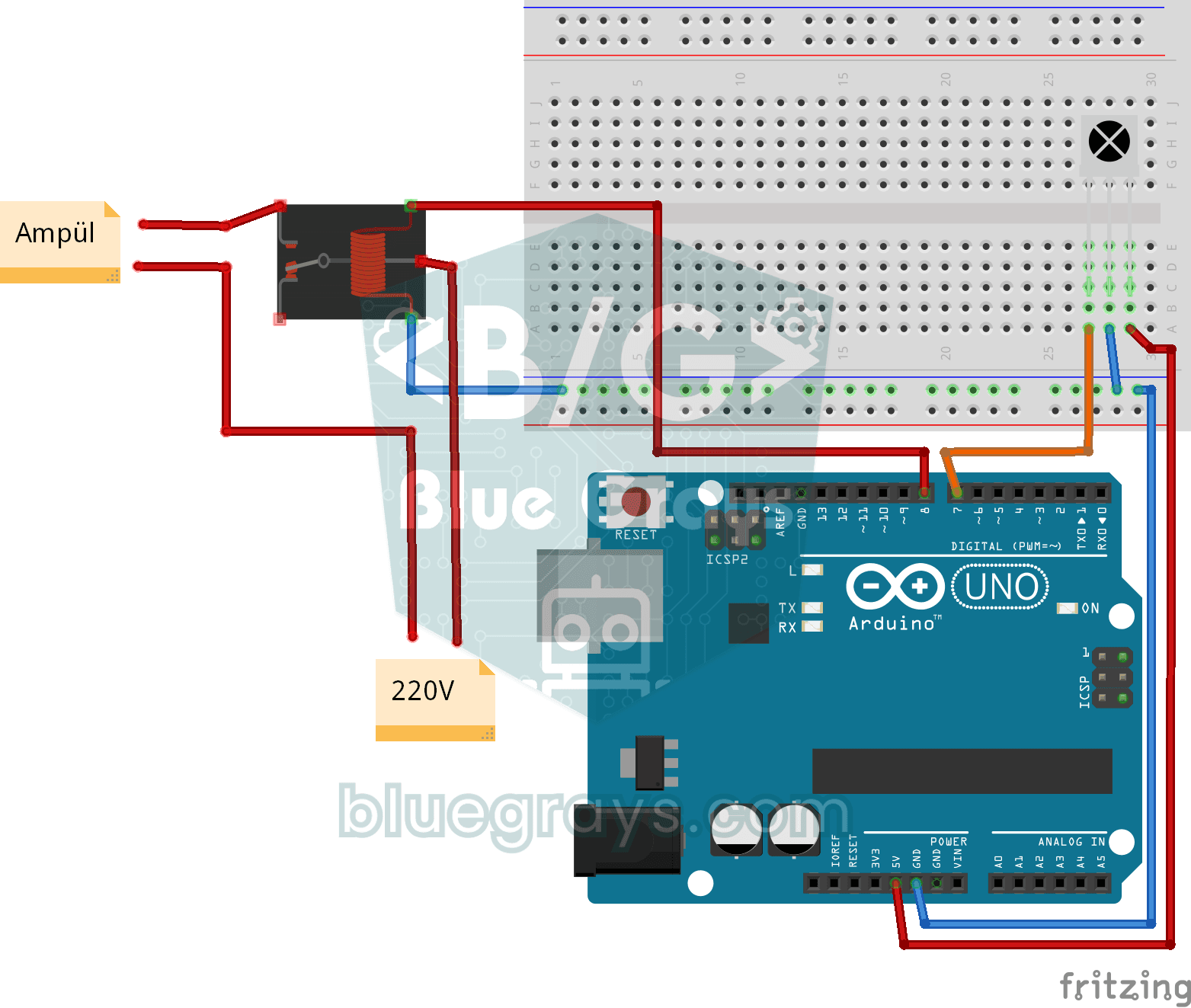
Lighting 220V Bulb with Remote Control
Switch a real light bulb in your home on and off with a TV remote, without getting up from the sofa. The Arduino reads the invisible light signal from the remote; the power button clicks the relay and
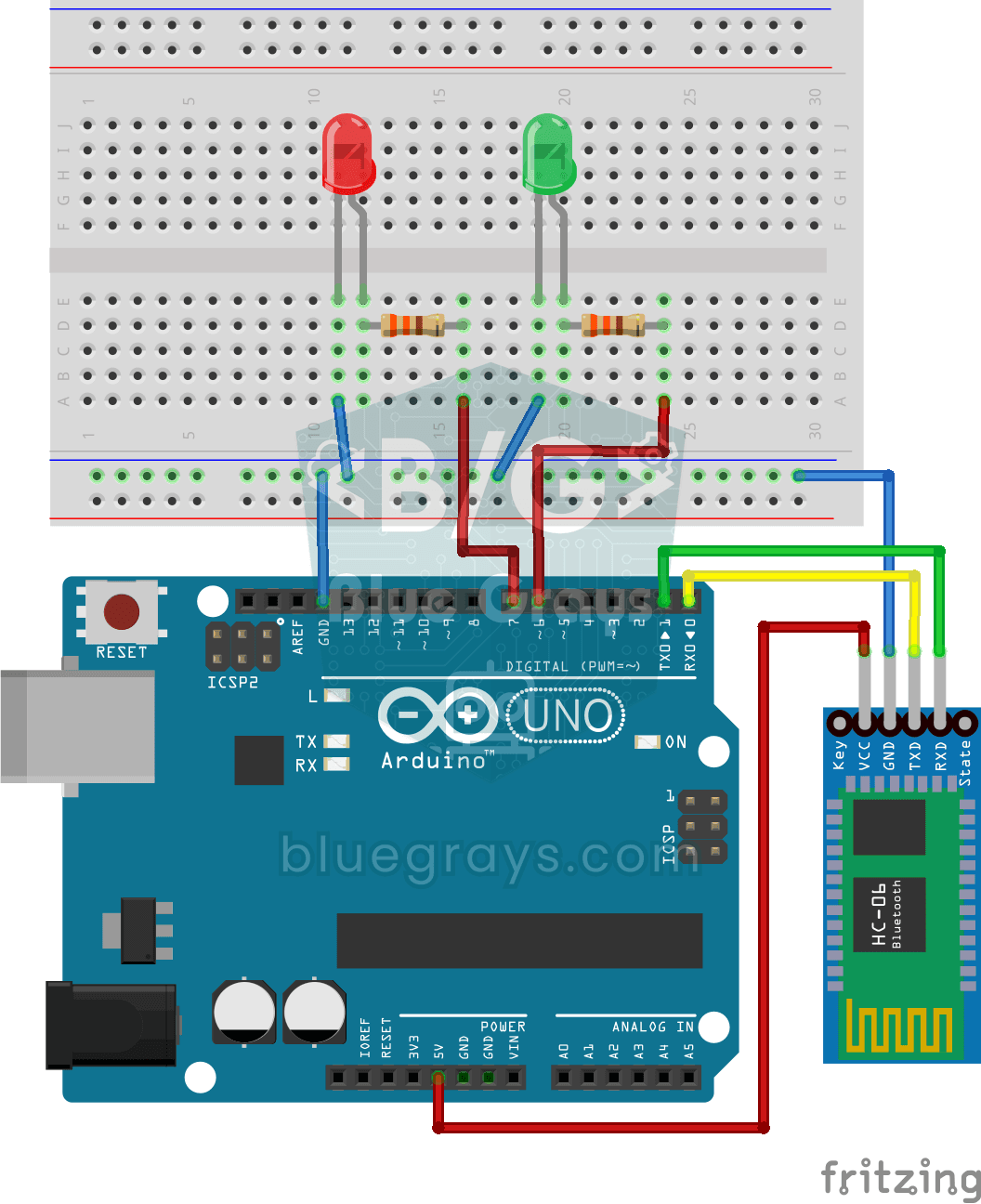
Control an LED from Your Phone via Bluetooth
A small rehearsal for switching the lights in your room on and off from your phone. The Bluetooth module passes the letters sent from your phone to the Arduino; one letter turns on the red LED, anothe

Bluetooth Controlled Car with L298N
Turn your phone into a remote and drive your own robot car. The Arduino receives commands from a remote-control app on your phone through a Bluetooth module and spins the wheels with a motor driver; t

Remote Control with ESP32 IR Receiver (with LCD Screen)
In this project, we use the TSOP4838 IR receiver module to capture signals from a TV, air conditioner, or any other infrared remote control using the ESP32. With the IRremote v4 library, we display decoded nonzero raw codes on the I2C LCD screen. This example is intended to help identify remote control codes; it does not include turning an LED on or off or adjusting its brightness with the remote. This is a great starting point for converting old remotes into smart home controls.

ESP32 Wi-Fi STA Connection (with LCD Screen)
In this project, we connect the ESP32 to the home Wi-Fi network in Station (STA) mode in a secure, fault-tolerant manner. We store the SSID and password in a separate secrets.h file to prevent leaking to Git, set up an auto-reconnect mechanism, and display the RSSI signal level and IP address on an I2C LCD screen. The internal LED works as a status indicator. It is a production-grade connection manager.

Real-Time Clock from the Internet via ESP32 NTP
The ESP32 connects to Wi-Fi and fetches the real time from NTP (Network Time Protocol) servers with millisecond precision. configTzTime() applies the Turkey time zone (TRT, UTC+3) automatically, and in countries with daylight saving time the DST switch is handled by a POSIX TZ string. The time is printed both to the Serial Monitor and to an optional I2C LCD.

ESP32 Asynchronous Web Server (with IP Display on LCD)
In this project, we’re turning the ESP32 into an asynchronous web server that you can control from your phone or computer on the same Wi-Fi network. Thanks to the ESPAsyncWebServer library, the server can process multiple requests simultaneously (unlike the classic WebServer.h, which blocks on a single request). You’ll be able to open the ESP32’s IP address in a browser and click the ON/OFF buttons (the /on and /off routes) to turn the LED connected to GPIO 5 on and off.

ESP32 WebSocket Counter (2 Buttons + LCD + Real-Time Web)
In this project, two buttons wired to the ESP32 (GPIO 5 counts up, GPIO 4 counts down) change a counter. The value updates instantly both on a 16x2 I2C LCD and, through the WebSocket support of ESPAsyncWebServer, in every connected browser without reloading the page. Instead of HTTP polling a single persistent connection is used, and the ESP32 sends the new value to everyone with ws.textAll().

ESP32 mDNS: Accessing the Device via bluegrays-esp.local (with LCD Screen)
In this project we add an mDNS (Multicast DNS) service to the ESP32, so you reach it by a readable host name like bluegrays-esp.local instead of an IP address. Even if the IP assigned by DHCP changes, the device always answers to the same name. A small web server on the board lets you control the LED from your browser at http://bluegrays-esp.local/.

ESP32 OTA Update — Wireless Firmware Installation (With LCD Screen)
In this project you'll learn to upload new firmware to the ESP32 over Wi-Fi, without a USB cable. With the ArduinoOTA library the ESP32 becomes visible on the network and shows up automatically as bluegrays-ota under "Network port" in the Arduino IDE. The first upload goes over USB; after that every update is wireless, a key feature for devices out in the field.

ESP32 HTTPClient + Weather API (with LCD Screen)
In this project the ESP32 makes a REST API call over the internet to a weather API (wttr.in) using HTTPClient.h. The JSON response is parsed with ArduinoJson v7, and the city, temperature, humidity, weather and wind are shown on an I2C LCD. wttr.in needs no API key; just type the name of any city.

ESP32 HTTPClient + Weather API (with SSD1306 OLED Display)
In this project the ESP32 makes a REST API call over the internet to a weather API (wttr.in) using HTTPClient.h. Unlike the I2C LCD version, it uses an SSD1306 OLED (128×64) display, with large text and vector icons for a richer look. Seven weather icons (sunny, rainy, snowy and more) are drawn on the fly, with no bitmap files.

ESP32 IR Universal Remote (IR Receiver + Remote Control + 3 LEDs + Buzzer + OLED)
Read a ready-made IR remote with the ESP32 and control your own device! The infrared receiver (NEC protocol, 38kHz) captures the signals of a 20-key remote: keys 1/2/3 toggle three separate LEDs and PWR turns them all off. Press an unknown key and the OLED shows its HEX code, so you can easily add your own remote's buttons to the code.
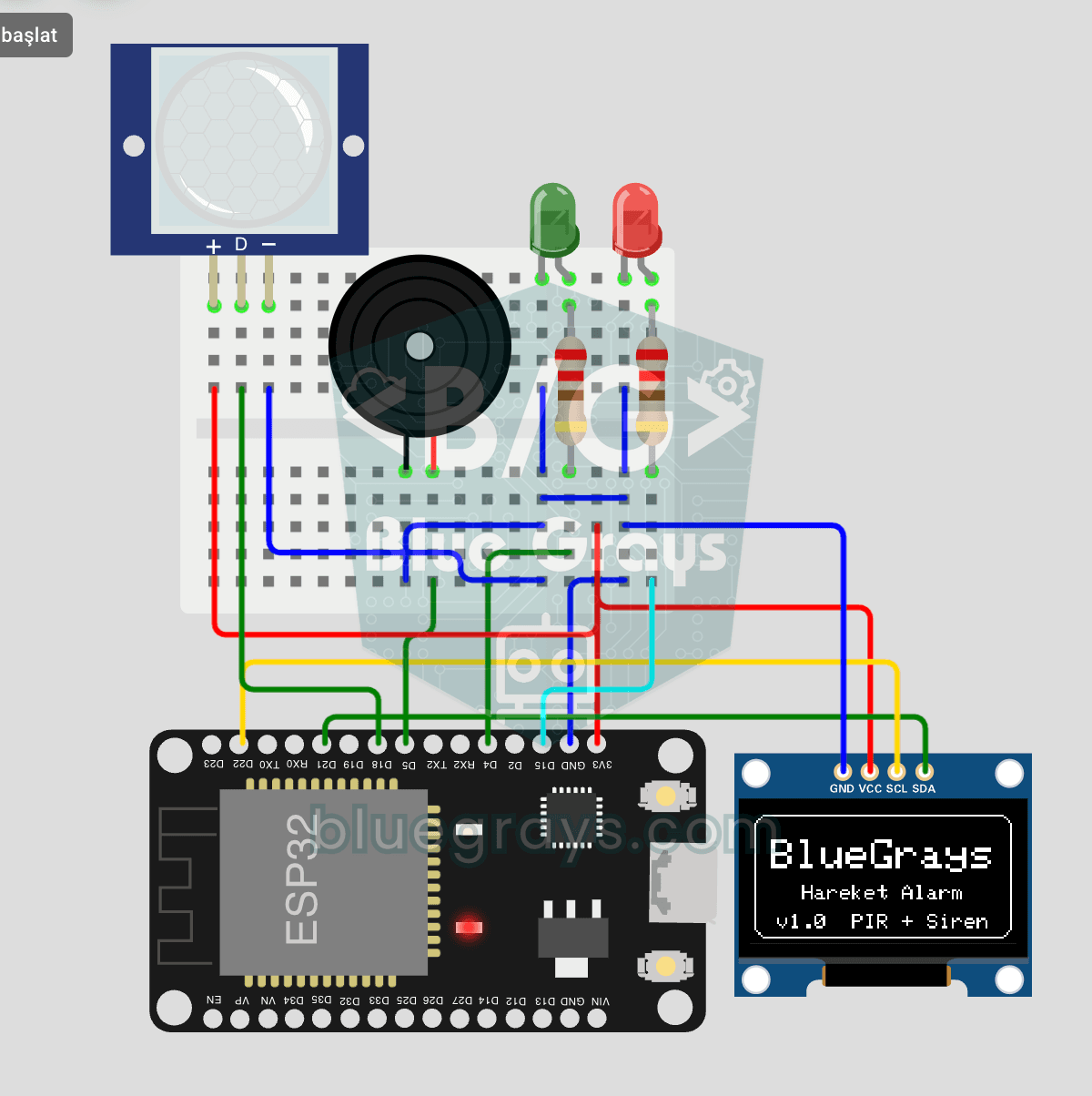
ESP32 Motion Alarm System (PIR + Buzzer + LED + Telegram)
A smart security alarm: when the PIR sensor detects motion, it sounds the buzzer, lights the LED and sends the owner an instant Telegram notification. A 30-second cooldown limits how often the alarm repeats; it does not filter out the PIR sensor's false detections. Use it at home, in a garage, a storeroom or a study.
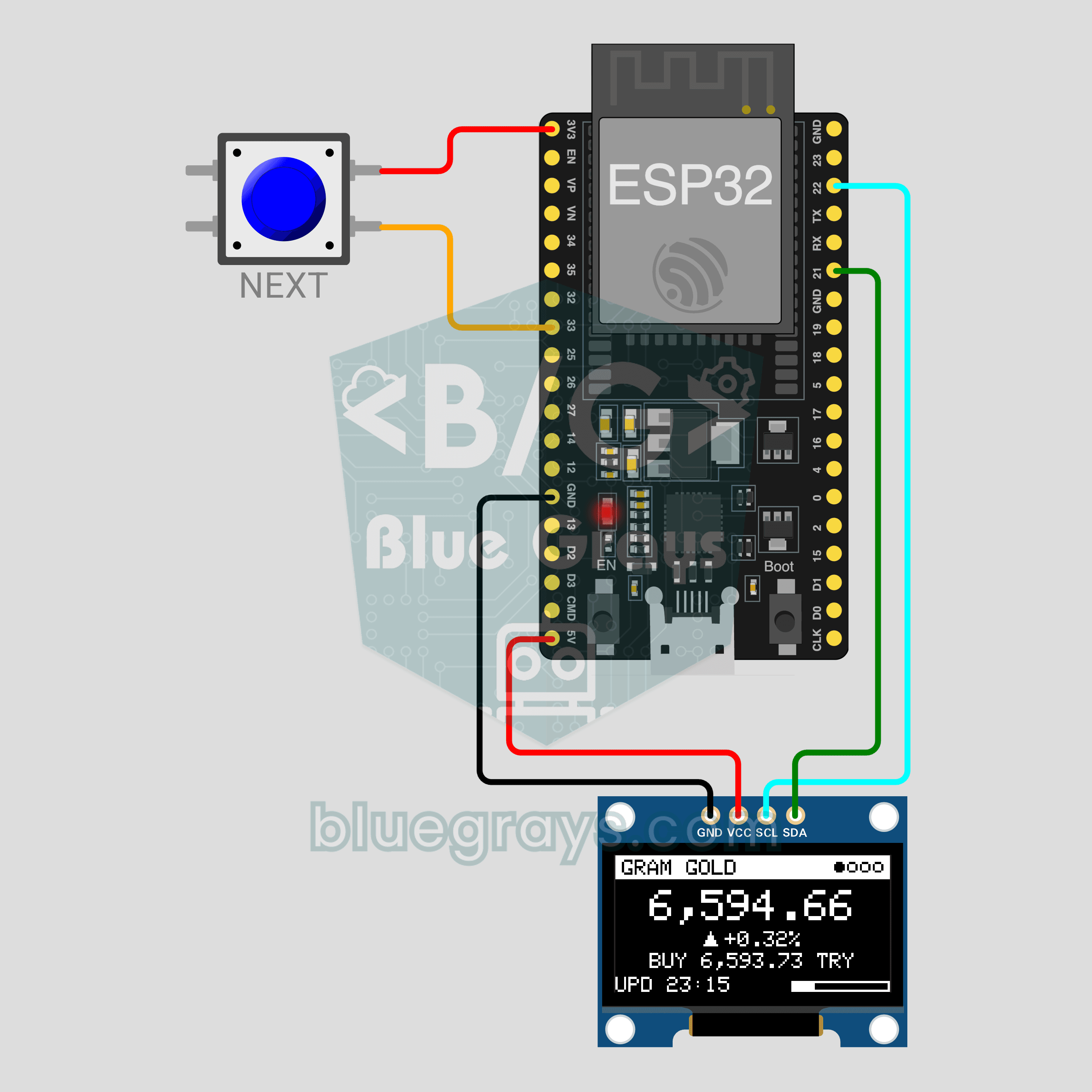
ESP32 Live Gold and Currency Display (Wi-Fi + OLED Display + Button)
What is gold trading at in Turkey right now? No need to check your phone! The ESP32 joins Wi-Fi, pulls gram gold, US dollar and euro prices in Turkish lira from a free, keyless JSON source and shows them on a 0.96 inch OLED. Prices refresh every 60 seconds; the button flips pages and a long press refreshes right away. If the internet drops, the last values stay on screen with an OFFLINE badge.
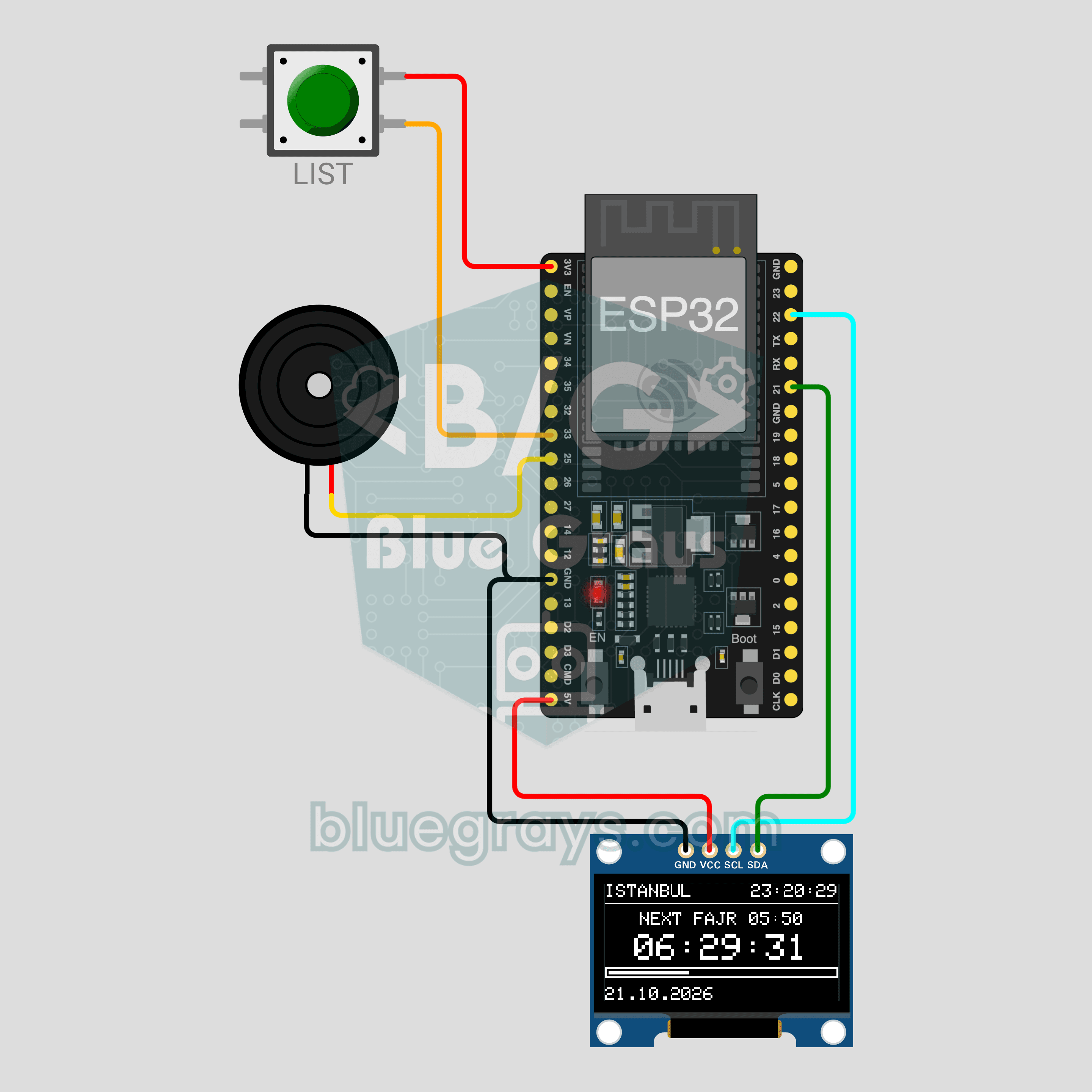
ESP32 Prayer Time Clock (Wi-Fi + OLED Display + Buzzer)
How long until Maghrib? The ESP32 gets the time from the internet, pulls your city's prayer times using the Diyanet method and shows the next prayer with a big countdown on a 0.96 inch OLED. When the time comes, a passive buzzer plays a short, gentle chime. Press the button to list all of today's times, or hold it to try the alert right away in demo mode.
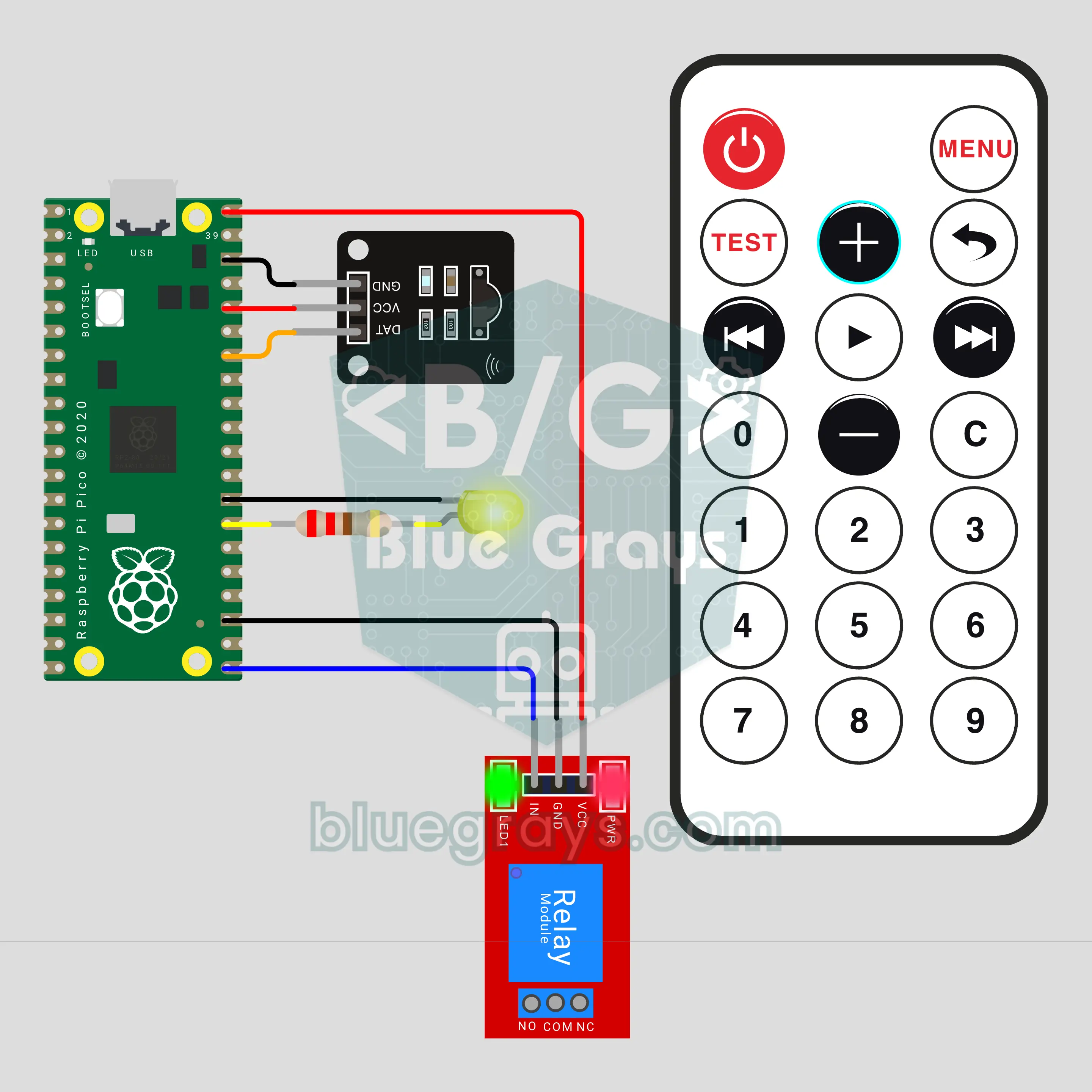
Raspberry Pi Pico IR Remote Control for an LED and a Relay (IR Receiver + Relay + LED)
Turn the light on with a remote! We are building a remote-controlled LED and socket with a Raspberry Pi Pico, an IR receiver and a relay. 1 toggles the relay, 2 the LED; + and − change the LED brightness in 5 steps, PLAY starts a breathing mode and 3 runs the relay on a timer. NEC codes are decoded without a library, from pulse times measured with an interrupt.
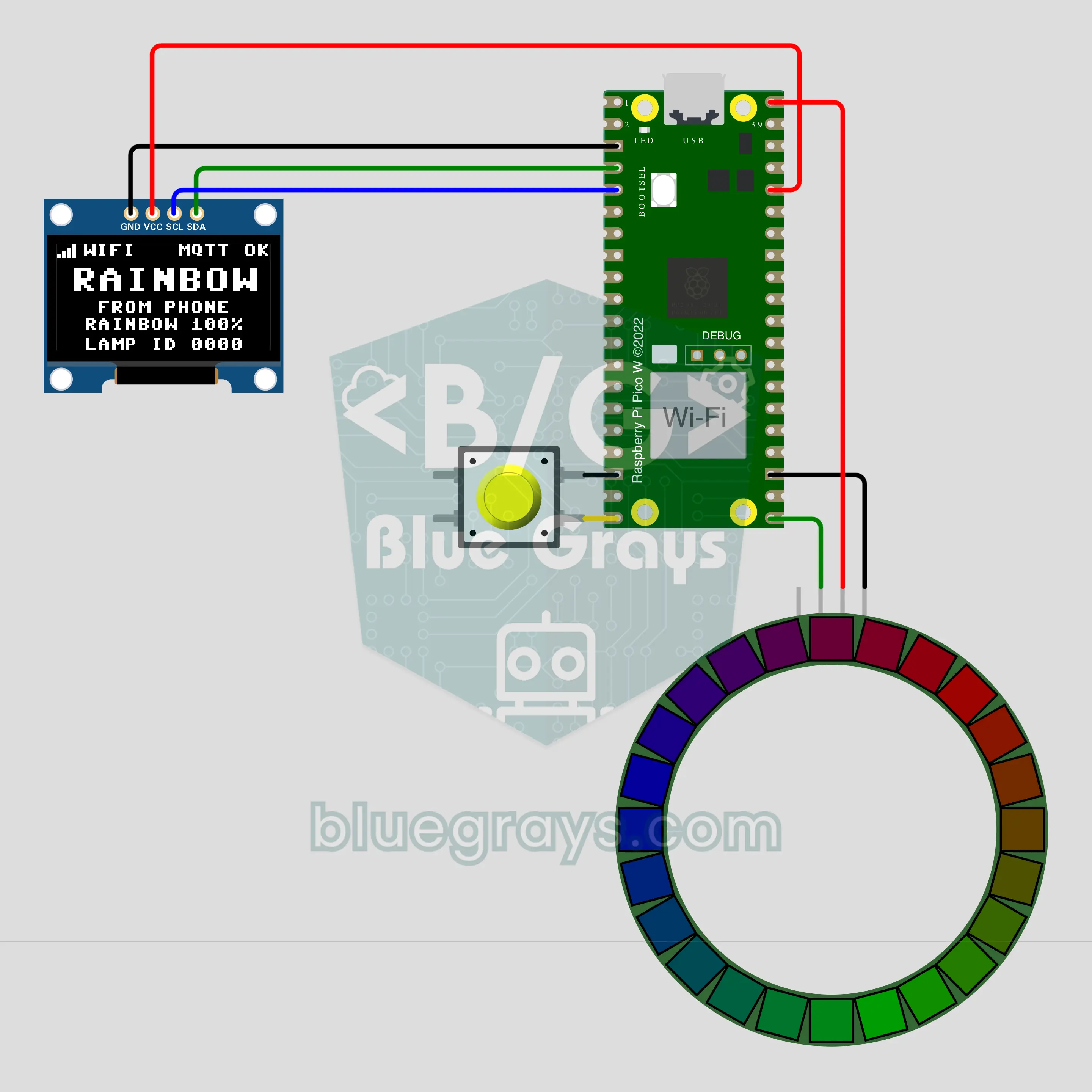
Raspberry Pi Pico W Phone-Controlled RGB Lamp (NeoPixel Ring + OLED + Button)
Pick a color on your phone and the lamp on your desk switches to it instantly! The Raspberry Pi Pico W joins Wi-Fi and listens for commands on a public MQTT broker, so any MQTT app on your phone can change the color, brightness and effect of a 24-LED NeoPixel ring. The OLED shows the connection and the last command. A local button works even without internet, and the last setting survives a power cut.
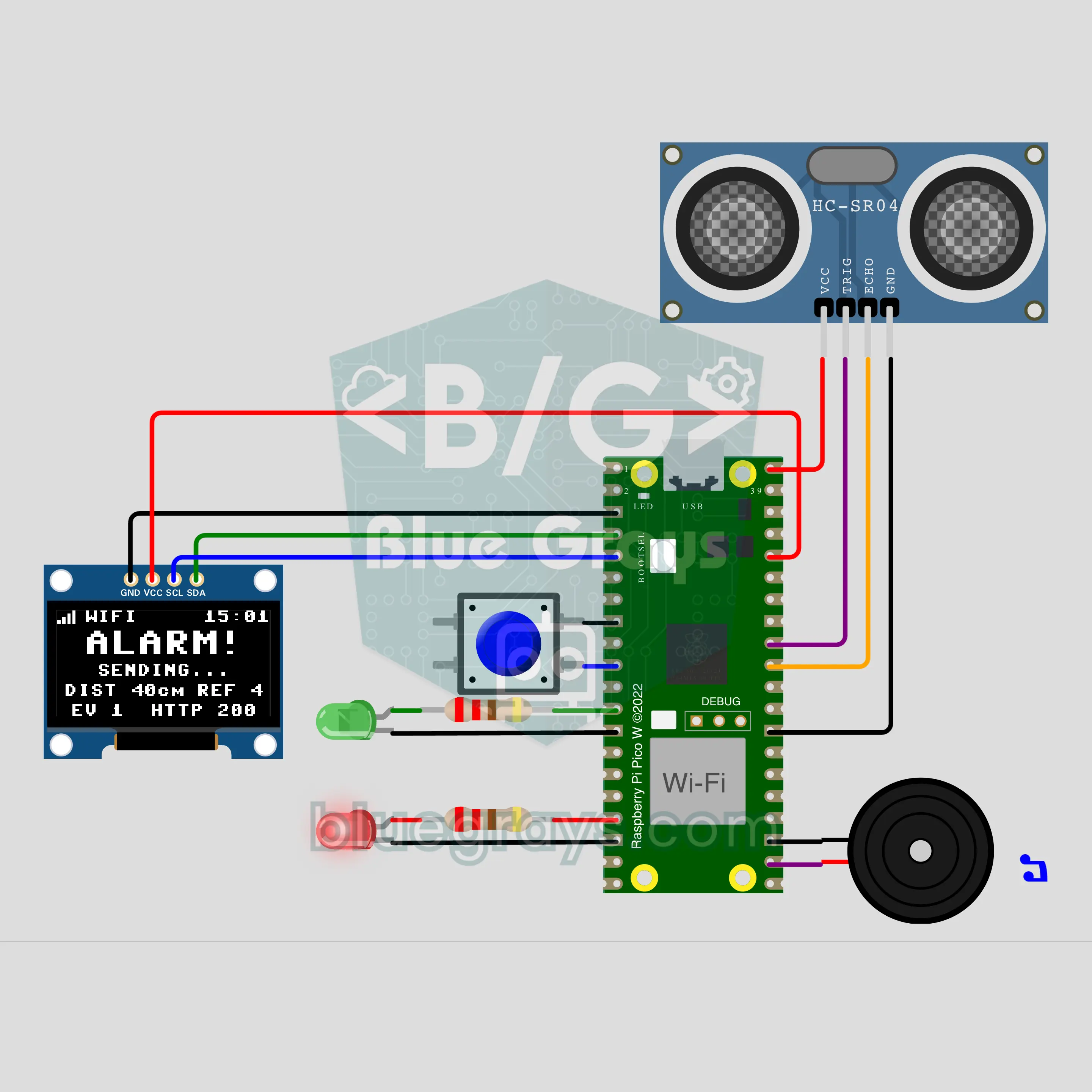
Raspberry Pi Pico W Door Alarm with Phone Notifications (HC-SR04 + OLED + Buzzer)
A home alarm that sounds a siren and pings your phone when the door opens! The Raspberry Pi Pico W joins your home Wi-Fi, and an HC-SR04 facing the door notices the change in distance as it opens. You arm it with a button; when the door opens, a 5-second entry delay starts, and if nobody disarms it the buzzer wails, the red LED flashes and an urgent notification goes out. The OLED shows the state, countdown, clock and send result.
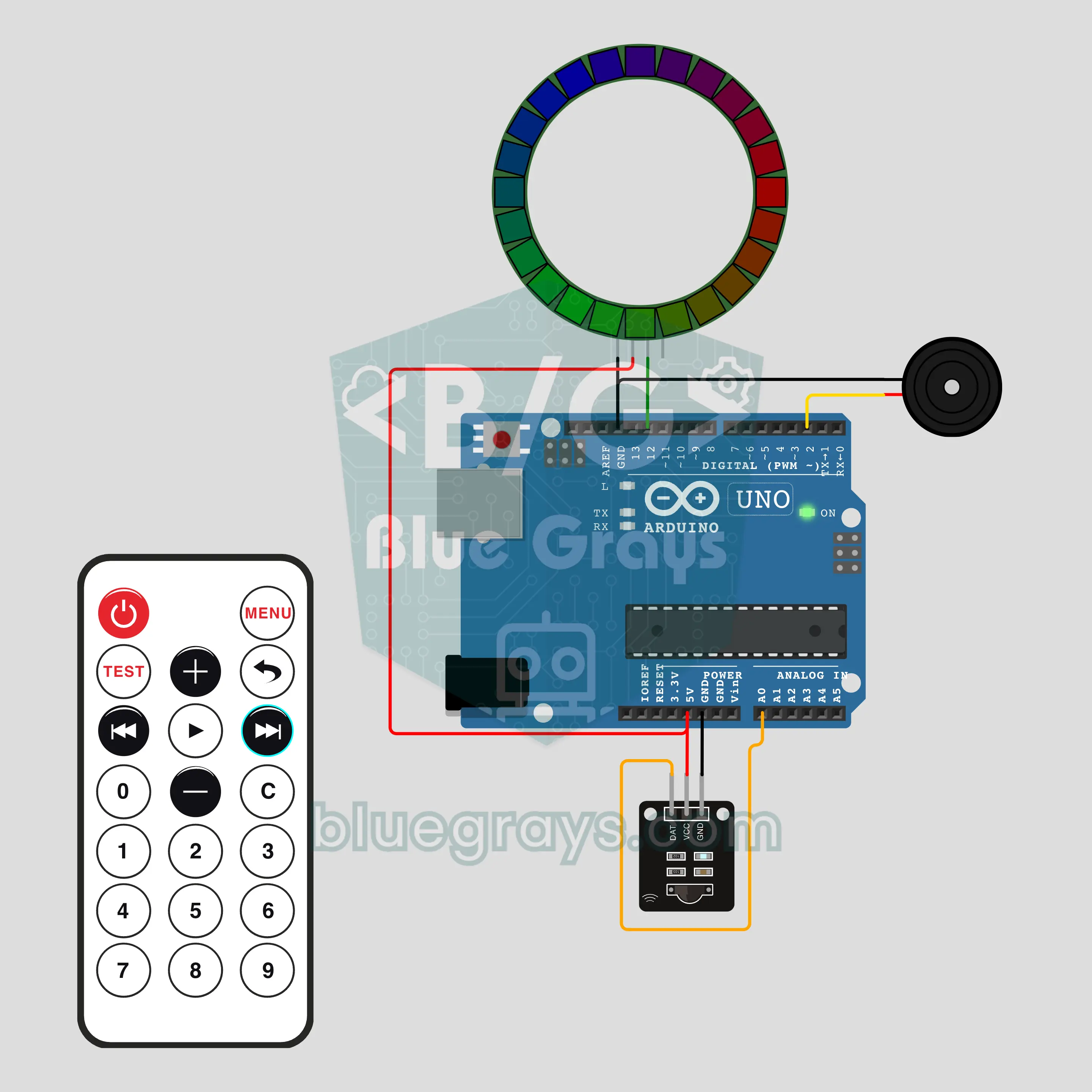
Arduino IR Remote Ambient Light (24-LED NeoPixel Ring + Remote)
Just like the remote of a home LED strip, except you code the light! With an infrared remote you change the colour, brightness and effect of a 24-LED WS2812B ring. Number keys pick 10 colours, next/prev step through 8 effects such as breath, rainbow, comet and candle, and C sets a sleep timer. The last setting is kept in EEPROM, and the buzzer answers every key with a short beep.
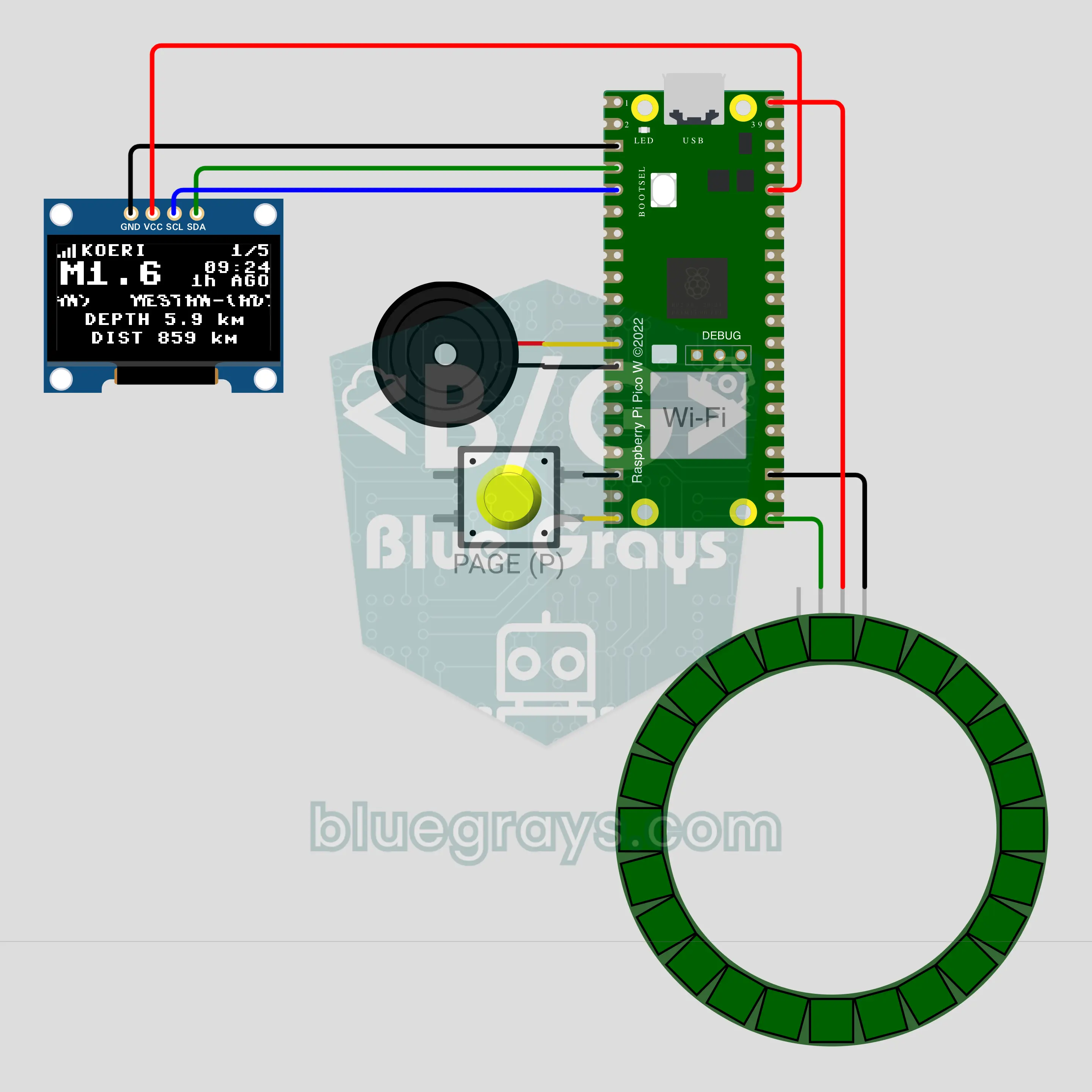
Raspberry Pi Pico W Latest Earthquakes Display (OLED + NeoPixel Ring + Buzzer)
The latest earthquakes in Turkey, right on your desk! The Pico W fetches the open data of the earthquake observatory once a minute and shows the magnitude, place, time, depth and distance to your home on an OLED display. A NeoPixel ring takes its colour from the magnitude; when a new quake passes the limit it shakes and the buzzer warns. A button pages through the last 5 quakes, a long press mutes for 10 minutes. For information only, not an official warning system.
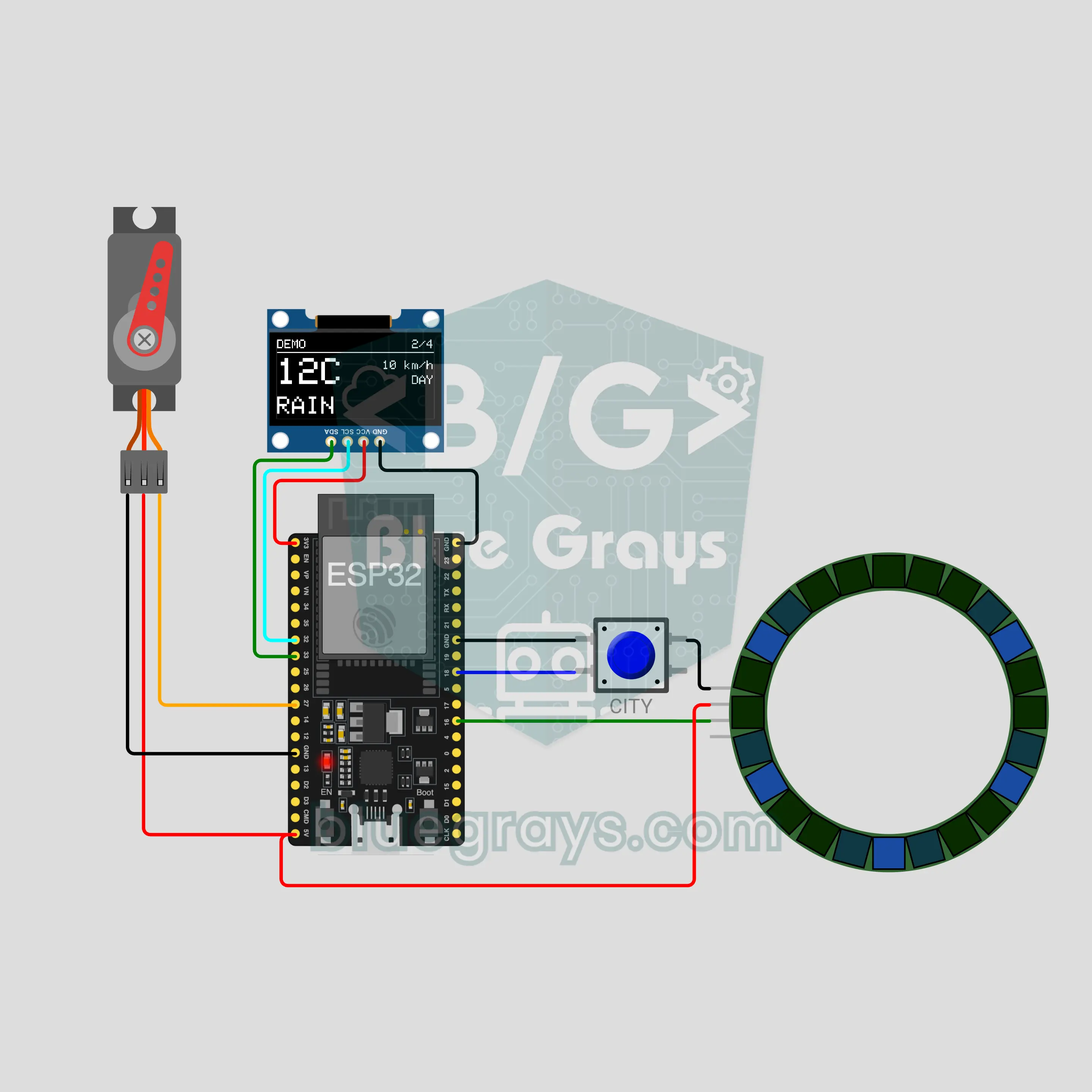
ESP32 Weather Needle (Servo + WS2812B LED Ring + OLED)
A gauge that shows the weather with a needle and light instead of text! Over Wi-Fi the ESP32 fetches the current weather of six cities in one request; an SG90 servo needle points at sunny, partly cloudy, cloudy, rain or snow-storm on a card. A 24-LED ring shows the temperature as color and the weather as animation, and a 0.96 inch OLED shows city, temperature and wind. A button changes the city; hold it for a demo.
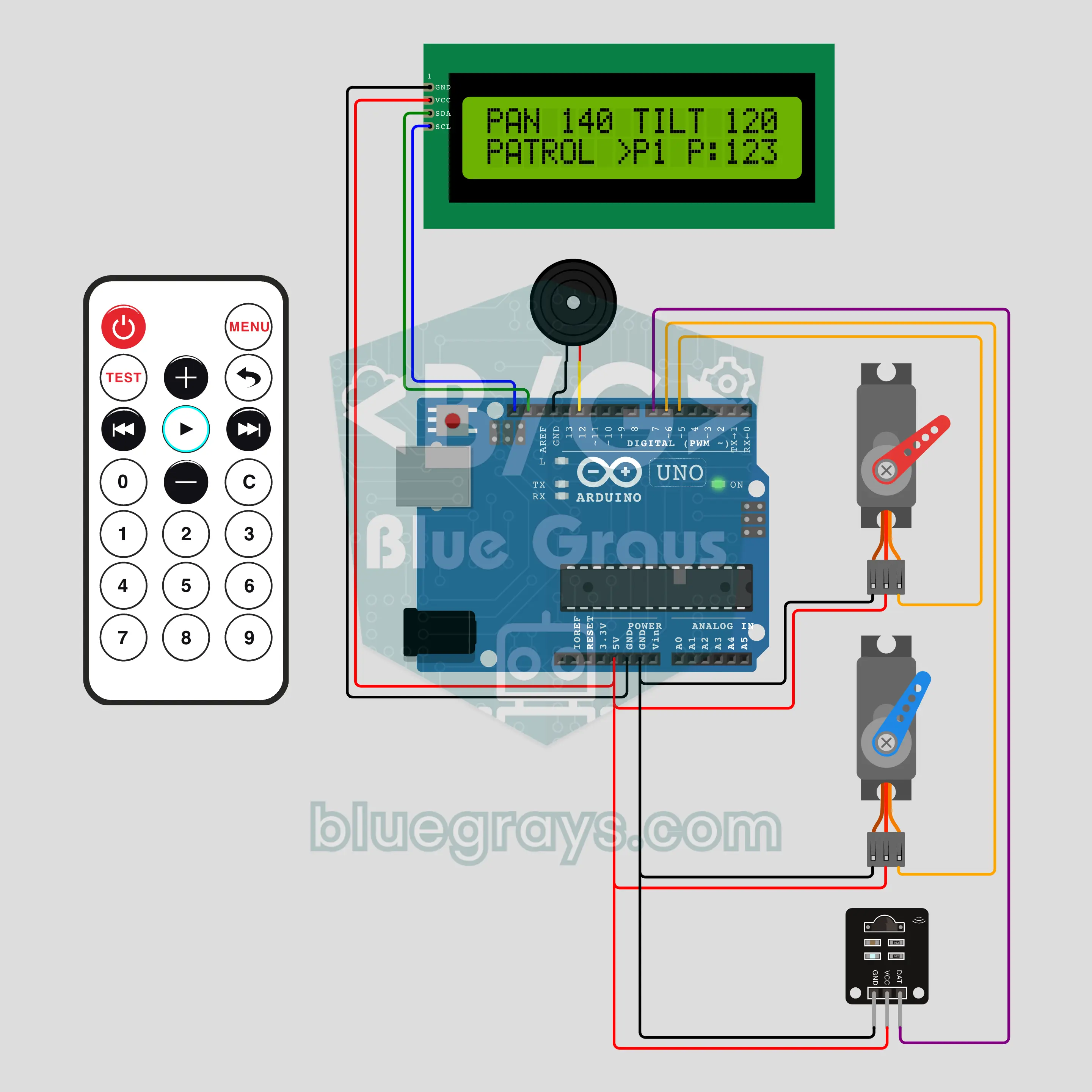
Arduino IR Remote Pan-Tilt Head (2 Servos + I2C LCD + Remote)
A two-axis head you steer with a TV remote! The lower SG90 servo pans the head left and right, the upper one tilts it up and down, and every press of an arrow key on the infrared remote moves it one step. MENU + 1-3 stores up to three poses, a number key glides the head back to one, and PLAY patrols between them. An I2C LCD shows the angles, and the poses stay in EEPROM.
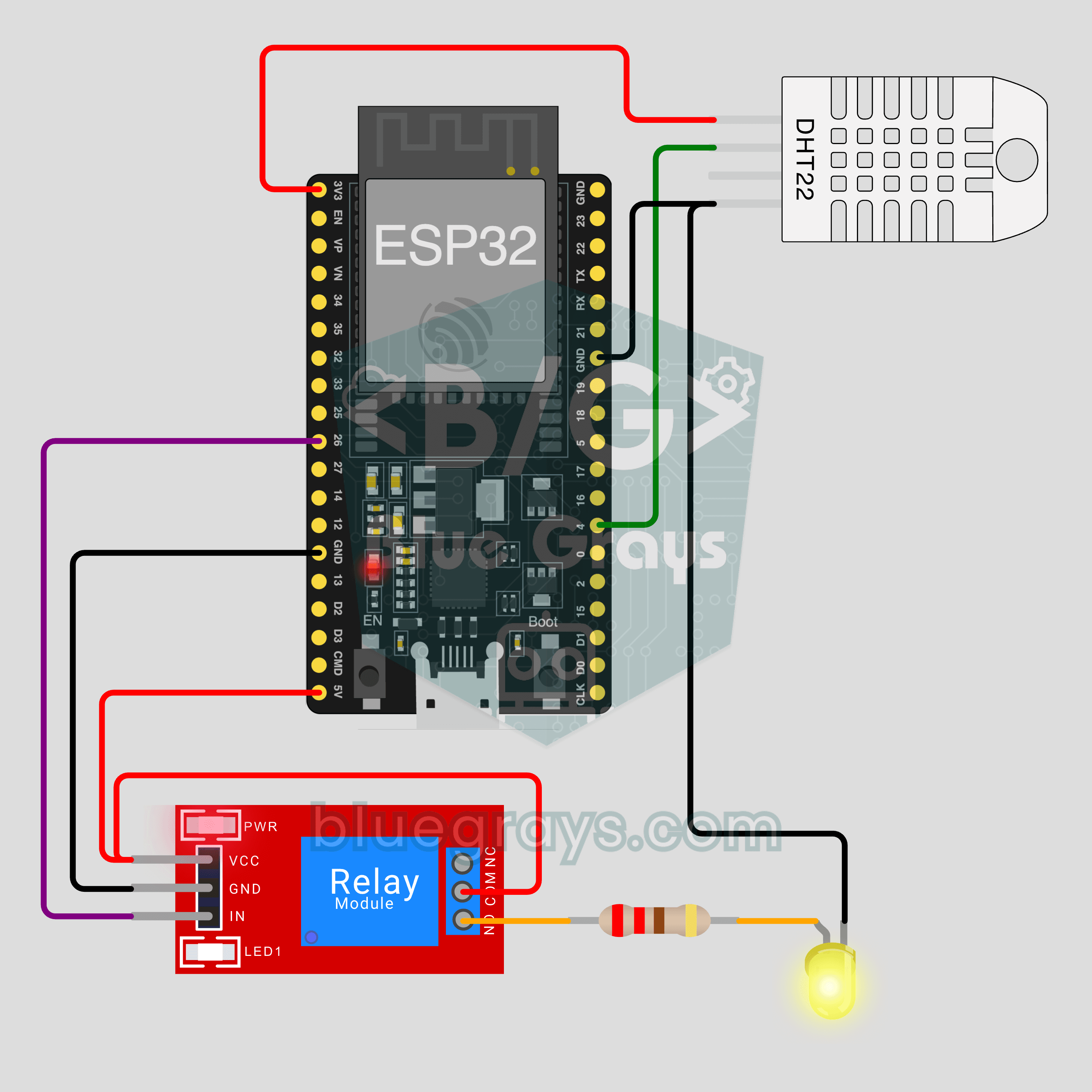
ESP32 IoT Room Station (Relay + DHT22)
Turn your lamp on from your phone and watch your room's temperature and humidity live, wherever you are. This project is the step-by-step guide to the Room station IoT template in the app, built with an ESP32, a relay module and a DHT22. Go to Workshop › Devices › Add a device and pick Room station; Ohmi prepares the code with your own device key. The code on this page is an example: the key and Wi-Fi details are placeholders.
ESP32 IoT Lamp Switch (Relay)
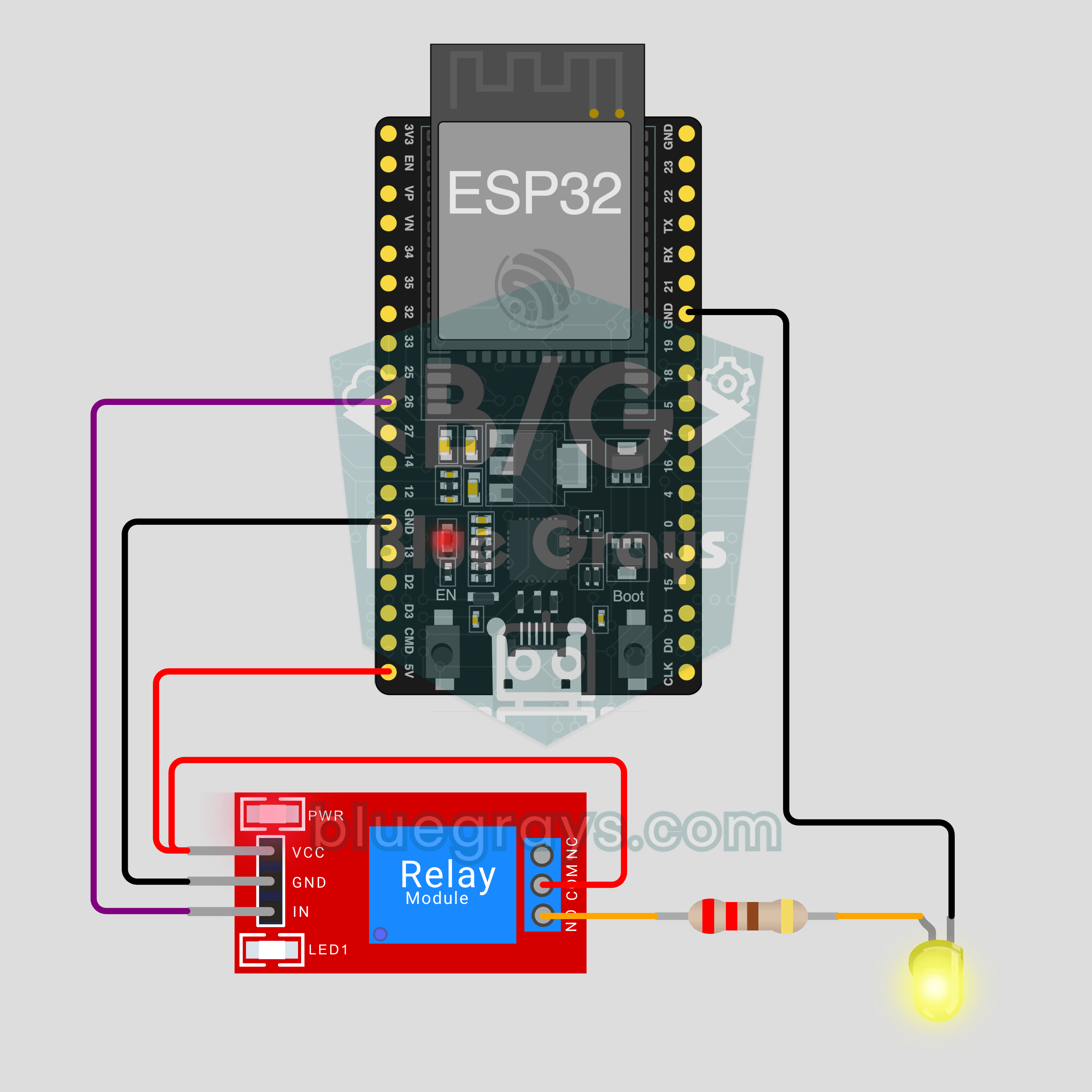
Turn your lamp on and off from your phone, wherever you are. This project is the step-by-step guide to the Relay lamp IoT template in the app, built with an ESP32 and a relay module and tried with an LED first. Go to Workshop › Devices › Add a device and pick Relay lamp; Ohmi prepares the code with your own device key. The code on this page is an example: the key and Wi-Fi details are placeholders.
Pico W IoT Temperature and Humidity (DHT22)
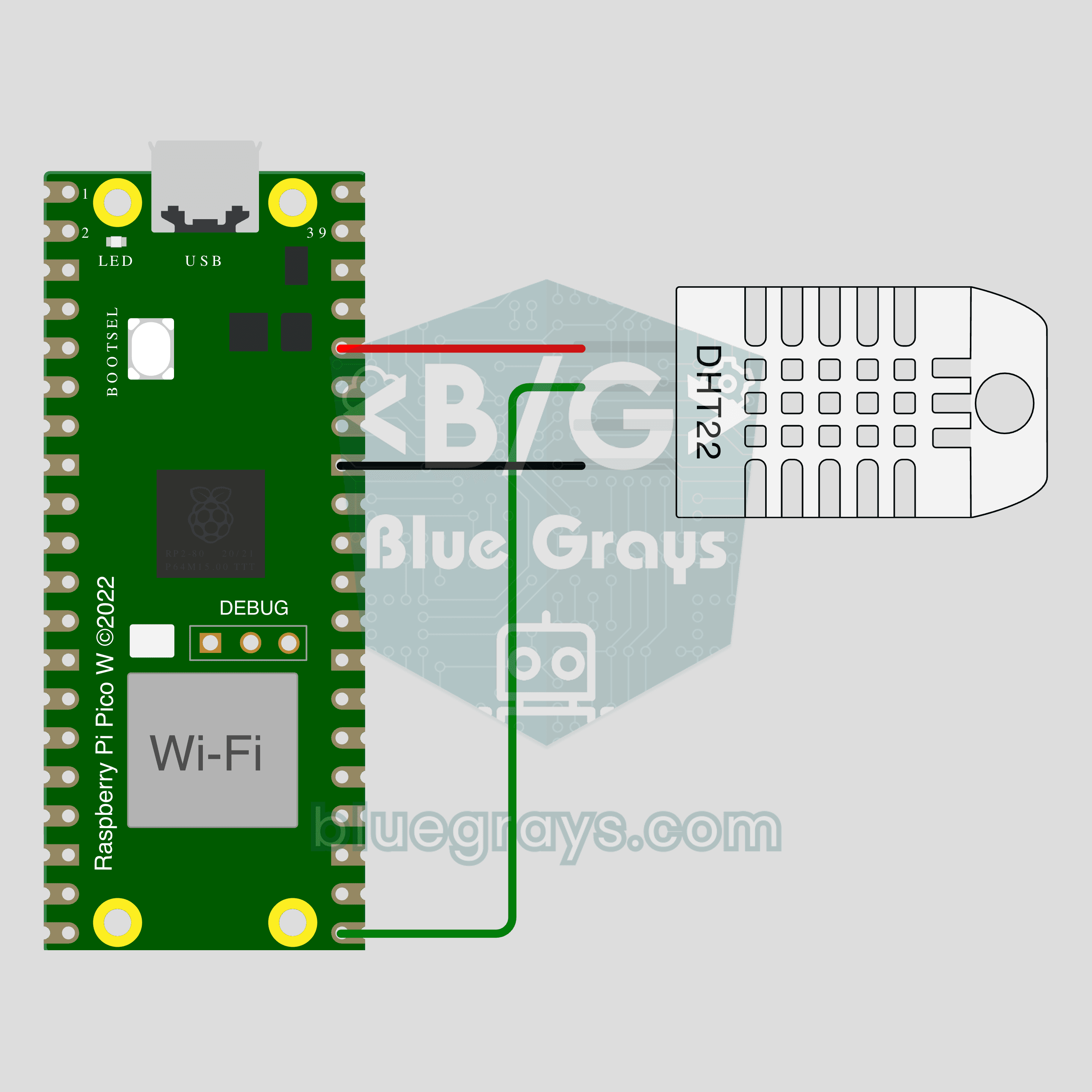
Watch your room's temperature and humidity live on your phone wherever you are. This project is the step-by-step guide to the Temperature and humidity IoT template in the app, built with a Raspberry Pi Pico W and a DHT22. Go to Workshop › Devices › Add a device, pick Pico W as the board and Temperature and humidity as the template; Ohmi prepares the code with your own device key. The code on this page is an example: the key and Wi-Fi details are placeholders.
ESP32 IoT RGB LED Strip (WS2812B)
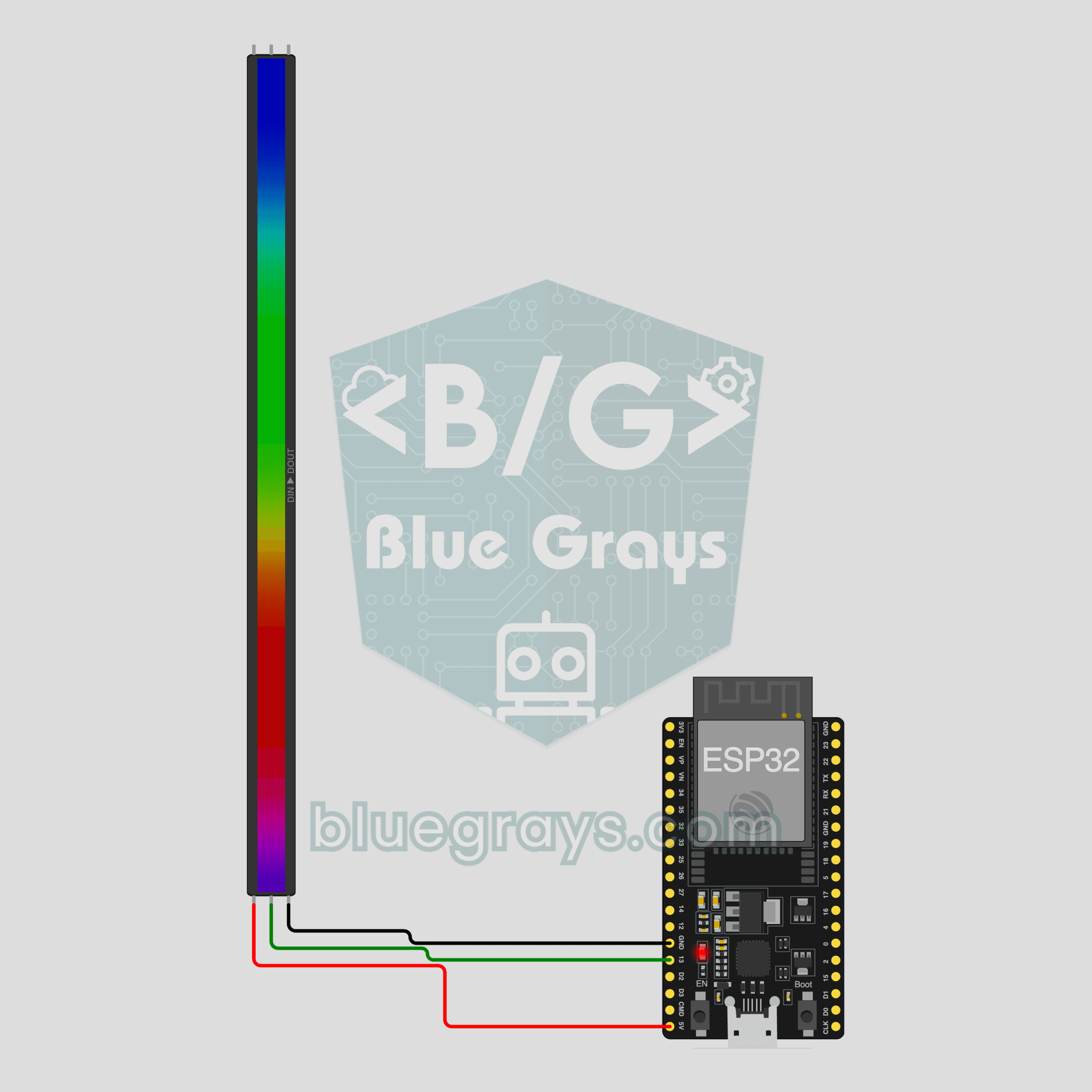
Control your room's light from your phone: pick a color, set the brightness, turn on the rainbow or breathe effect. This project is the step-by-step guide to the RGB LED strip IoT template in the app, built with an ESP32 and a 30-LED WS2812B strip using three wires. Go to Workshop › Devices › Add a device and pick RGB LED strip; Ohmi prepares the code with your own device key. The code on this page is an example: the key and Wi-Fi details are placeholders.
Pico W IoT Door Sensor (Reed Switch)
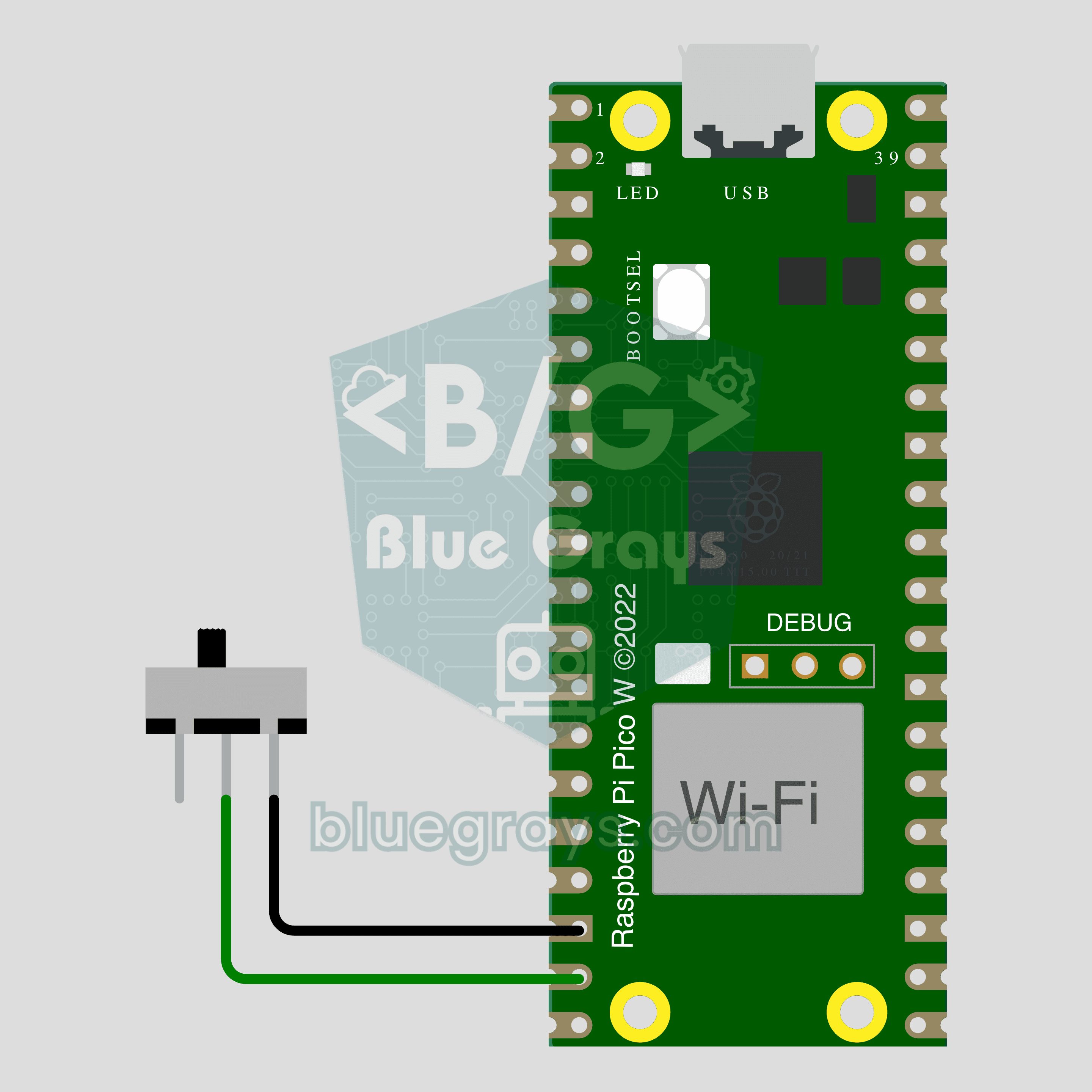
Did you leave the door or window open? Check on your phone wherever you are. This project is the step-by-step guide to the Door / window IoT template in the app, built with a Raspberry Pi Pico W, a reed switch and a small magnet using two wires. Go to Workshop › Devices › Add a device, pick Pico W as the board and Door / window as the template; Ohmi prepares the code with your own device key. The code on this page is an example: the key and Wi-Fi details are placeholders.
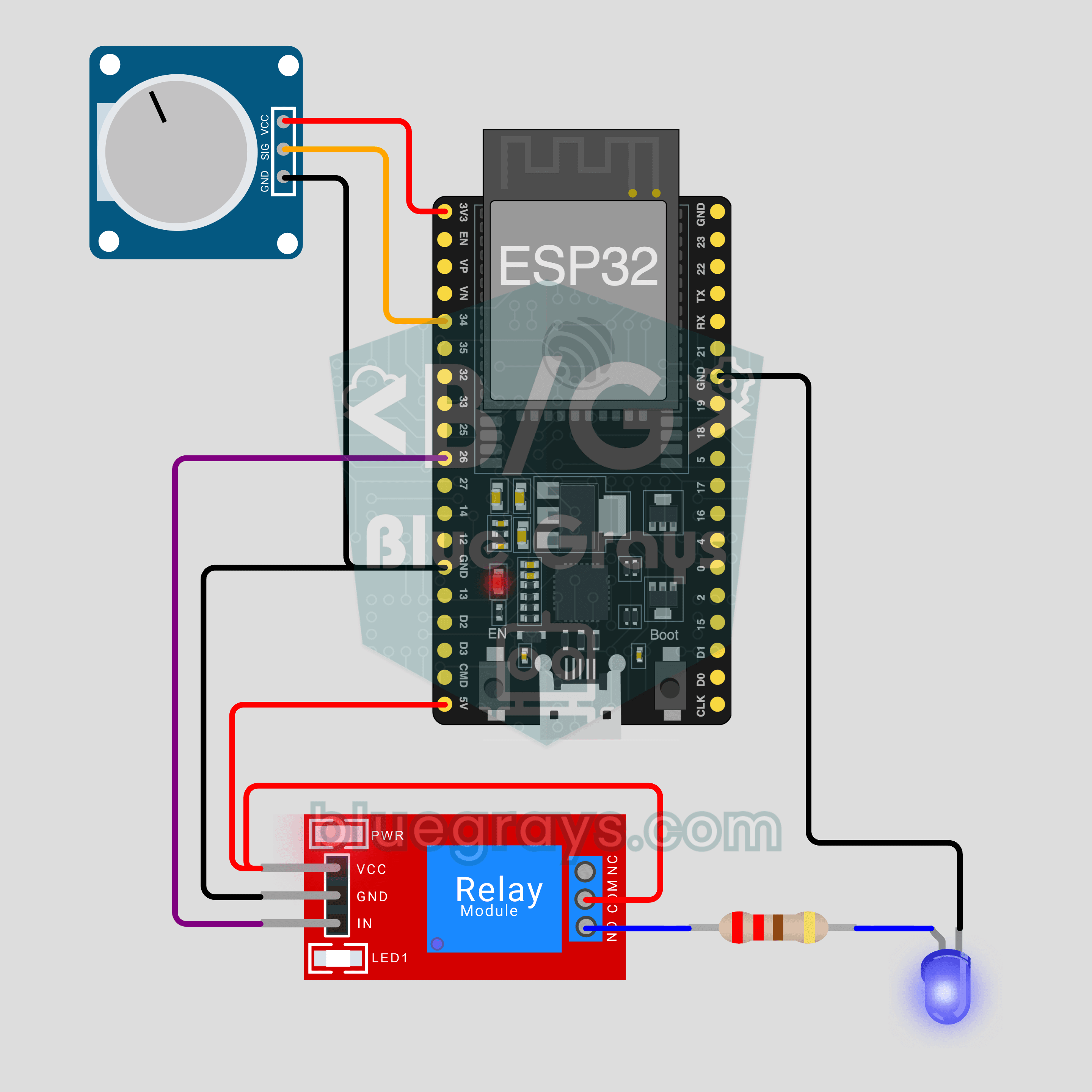
ESP32 IoT Plant Watering (Soil Sensor + Pump)
Let the pump start by itself when the soil in your pot dries out, and watch the soil moisture live on your phone. This project is the step-by-step guide to the Soil moisture + pump IoT template in the app, built with an ESP32, a soil moisture sensor, a relay and a mini water pump. Go to Workshop › Devices › Add a device; Ohmi prepares the code with your own device key. The code on this page is an example: the key and Wi-Fi details are placeholders.
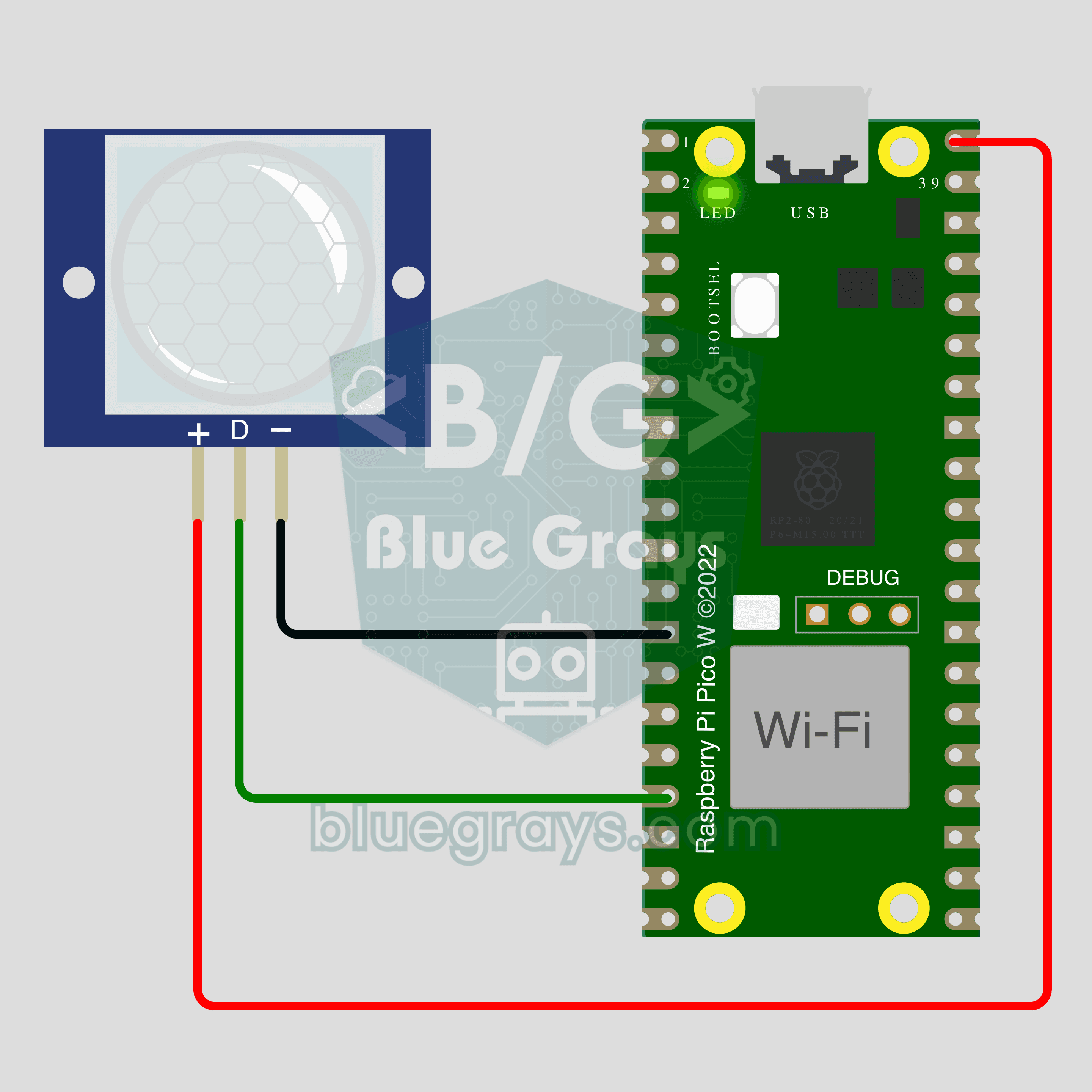
Pico W IoT Motion Counter (PIR)
Count how many times someone walks through a door or hallway, and see the moment of motion live on your phone. This project is the step-by-step guide to the Motion detector IoT template in the app, built with a Raspberry Pi Pico W and a PIR motion sensor using just 3 wires. Go to Workshop › Devices › Add a device; Ohmi prepares the code with your own device key. The code on this page is an example: the key and Wi-Fi details are placeholders.
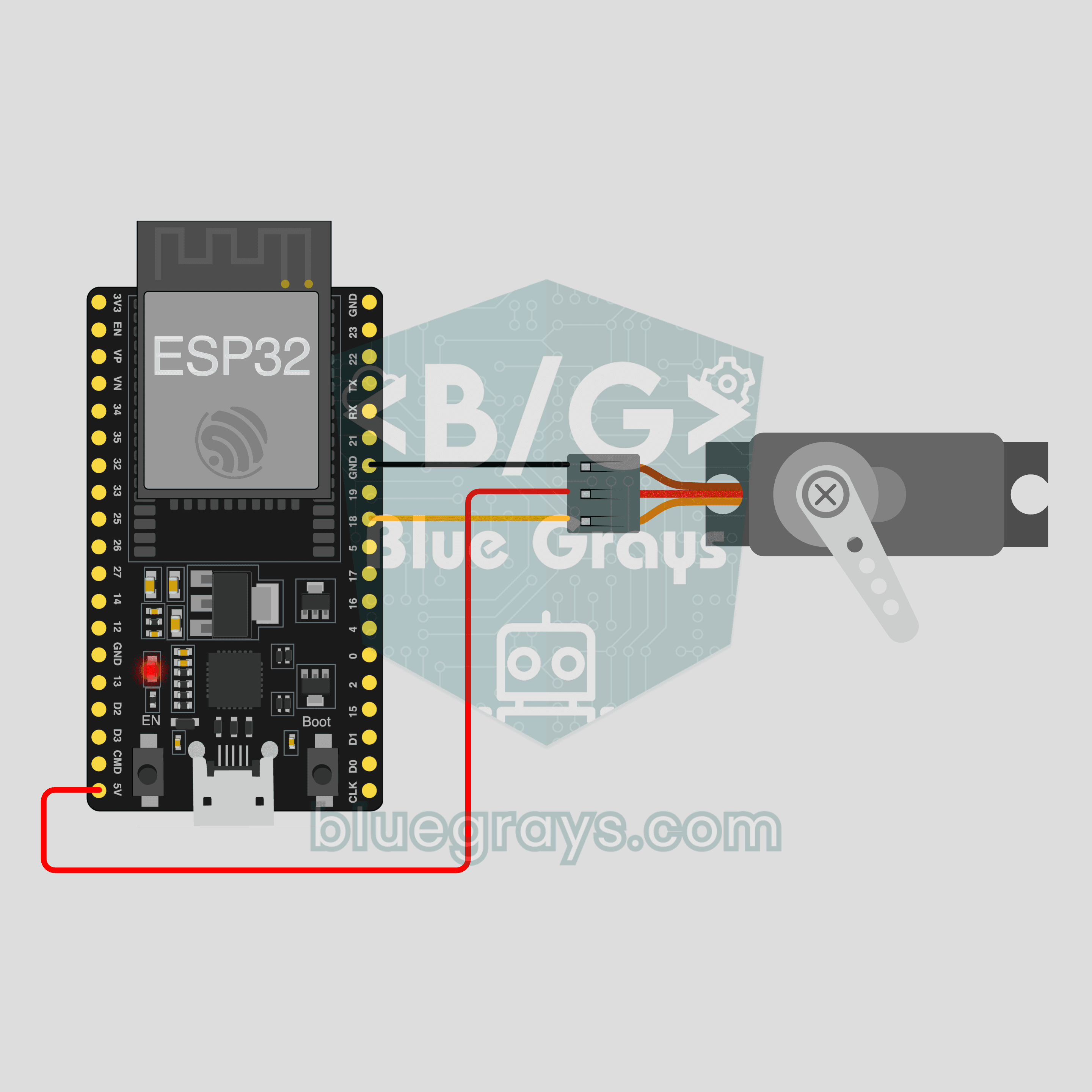
ESP32 IoT Curtain Opener (SG90 Servo)
Tap + or − on your phone and the servo turns to that angle at the same moment: open and close a model curtain, a blind's tilt rod or a small lid from wherever you are. This project is the step-by-step guide to the Servo curtain IoT template in the app, built with an ESP32 and an SG90 servo using just 3 wires. Go to Workshop › Devices › Add a device; Ohmi prepares the code with your own device key. The code on this page is an example: the key and Wi-Fi details are placeholders.
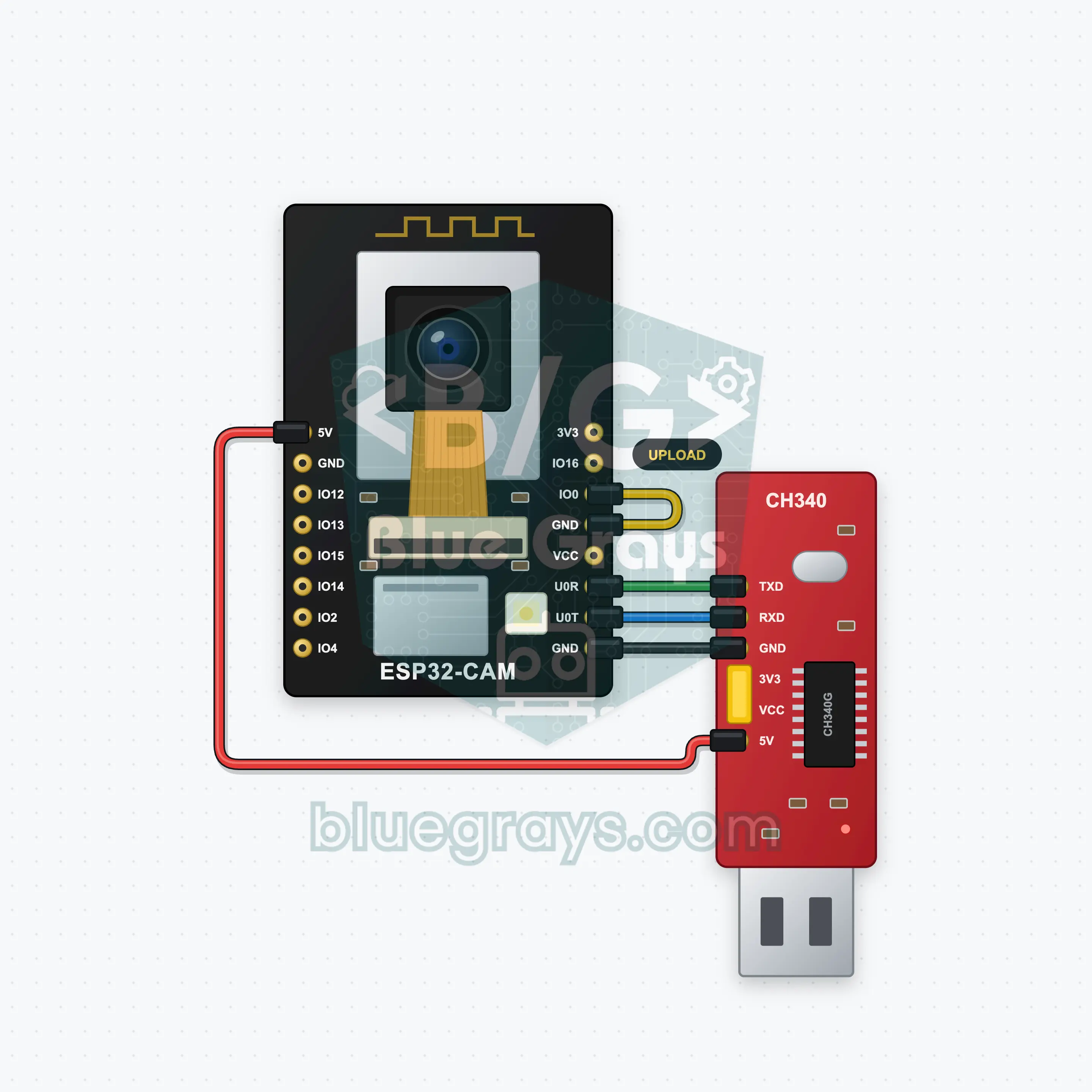
ESP32-CAM Wi-Fi Live Camera
A live camera on your phone with a palm-sized board: the ESP32-CAM joins your home Wi-Fi and serves its own web page. Type the address from the Serial Monitor into your phone's browser and the live picture (MJPEG stream) appears. A button on the page turns the on-board flash LED on and off, and a list picks the resolution from 320x240 up to 1280x720. You upload the code with a CH340 USB-TTL adapter; one jumper between IO0 and GND while uploading is all it takes.
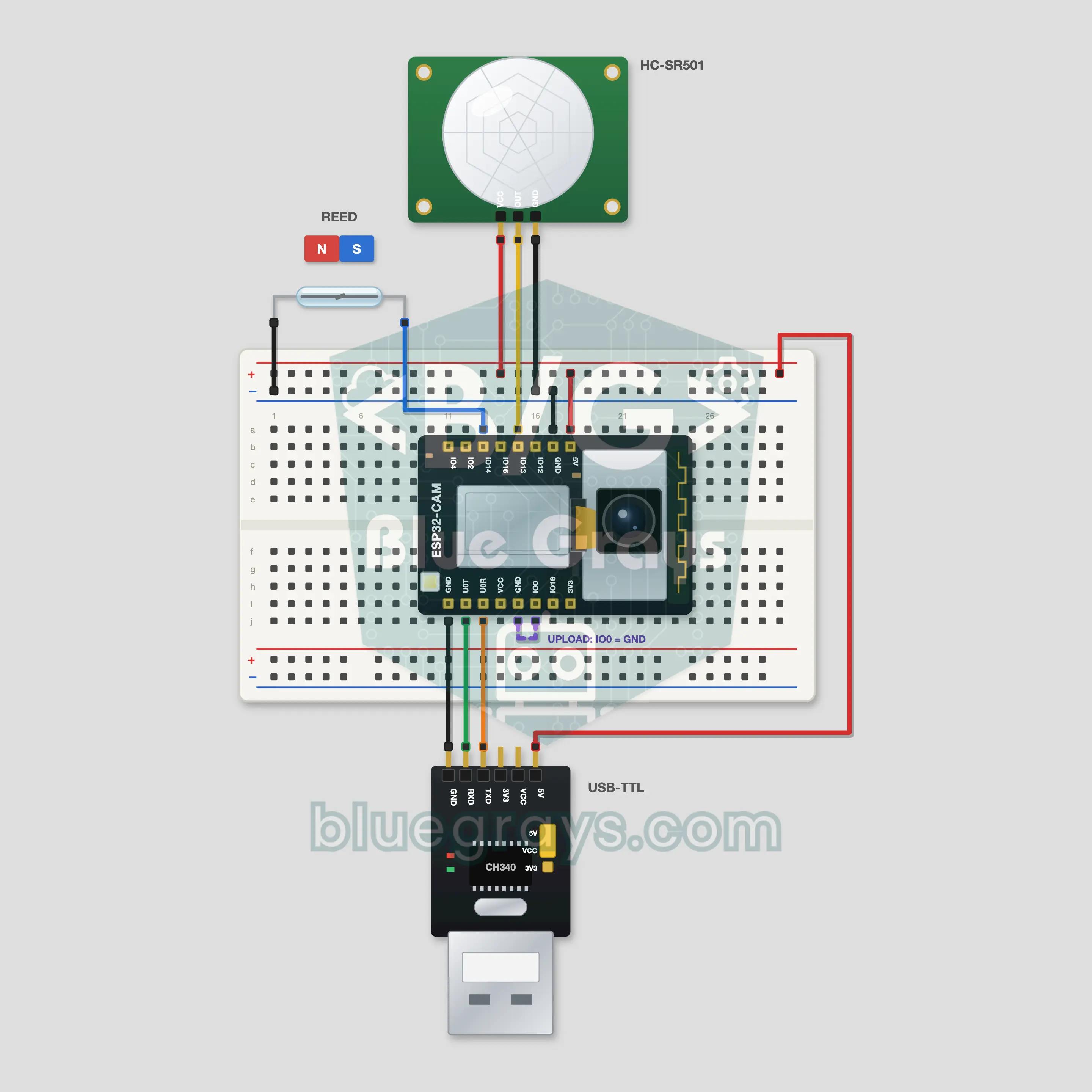
ESP32-CAM Telegram Security Camera
When your door opens or something moves in the room, the ESP32-CAM takes a photo and your Telegram bot sends it to your phone. A reed switch and magnet guard the door, a PIR HC-SR501 watches the room. Type /photo to the bot for a photo on demand; /flash on, /alarm off and /status run the camera from anywhere. The bot only listens to your own chat id. You get the token from @BotFather; the steps are in the FAQ.
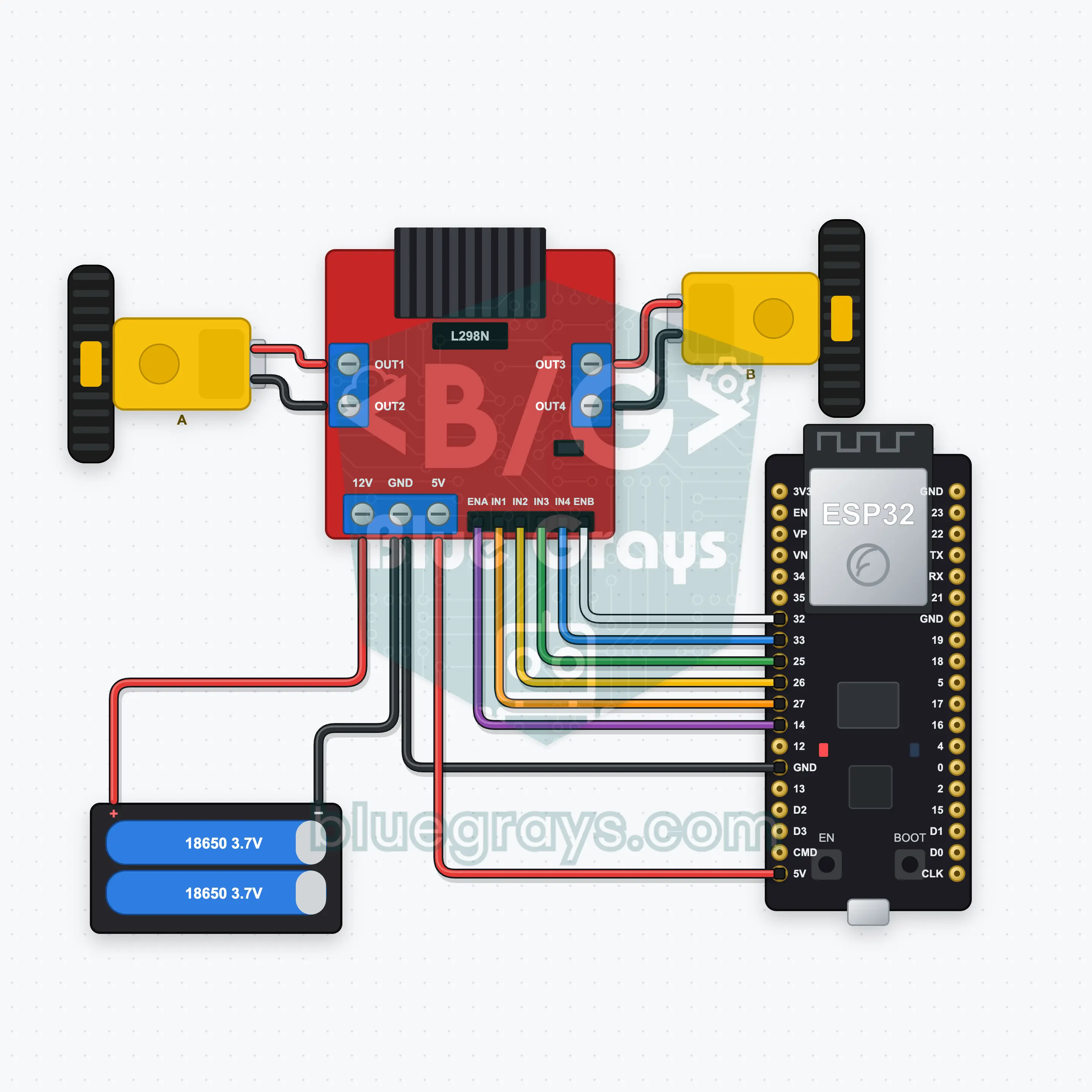
ESP32 Bluetooth Car (L298N)
Drive a two-wheel car over Bluetooth with the joystick on your phone; no internet needed, works on iPhone and Android. This project is the step-by-step guide to the Car remote Bluetooth template in the app, built with an ESP32, an L298N and two motors. Go to Workshop › Devices › Add a device › Bluetooth, pick Car remote and upload the code from Get the code. The Set up as a Bluetooth panel button on this page opens the wizard with this template.
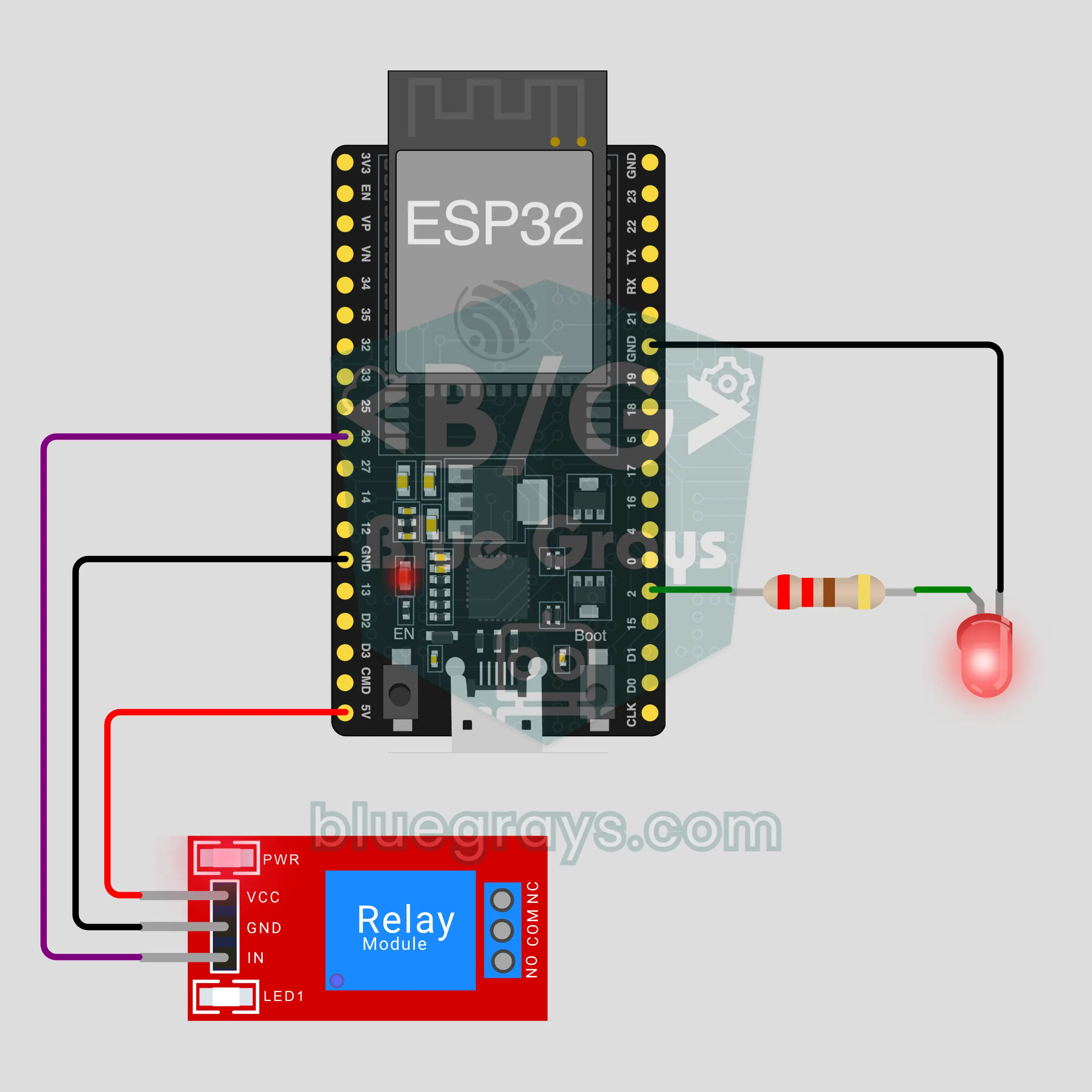
ESP32 Bluetooth LED and Relay
Switch an LED and a relay on and off from your phone over Bluetooth, no internet or Wi-Fi needed. This project is the step-by-step guide to the LED and relay Bluetooth template in the app, built with an ESP32 and a 5 V relay module. Go to Workshop › Devices › Add a device › Bluetooth, pick LED and relay and upload the code with Get the code. The Set up as a Bluetooth panel button on this page opens the wizard with this template too.
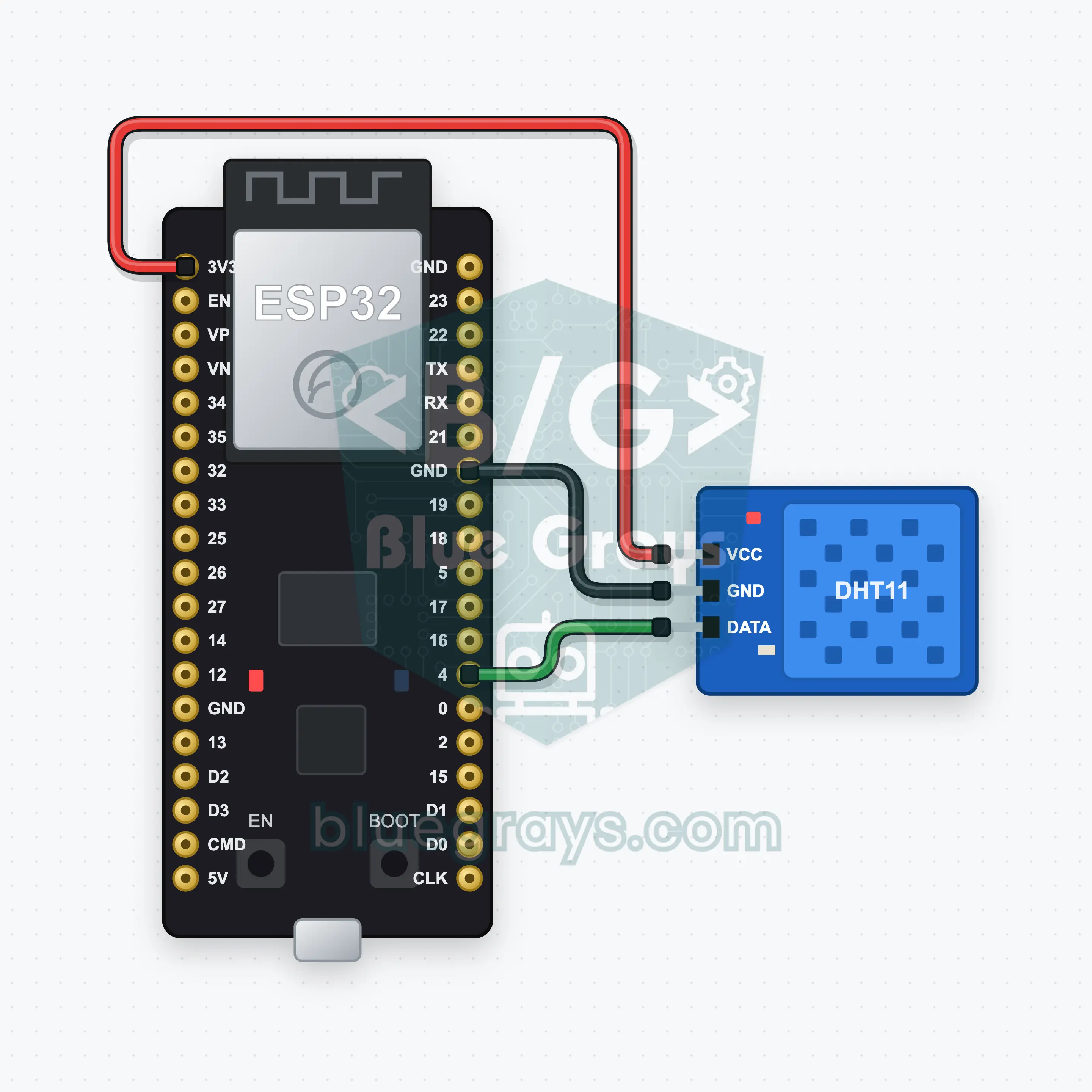
ESP32 Bluetooth Temp and Humidity (DHT11)
Watch your room's temperature and humidity live on your phone with an ESP32 and a DHT11 sensor: two reading boxes and a chart update every 2 seconds, no internet needed. This project is the step-by-step guide for the Temperature and humidity Bluetooth template in the app. Go to Workshop › Devices › Add a device › Bluetooth, pick the template and upload the code with Get the code. The Set up as a Bluetooth panel button on this page opens the wizard ready to go.
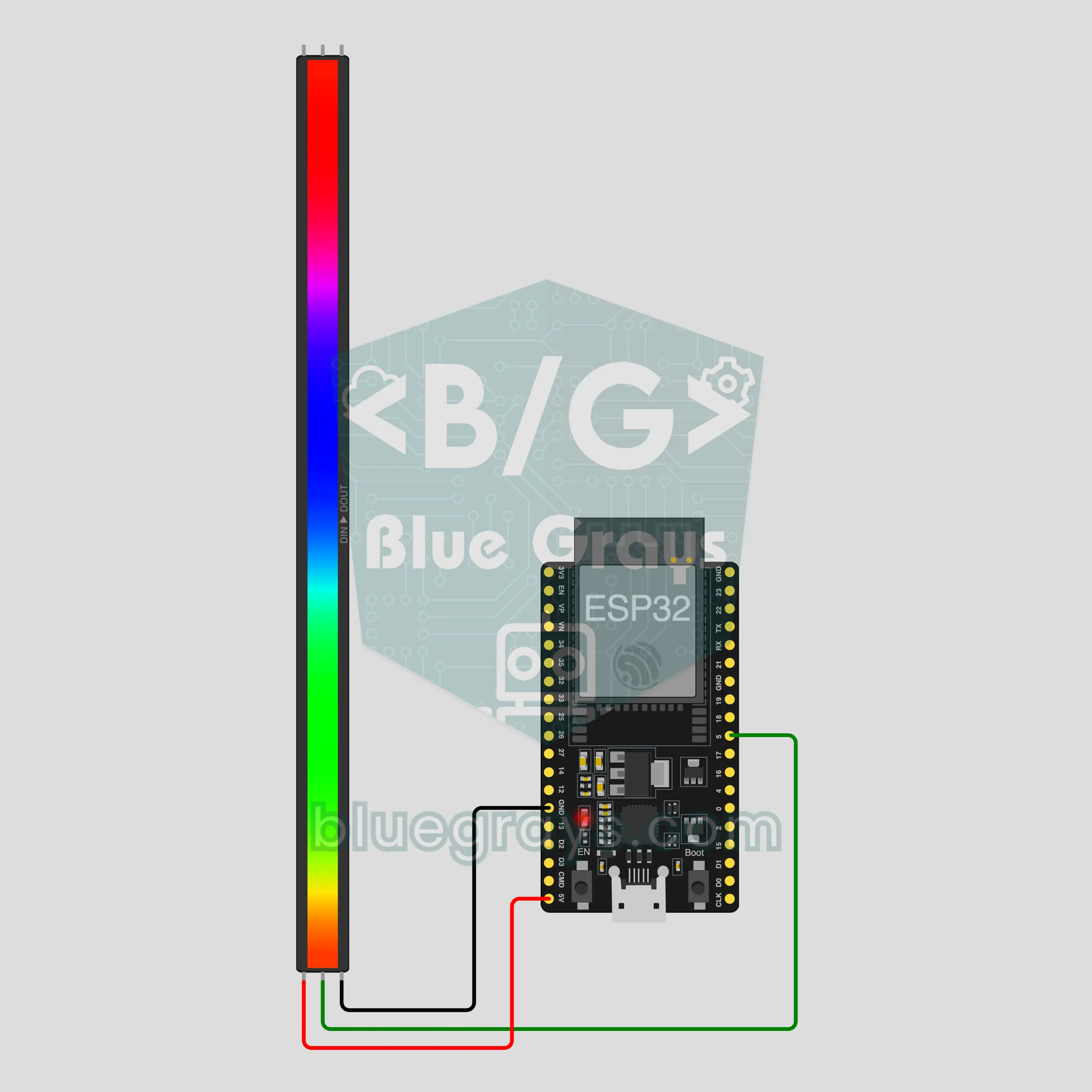
ESP32 Bluetooth RGB LED Strip (WS2812B)
Change your strip's color, brightness and effect from your phone: the ESP32 connects straight to your phone over its built-in Bluetooth, and the WS2812B strip needs only 3 wires. This project is the step-by-step guide to the RGB LED strip Bluetooth template in the app. Go to Workshop › Devices › Add a device › Bluetooth, pick RGB LED strip and upload the code with Get the code. The Set up as a Bluetooth panel button on this page opens the wizard with this template.
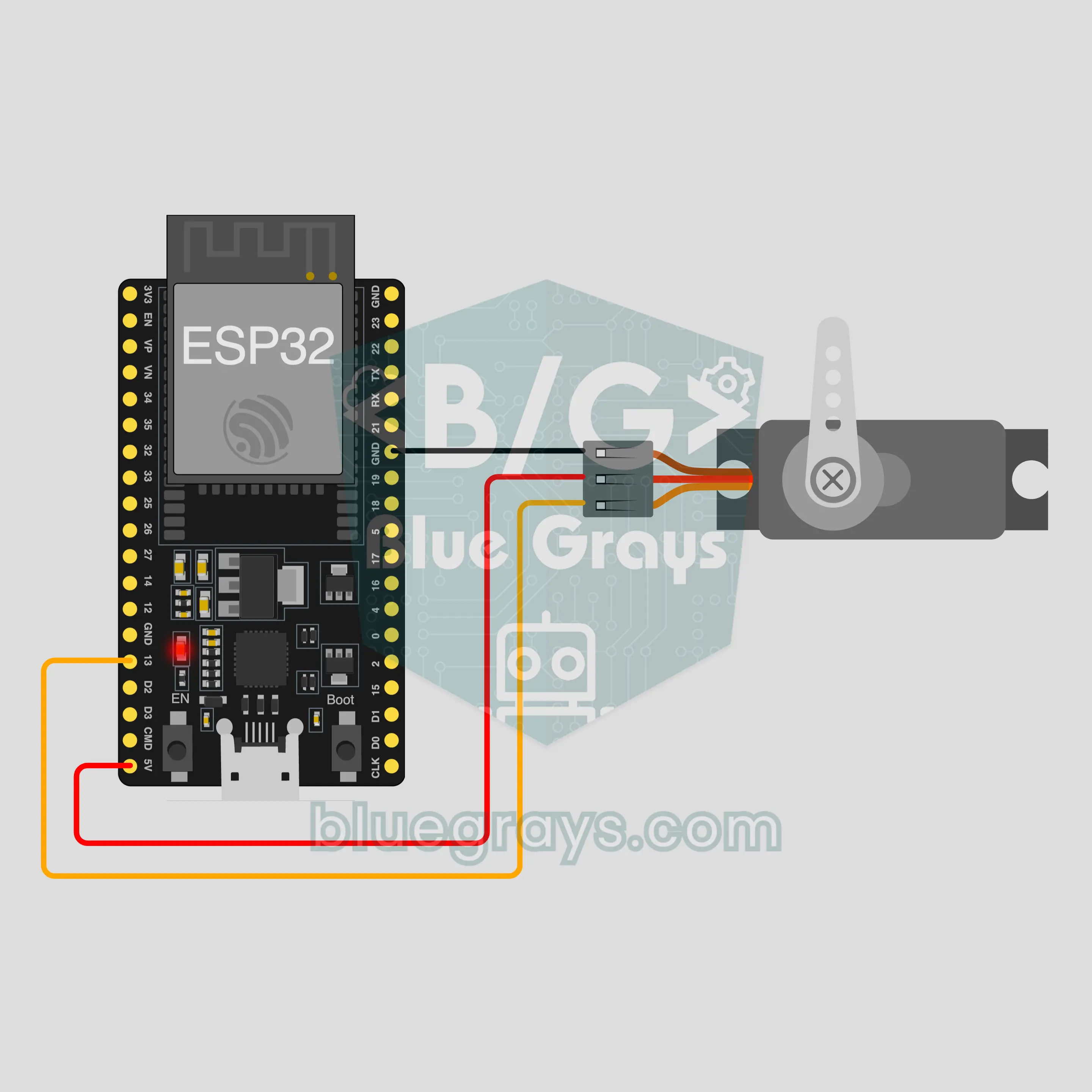
ESP32 Bluetooth Servo Lock
Control an SG90 servo as a small latch from your phone over Bluetooth: lock, open or set the angle, no internet or Wi-Fi needed. This project is the step-by-step guide to the Servo lock Bluetooth template in the app, built with an ESP32, one servo and 3 wires. Go to Workshop › Devices › Add a device › Bluetooth, pick Servo lock and upload the code with Get the code. The Set up as a Bluetooth panel button on this page opens the wizard with this template too.
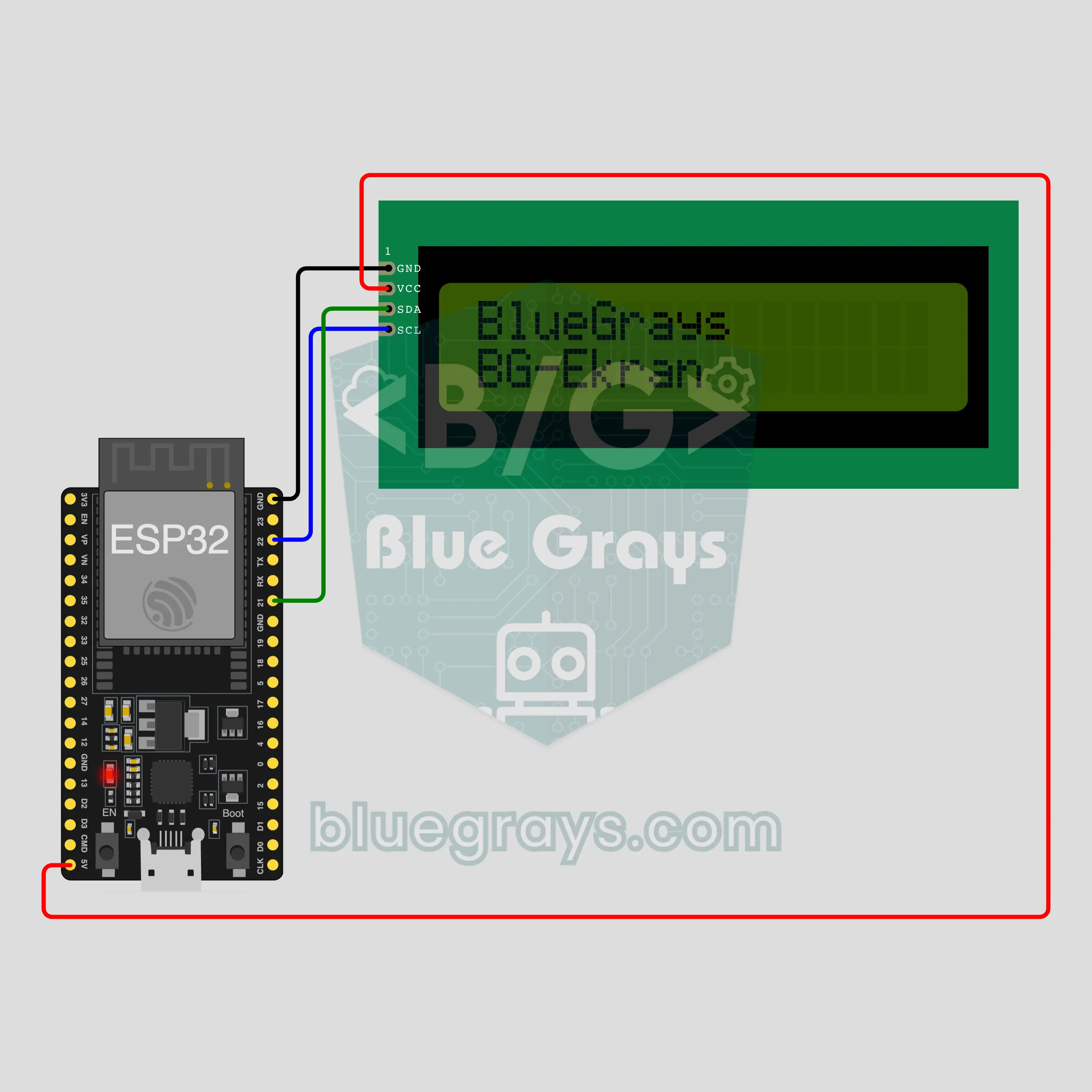
ESP32 Bluetooth Text on an LCD
Type a message on your phone and it shows up on a 16x2 LCD over Bluetooth, no internet or Wi-Fi needed. This project is the step-by-step guide to the Text on an LCD Bluetooth template in the app, built with an ESP32 and an I2C LCD. Go to Workshop › Devices › Add a device › Bluetooth, pick Text on an LCD and upload the code with Get the code. The Set up as a Bluetooth panel button on this page opens the wizard with this template too.
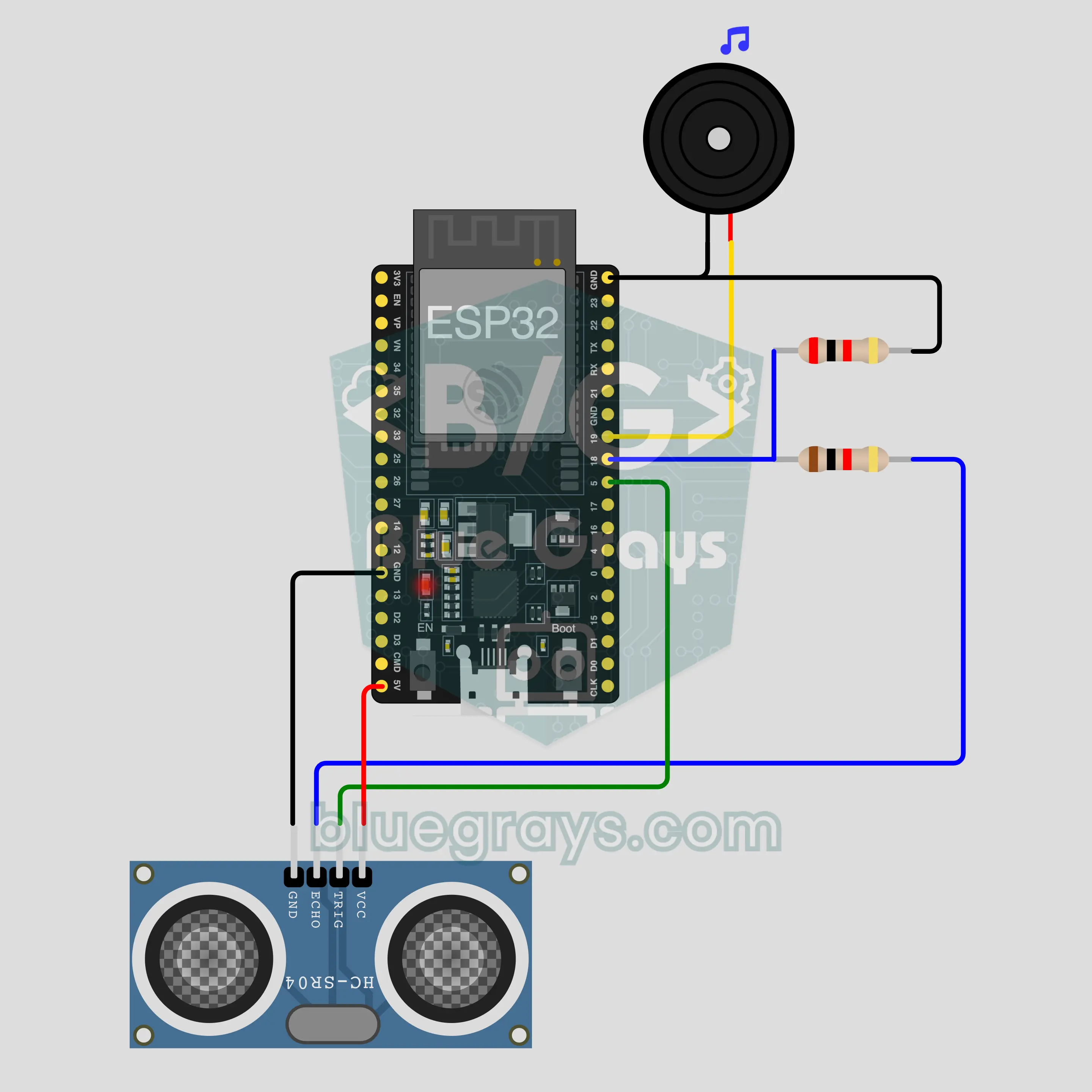
ESP32 Bluetooth Parking Sensor (HC-SR04)
Measure the distance to an obstacle with an HC-SR04 and watch it on your phone; the buzzer beeps faster as it gets closer. No internet needed. This is the step-by-step guide to the Parking sensor Bluetooth template in the app, built with an ESP32. Go to Workshop › Devices › Add a device › Bluetooth, pick Parking sensor and upload the code with Get the code. The Set up as a Bluetooth panel button on this page opens the wizard with this template too.
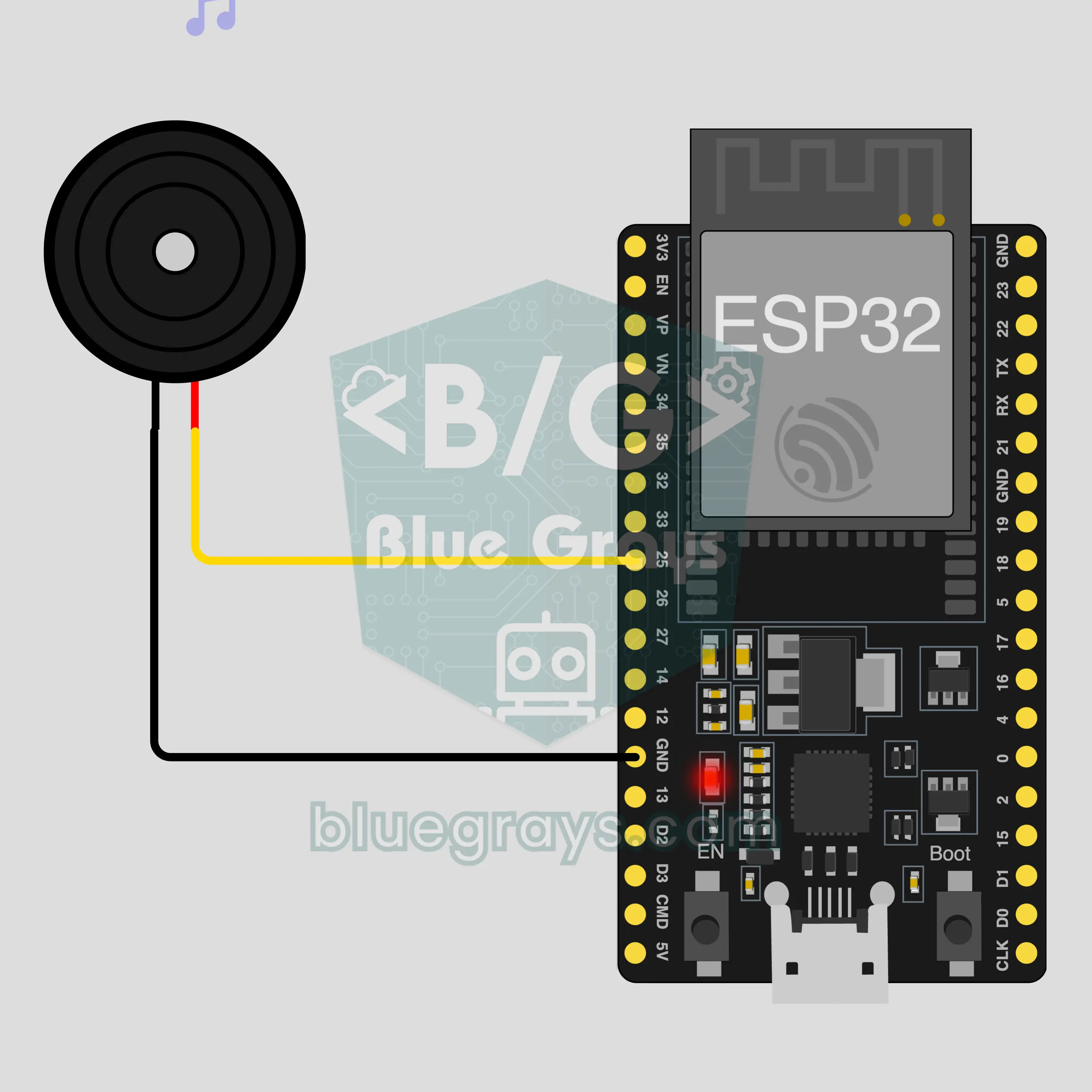
ESP32 Bluetooth Phone Piano
Turn your phone into an 8-key piano: press a key and a passive buzzer on the ESP32 plays that note, no internet or Wi-Fi needed. This is the step-by-step guide to the Phone piano Bluetooth template in the app, built with a buzzer and two jumper wires. Go to Workshop › Devices › Add a device › Bluetooth, pick Phone piano and upload the code with Get the code. The Set up as a Bluetooth panel button on this page opens the wizard with this template too.
Blog
- Arduino Wireless Communication: Bluetooth, Wi-Fi, RF, LoRa, GSM
- LoRa Arduino Guide: SX1278 Ra-02 Long-Range Wireless with ESP32
- 433MHz RF Module Arduino Guide: Transmitter, Receiver, Antenna
- SIM800L Arduino Guide: Send SMS, Control a Relay and Make Calls
- MIT App Inventor Arduino Bluetooth: Build an HC-05 Android App
- nRF24L01 Arduino Tutorial: Wiring, RF24 Code, Range and Fixes
- HC-05 Bluetooth Module: Control Your Arduino from Your Phone
- IR Receiver and Remote Control: Remote-Controlled Projects with Arduino