
LCD, OLED and 7-Segment Display Projects: Clocks and Gauges
Seeing your readings on a screen instantly turns a project into a real device. In these projects you'll learn to use LCD, OLED and 7-segment displays, keep time with an RTC module and show sensor data clearly.
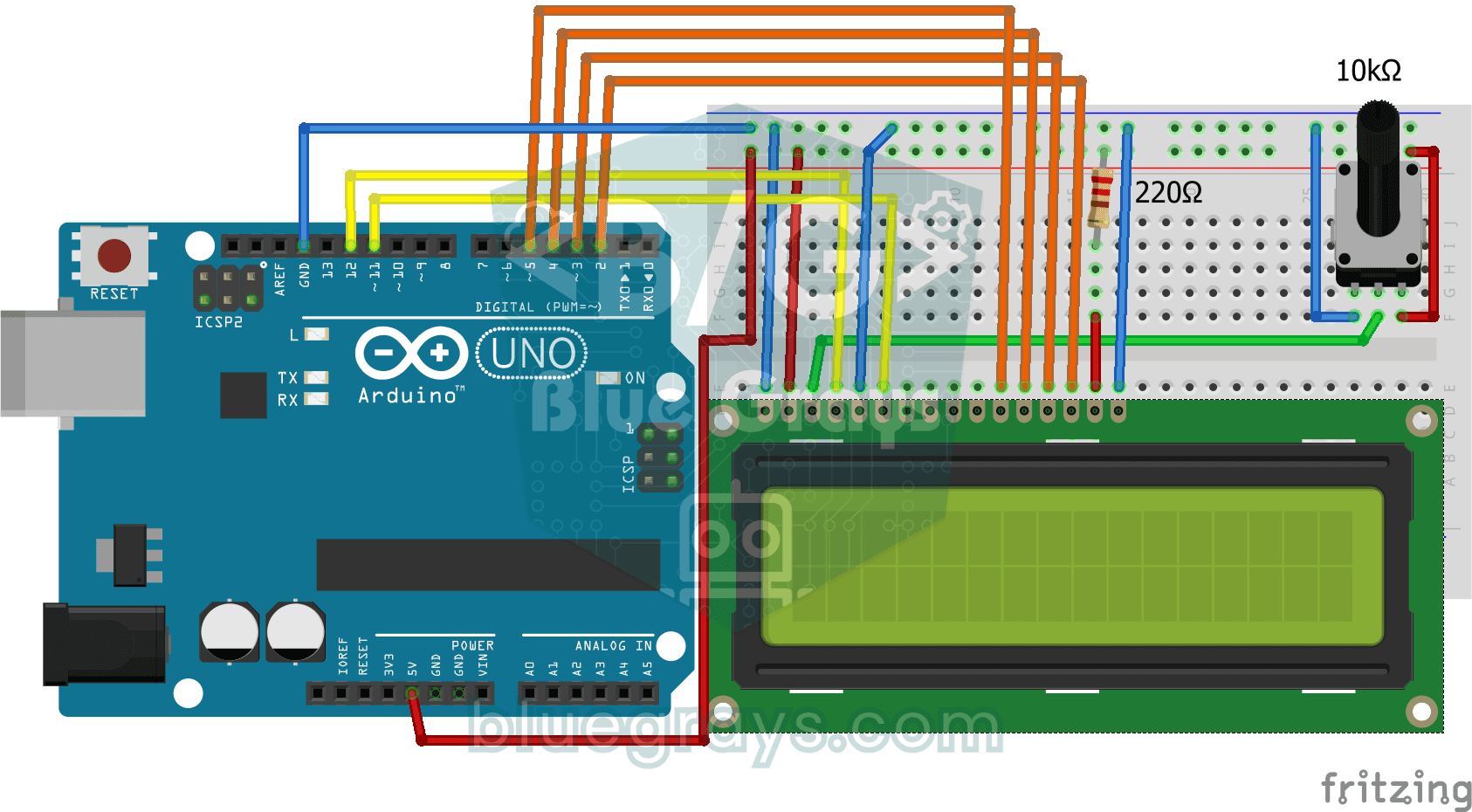
Print Message on 2x16 LCD Screen
Your first step to writing text on a screen. The two-line LCD screen first shows a waiting message, then writes a greeting on the top line and types a word letter by letter on the bottom line like a t
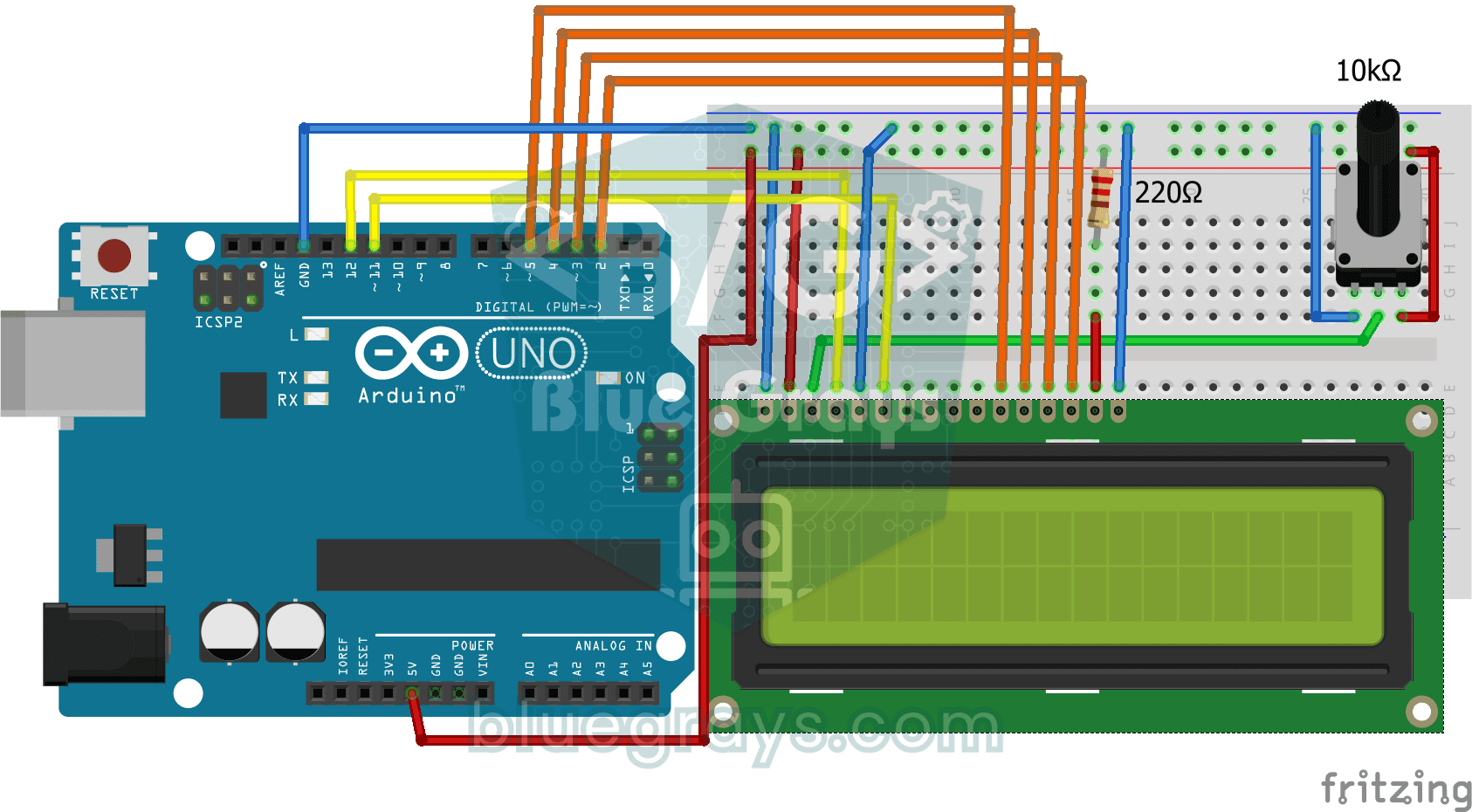
Bouncing Text Animation on LCD
On the top line of the LCD screen, the word BLUEGRAYS slides from one edge to the other and bounces back like a ball off a wall, over and over without end. All you need is an Arduino, a 2x16 LCD scree
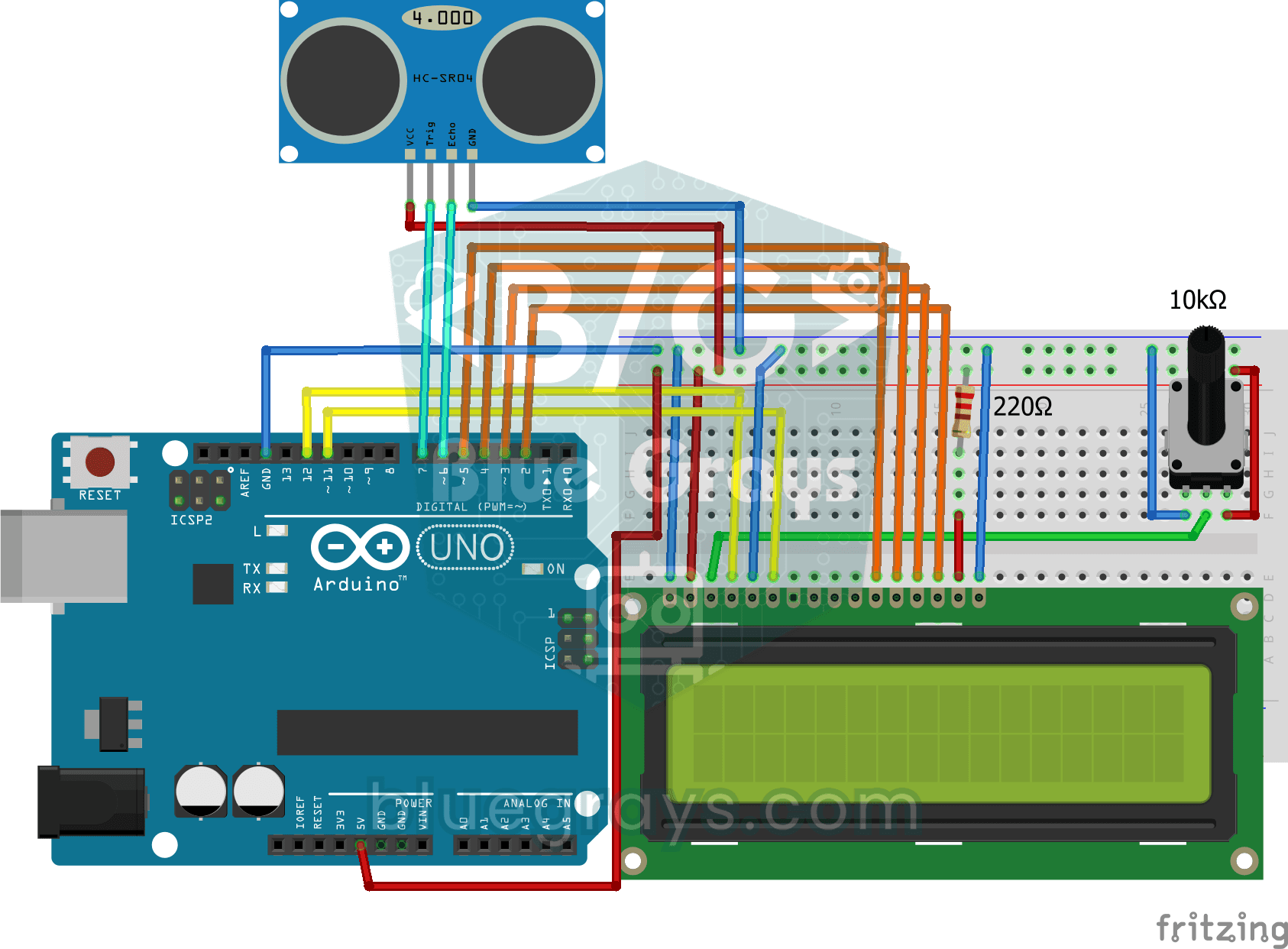
Measuring Distance Using LCD Display
A tool that measures distance without a ruler: move your hand back and forth in front of the sensor and watch the number change. The HC-SR04 sends out a sound wave and listens for its echo, and the Ar
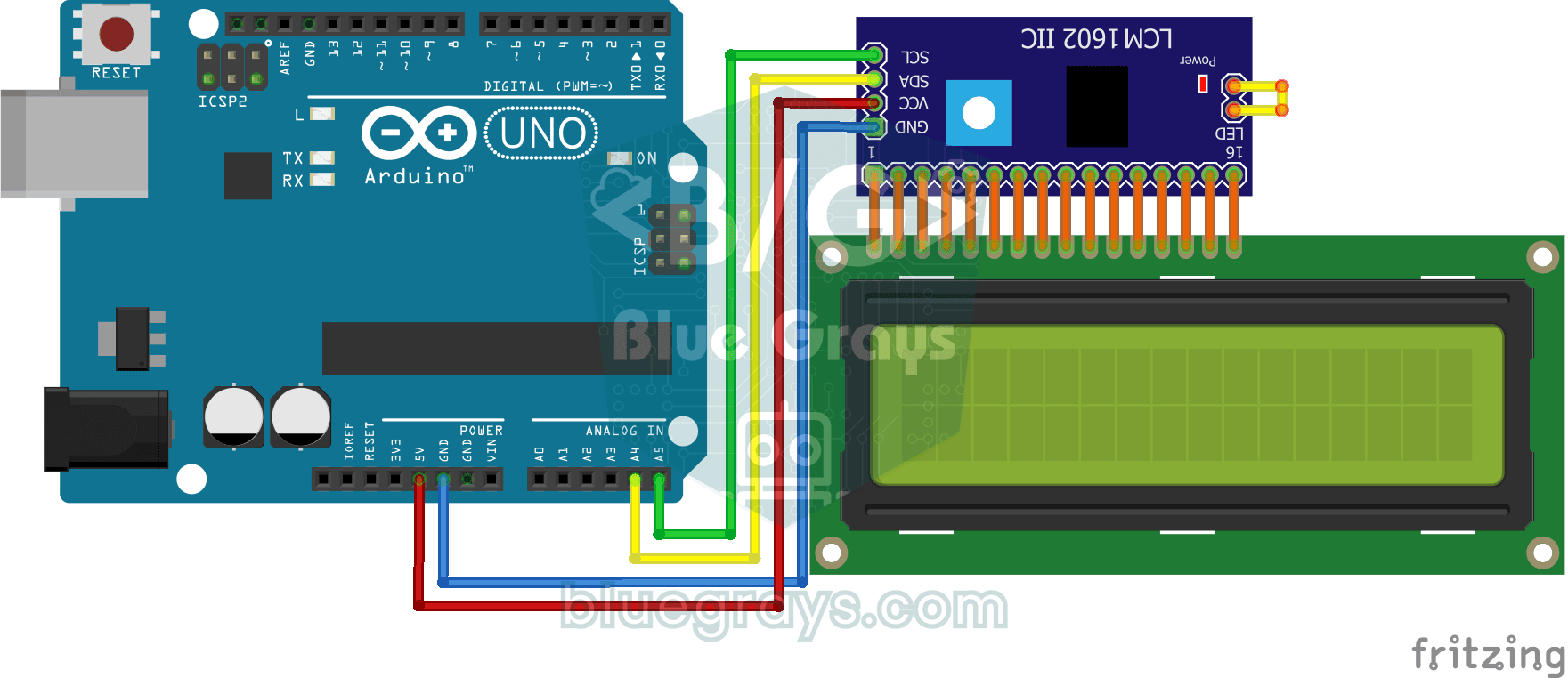
Using LCD Screen with I2C
Give your Arduino its own screen and make it write its first message. The two-line LCD screen hooks up with just a few wires; a greeting appears on the top line, then a second message on the bottom li
Height Measurement Project
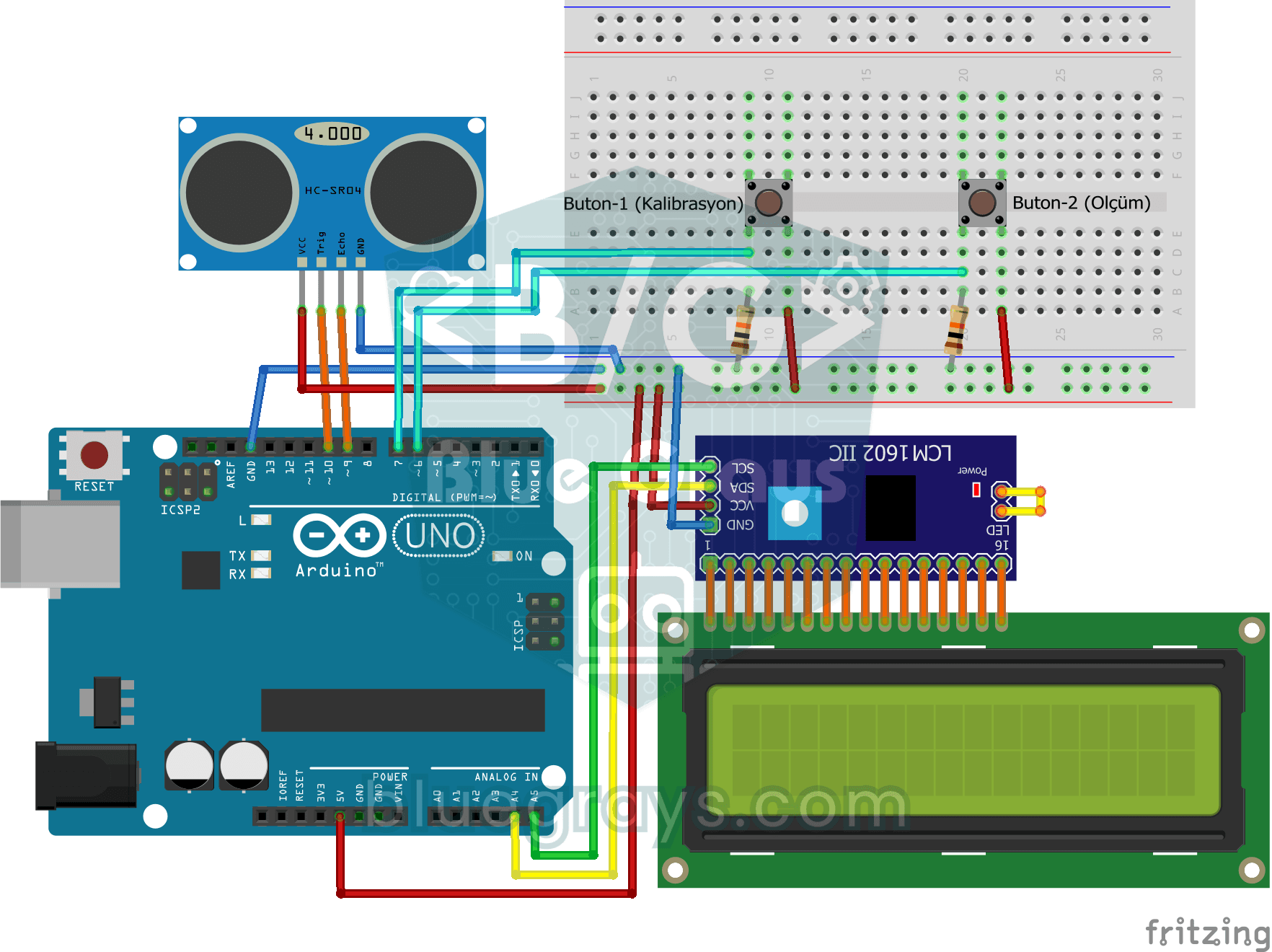
A height meter that hangs from a door frame and tells you, in centimetres, how tall the person standing under it is. First you press the first button with nobody underneath, and the distance sensor me
Displaying Numbers 0-9 on a 7-Segment Display
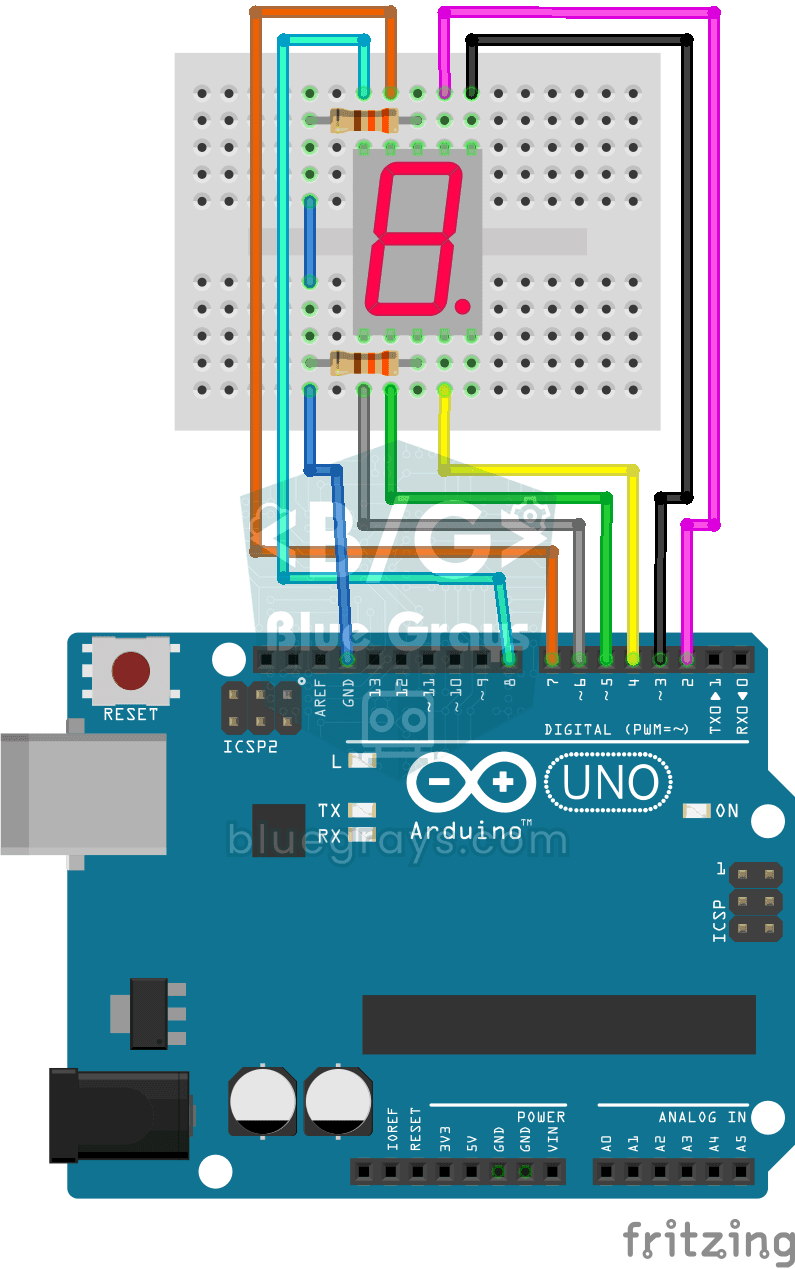
Write those familiar numbers you see in elevators and digital clocks yourself. On a display made of seven little light bars, the Arduino shows a digit from 0 to 9, one each second, and then starts ove
Displaying Numbers 0-99 on a 7-Segment Display
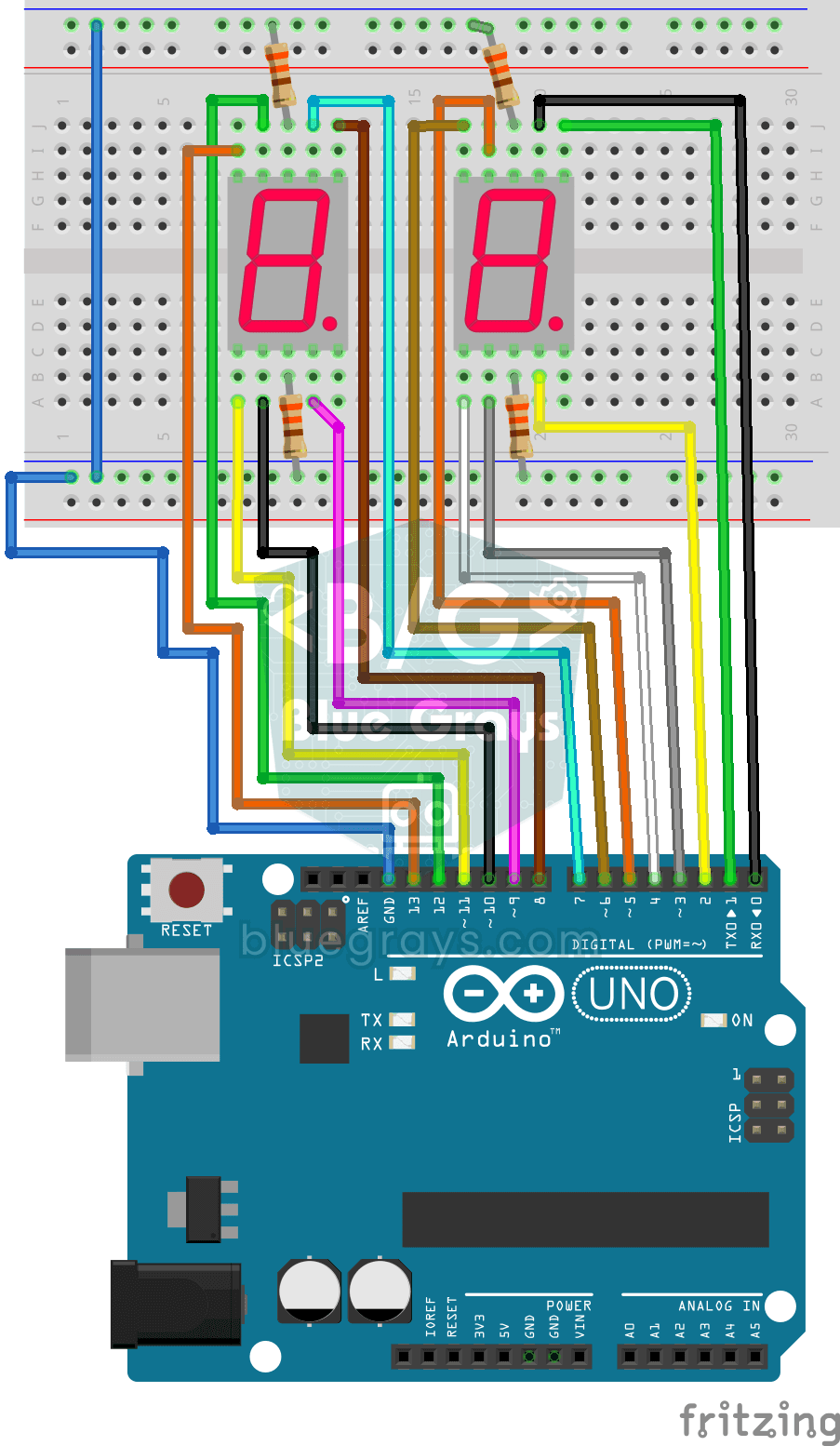
A two-digit display made of little bars, like the ones on a calculator, counts from 0 to 99. The Arduino splits each number into its units and tens and lights the right bars out of the seven in each d
Counter with 7-Segment Display and Buttons
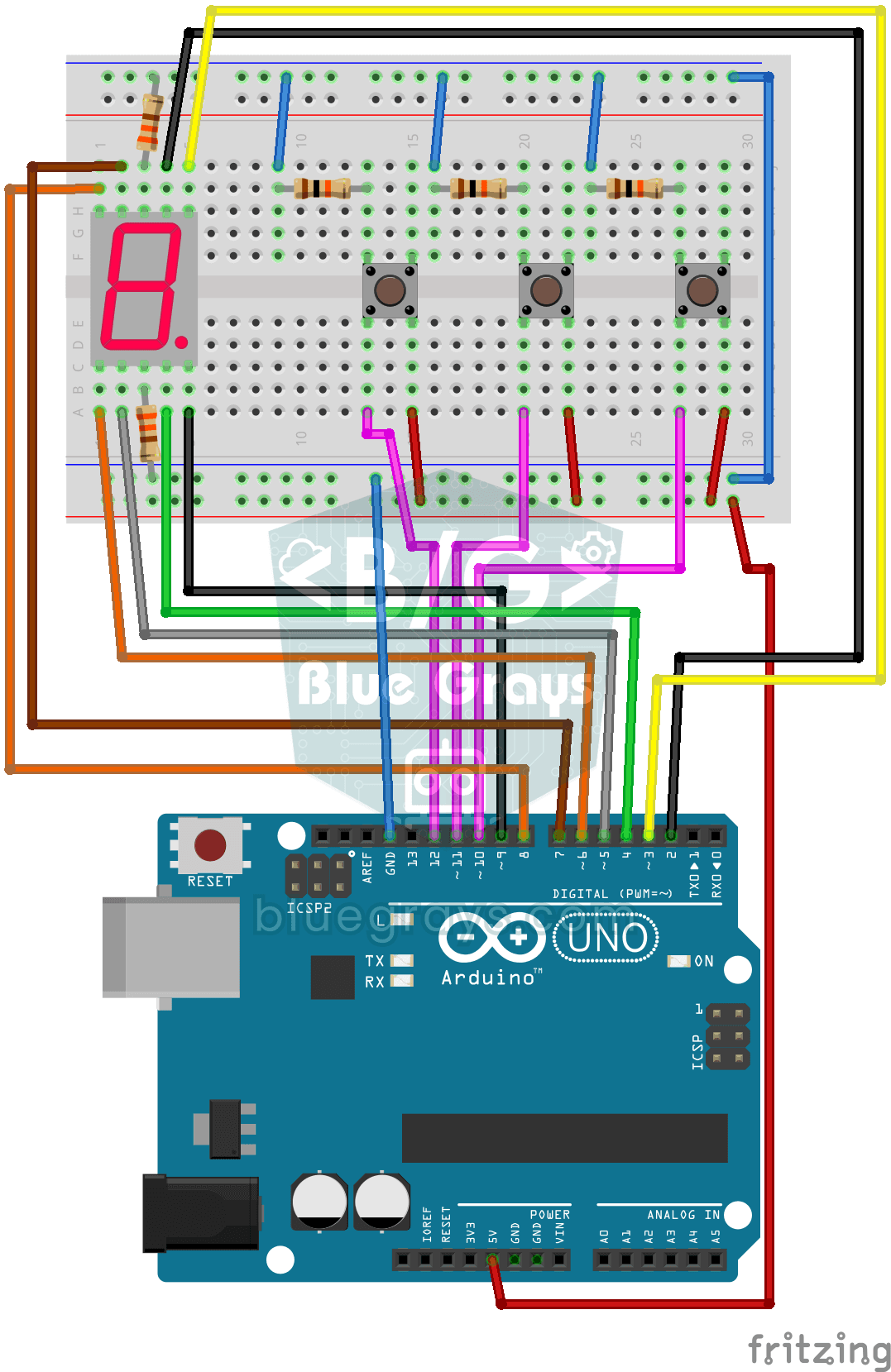
A simple counter with three buttons: press one and the digit on the display goes up by one, press another and it goes down by one, and the third sends it back to zero. The single-digit 7-segment displ
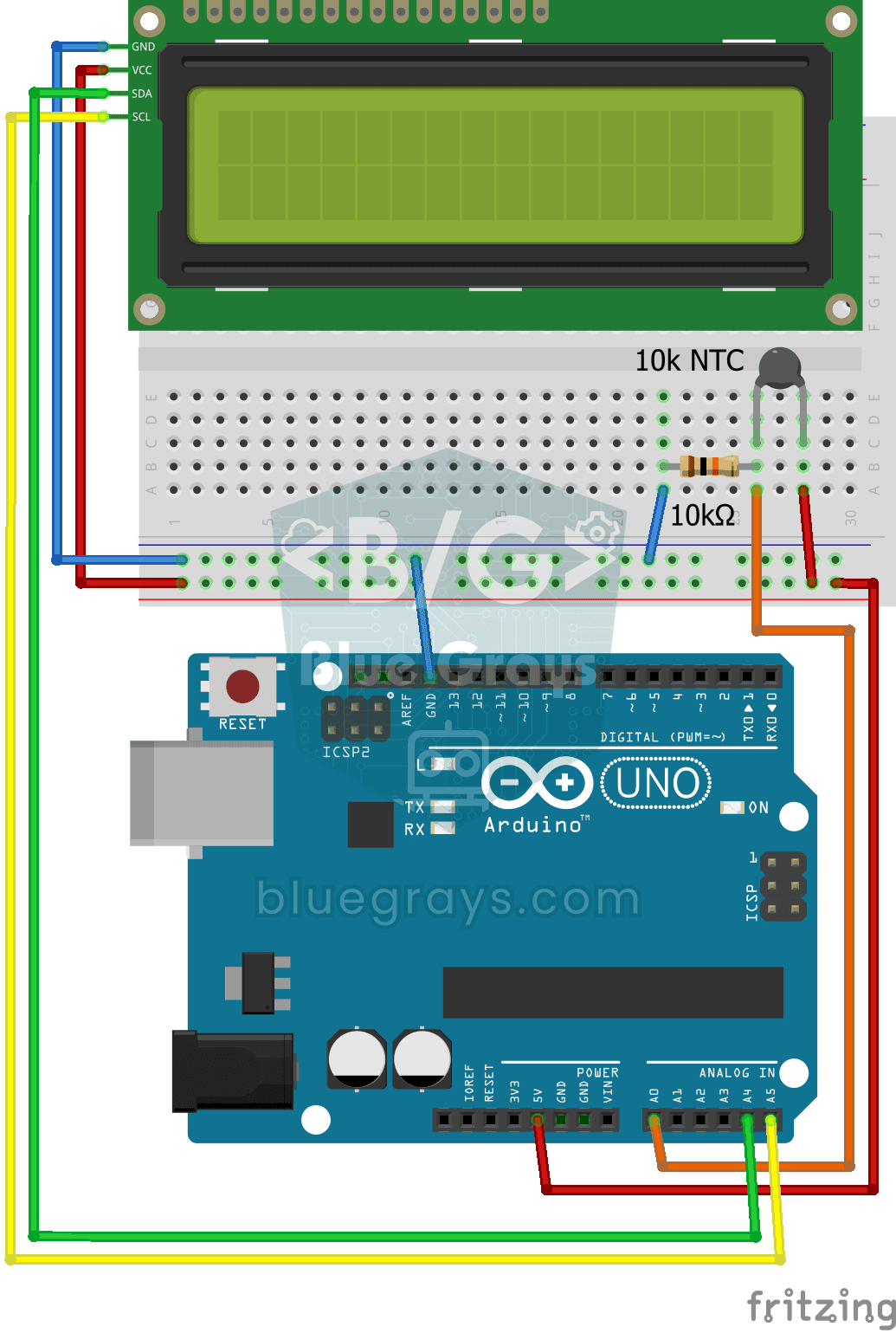
Temperature Measurement with NTC and 2x16 Lcd Display
Measure the temperature around you with a sensor that looks like a tiny bead. This part, called an NTC, lets electricity through more easily as it warms up; the Arduino reads that change, turns it int
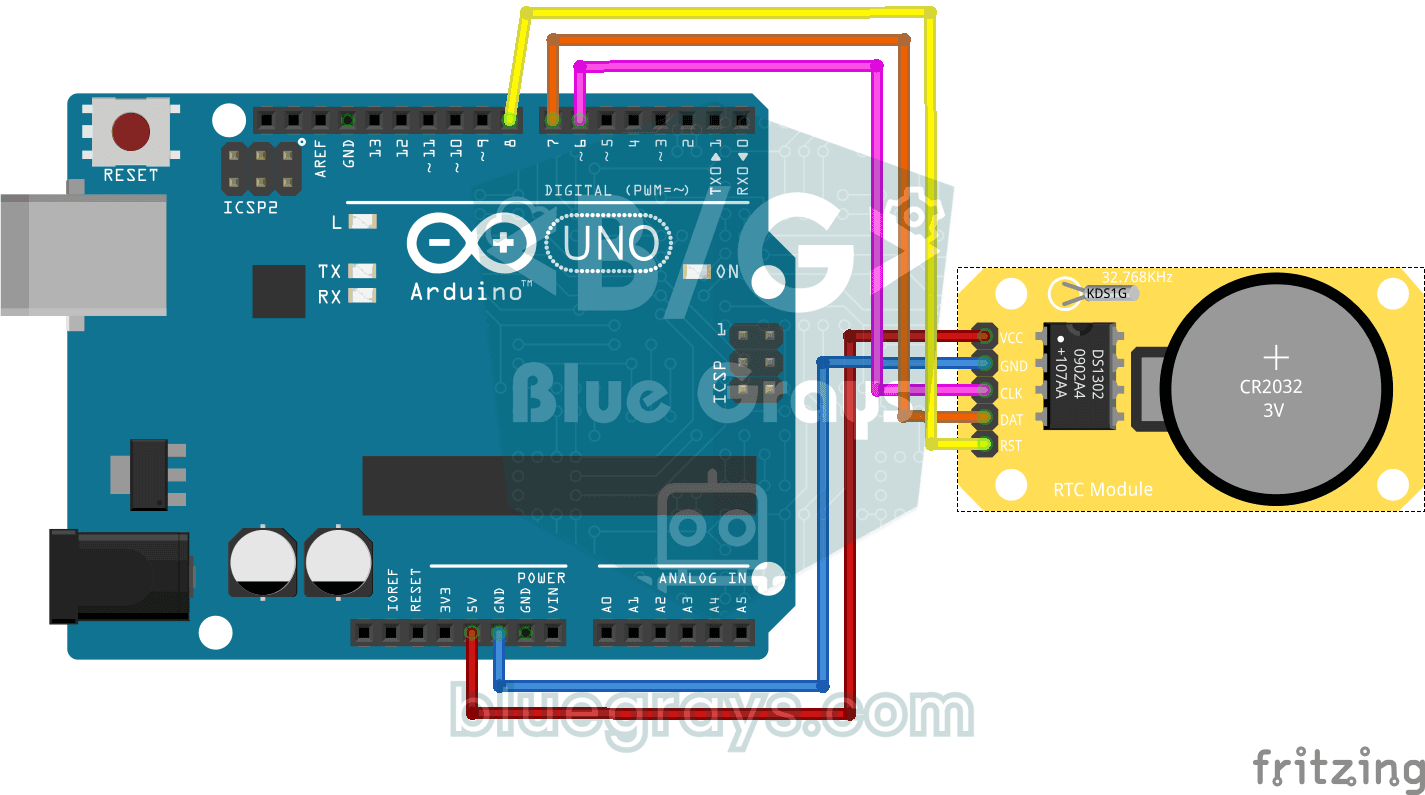
DS1302 RTC Clock Module Setup
You get a small clock module running that never forgets the time, even when the Arduino is switched off. The module has its own tiny battery, and once the clock is set, the date and time are printed o
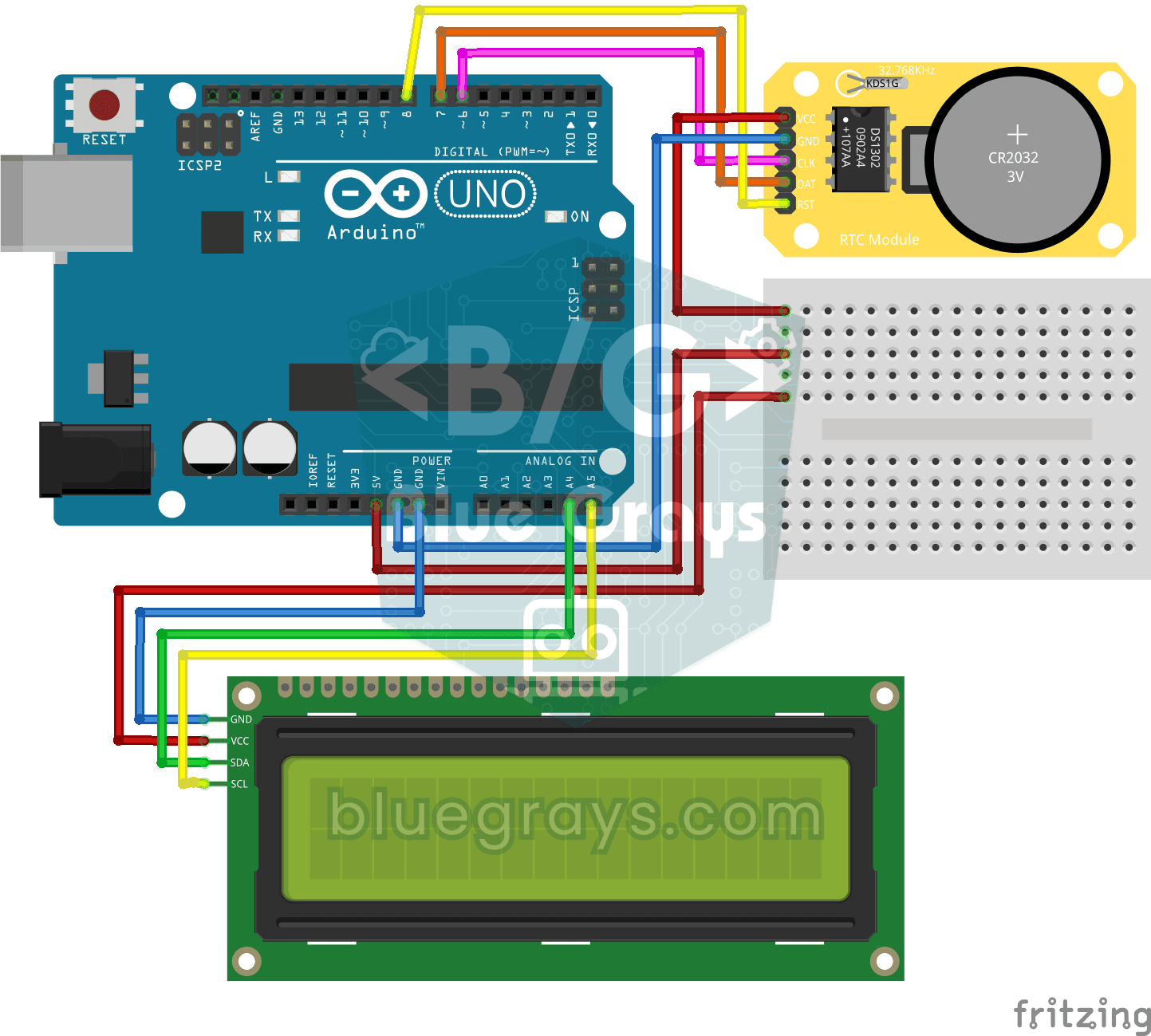
DS1302 RTC Clock with LCD Display
A little desk clock that keeps the time even when the power goes out. The DS1302 clock module keeps time thanks to its own tiny battery; every second the Arduino reads it and writes the time and date
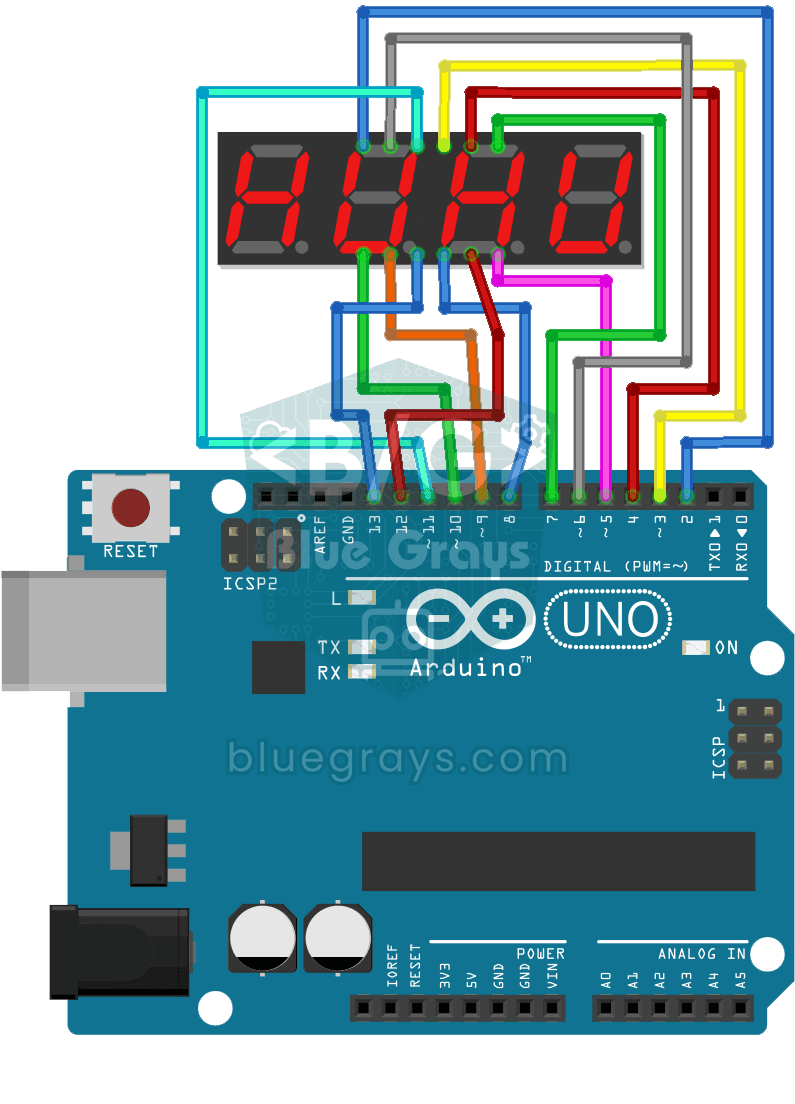
Displaying 0-9999 on a 4-Digit 7-Segment Display
On a four-digit number display, numbers race from 0 to 9999 and then start again from zero. The Arduino plays a trick on your eyes to make all four digits look lit at the same time: it actually lights
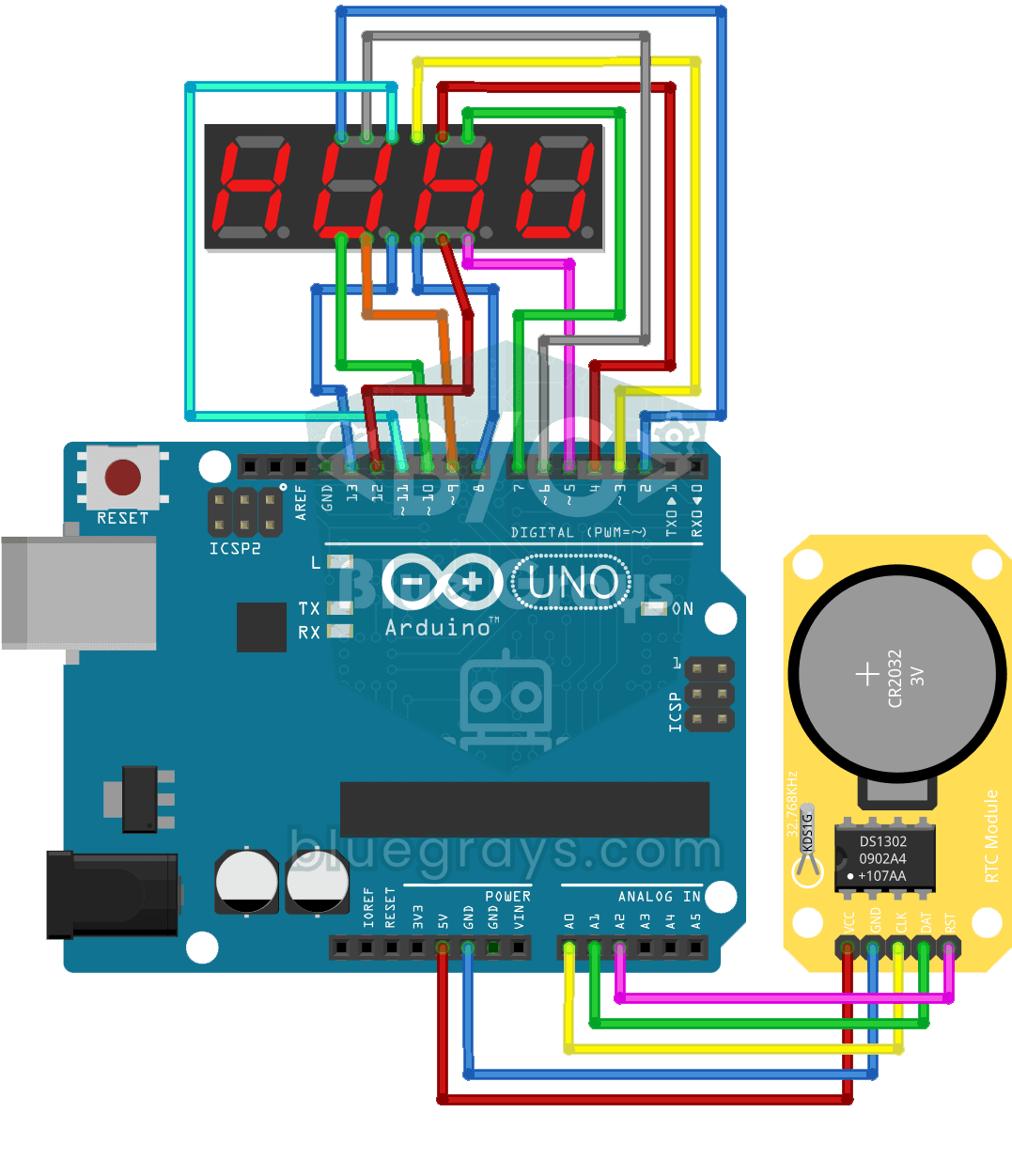
Digital Clock with 4-Digit 7-Segment Display
A four-digit glowing digital clock, much like the one on a kitchen oven. The DS1302 clock module keeps the time, and every second the Arduino reads the hours and minutes and shows them on the four-dig
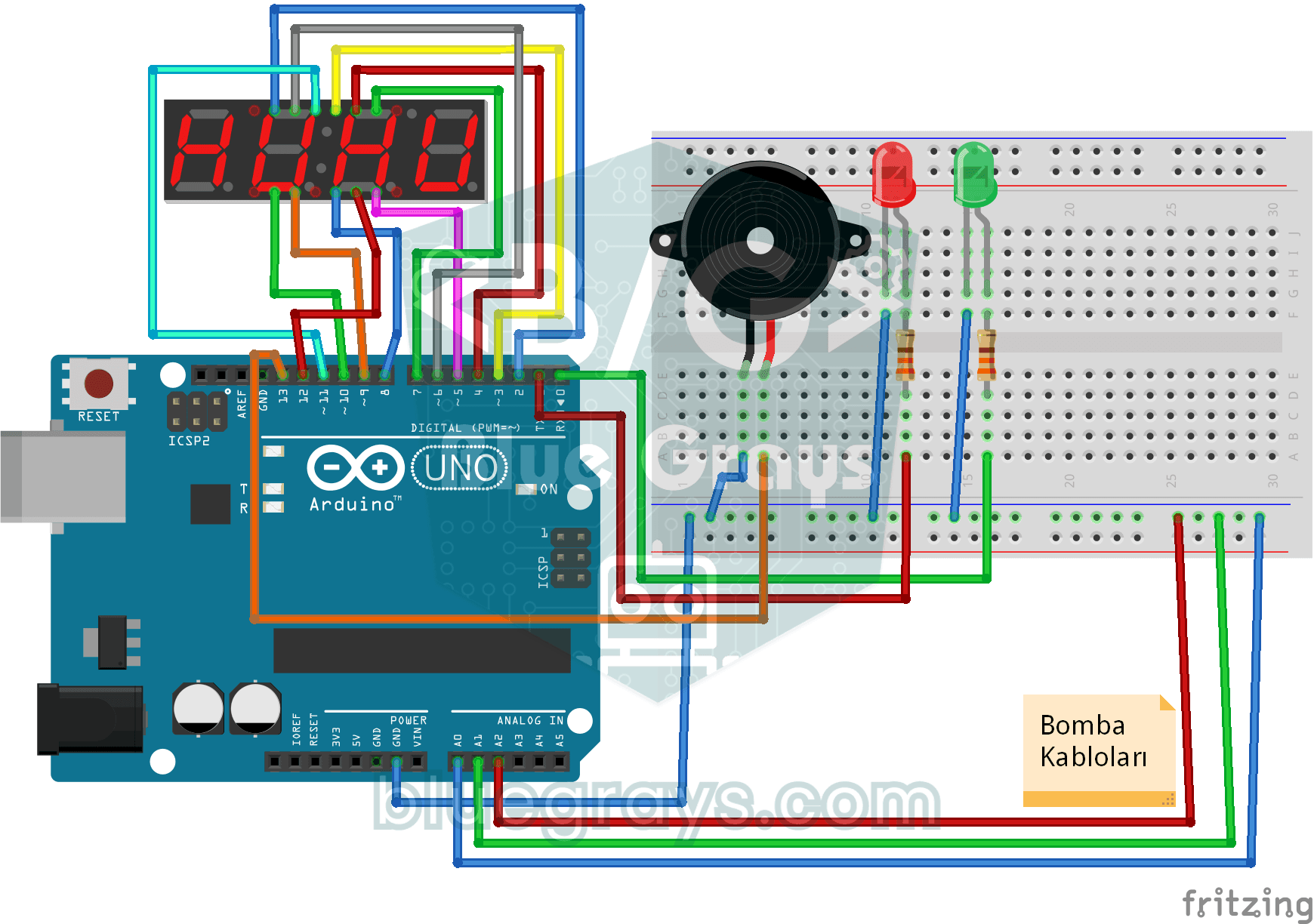
Bomb Animation with 4-Digit 7-Segment Display
The ticking bomb scene from the films, right on your desk and completely harmless: the 4-digit display counts down from 1:05, the buzzer beeps every second and the red LED blinks. You decide which of
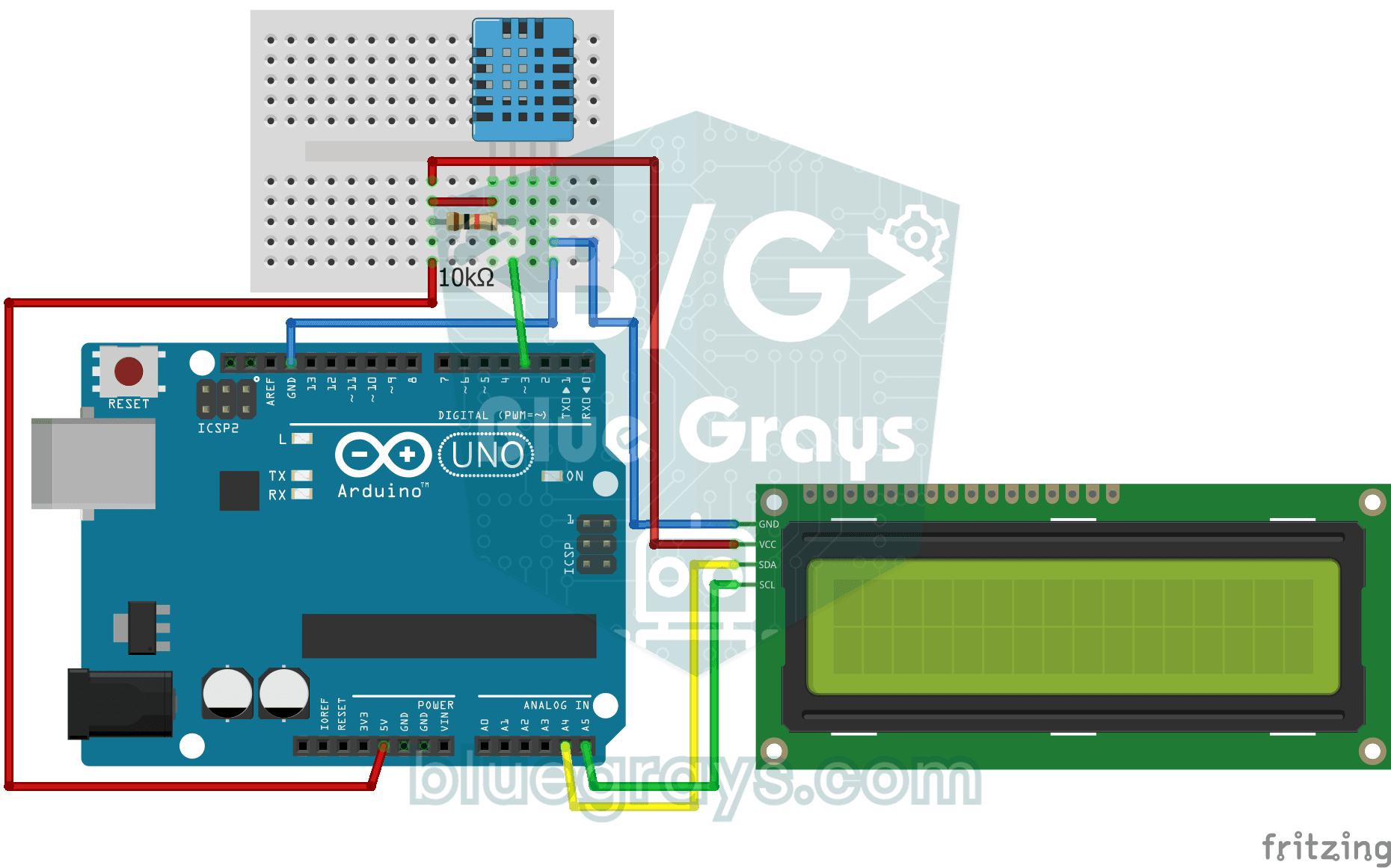
Temperature and Humidity with DHT11
How warm is your room, and is the air humid or dry? The DHT11 sensor measures temperature and humidity, and the Arduino writes the values on a two-line LCD screen, refreshing every couple of seconds.
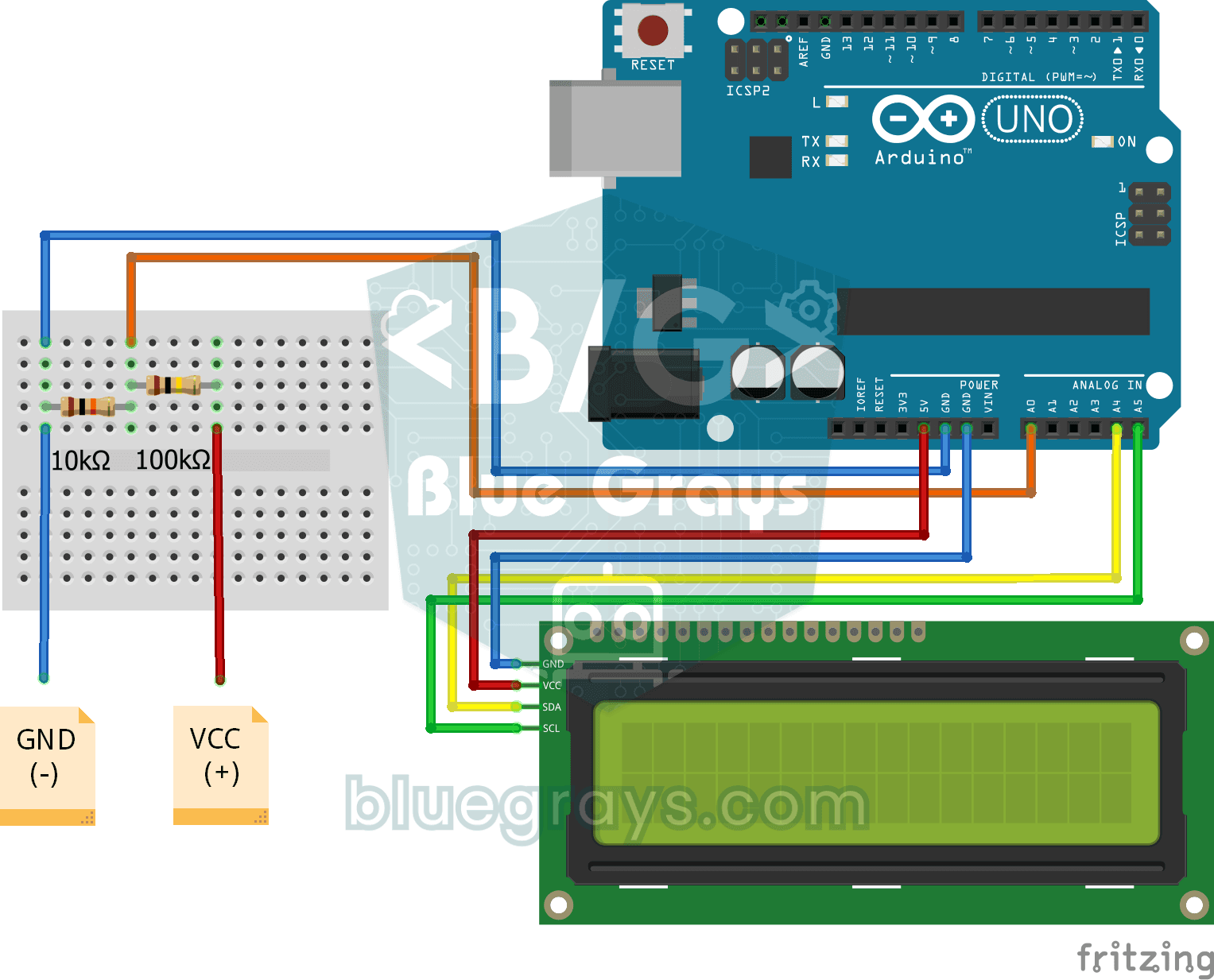
Digital Voltmeter with LCD Display
Find out how much voltage a battery or power adapter gives with a meter you built yourself. A divider made of two resistors brings high voltage down to a level the board can read, and the Arduino calc
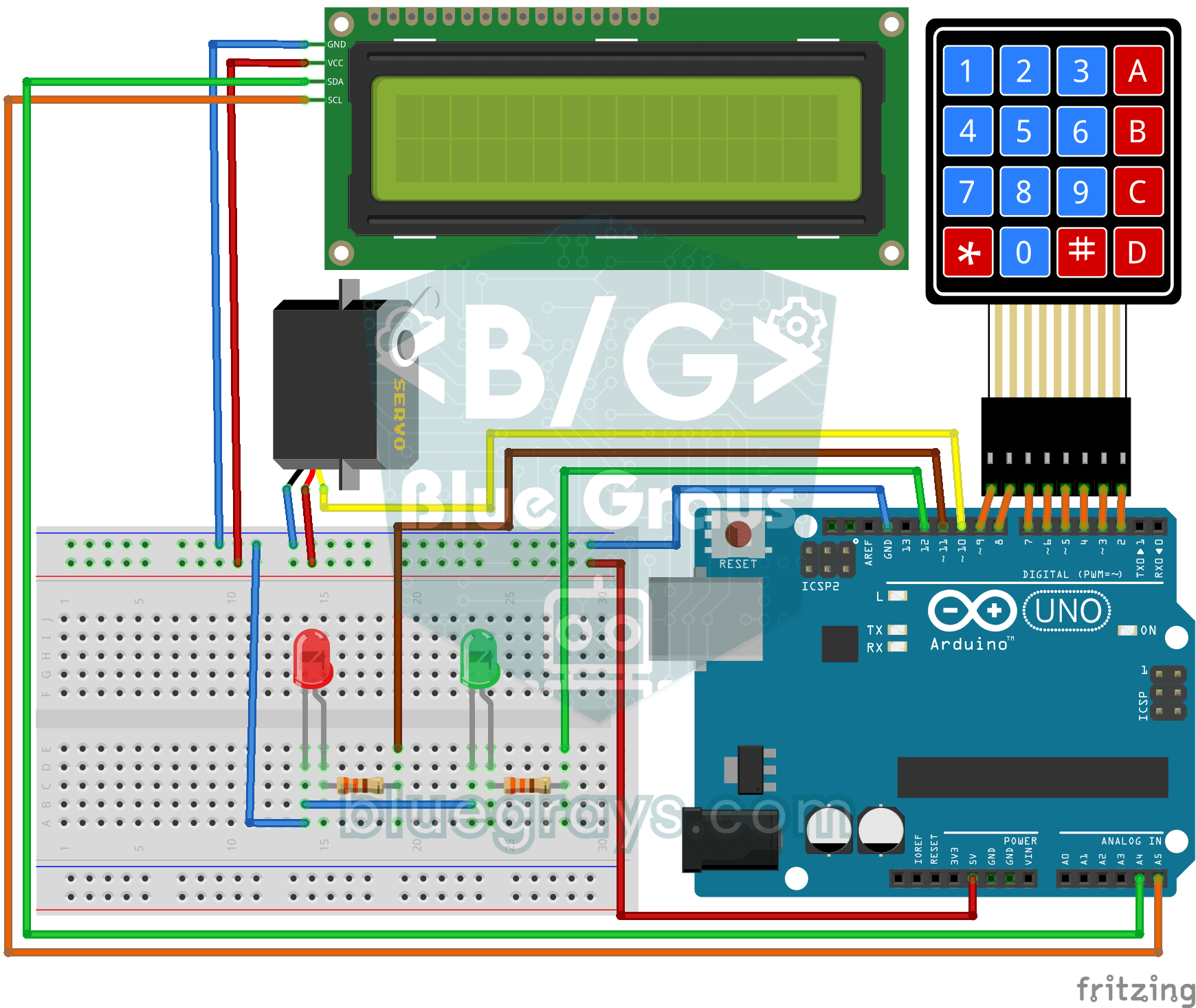
Password Lock with 4x4 Keypad and LCD
A small electronic door lock that keeps out anyone who doesn't know the code. You press the hash key and type the code on the keypad; if it is right, the screen says access granted, the green LED ligh

Reading Reflection (Proximity) with TCRT5000
With a small sensor that sends out invisible light and measures how much bounces back, you can detect the surface in front of it. The closer an object or a light-coloured surface gets, the more light

Dice Project
No more lost dice during board games: every time you press the button, a random number from 1 to 6 appears on the 7-segment display. Each press gives exactly one result, and the result is also written

Dot Matrix Clock and Calendar (MAX7219, DS1307)
A glowing board for your desk or wall that shows the time and date in scrolling text. The 8x32 LED display holds a big-digit clock whose two dots blink every second; at the start of each minute the da

Dot Matrix Clock, Calendar and Weather Station (MAX7219, DS1307)
A scrolling-text board for your desk or wall that shows the time, the date and the room's weather in turn. On the 8x32 LED display you first see the temperature in both Celsius and Fahrenheit, then th

Paddle Ball Game - SSD1306
A ball, two paddles and you: you play table tennis, one of the very first video games, on a small OLED screen. Two buttons move your paddle on the right up and down, while the computer controls the le

OLED T-Rex Run: Arduino Dinosaur Game
The dinosaur game that pops up when your internet goes down, now on your desk: the dinosaur runs across the small OLED screen, cacti come at you, and you jump with a single button. Your score climbs l

4x 32x8 Matrix LED Animation and Text
Stack four long LED matrix modules on top of each other and you get a square screen with more than a thousand dots of light. First, letters pour down from the top like rain in the movies, then a curta

4x 32x8 LED Matrix - 6-Animation Pack
Four 32x8 LED panels stacked on top of each other form a square screen where six animations play in turn: falling digital rain, a growing spiral, cells that are born and die all by themselves, ripplin

Smart Electronic Safe
A small safe for your valuables that opens with a code. You type your four-digit code on the keypad; if it is right, the servo motor opens the lock, the green light comes on and the screen shows the s

Arduino I2C Calculator
It is an Arduino-based calculator project that performs addition, subtraction, multiplication and division operations using a 4x4 membrane keypad and a 16x2 I2C LCD display. Thanks to I2C, the display connection is provided with only 2 cables, thus reducing cable clutter and keeping more pins open for use. There is also decimal number input and negative number support.

Arduino LCD Runner Game
Side scrolling endless runner game running on 16x2 character LCD screen. Hero runs automatically, player jumps over obstacles by pressing the button. Random obstacles appear on the top and bottom row. Passive buzzer plays opening melody, jumping sound, 50 point celebration sound and end of game melody. "BlueGrays - Arduino Projects" splash screen is shown on startup. The score is updated instantly in the upper right corner of the screen.

ESP32 HC-SR04 Ultrasonic Distance Sensor
The HC-SR04 ultrasonic sensor measures distance by timing how long its sound pulse takes to bounce off an object and return (time of flight). In this project the ESP32 sends a 10-microsecond pulse to the TRIG pin and reads the echo time from the ECHO pin with pulseIn(). The distance is shown in cm on a 16x2 I2C LCD. The HC-SR04 runs on 5V, so the ECHO pin needs a voltage divider, or the ESP32's 3.3V GPIO gets damaged.

ESP32 DHT22 Temperature and Humidity (with LCD Display)
This project measures ambient temperature and humidity using a DHT22 sensor and displays the data in real time on a 16x2 I2C LCD. Data is read from the sensor using the one-wire protocol via the Adafruit DHT library. This project serves as the foundation for IoT weather stations, smart home automation, or environmental monitoring systems in greenhouses. Communication with the DHT22 is established via the ESP32's GPIO 4 pin.

ESP32 I2C LCD Display (16x2)
In this project we connect a 16x2 character LCD to the ESP32 over I2C and display text. With I2C, just 2 data pins (SDA and SCL) control the screen, instead of the 6+ pins a classic parallel connection wastes. The code prints a fixed message on the first line and a counter that goes up every second on the second. At startup an I2C scanner also prints the display's address to the Serial Monitor (usually 0x27 or 0x3F).

Digital Clock with ESP32 and DS1307 RTC (I2C + LCD)
In this project, we display the time and date on a 16x2 I2C LCD screen using the DS1307 real-time clock (RTC) module. The DS1307 is a battery-backed RTC that maintains the time even if the ESP32 is powered off. Both modules share the same I2C bus (SDA/SCL), allowing us to learn how to control multiple devices using just two signal wires. Through this project, you will gain practical knowledge of the I2C communication protocol, RTC module operation, and dynamic data display on an LCD screen.

ESP32 RFID RC522 Card Reader (with LCD)
In this project, we will connect the MFRC522-based RC522 RFID module to the ESP32 via SPI and read the card/tag UID. This forms the basis for applications such as door locks, membership systems, and access control. We will display the read UID on an LCD screen; this version does not compare it with an authorized card list. WARNING: The RC522 operates only at 3.3V; supplying 5V will burn out the module!

Remote Control with ESP32 IR Receiver (with LCD Screen)
In this project, we use the TSOP4838 IR receiver module to capture signals from a TV, air conditioner, or any other infrared remote control using the ESP32. With the IRremote v4 library, we display decoded nonzero raw codes on the I2C LCD screen. This example is intended to help identify remote control codes; it does not include turning an LED on or off or adjusting its brightness with the remote. This is a great starting point for converting old remotes into smart home controls.

ESP32 TM1637 4-Digit 7-Segment Display
We are controlling a 4-digit 7-segment display module with a TM1637 driver using an ESP32. Using just 2 GPIO pins (CLK and DIO), we run a counter from 0 to 9999, adjust the brightness level, and display the colon (:) character in clock format. Thanks to the TM1637Display library, controlling numbers, hex values, segments, and strings is very easy.

Real-Time Clock from the Internet via ESP32 NTP
The ESP32 connects to Wi-Fi and fetches the real time from NTP (Network Time Protocol) servers with millisecond precision. configTzTime() applies the Turkey time zone (TRT, UTC+3) automatically, and in countries with daylight saving time the DST switch is handled by a POSIX TZ string. The time is printed both to the Serial Monitor and to an optional I2C LCD.

ESP32 WebSocket Counter (2 Buttons + LCD + Real-Time Web)
In this project, two buttons wired to the ESP32 (GPIO 5 counts up, GPIO 4 counts down) change a counter. The value updates instantly both on a 16x2 I2C LCD and, through the WebSocket support of ESPAsyncWebServer, in every connected browser without reloading the page. Instead of HTTP polling a single persistent connection is used, and the ESP32 sends the new value to everyone with ws.textAll().

ESP32 HTTPClient + Weather API (with LCD Screen)
In this project the ESP32 makes a REST API call over the internet to a weather API (wttr.in) using HTTPClient.h. The JSON response is parsed with ArduinoJson v7, and the city, temperature, humidity, weather and wind are shown on an I2C LCD. wttr.in needs no API key; just type the name of any city.

ESP32 HTTPClient + Weather API (with SSD1306 OLED Display)
In this project the ESP32 makes a REST API call over the internet to a weather API (wttr.in) using HTTPClient.h. Unlike the I2C LCD version, it uses an SSD1306 OLED (128×64) display, with large text and vector icons for a richer look. Seven weather icons (sunny, rainy, snowy and more) are drawn on the fly, with no bitmap files.

ESP32 Deep Sleep — Battery Saving (OLED + RTC RAM Counter)
The ESP32's Deep Sleep mode shuts down the CPU and most peripherals, cutting current draw to about 10µA, which is vital for battery-powered IoT devices. This project uses three wake-up sources: a timer (15 s), an external pin (EXT0, the button on GPIO 33) and a touch pin (T0/GPIO 4). Counters marked with RTC_DATA_ATTR survive deep sleep.

ESP32 Prayer Rakat Counter (HC-SR04 + SSD1306 OLED + 2 Buttons)
Do you sometimes lose track of which rakat you are on during prayer? This project is a rakat counter that sits next to your prayer mat and counts your prostrations when you bring your hand close. The HC-SR04 ultrasonic distance sensor detects your hand, the SSD1306 OLED display shows the count, and two buttons let you choose 2, 3 or 4 rakats and reset. A 2.5-second debounce and a "hand-away" check make sure no prostration is counted twice.

ESP32 Color Mixer Light (3 Potentiometers + RGB LED + OLED)
A smart color-mixer lamp: turn 3 potentiometers on the ESP32 and mix any color you like! As you turn the red, green and blue potentiometers, the common-cathode RGB LED changes color instantly. The SSD1306 OLED display shows each channel's 0-255 value, fill bars and the HEX web color code (like #FF8040) live.
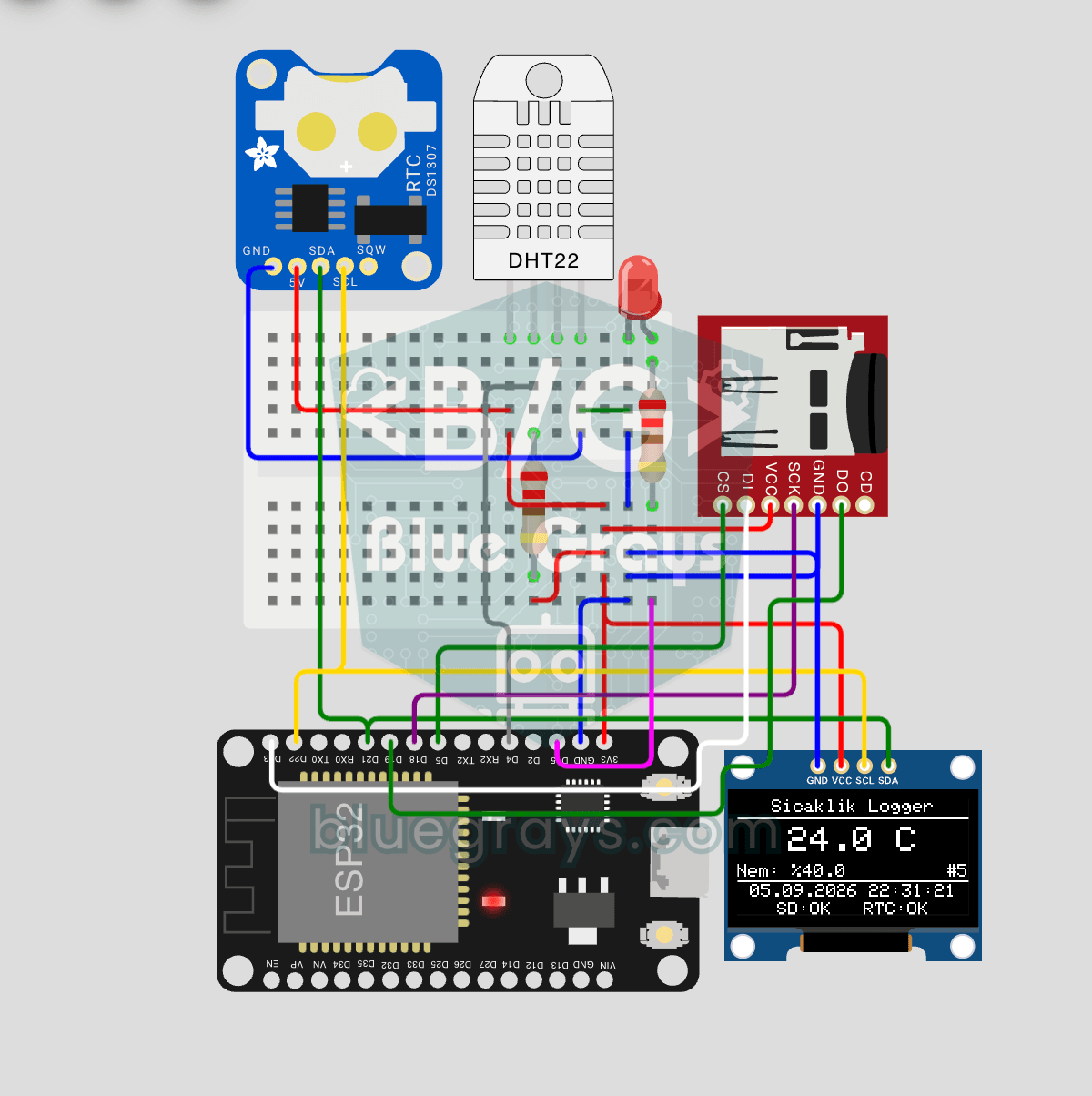
ESP32 Temperature Data Logger (DHT22 + DS1307 RTC + microSD + OLED)
Build a timed temperature and humidity logger with the ESP32! A DHT22 sensor reads temperature and humidity once a minute, and each reading is saved to a microSD card in CSV format with a real-time stamp from the DS1307 RTC module. The OLED display shows the latest temperature, humidity, timestamp and total number of records live, in large text.
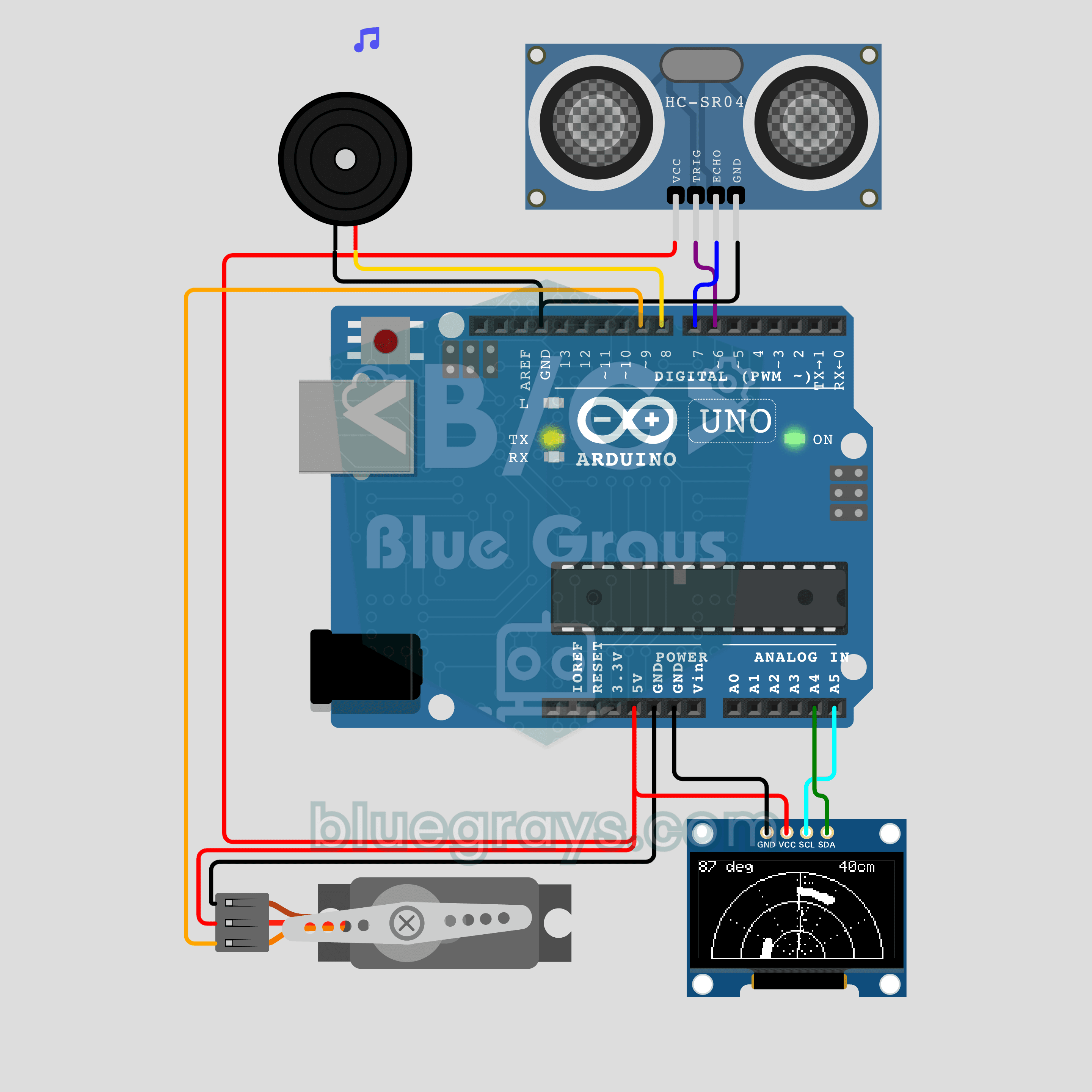
Arduino Mini Radar (Servo + HC-SR04 + OLED Display)
A movie-style radar from a distance sensor and a servo! The SG90 servo sweeps the HC-SR04 from 0 to 180 degrees while the 0.96 inch OLED draws a rotating sweep line and shows detected objects as dots. When something enters the range, the passive buzzer pings, and the pitch rises as the object gets closer. Servo control, ultrasonic measurement, trigonometry-based drawing and tone() sound in one project.
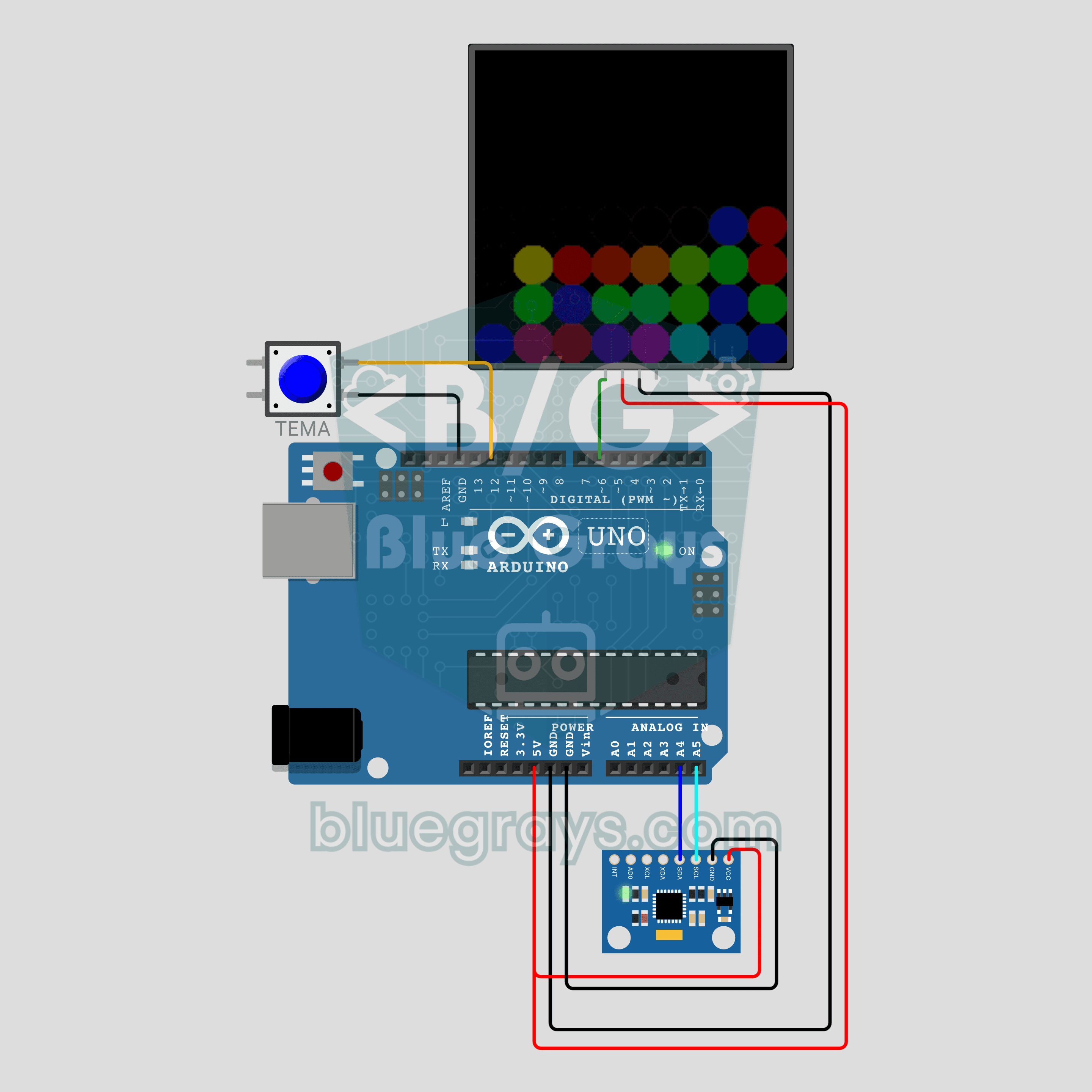
Arduino Tilt-Controlled Digital Sand (MPU-6050 + 8x8 NeoPixel Matrix)
LED sand that flows whichever way you tilt the circuit! The MPU-6050 accelerometer measures the tilt, and 24 grains on the 8x8 NeoPixel matrix fall toward gravity and pile up at the edges like real sand. A theme button switches between sand, water, lava and rainbow colors. Library-free I2C reading, turning tilt into a gravity direction and a simple falling-sand algorithm in one project.
Arduino Magic Drawing Tablet (2 Potentiometers + OLED Display)
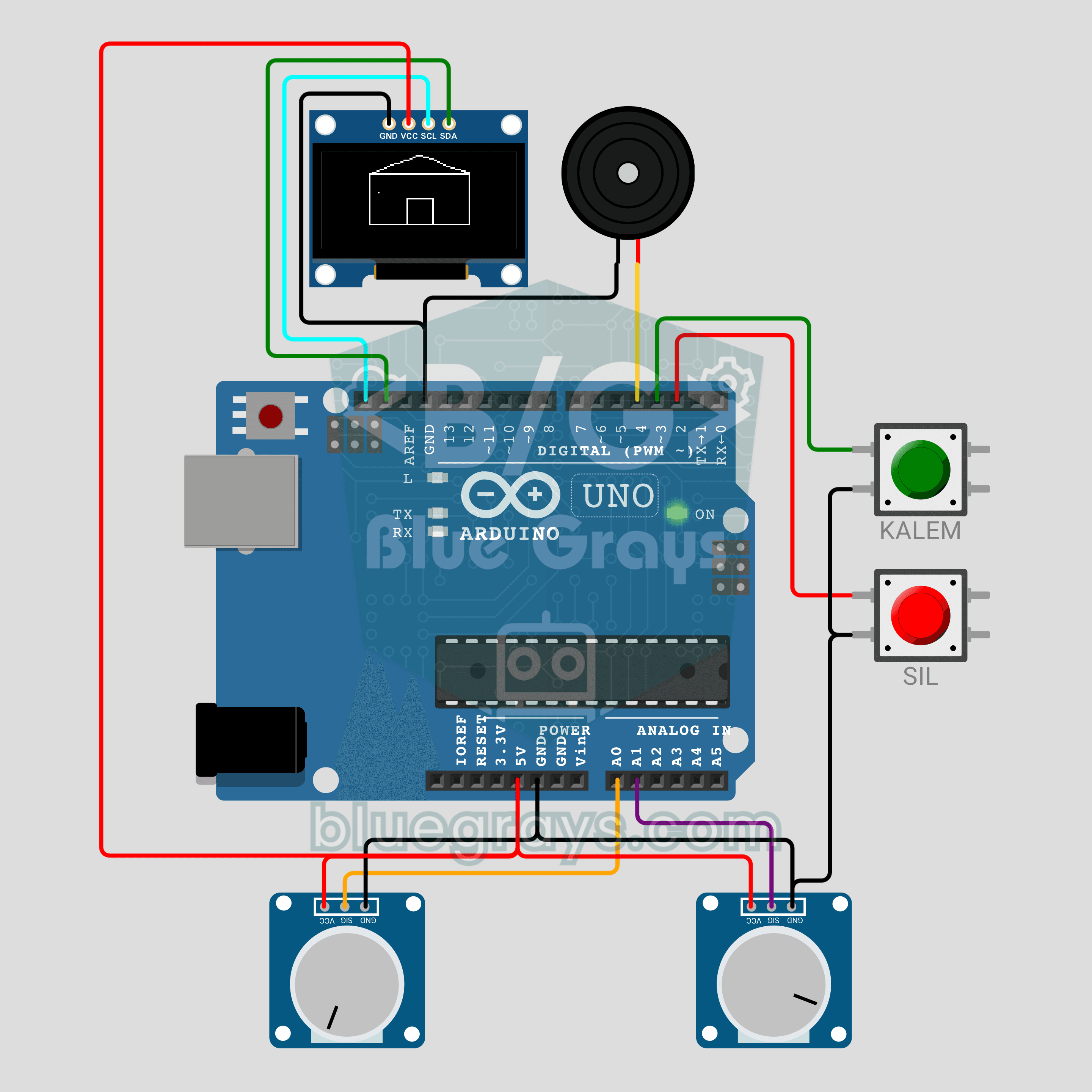
We are rebuilding the classic magic drawing tablet with an Arduino! The left potentiometer moves the pen horizontally, the right one vertically, and the 0.96 inch OLED keeps a continuous line. The PEN button lifts and lowers the pen, while the CLEAR button wipes the screen with an eraser animation and a buzzer sound. A fun beginner project about analog input, jitter filtering and drawing on a display.
ESP32 Robot Eyes (OLED Display + TTP223 Touch Sensor)
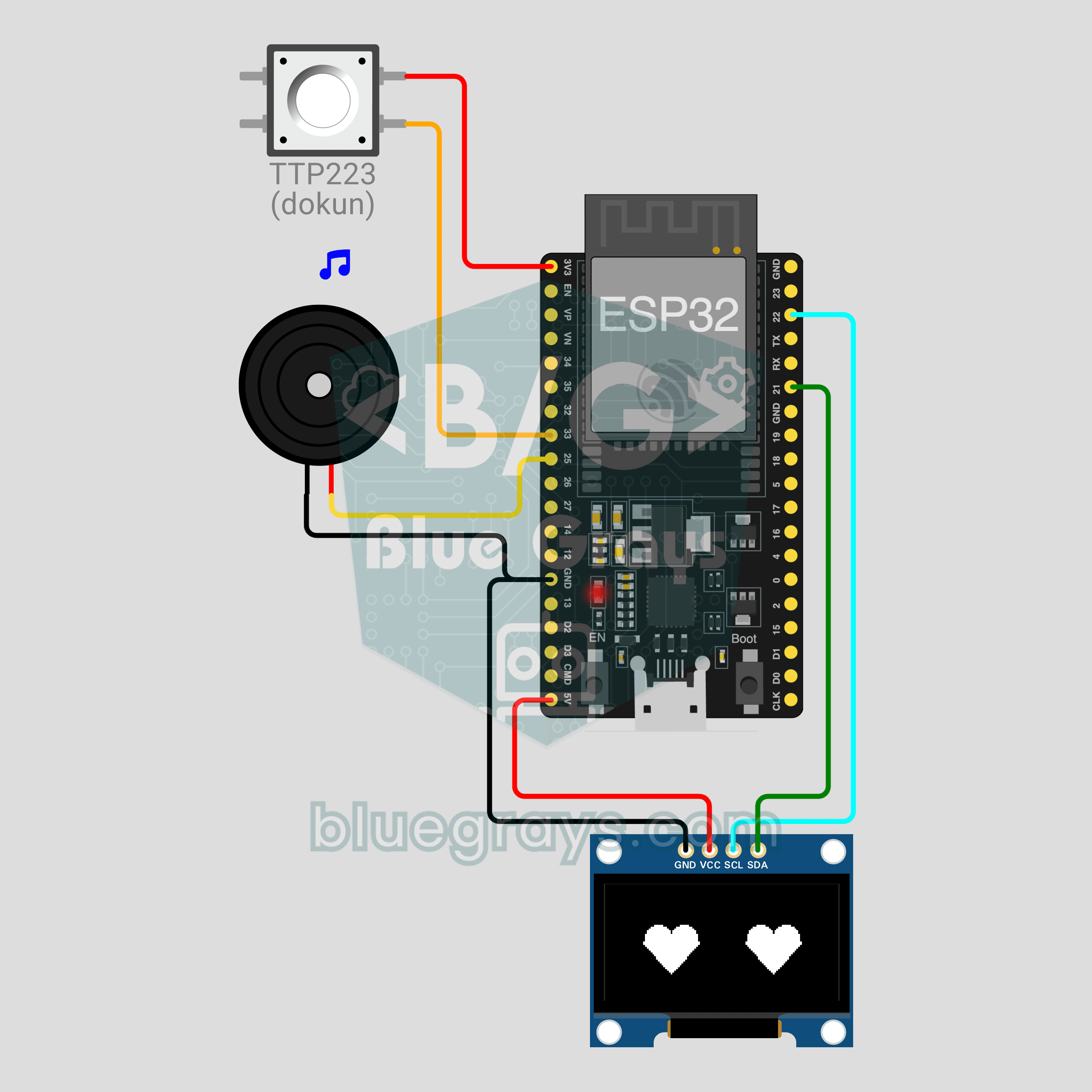
A desk robot with feelings! The ESP32 draws two eyes on a 0.96 inch OLED that look around and blink on their own. Tap the TTP223 touch sensor and the robot gets happy, hold it and the eyes turn into hearts, poke it too often and it gets angry, ignore it for 20 seconds and it falls asleep. A passive buzzer gives every mood its own sound: a state machine, shape-based animation and non-blocking audio in one project.
Raspberry Pi Pico Mini Weather Station (DHT22 + OLED Chart)
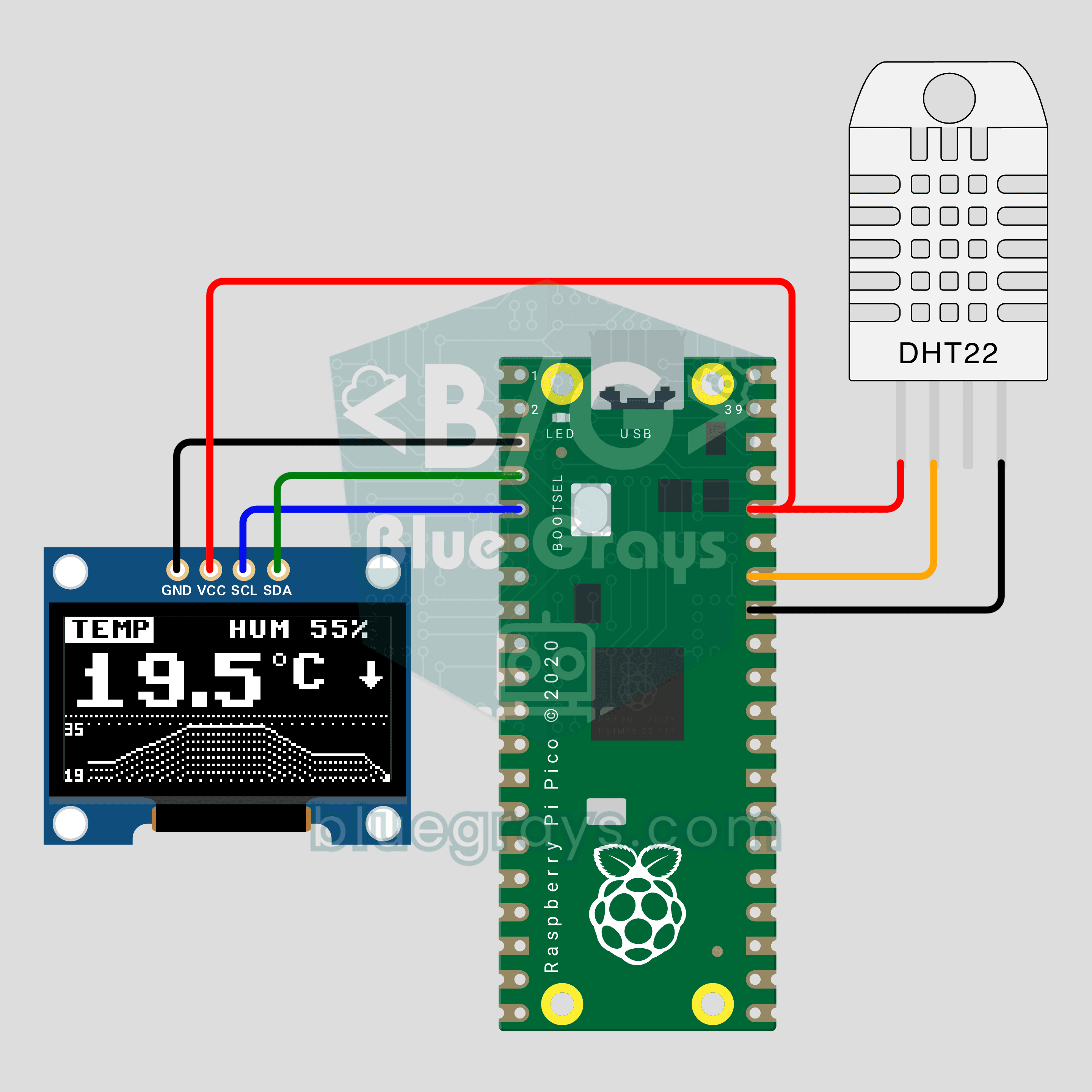
How has your room's temperature changed over the last two minutes? The Raspberry Pi Pico reads temperature and humidity from a DHT22 every 2 seconds and shows the value in big digits on a 0.96 inch OLED, with a line chart of the last 60 readings below. An arrow shows the trend and the temperature and humidity pages swap every 4 seconds. The OLED driver is built into the code: one file, no libraries.
Blog
- Arduino Countdown Timer: New Year Clock with ESP32 and MAX7219
- Arduino Display Types Compared: LCD, OLED, TFT, E-Paper, 7-Seg
- 16x2 LCD Arduino Wiring Without I2C: 4-Bit Mode and Contrast
- ST7789 ESP32: Colour IPS Display with TFT_eSPI, Sprites, Clock
- What Is SPI? MOSI, MISO, SCK and CS Pins Explained for Arduino
- ILI9341 Arduino Guide: TFT Display Wiring, Touch and SD Images
- Arduino RTC Module: DS3231 vs DS1307 vs DS1302, Time and Alarms
- MAX7219 Arduino LED Matrix: Scrolling Text with MD_Parola
- Rotary Encoder Arduino: KY-040 Wiring, Interrupts and Menu Code
- What Is I2C? SDA, SCL, Pull-up Resistors and an Arduino Scanner
- How to Use an OLED Display (SSD1306): Text, Shapes and Graphics with Arduino
- How to Use a 7-Segment Display: Showing Numbers with Arduino, Common Anode vs Cathode
- How to Use an I2C LCD Display (16x2) with Arduino, ESP32 and Pico