
Arduino Distance Sensor Types: HC-SR04, IR, VL53L0X and LiDAR
Arduino distance sensor comparison: HC-SR04, JSN-SR04T, Sharp IR, VL53L0X/VL53L1X, TF-Luna and TCRT5000; range, accuracy, beam angle, surfaces and example code.
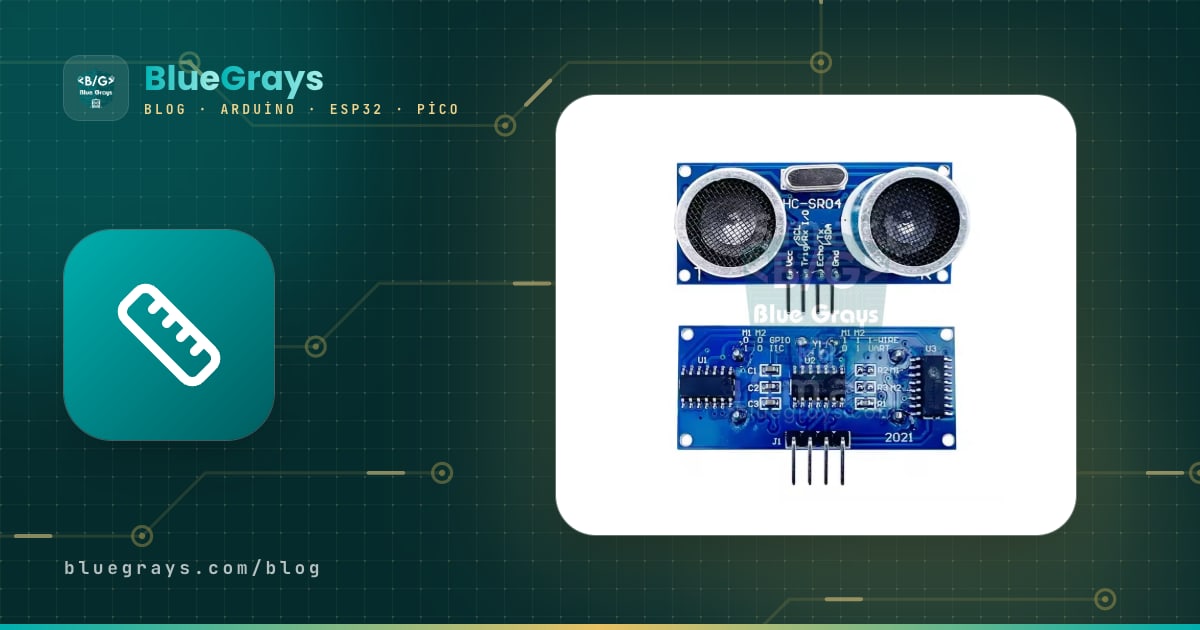
Choosing between Arduino distance sensor types looks at first like a question of "which one measures furthest", but what really decides it is the surface you're measuring, the accuracy you need, how narrow the beam must be and the conditions around it. The same HC-SR04 that measures the distance to a wall to the centimetre can turn erratic on the soft fabric of a sofa, while a cheap laser sensor that gives millimetre precision may lose half its range in sunlight. In this guide we put the six sensors most used in Arduino projects side by side.
The sensors we compare are: the ultrasonic HC-SR04 and its waterproof sibling the JSN-SR04T, the infrared triangulation sensor Sharp GP2Y0A21, the laser time-of-flight (ToF) sensors VL53L0X and VL53L1X, the small LiDAR TF-Luna and the short-range proximity sensor TCRT5000. For each one we explain the working principle, range, accuracy, beam angle, how it reacts to surfaces and its interface, and give a compiled example sketch. At the end, a table sums up which one to choose for which project.
How do distance sensors measure? Three basic principles
Almost every distance sensor used with Arduino relies on one of three methods. Time of flight: the sensor sends a pulse of sound or light and measures how long the reflection takes to come back; distance is half the product of time and speed. Ultrasonic sensors do this with sound, the VL53L0X and TF-Luna with light. Because light is about a million times faster than sound, ToF sensors contain special chips with picosecond-level timing. Triangulation: Sharp IR sensors send an infrared beam at the target and see where the reflected light lands on a position-sensitive detector (PSD); for close objects the spot moves to one end, for distant ones to the other. Reflection intensity: simple sensors like the TCRT5000 only measure how strong the returning light is; since this depends heavily on surface colour, it's proximity detection rather than real distance measurement.
| Principle | Sensors | Pros | Cons |
|---|---|---|---|
| Time of flight with sound | HC-SR04, JSN-SR04T | Cheap, unaffected by colour and light | Wide beam, weak on soft and angled surfaces, temperature-sensitive |
| Time of flight with light | VL53L0X, VL53L1X, TF-Luna | Fast, narrow beam, good accuracy | Sunlight and glass cause trouble |
| Infrared triangulation | Sharp GP2Y0A21 | Little affected by colour, simple analog output | Non-linear output, narrow range, misleading below 10 cm |
| Reflection intensity | TCRT5000 | Very cheap, very fast | Only a few mm to cm, highly colour-dependent |
The big comparison table
The table below brings together typical module values for each sensor. Ranges are the manufacturers' figures; in a real project they can be shorter depending on the surface and environment. Prices vary by country, so they're given in relative terms.
| Sensor | Range | Accuracy | Beam angle | Interface | Supply | Relative price |
|---|---|---|---|---|---|---|
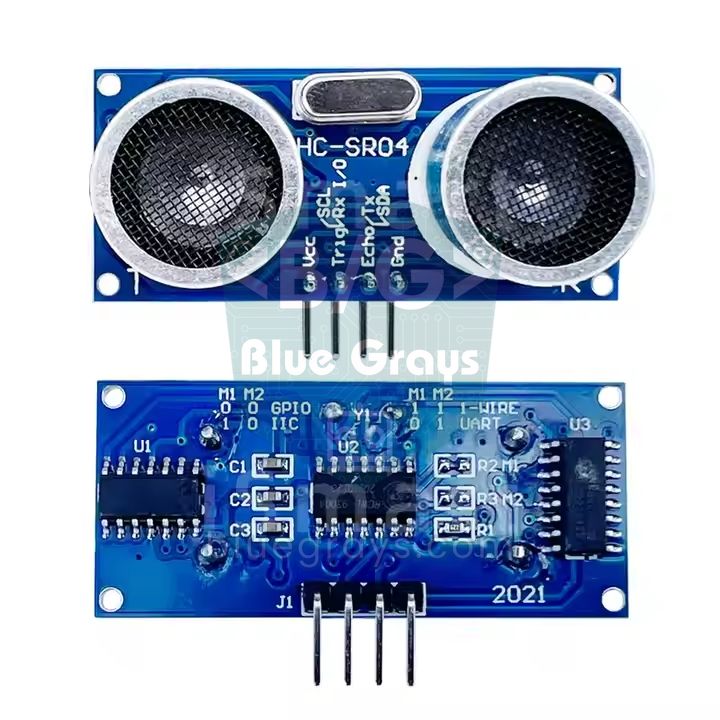
| HC-SR04 | 2–400 cm | About ±0.3–1 cm | About 15° | Trig/Echo pulse | 5 V (HC-SR04P: 3.3–5 V) | Very cheap |
| JSN-SR04T | About 25–450 cm | About ±1 cm | Wide (about 45° or more) | Trig/Echo, UART on some versions | 5 V | Cheap |
| Sharp GP2Y0A21 | 10–80 cm | Good up close, weak far away | Narrow (a few degrees) | Analog voltage | 4.5–5.5 V | Medium |
| VL53L0X | 3 cm – 2 m (default ~1.2 m) | About ±3% | 25° | I2C (0x29) | Module 3.3–5 V | Cheap |
| VL53L1X | 4 cm – 4 m | About ±3%, mm resolution | 27° (can be narrowed to 15°) | I2C (0x29) | Module 3.3–5 V | Medium |
| TF-Luna | 0.2–8 m | ±6 cm (up to 3 m), ±2% (3–8 m) | 2° | UART or I2C | 5 V, 3.3 V logic | Expensive |
| TCRT5000 | About 0.2–15 mm (best at 2.5 mm) | Not distance, present/absent | Narrow | Digital (DO) + analog (AO) | 3.3–5 V | Very cheap |
HC-SR04: the ultrasonic classic
The HC-SR04 sends eight 40 kHz sound pulses and holds its ECHO pin HIGH until the echo returns. The Arduino measures the length of this pulse in microseconds with pulseIn(). At 20 °C sound travels about 343 metres per second, or 0.0343 cm per microsecond; since the sound goes to the target and back, distance = time × 0.0343 / 2. The speed of sound changes with temperature (about 331.3 + 0.606 × T m/s): between 0 °C and 35 °C there's a difference of about 6%, which means up to 12 cm of error at 2 metres. The code below applies this correction and takes the median of five readings to weed out the occasional bad echo.
1const int TRIG_PIN = 9;
2const int ECHO_PIN = 10;
3const float SICAKLIK = 20.0;     // ortam sıcaklığı, °C / ambient temperature, °C
4float sesHizi;                   // cm/µs
5
6float mesafeOlc() {
7  digitalWrite(TRIG_PIN, LOW);
8  delayMicroseconds(2);
9  digitalWrite(TRIG_PIN, HIGH);  // 10 µs tetik darbesi / 10 µs trigger pulse
10  delayMicroseconds(10);
11  digitalWrite(TRIG_PIN, LOW);
12  unsigned long sure = pulseIn(ECHO_PIN, HIGH, 30000UL);   // 30 ms ≈ 5 m sınırı / ~5 m limit
13  if (sure == 0) return -1;      // yankı yok / no echo
14  return sure * sesHizi / 2.0;   // gidiş-dönüş / round trip
15}
16
17void setup() {
18  Serial.begin(9600);
19  pinMode(TRIG_PIN, OUTPUT);
20  pinMode(ECHO_PIN, INPUT);
21  sesHizi = (331.3 + 0.606 * SICAKLIK) / 10000.0;   // m/s -> cm/µs (20 °C: 0,0343)
22}
23
24void loop() {
25  float olcum[5];
26  for (int i = 0; i < 5; i++) {  // 5 ölçüm, aralarında 60 ms / 5 readings, 60 ms apart
27    olcum[i] = mesafeOlc();
28    delay(60);
29  }
30  for (int i = 1; i < 5; i++) {  // sırala / sort
31    float x = olcum[i];
32    int j = i - 1;
33    while (j >= 0 && olcum[j] > x) { olcum[j + 1] = olcum[j]; j--; }
34    olcum[j + 1] = x;
35  }
36  float d = olcum[2];            // ortanca / median
37  if (d < 0) Serial.println("Menzil disi / out of range");
38  else { Serial.print(d, 1); Serial.println(" cm"); }
39}
40- Wait at least 60 ms between readings: if you measure again while echoes of the previous pulse are still bouncing around the room, you'll get wrong results.
- Soft and angled surfaces: fabric, foam and curtains absorb sound; surfaces tilted more than 45 degrees bounce the echo away from the sensor.
- Wide beam: the roughly 15-degree cone covers an area close to 50 cm across at 2 metres; in a narrow corridor it can see the side walls too.
- 3.3 V boards: the classic HC-SR04 needs 5 V and its ECHO output is 5 V; on the ESP32 and Pico, put a voltage divider on ECHO or use the HC-SR04P, which runs on 3.3 V.
- Several sensors: two HC-SR04s triggered at the same time hear each other's echoes; trigger them one after the other.
Wiring the HC-SR04 and using it with the Serial Monitor and an LCD are covered in detail in the HC-SR04 distance sensor post; here we focus on the comparison.
JSN-SR04T: the waterproof ultrasonic
The JSN-SR04T works with the same trigger and echo logic as the HC-SR04, but its transducer sits in a waterproof capsule on a cable, separate from the electronics board. That makes it the choice for damp places such as water tanks, wells, rainwater tanks and outdoor parking sensors. It has two important differences: because a single transducer both sends and listens, there's a blind zone at short range (about 20–25 cm), and its beam is wider than the HC-SR04's. Mount the sensor on the tank's top lid, at least 25 cm above the highest water level. The code below turns the distance into a fill percentage.
1// JSN-SR04T ile su deposu doluluğu / water tank level with a JSN-SR04T
2const int TRIG_PIN = 9;
3const int ECHO_PIN = 10;
4const float SENSOR_BOSLUK = 25.0;  // sensörden en yüksek su seviyesine, cm (ölü bölge) / sensor to max level (blind zone)
5const float DEPO_DERINLIK = 120.0; // en yüksek seviyeden depo dibine, cm / max level to tank bottom
6
7float mesafeOlc() {
8  digitalWrite(TRIG_PIN, LOW);
9  delayMicroseconds(5);
10  digitalWrite(TRIG_PIN, HIGH);
11  delayMicroseconds(20);           // JSN-SR04T 10 µs'den uzun darbeyi sever / likes a longer pulse
12  digitalWrite(TRIG_PIN, LOW);
13  unsigned long sure = pulseIn(ECHO_PIN, HIGH, 40000UL);
14  if (sure == 0) return -1;
15  return sure * 0.0343 / 2.0;      // 20 °C ses hızı / speed of sound at 20 °C
16}
17
18void setup() {
19  Serial.begin(9600);
20  pinMode(TRIG_PIN, OUTPUT);
21  pinMode(ECHO_PIN, INPUT);
22}
23
24void loop() {
25  float d = mesafeOlc();
26  if (d < 0) {
27    Serial.println("Yanki yok / no echo");
28  } else {
29    float suYuksekligi = DEPO_DERINLIK - (d - SENSOR_BOSLUK);   // dipten su yüksekliği / water height
30    float yuzde = constrain(suYuksekligi / DEPO_DERINLIK * 100.0, 0, 100);
31    Serial.print("Mesafe / distance: ");
32    Serial.print(d, 1);
33    Serial.print(" cm  Doluluk / fill: %");
34    Serial.println(yuzde, 0);
35  }
36  delay(1000);                     // su yüzeyi dalgalanır, sık ölçme / water ripples, measure slowly
37}
38Sharp GP2Y0A21: analog infrared
The Sharp GP2Y0A21YK0F is an infrared sensor that works between 10 and 80 cm and outputs an analog voltage depending on distance. Because it uses triangulation, it's less sensitive to target colour than sensors based on reflection intensity. Its output isn't linear: it gives about 2.3 V at 10 cm and 0.4 V at 80 cm and follows an inverse power curve in between. The code converts this curve with the approximation distance = 29.988 × V^-1.173. The biggest trap is below 10 cm: as the target gets closer, the output falls again, and an object at 5 cm can look as if it were at 20 cm. Mount the sensor so the target can never come closer than 10 cm.
1// Sharp GP2Y0A21YK0F (10–80 cm), analog / analog output
2const int SHARP_PIN = A0;
3
4float sharpCm() {
5  long toplam = 0;
6  for (int i = 0; i < 20; i++) {          // 20 okumanın ortalaması / average of 20 readings
7    toplam += analogRead(SHARP_PIN);
8    delay(2);
9  }
10  float volt = toplam / 20.0 * 5.0 / 1023.0;
11  if (volt < 0.35) return -1;             // 80 cm'den uzak / farther than 80 cm
12  float cm = 29.988 * pow(volt, -1.173);  // ters güç eğrisi / inverse power curve
13  if (cm > 80) return -1;
14  return cm;                              // 10 cm altı yanıltıcı / misleading below 10 cm
15}
16
17void setup() {
18  Serial.begin(9600);
19}
20
21void loop() {
22  float cm = sharpCm();
23  if (cm < 0) Serial.println("Menzil disi / out of range");
24  else { Serial.print(cm, 1); Serial.println(" cm"); }
25  delay(100);
26}
27
Sharp sensors draw short, high current pulses while measuring, and these pulses create noise on the supply line. A capacitor of around 10 µF close to the sensor's VCC and GND pins calms the readings noticeably. The family has members with other ranges too: the GP2Y0A41SK0F works from 4 to 30 cm, the GP2Y0A02YK0F from 20 to 150 cm; each has different curve coefficients.
VL53L0X and VL53L1X: laser ToF sensors
The VL53L0X and VL53L1X are tiny laser time-of-flight sensors from STMicroelectronics. They send an invisible 940 nm laser pulse, measure the return time of the reflection with photon counters and deliver the result directly in millimetres over I2C. They're almost independent of colour, their beam is narrower than an ultrasonic sensor's and a measurement takes 20–50 ms. The VL53L0X measures up to about 1.2 metres in default mode and 2 metres in long-range mode; the VL53L1X reaches 4 metres and its field of view (ROI) can be narrowed in software. Both have the default I2C address 0x29. The code below uses Pololu's VL53L0X library; search for "VL53L0X" in the Library Manager and install the Pololu version.
1#include <Wire.h>
2#include <VL53L0X.h>              // Pololu VL53L0X kütüphanesi / library
3
4VL53L0X sensor;
5
6void setup() {
7  Serial.begin(9600);
8  Wire.begin();                    // Uno: SDA A4, SCL A5 / ESP32: SDA 21, SCL 22
9  sensor.setTimeout(500);
10  if (!sensor.init()) {
11    Serial.println("VL53L0X bulunamadi / not found");
12    while (true) {}
13  }
14  // Uzun menzil modu (2 m'ye kadar, daha gürültülü) / long range mode (up to 2 m, noisier):
15  // sensor.setSignalRateLimit(0.1);
16  // sensor.setVcselPulsePeriod(VL53L0X::VcselPeriodPreRange, 18);
17  // sensor.setVcselPulsePeriod(VL53L0X::VcselPeriodFinalRange, 14);
18  sensor.setMeasurementTimingBudget(50000);   // 50 ms: daha kararlı ölçüm / steadier reading
19  sensor.startContinuous();
20}
21
22void loop() {
23  uint16_t mm = sensor.readRangeContinuousMillimeters();
24  if (sensor.timeoutOccurred()) {
25    Serial.println("Zaman asimi / timeout");
26  } else if (mm >= 8190) {         // 8190-8191: hedef yok / no target
27    Serial.println("Menzil disi / out of range");
28  } else {
29    Serial.print(mm);
30    Serial.println(" mm");
31  }
32}
33
The measurement timing budget sets the balance between accuracy and speed: 20 ms is fast but noisy, 200 ms slow but steady. Sunlight and strong infrared sources shorten the range noticeably; keep that in mind if you'll measure outdoors. To connect two VL53L0Xs to the same I2C bus, since both have address 0x29, you hold one off with its XSHUT pin and give the other a new address (setAddress); I2C details are in the What is I2C post.
TF-Luna: 8 metres with a small LiDAR
The TF-Luna is Benewake's small single-point LiDAR: it measures time of flight by modulating 850 nm infrared light, works from 0.2 to 8 metres with a very narrow beam of just 2 degrees, and can take up to 250 readings per second. By default it sends each reading over UART at 115200 baud as a 9-byte packet: two 0x59 header bytes, distance (cm), signal strength, internal temperature and a checksum. If the signal strength is below 100 or equal to 65535 (overexposure), the reading is considered unreliable. It's powered from 5 V but its UART logic level is 3.3 V, so it connects directly to an ESP32. Because the Uno's SoftwareSerial isn't reliable at 115200 baud, choose a board with a hardware UART such as the ESP32 or Mega; the logic of parsing UART packets is explained in the UART serial communication post.
1// TF-Luna LiDAR, UART (115200), ESP32 Serial2
2// TF-Luna TX -> GPIO 16, RX -> GPIO 17, VCC 5V, GND
3const int RXD2 = 16, TXD2 = 17;
4
5uint8_t kare[9];                   // 0x59 0x59 DistL DistH AmpL AmpH TempL TempH Checksum
6int konum = 0;
7
8void setup() {
9  Serial.begin(115200);
10  Serial2.begin(115200, SERIAL_8N1, RXD2, TXD2);
11}
12
13void loop() {
14  while (Serial2.available()) {
15    uint8_t b = Serial2.read();
16    if (konum < 2) {               // iki 0x59 başlık baytını bekle / wait for two 0x59 header bytes
17      if (b == 0x59) kare[konum++] = b;
18      else konum = 0;
19      continue;
20    }
21    kare[konum++] = b;
22    if (konum < 9) continue;
23    konum = 0;
24
25    uint8_t toplam = 0;
26    for (int i = 0; i < 8; i++) toplam += kare[i];
27    if (toplam != kare[8]) continue;             // sağlama toplamı hatalı / bad checksum
28
29    uint16_t mesafe = kare[2] | (kare[3] << 8);  // cm
30    uint16_t guc = kare[4] | (kare[5] << 8);     // sinyal gücü / signal strength
31    float derece = (kare[6] | (kare[7] << 8)) / 8.0 - 256.0;
32
33    if (guc < 100 || guc == 65535) {             // zayıf ya da aşırı sinyal / weak or saturated
34      Serial.println("Guvenilmez / unreliable");
35    } else {
36      Serial.print(mesafe);
37      Serial.print(" cm  guc / amp: ");
38      Serial.print(guc);
39      Serial.print("  ic sicaklik / chip temp: ");
40      Serial.println(derece, 1);
41    }
42  }
43}
44
TCRT5000: proximity and line detection
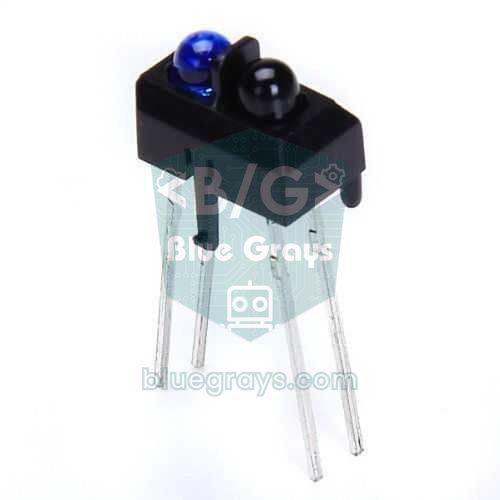
The TCRT5000 isn't a distance meter but a reflective sensor: light from the infrared LED bounces off the surface and the phototransistor next to it measures how much comes back. It works best at about 2.5 mm, and the signal fades quickly beyond 1.5 cm. Because white surfaces reflect a lot and black ones very little, it gives completely different values depending on colour even at the same distance; that's why it's used to tell black from white in line-following robots, to count holes in encoder discs and to detect very close objects. The comparator on the module switches the digital output when the threshold set with the potentiometer is crossed. Details in the TCRT5000 infrared sensor post.
1// TCRT5000 modülü: DO dijital, AO analog / TCRT5000 module: DO digital, AO analog
2const int DO_PIN = 7;
3const int AO_PIN = A1;
4const int LED_PIN = 13;
5
6void setup() {
7  Serial.begin(9600);
8  pinMode(DO_PIN, INPUT);
9  pinMode(LED_PIN, OUTPUT);
10}
11
12void loop() {
13  bool nesneVar = (digitalRead(DO_PIN) == LOW);  // çoğu modülde LOW = yansıma var / LOW = reflection on most modules
14  int yansima = analogRead(AO_PIN);              // düşük değer = güçlü yansıma / low value = strong reflection
15  digitalWrite(LED_PIN, nesneVar);
16  Serial.print(nesneVar ? "Nesne VAR / object  " : "Nesne yok / none  ");
17  Serial.println(yansima);
18  delay(100);
19}
20
Effect of surface and environment
A sensor's range on paper changes once it meets the surface you're measuring. Ultrasonic sensors are excellent on hard surfaces that reflect sound but struggle with fabric that absorbs it; light-based sensors care about colour, shine and sunlight. The table below shows which sensor stays reliable in which situation as you design your project.
| Surface / environment | Ultrasonic (HC-SR04) | Sharp IR | Laser ToF (VL53, TF-Luna) | TCRT5000 |
|---|---|---|---|---|
| Hard, flat wall | Very good | Good | Very good | Good (only very close) |
| Fabric, foam, curtains | Weak (sound absorbed) | Good | Good | Medium |
| Matte black surface | Good | Medium | Range shortens | Very weak |
| Glass, mirror, shiny metal | Good (sound reflects) | Misleading | Misleading (light passes or deflects) | Misleading |
| Angled surface | Weak (echo deflects) | Medium | Good | Medium |
| Sunlight, outdoors | Unaffected | Affected | Range drops noticeably | Affected |
| Water surface | Good (tank measurement) | Weak | Variable | Not suitable |
| Temperature changes | Speed of sound changes, needs correction | Little affected | Little affected | Little affected |
Wiring summary: Uno, ESP32 and Pico
| Sensor | Arduino Uno | ESP32 | Raspberry Pi Pico | Note |
|---|---|---|---|---|
| HC-SR04 / JSN-SR04T | TRIG D9, ECHO D10, 5V | TRIG 5, ECHO 18 (via divider), VIN 5V | TRIG GP14, ECHO GP15 (via divider), VBUS | ECHO outputs 5 V |
| Sharp GP2Y0A21 | A0, 5V | GPIO 34 (via divider), VIN 5V | GP26 (via divider), VBUS | Output can reach 3.1 V |
| VL53L0X / VL53L1X | SDA A4, SCL A5 | SDA 21, SCL 22 | SDA GP4, SCL GP5 | Address 0x29 |
| TF-Luna | SoftwareSerial not recommended | TX → GPIO 16, RX → GPIO 17 | TX → GP1 (uart0 RX), RX → GP0 | 5 V supply, 3.3 V logic |
| TCRT5000 module | DO D7, AO A1 | DO 27, AO 34 | DO GP16, AO GP27 | 3.3–5 V |
Ultrasonic measurement with the Raspberry Pi Pico
In MicroPython, pulse length is measured with machine.time_pulse_us(); it does the same job as pulseIn() on the Arduino and returns a negative value on timeout. Power the HC-SR04 from the Pico's VBUS (USB 5 V) pin and put a 1 kΩ + 2 kΩ divider on the ECHO line, or use the HC-SR04P, which runs directly on 3.3 V. MicroPython drivers also exist for the VL53L0X and TF-Luna; you can easily parse the TF-Luna's UART packet with machine.UART using the same logic as the Arduino code.
1from machine import Pin, time_pulse_us
2import time
3
4trig = Pin(14, Pin.OUT)
5echo = Pin(15, Pin.IN)             # 5 V ECHO için gerilim bölücü şart / divider required for a 5 V ECHO
6SES_HIZI = 0.0343                  # cm/µs, 20 °C
7
8def mesafe_olc():
9    trig.low()
10    time.sleep_us(2)
11    trig.high()
12    time.sleep_us(10)              # 10 µs tetik / 10 µs trigger
13    trig.low()
14    sure = time_pulse_us(echo, 1, 30000)   # zaman aşımında eksi döner / negative on timeout
15    if sure < 0:
16        return None
17    return sure * SES_HIZI / 2
18
19while True:
20    d = mesafe_olc()
21    print("Menzil disi" if d is None else "{:.1f} cm".format(d))
22    time.sleep_ms(100)
23
Which distance sensor for which project?
| Project | Recommended sensor | Why? |
|---|---|---|
| Obstacle-avoiding robot | HC-SR04 (budget) or VL53L0X | The wide beam doesn't miss obstacles; the VL53L0X is faster and smaller |
| Water tank or well level | JSN-SR04T | Waterproof probe, sees the water surface well |
| Car parking sensor | JSN-SR04T or HC-SR04 | Outdoor durability, 2–3 m range is enough |
| Line-following robot | TCRT5000 | Made for telling black from white |
| Mini sumo, precise desktop measurement | VL53L0X / VL53L1X | Millimetre resolution, narrow beam, small size |
| Arduino radar (servo sweep) | HC-SR04 or TF-Luna | HC-SR04 is cheap; the TF-Luna's 2° beam draws a much sharper map |
| Height meter, doorway counter | VL53L1X or TF-Luna | Long range and stable readings |
| Drone, long distance | TF-Luna | 8 m range, up to 250 Hz |
| Touchless tap, hand detection | Sharp GP2Y0A21 | 10–80 cm range and simple analog output |
A few project ideas too: turn an HC-SR04 on a servo to build an Arduino radar display; use one HC-SR04 at the front and two VL53L0Xs at the sides of your obstacle-avoiding robot; open the lid of a smart bin when a hand approaches; build a portable digital tape measure with an OLED display, or send your water tank's fill level to your phone via an ESP32 with a JSN-SR04T.
Common mistakes and fixes
| Symptom | Likely cause | Fix |
|---|---|---|
| HC-SR04 always reads 0 or out of range | No echo, wiring or power problem | Check the 5 V supply and TRIG/ECHO pins, give pulseIn a timeout |
| Ultrasonic readings jump now and then | Echo from the previous pulse or a side wall | Wait 60 ms between readings, use a median filter |
| JSN-SR04T can't measure close up | Blind zone (20–25 cm) | Mount the sensor at least 25 cm from the target |
| Sharp gives a large, wrong value very close up | The curve folds back below 10 cm | Stop the target from coming closer than 10 cm |
| Sharp readings are noisy | Current pulses disturb the supply | 10 µF capacitor across VCC-GND, average readings |
| VL53L0X not found | I2C wiring or address conflict | Check SDA/SCL and address 0x29 with an I2C scanner |
| Laser sensor reads short outdoors | Infrared in sunlight | Add shading, raise the timing budget or use ultrasonic |
| TF-Luna data is garbage | Wrong baud rate or SoftwareSerial can't keep up | Use 115200 baud and a hardware UART, check the checksum |
Distance sensors are the easiest way to give Arduino projects awareness of their surroundings, and choosing the right one is the difference between a project that runs steadily and one that drives you mad. The tables and code in this comparison help you balance budget and performance for your needs. In the BlueGrays app you'll find step-by-step projects with circuit diagrams and code for measuring distance with an HC-SR04, a parking sensor, a height meter, an obstacle-avoiding robot, an ESP32 parking sensor and distance measurement with a TCRT5000.
Frequently asked questions
What is the best distance sensor for Arduino?
There's no single best sensor; the choice depends on the target and environment. The HC-SR04 suits general, low-cost use, the VL53L0X or VL53L1X millimetre precision and a narrow beam, the JSN-SR04T damp places, and the TF-Luna fast measurement beyond a few metres.
How far can the HC-SR04 measure?
The manufacturer's figure is 2 cm to 4 metres, but in practice reliable readings usually reach 2–3 metres. You get close to the limit when the target is large, hard and perpendicular to the sensor; with soft, small or angled targets the range shrinks noticeably.
What is the difference between ultrasonic and infrared distance sensors?
An ultrasonic sensor measures the echo time of a sound pulse; it isn't affected by colour or light, but its beam is wide and it struggles with soft surfaces. Infrared sensors use light, have narrower beams and are fast, but sunlight, glass and some dark surfaces can upset the reading.
What is the difference between the VL53L0X and VL53L1X?
Both are laser ToF sensors with an I2C interface. The VL53L0X measures up to about 2 metres, while the VL53L1X reaches 4 metres, can measure faster and lets you narrow its field of view in software. The VL53L0X suits small short-range robots, the VL53L1X longer and more precise measurement.
Which distance sensor should I use for a water tank level?
The JSN-SR04T with its waterproof probe is the most common choice; it's mounted on the tank's top lid, at least 25 cm above the highest water level. The HC-SR04 also works in dry, closed tanks, but humidity and condensation can damage it quickly.
Do distance sensors work with the ESP32 and Raspberry Pi Pico?
Yes, but you need a voltage divider to bring the ECHO output of the 5 V HC-SR04 and JSN-SR04T and the Sharp's analog output down to 3.3 V. VL53L0X modules and the TF-Luna already use 3.3 V-friendly logic, and the HC-SR04P runs directly on 3.3 V.
Projects to build after reading this
See all projects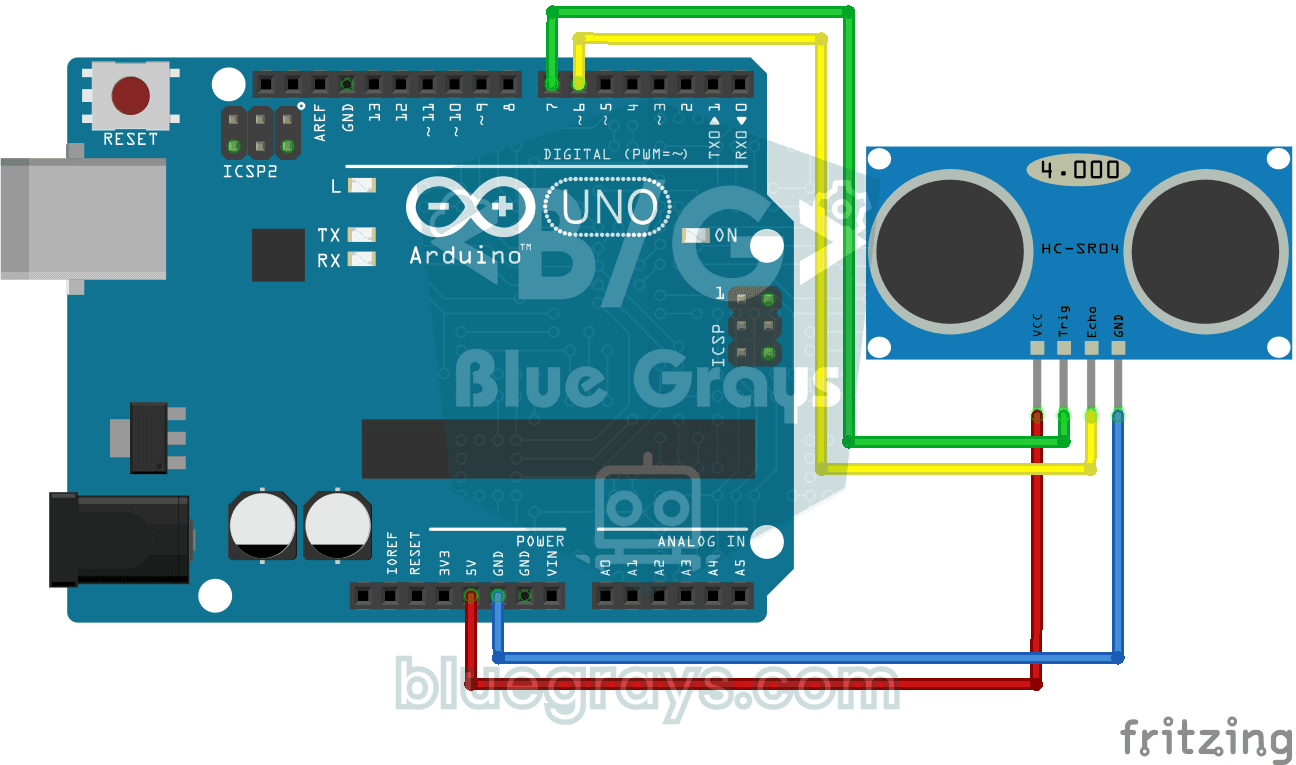
HC-SR04 Distance Measurement (Serial Display)
The HC-SR04 sensor works just like a bat finding its way in the dark: it sends out a sound you cannot hear, listens for the echo and measures how far away the object in front of it is. The Arduino wri
Parking Sensor with HC-SR04
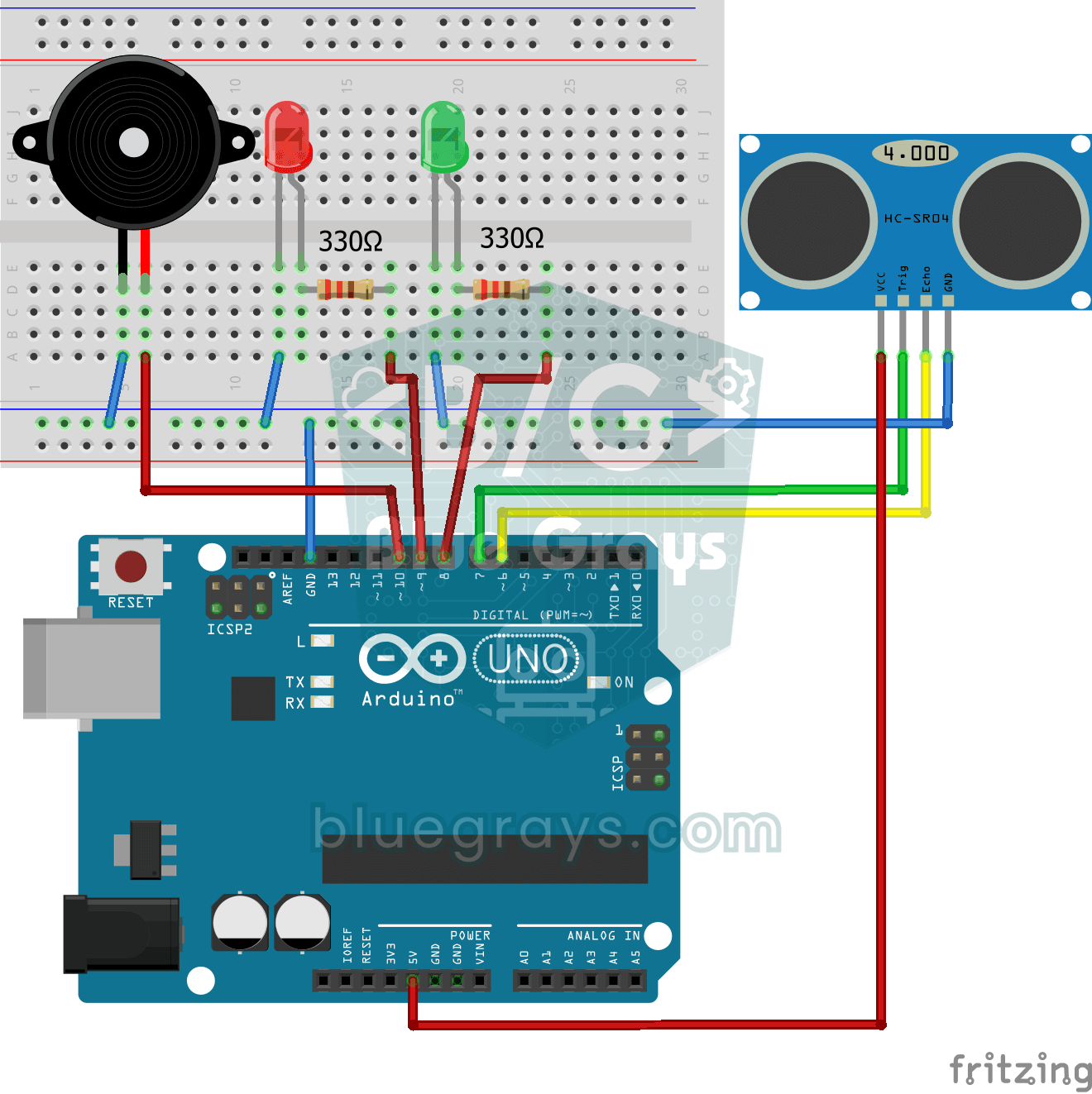
A mini version of a car's parking sensor: the closer something gets, the faster the beeps. The distance sensor measures the object in front of it; if it is more than 20 centimetres away the green LED
Height Measurement Project
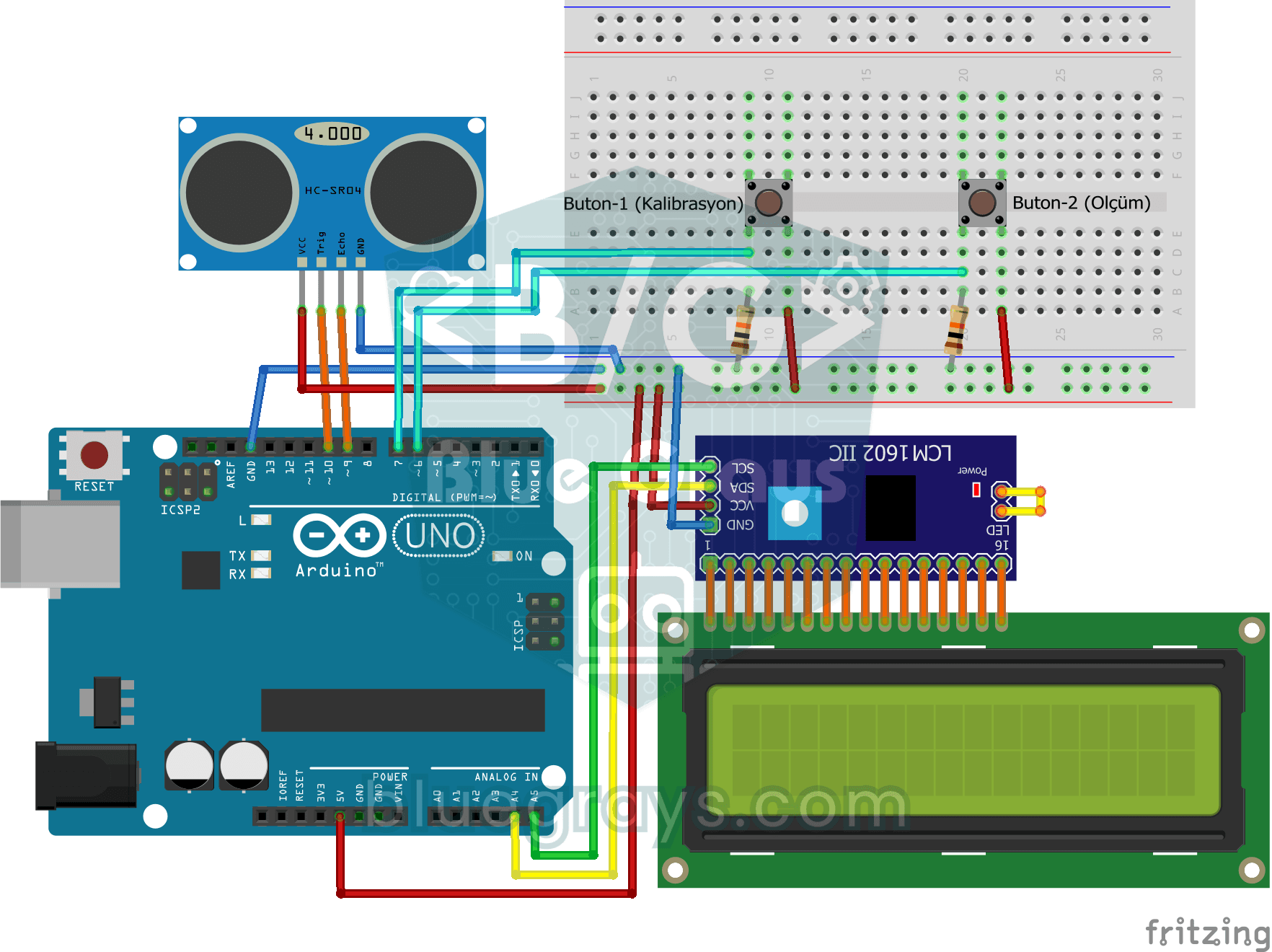
A height meter that hangs from a door frame and tells you, in centimetres, how tall the person standing under it is. First you press the first button with nobody underneath, and the distance sensor me

Obstacle Avoidance Robot
How about building a smart vehicle that finds its own way? The Obstacle Avoidance Robot constantly scans its surroundings thanks to the ultrasonic sensor in front of it. When it encounters an obstacle

ESP32 HC-SR04 Ultrasonic Distance Sensor
The HC-SR04 ultrasonic sensor calculates distance by measuring the time it takes for the sound wave it emits to bounce off an object and return (Time of Flight). In this project, we will send a 10-microsecond pulse from the ESP32 to the sensor's TRIG pin and read the echo duration from the ECHO pin using pulseIn(). We will display the calculated distance in centimeters on a 16x2 I2C LCD. Since the HC-SR04 operates at 5V, a voltage divider is required on the ECHO pin—otherwise, the ESP32’s

ESP32 Parking Sensor (HC-SR04 + 5-LED Bar + Buzzer + OLED)
The ESP32 version of the car parking sensor! We use the HC-SR04 ultrasonic sensor to measure the distance to the object in front of it. As the distance decreases, the 5-LED bar fills up (green → yellow → red) and the buzzer beep interval shortens. When the object gets very close (under 10 cm), a continuous alarm sounds and all LEDs light up. The SSD1306 OLED display shows the current distance in cm in large font, a status message (STOP / CAUTION / CLOSE / STOP! / DANGER), and a simulation of the

Reading Reflection (Proximity) with TCRT5000
With a small sensor that sends out invisible light and measures how much bounces back, you can detect the surface in front of it. The closer an object or a light-coloured surface gets, the more light
Measuring Distance Using LCD Display
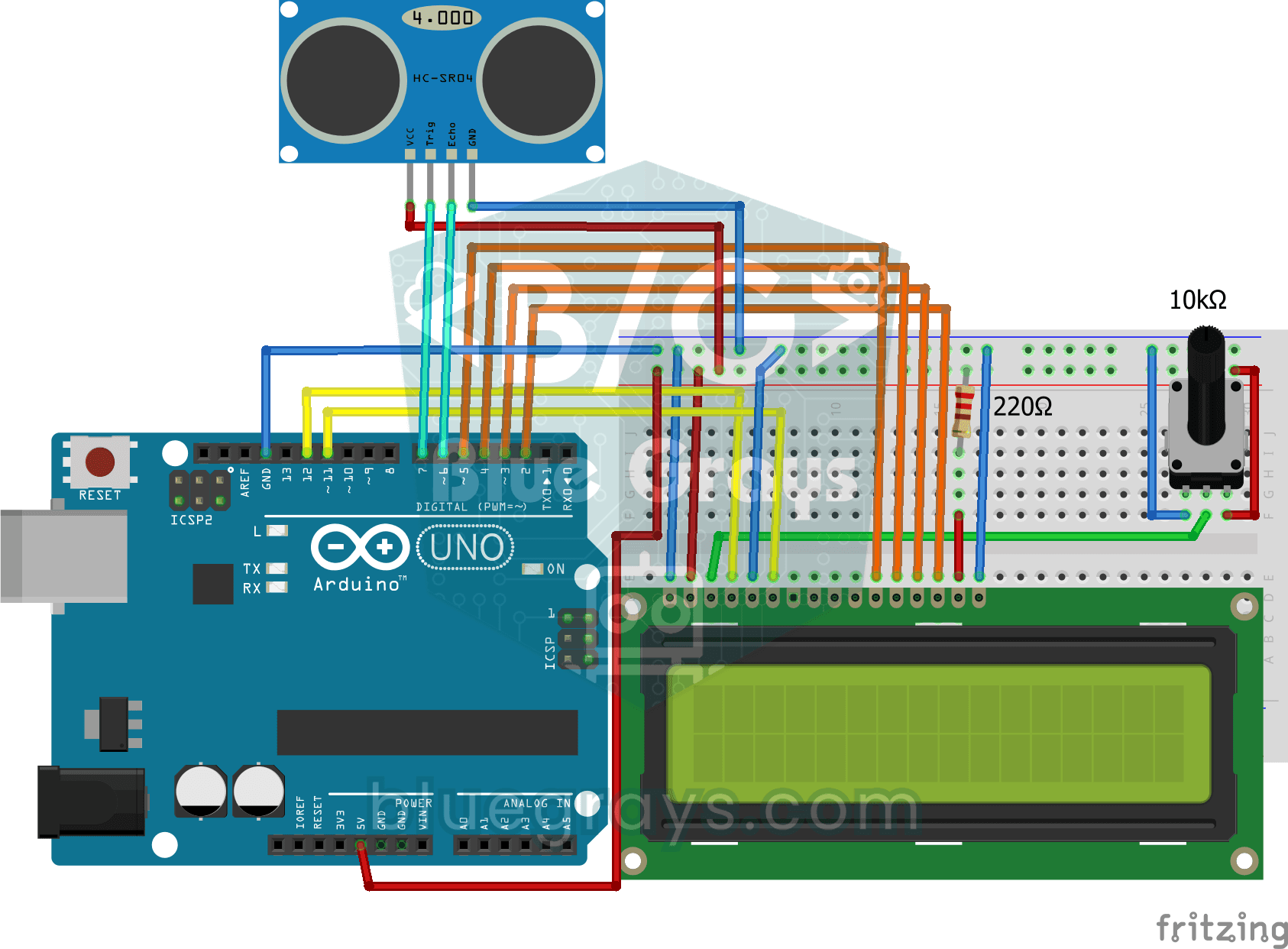
A tool that measures distance without a ruler: move your hand back and forth in front of the sensor and watch the number change. The HC-SR04 sends out a sound wave and listens for its echo, and the Ar