
Arduino Quiz: Daily Questions, Placement Test and Weekly Ranking
Test your Arduino skills with a daily quiz: 5 new questions a day, a 15-question placement test, levels A1–C2, a level-up exam and a weekly ranking.
The most sustainable way to test your Arduino knowledge is not one long exam a week but a few short questions every day. Daily questions in the BlueGrays app is an Arduino quiz built for exactly that: a new 5-question set arrives every day at 00:00 your local time, it takes about 3 minutes, and the questions are picked for your level. On your first visit, a 15-question Placement test puts you on one of six levels from A1 to C2. Every correct answer earns XP, and your XP decides your place in This week's ranking. The daily set, the placement test, the levels and the ranking are all free.
This post walks through the whole section: how the daily set is mixed, what each level is called and what it covers, the conditions for the level-up exam, the 10 question types with a sample Arduino quiz question for each, the code language setting, XP and streaks, badges, My mistakes and Practice, the ranking filters, and an honest suggestion for teachers who want to use it in class. You open it from the DAILY QUESTIONS card in Learn › Lessons; inside are the Today, Ranking and My level tabs. If you want a plan for using the rest of the app, have a look at the 30-day Arduino learning roadmap.
How Daily questions work: 5 questions, about 3 minutes
The Today tab shows a card with today's 5 questions and the set mix: "3 at your level, 1 review, 1 challenge". Tap Start and the questions come one by one; most have four options, and as soon as you answer you see whether you were right plus a short explanation. If you get it wrong, the screen tells you the correct option ("So close! The answer is B"), so no question is left unanswered. When the set is finished, the result screen shows your correct answers and the XP you earned, and the next set is ready the following day at 00:00. If you have not solved the set by your chosen time, a reminder arrives; you change that time from the reminder line on the Today tab.
| Slot in the set | Questions | Where it comes from | If you get it wrong |
|---|---|---|---|
| Your level | 3 | From your current level, close to your percentage; questions you have not seen yet whenever possible | Your in-level percentage drops a little |
| Review | 1 | A question you got wrong at least 20 hours ago and have not answered correctly since; otherwise one from the level below or the easy end of your level | It can come back as a review question later |
| Challenge | 1 | One of the easier questions from the next level | You lose nothing from your percentage |
The logic is simple: three questions measure you where you are, the review question catches what you missed yesterday before you forget it, and the challenge gives you a taste of the next level with no penalty. Your in-level percentage moves according to how hard each question is; getting a hard question right raises it more, and missing an easy one lowers it more. A bad day has a limit too: you can lose at most 15 points of percentage in one day, so a string of wrong answers does not erase weeks of work. One more important detail: only questions you see for the first time count toward level progress. Getting the same question right a second time earns XP but does not move the percentage, so memorising answers does not look like progress.
Placement test: start at the right level in 15 questions
The first time you open the section, the Today tab shows the card "Placement test: 15 questions to start you at the right level". The test is adaptive: it starts with a medium question, gets harder as you answer correctly and easier when you miss, and the jumps get smaller with each step until it settles on your level. After the fifteenth question, the result screen places you on a level. The test places you no higher than C1; C2 can only be reached through the level-up exam. In your first questions after the test the percentage moves quickly, because the app is still settling your level; after that period your level never drops. So when you are unsure, pick the option that makes the most sense to you instead of guessing at random. If luck puts you too high, your percentage will fall fast in the first days and the sets will feel needlessly hard. The placement test gives no XP and does not affect the ranking.
Levels A1 to C2: names and what they cover
Each of the six levels has a title in the app, and its questions cluster around certain topics. The topic spread and question counts in the table below come from the live question bank; the bank keeps growing, so treat the numbers as approximate. The last column is the minimum number of questions you must answer for the first time at that level before the level-up exam unlocks. The rule on the My level tab fits in one sentence: "Your level never drops. The percentage only moves within your level." Once you reach B1, even a bad week will not send you back to A2; only your B1 percentage goes down. That matters if you come back to the app after a long break: the title you earned stays and you pick up where you left off.
| Level | Title | Main topics | Question pool (approx.) | New questions needed for the exam |
|---|---|---|---|---|
| A1 | First Light | Digital I/O, control flow, basic electricity, blocks | 50 | 15 |
| A2 | Circuit Builder | Analog reading, control flow, digital I/O, first sensors | 55 | 30 |
| B1 | Sensor Explorer | Sensors, motors and outputs, analog, functions | 70 | 40 |
| B2 | Project Maker | Timing, data and variables, interrupts, control flow | 75 | 50 |
| C1 | System Designer | Communication, wireless, displays, power | 80 | 60 |
| C2 | Workshop Master | Wireless, multitasking, security, power | 75 | Top level, no exam |
The level-up exam: two conditions, 10 questions, 9 correct
- Watch the two conditions on the My level tab: "percentage at 100%" and "answer at least N questions at this level". Only questions you see for the first time in the daily set or in Practice add to the counter.
- When both are met, a "Start the exam" button appears on the card, and the result screen of the set that met them says the level-up exam is unlocked. If one is missing, the card reads "Unlocks when both conditions are met".
- The exam has 10 questions: half from the hard end of your current level, half from the easy end of the next one, chosen from questions you have not seen whenever possible.
- Get 9 out of 10 right and you move up: the screen shows your new title, and you earn 100 XP and a Level badge. On the new level your percentage starts at the bottom and the question counter starts from zero.
- With 8 or fewer, you see "Not this time" and your percentage is pulled back a little (to about 85%). Your question count is kept; you only need to climb back to 100%.
- On a free account you wait 24 hours before retrying a failed exam; with Premium, "Try now with Premium" removes that wait.
10 question types, with a sample Arduino quiz question for each
The questions do not all follow one pattern; there are ten types, each measuring a different skill, and the type is shown above the question. All types except Put in order have four options. In Put in order questions you tap the lines in the right order ("Tap the options in the right order"), and if you start wrong, Reset lets you begin again. Some questions include a code snippet, others a circuit picture or a block image. We wrote the samples below for this post; the questions in the app are of the same types but different content. If you want to test yourself, cover the answer column and solve them first.
| Type | What it measures | Sample question | Answer |
|---|---|---|---|
| Concept | Whether you understand a basic idea | What range of values does analogRead() return on an Arduino Uno? | 0 to 1023 (10 bits) |
| Code output | Running code in your head | int x = 7 / 2; Serial.println(x); What appears in the Serial Monitor? | 3; dividing two integers drops the decimal part |
| Fill the blank | Remembering the right command or constant | To read a button without an external resistor: pinMode(2, ____); | INPUT_PULLUP |
| Find the bug | Spotting code that compiles but behaves wrongly | Why is the condition if (count = 10) true on every pass? | A single = assigns; comparison needs == |
| Put in order | Ordering the steps of a task | The LED should stay on for 1 second and off for 1 second: order the four lines inside loop(). | digitalWrite(13, HIGH); delay(1000); digitalWrite(13, LOW); delay(1000); |
| Calculation | Using a formula with numbers | The pin gives 5 V, the LED drops 2 V and you want 15 mA. What series resistor do you need? | (5 − 2) / 0.015 = 200 Ω |
| Circuit | Reading a schematic together with the code | The schematic shows the LED and its resistor between pin 7 and GND, but the code sets pin 8 HIGH. Why doesn't the LED light up? | The code writes to a pin the LED is not connected to; move the wire to 8 or write 7 in the code |
| Which project? | Recognising what a piece of code does | The code reads an LDR with analogRead and turns on an LED when it gets dark. Which project is it? | Night Light with Ldr |
| Logic | Conditions and logical operators | With a = 5 and b = 3, is if (a > 4 && b > 4) true? | No; && needs both sides to be true, and b > 4 is false |
| Blocks | Reading a block program | Inside "repeat forever": turn LED on, wait 1 second, turn LED off, wait 0.5 seconds. How long is one pass? | 1.5 seconds |
Topics: what the 17 categories cover
Every question belongs to a topic, and the Topics card at the bottom of the My level tab shows your correct and total answers for each topic as a bar. Instead of guessing where you are weak, you read it there. If calculation questions trip you up, doing the same sum once more in the app's Ohm's law and LED resistor tools helps the formula sink in; for the theory, see our Ohm's law guide. Block questions ask how blocks map to real code, an idea we explain in detail in the block coding post. The app groups topics under 17 headings; we summarised them in five groups:
- Basic electricity: Electricity, Power. Voltage, current, resistance, LED resistors, battery and supply calculations.
- Inputs and outputs: Digital I/O, Analog, Sensors, Motors and outputs, Displays. Reading and driving parts such as buttons, potentiometers, LDRs, servos, buzzers, LCDs and OLEDs.
- Program flow: Control flow, Data and variables, Functions, Timing. if, for, while, arrays, variable types, delay() and millis().
- Advanced program structure: Interrupts, Multitasking. attachInterrupt, running several jobs at once, asyncio in MicroPython.
- Connectivity and visual programming: Communication, Wireless, Security, Blocks. Serial, I2C, SPI, Wi-Fi, BLE, MQTT, storing passwords safely, HTTPS and block programs.
Both, Arduino or MicroPython: the code language of the questions
The question bank holds code questions written in Arduino C++ and in MicroPython, and some questions contain no code at all. In the Notifications and ranking settings, the "Code language in questions" line lets you choose Both, Arduino or MicroPython. The choice only decides which language's code questions come first; general questions without code arrive with every choice. If you run out of unseen questions in your preferred language at your level, the set is filled with questions in the other language, so a set is never empty. Upper levels have more MicroPython questions, so even with Arduino selected it is normal to see the odd MicroPython question from B2 on. If you are new to MicroPython, the Raspberry Pi Pico guide is a good place to start.
| Your situation | Suggested choice | Why |
|---|---|---|
| You write C++ in the Arduino IDE for an Arduino Uno or Nano | Arduino | Code questions come in the same language as the code on your desk |
| You program an ESP32 from the Arduino IDE | Arduino | Wi-Fi and Bluetooth questions also come in C++ syntax |
| You use a Raspberry Pi Pico with MicroPython in Thonny | MicroPython | Questions on print(), machine.Pin and asyncio are the ones you need |
| You are learning both languages, or your course covers both | Both | Seeing the same topic in two syntaxes separates the concept from the language |
| You are moving from block coding to text code | Both | You see early on how a block is written in each language |
XP, streaks and rest days
| What you did | XP |
|---|---|
| Answered a new question at your level correctly | 10 |
| Answered the challenge question correctly | 15 |
| Answered a review question or a question you had seen before correctly | 5 |
| Answered a question you saw for the first time wrongly | 1 |
| Finished the daily set | +10 |
| Finished the set with no mistakes | +10 (extra) |
| Passed the level-up exam | 100 |
What the table tells you: a perfect daily set earns at most 70 XP. Your total XP has no limit, but only up to 150 XP a day counts toward the weekly ranking. Your day streak goes up by one each day you finish the daily set. If you skip a day, it is taken automatically from that week's rest days: a free account has 1 rest day a week, Premium has 2, and the Today tab shows what is left, for example "You have 1 rest day this week". If you skip another day after your rest days are used up, the streak starts again from 1. On the Notifications and ranking screen, three notifications can be switched on and off separately: Daily reminder (at your chosen time if you have not solved the set), Streak reminder (at 21:30 when your streak is 3 days or more) and Weekly result (your place from the previous week, on Monday morning). No notifications are sent between 22:00 and 08:00, and you get at most 2 a day.
Badges, My mistakes, Practice and the links under each question
- Badges: They come in four groups. Question hunter goes by your total correct answers (25, 100, 250, 500 and 1,000), Streak master by your longest streak (3, 7, 30, 100 and 365 days), Level by every level you pass, and Topic master is awarded when you reach 20 correct answers in one topic.
- My mistakes: Questions you answered wrongly are kept here with the correct answer. On a free account you see your last 10 mistakes; with Premium you see all of them. A question you got wrong can also return as the review question in your daily set at least 20 hours later, and it stays in line until you get it right.
- Practice: 10-question sets for when you want more after the daily set; you can start as many as you like. Unseen questions close to your level come first, and your answers count toward XP and level progress. Practice is a Premium feature and shows a crown icon on free accounts.
- This question comes from: Under the explanation of many questions there is a card leading to the project the question was taken from. Opening the project and finding the line from the question in real code puts the question in context; for a line-by-line walkthrough of a project, see our Understand the code guide.
- Topic card: If the question's topic is linked to a card in the Code guide, this link opens that card. The card covers what the command does, its syntax, an example and a common mistake.
- Something's wrong with this question: If you think a question is wrong, you report it here. You pick one of the reasons: The answer is wrong, The question is unclear, Typo or Something else. A short thank-you message confirms that the team will review it.
The weekly ranking: Everyone, My level, My country
This week's ranking on the Ranking tab counts only the XP earned that week. The week starts on Monday and ends on Sunday night, and the time left is shown at the top of the list. The list shows the top 50 and, if you are outside them, your own row. Everyone appears with their nickname (username), and since only 150 XP a day counts, solving questions for hours does not get you ahead on its own; showing up every day matters more. There is one general league: no relegation and no separate divisions, and the filters only narrow the same list. If you would rather not appear, switch off Show me in the ranking on the Notifications and ranking screen; your nickname disappears from the list while your XP, streak and level keep counting.
| Filter | Who it shows | When it helps |
|---|---|---|
| Everyone | Everyone who earned XP that week and is visible in the ranking | To see where you stand overall |
| My level | People currently at the same level as you | To compare yourself with people at your level, not with C2 players while you are at A1 |
| My country | People whose account country matches yours | To find friends or classmates in the same country by their nicknames |
A study routine that works: 3 minutes a day, a weekly mistake review
| Day | What to do | Time |
|---|---|---|
| Monday | Solve the set, check the Weekly result notification, set one goal for the week (e.g. 6 days of sets) | 3–5 min |
| Tuesday | Solve the set; for a question you missed, open the Topic card and read the example | 5 min |
| Wednesday | Solve the set; if This question comes from appears, open the project and find the line in its code | 8–10 min |
| Thursday | Just the set | 3 min |
| Friday | Solve the set; on My level, check your percentage, the question counter and the Topics bars, and note your weakest topic | 5 min |
| Saturday | Solve the set, then review My mistakes: read the correct answer to each one and write the reason in one sentence | 15 min |
| Sunday | Use your rest day or solve the set | 0–3 min |
This routine takes 40 to 45 minutes a week in total, with most of the load on Saturday. The idea: the daily set is a short, regular review that slows down forgetting, and the Saturday session is where you sort your mistakes. Writing the reason for a wrong answer in one sentence ("I wrote = instead of ==", "I forgot integer division drops the decimals") makes the same mistake less likely next time, because you remember the cause rather than the answer. The Sunday row is flexible: you can spend your rest day there, or save it for an unexpected day during the week and solve the set on Sunday too. When the level-up exam is close, moving the Saturday session to the day before the exam is also a good idea.
For teachers: use it for motivation in class, not for grades
Daily questions make a good warm-up at the start of a lesson: for the first 3 minutes everyone solves their own set on their phone, then two students explain at the board a question they got wrong. Because each student's set is picked for their own level, there is no point in a "who got this question right" race, but "explain the question you missed today in one sentence" works well. If you want to look at the weekly ranking as a class, use the My country filter; classmates appear in the same list as the rest of the country. Since the list shows the top 50, not everyone will find each other, but every student sees their own row and their weekly XP on the My level tab, so on Monday everyone can share that number. The My level filter keeps a beginner from an unfair comparison with a more advanced classmate. Keep class goals individual: a threshold every student can reach, such as "sets on 5 days this week", is a fairer motivator than a ranking position. If you handed out Premium codes from an educator pack, Practice and the full mistake list are unlocked for your students too; we explain how codes are distributed in the post on bulk Premium codes for a class.
| Do | Don't |
|---|---|
| Give the first 3 minutes of the lesson to everyone's own set | Compare correct-answer counts as if everyone had the same questions |
| Ask a student to explain a question they missed at the board | Turn ranking positions into grades or participation marks |
| Match the project from a Which project? or This question comes from card with the week's project | Push a student who doesn't want to appear in the ranking to make themselves visible |
| Briefly celebrate streaks and badges at the start of the week | Expect Practice or the full mistake list from students without Premium |
Is it free, and what changes with Premium?
| Feature | Free | Premium |
|---|---|---|
| Daily questions (5 a day) | Yes | Yes |
| Placement test, levels A1–C2, level-up exam | Yes | Yes |
| Retrying after a failed level-up exam | After 24 hours | Right away |
| My mistakes | Last 10 mistakes | All mistakes |
| Practice (10-question sets) | No | Unlimited |
| Weekly rest days | 1 | 2 |
| XP, day streak, badges, weekly ranking | Yes | Yes |
| Code language setting, Topic card, error reports | Yes | Yes |
In short, you don't have to pay anything to test your Arduino knowledge regularly: 5 questions a day, the placement test, the level-up exams and the weekly ranking are free. Premium adds Practice, the full mistake list and immediate exam retries for those who want to solve more. Take a minute tonight for the placement test and your first set will be waiting at your level tomorrow morning; in the BlueGrays app you start from the DAILY QUESTIONS card in Learn › Lessons.
Frequently asked questions
How can I test my Arduino knowledge?
The most practical way is a short quiz every day. Daily questions in BlueGrays prepares a new 5-question set for your level every day at 00:00, and it takes about 3 minutes. On your first visit, a 15-question placement test puts you on the right level between A1 and C2.
Is the Arduino quiz free?
Yes, the core is free: the daily set, the placement test, the levels, the level-up exam, XP, badges and the weekly ranking are open to everyone. Premium adds unlimited extra questions with Practice, access to all your mistakes and instant retries after a failed exam.
How many questions are in the placement test?
The placement test has 15 questions and is adaptive: questions get harder when you answer correctly and easier when you miss. It places you no higher than C1; C2 is reached only through the level-up exam. In your first questions after the test the percentage moves quickly, after that your level never drops.
How many correct answers do I need to pass the level-up exam?
The exam has 10 questions and you need 9 correct to pass. It unlocks when your level percentage reaches 100% and you have answered enough new questions at that level (15 at A1, 60 at C1). If you fail, a free account can retry after 24 hours.
Do I have to appear in the weekly ranking?
No. If you switch off Show me in the ranking on the Notifications and ranking screen, your nickname does not appear in the list. Your XP, streak and level keep counting; you are simply not listed.
Can a teacher see students' quiz scores?
No. There is no dashboard that shows students' quiz results to a teacher, and class leagues are not available. With the My country filter you may spot students by their nicknames in the weekly ranking, but only if they chose to be visible. It is better used for motivation than for grading.
Projects to build after reading this
See all projects
LED Blink
The very first hello of electronics: switching a single LED on and off. The Arduino turns the LED on and off at short intervals, so the light blinks quickly. You see in the simplest way how the board

Traffic Light
A tiny copy of the traffic light you see on the road every day. Red stays on for two seconds, yellow flashes for a moment, green stays on for two seconds, then it goes back to red through yellow again

LED Control with a Push Button (Push)
Just like a doorbell: the light stays on as long as you press, and goes off when you let go. The Arduino keeps listening to the button; while it's pressed the LED is on, and the moment you lift your f

Toggle an LED with a Button (On/Off)
Press the button once and the light comes on, press it again and it goes off, just like the light switch in your room. The Arduino notices every press and flips the LED to the opposite state, waiting

Night Light with Ldr
A little night light that turns on by itself when it gets dark and goes off when morning comes. A light sensor measures how bright the room is, and the Arduino switches the LED on when it is dark enou
Using a Buzzer
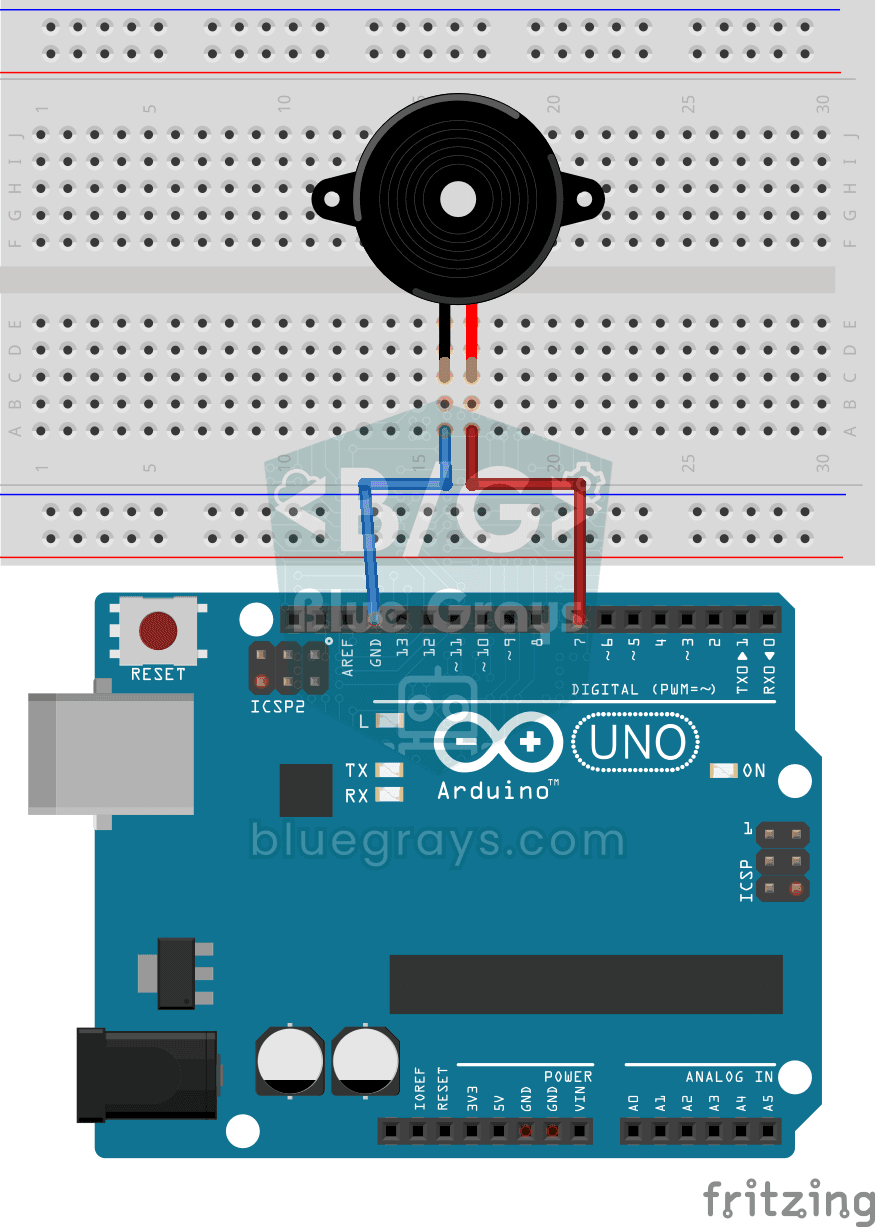
Ever wondered how a doorbell or an alarm makes its sound? The Arduino makes a small buzzer beep at short intervals: beep, pause, beep, pause. You see how sound is made with electricity and take the fi
HC-SR04 Distance Measurement (Serial Display)
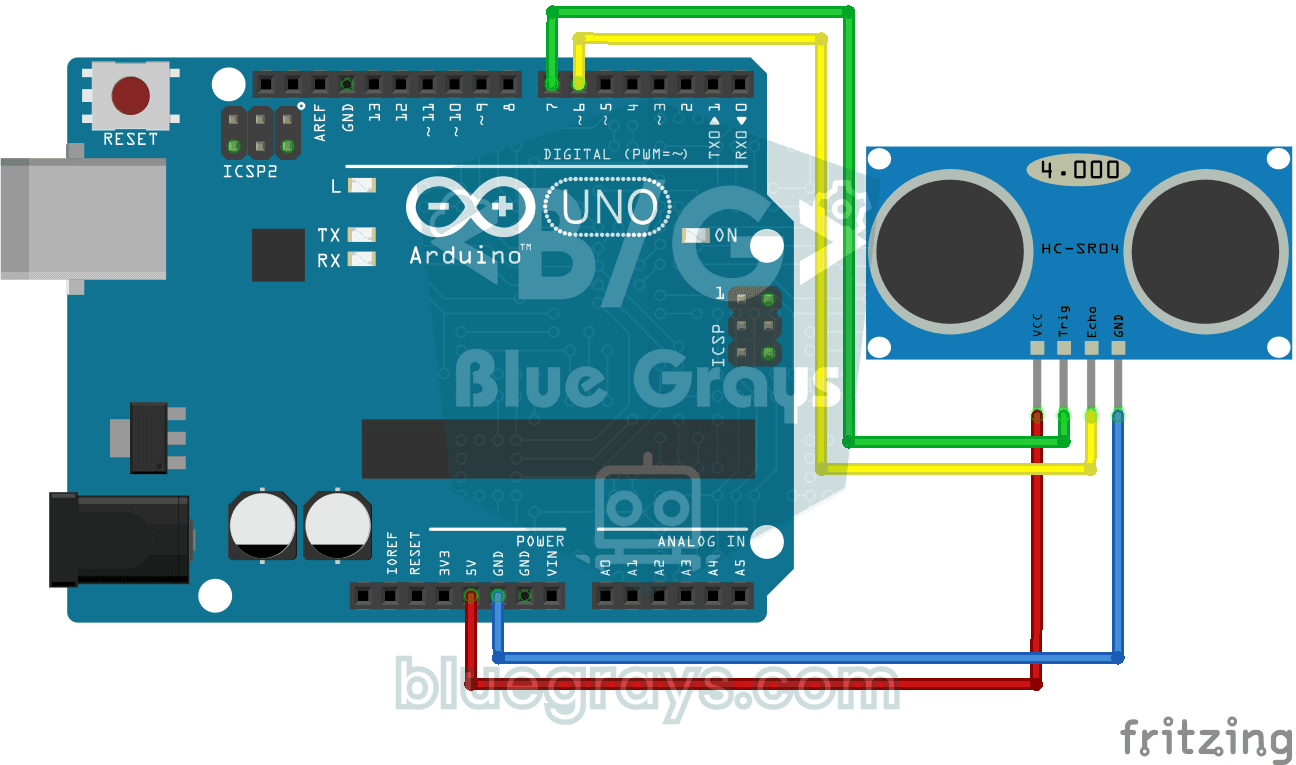
The HC-SR04 sensor works just like a bat finding its way in the dark: it sends out a sound you cannot hear, listens for the echo and measures how far away the object in front of it is. The Arduino wri
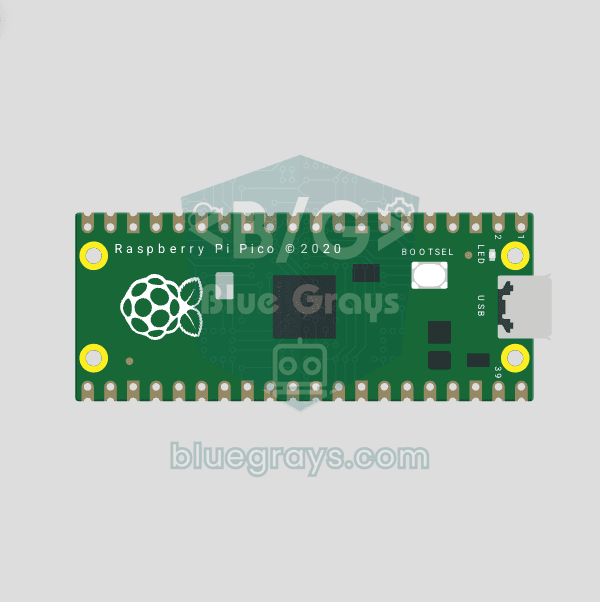
Raspberry Pi Pico Onboard LED Blink (Pico and Pico W)
The opening project of the Raspberry Pi Pico series! We blink the green onboard LED to verify the board works — a classic "Hello World" first experiment. NO external components, just Pico and USB cable. Code is written in MicroPython (the official language backed by Raspberry Pi Foundation). Learn machine.Pin class, Pin.OUT mode, led.on()/off() methods, and time.sleep() in Thonny IDE. Follow every toggle live in the Serial (REPL) output. Also perfect to verify